
The Office-at-Home Divide: Keep Work Surfaces From Becoming Household Catchalls
A home office rarely stays devoted to work alone.
The desk has unopened mail, the keys sit next to the keyboard, a shopping receipt lies under a notebook, coffee cups sit from leftover meetings, charging cables sprawl across the surface, and the package waiting to be returned occupies the spare chair.
The individual objects do not appear to be serious in themselves.
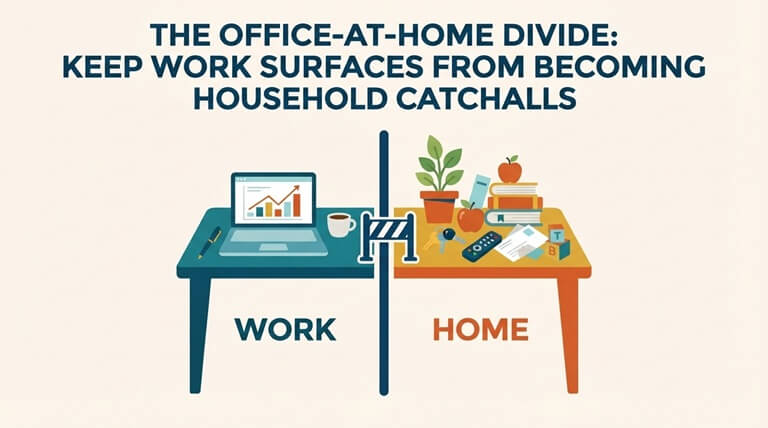
Together, they alter the way in which the room can be cleaned.
When a work surface is used as a general landing area, dust and crumbs become more difficult to access, papers are moved unnecessarily, and what at first might be a desk wipe can turn into a sorting task.
The right approach isn’t to keep the office completely empty. Instead, it is to draw a clear distinction between things that are part of active work and those which go through the room.
Identify the Real Work Surface
Start by choosing the part of the room that actually suits work.
It might be the entire desk, but most of the time it only refers to a particular section near the computer, notebook, or the area where one writes.
Protect that working footprint.
Things that are used every day can stay close to you if they have a function. Items such as pens, a charger, headphones, and a current notebook won’t become clutter.
Trouble arises when objects with no connection to the work begin to occupy the same space.
Having a clearly defined working surface makes it easier to see that difference.
Give Incoming Items Somewhere Else to Land
Catchall desks often appear because the room has no better place to put things.
The mail is delivered through the door and ends up next to the laptop.
The keys should be placed on the closest flat surface.
Receipts are kept in a pocket and remain on the desk for days.
Set aside a separate area for the temporary arrivals.
A small basket, tray, entry table, or other designated surface can stop them from reaching the workspace.
We don’t need detailed organization.
It is merely assigning different destinations to non-work objects.
Keep Paperwork From Becoming One Indistinguishable Pile
Work papers need just as much care as ordinary clutter since some of them may be current, private, or time-sensitive.
Do not put everything in a single pile just in order to reveal the desk.
Divide the active work from the unrelated paper.
A project that is currently underway can continue.
Move personal mail to a separate location.
Clear the surface of old receipts and obvious rubbish.
It keeps the paperwork’s meaning and leaves enough room to clean around it.
We shouldn’t lose sight of important documents if we want a cleaner desk.
Cups and Snack Debris Change the Desk Quickly
It creates a different type of mess.
A few crumbs under a keyboard can still be concealed.
A mug can leave behind a ring.
Next to the equipment, small snack wrappers are collected, together with a sticky residue that may go unnoticed underneath them.
Before handling the dust, remove the food-related items.
Start by clearing away the cups, plates, the wrappers, and the loose crumbs.
Now look at the surface that is exposed.
Keeping food debris separate from regular desk clutter prevents residue from spreading when you move things.
Cables Create Narrow Dust Traps
Charging cables, monitor cords,, and accessories break the desk into small sections.
Dust icangather behind them since wiping usually starts with the open areas.
You don’t have to disconnect the whole workstation for routine cleaning.
Give enough of the loose, safely movable cables a chance to get to the surrounding surface.
Do not move any equipment that is connected, since doing so would cause unnecessary disruption.
The aim is to deal with the visible dust rather than taking apart the arrangement each time the desk requires attention.
Clean Around Equipment Without Treating It Like Furniture
The computer, the monitor, the printer, the speakers, and all the other electronic equipment need different kinds of care from the desk underneath them.
You should not apply spraying products directly to the equipment, nor should you suppose that a method which is appropriate for the desktop is suitable for use on a screen or keyboard.
Follow the manufacturer’s instructions to care for your device.
Focusing on the area around it, look for loose dust, crumbs, and those accessible edges.
The desk and the equipment might occupy the same small area, but they aren’t on the same surface for cleaning.
Reveal the Desk’s Cleanable Footprint
A useful shift happens once unrelated drop-off items leave the workspace.
The desk suddenly has a larger exposed footprint.
That exposed area is where cleaning services seattle intersects with the home office: dust, crumbs, chair-side debris, and accessible surface edges can be handled without requiring anyone to sort active documents, reorganize files, or decide where every personal item should permanently live.
The surface looks cleaner since the tasks have been separated.
Cleaning handles residue.
Organization handles decisions.
Check the Chair Zone Separately
It forms a small cleaning area of its own.
Hair and dust can accumulate around the wheels or the legs.
Crumbs may end up next to the seat.
A jacket or a bag placed over the chair could cover some of the upholstery.
First, remove the obvious items that aren’t needed for the work, then look around the chair on the floor before completing the room.
When the chair rolls, make sure you check the path it uses most frequently.
The narrow movement area can gather more debris than the quieter parts of the office.
Watch the Floor Beneath the Desk
The flooring under the desk is easy to overlook.
Debris is carried into the area, although the furniture and cables make it difficult to access.
Dust also accumulates close to the legs of the desk, the power strips, and the wall behind the workstation.
Access what can be safely reached without disturbing the electrical equipment.
Use a crevice attachment or an appropriate narrow tool rather than forcing a large floor tool into the space.
The open area in the office is generally easier to access than the few feet directly under the workstation.
Keep Storage From Spilling Back Onto the Desk
A desk tends to get crowded when nearby storage reaches capacity.
Since the drawer is full, the new supplies remain outside.
The filing area is inconvenient, so documents pile up next to the keyboard.
Since the shelf is overloaded, there are still books on the work surface.
It is not possible for cleaning alone to deal with those storage problems.
Perhaps the problem lies in the places where the objects should go rather than in how frequently the desk is wiped when it has been cleared.
Create an End-of-Work Boundary
At the close of your working day, take one minute to distinguish between active work and all the other activities.
Put the documents that are still required away or pile them up.
Put the work tools back where they usually are.
Take the cups and the food packaging out.
Transfer the keys, the shopping items, and the personal mail to their correct landing areas.
It is not a complete cleaning session.
This resets the boundary.
The desk remains identifiable as a workspace, which in turn makes it much easier to clean actually when the time comes.
Do Not Demand an Empty Desk
An office that is active should appear to be active.
A notebook can stay open.
Next to the monitor, there might be a reference book.
It might be necessary for a charger to remain connected.
Attempting to get rid of every single object may result in unnecessary effort and cause the room to become less functional.
Rather, consider if each item supports the present way of using the desk.
Useful objects can remain.
Items that are unrelated should be moved before they become part of the landscape.
Treat Shared Workspaces With Extra Clarity
Since several people might place things on the same surfaces, a shared desk or office should have more defined boundaries.
The active papers of one person may appear to be clutter to another person.
You should not move documents unless you know what their purpose is.
You can use the trays, the sides of the desk, or other simple dividers to separate out the different work areas.
Cleaning then involves less disruption since the surface already makes it clear which parts can be moved and which should be left alone.
Well-defined boundaries serve to protect both the room and the work taking place within it.
Let the Office Be an Office Again
It becomes difficult to clean a home office since it ends up taking charge of all the things that have no other place to go.
Before it can be used as a workspace, the desk has become a mail station, a storage shelf, a snack table, a charging hub, and a drop zone.
Change that pattern by protecting the work footprint.
Give incoming objects another place to land, separate personal papers from active projects, clear away food debris quickly, and keep storage overflow from spreading across the desk.
Cleaning can then still be cleaning.
It doesn’t have to be perfectly organized or empty, only needing a clear enough separation so that the work surfaces remain available for use rather than becoming a place where the rest of the home temporarily puts things.
Popular on OTW Right Now!




About The Author

Gagan Bhangu
Founder of otechworld.com and managing editor. He is a tech geek, web-developer, and blogger. He holds a master's degree in computer applications and making money online since 2015.