
Why More Content Creators Are Turning to AI Voiceovers
If you’ve ever made a video you’ll know that recording the voiceover often ends up taking far longer than you initially anticipated. You write the script, you start to record, you make a mistake and have to go back to the beginning. Even if the recording itself goes well, you’re invariably going to have some background noise (a fan, a passing car, etc.) which will then have to be removed.
If you only do it once in a while then this probably won’t be a massive issue. If you’re, however, publishing content every few days, then these little things can add up and eat into your time.
That is one reason tools like an AI voice generator are getting attention from content creators. They make it possible to turn a written script into spoken audio without setting up a microphone or recording every line yourself.
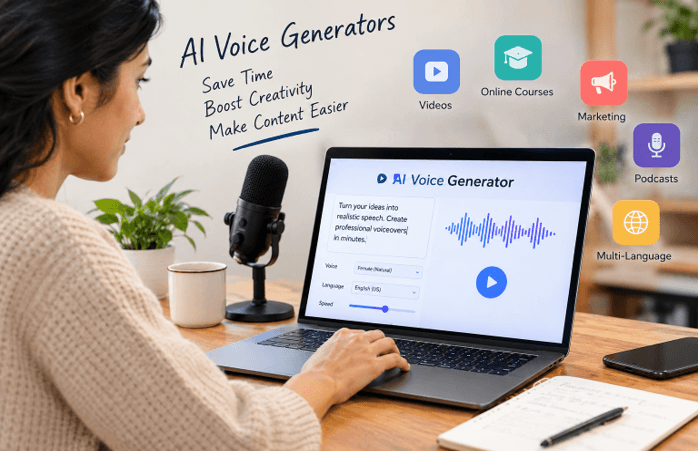
The concept is straightforward; it’s interesting to see how people employ these tools. Some use them for tutorial videos, some for product demos and some simply want to get round the bother of recording their own voice. The quality of the end result will of course vary depending on the tool, the script and the amount of work you put into editing the audio.
The Trouble With Recording Every Video Yourself
Imagine running a small YouTube channel dedicated to mobile apps. You’re doing tutorials showing people how to use various features and each video requires a short explanation of what’s going on in the screen.
Recording the narration yourself may seem like the obvious thing to do. If you’ve got to fix a mistake in the tutorial you’re making, though, you’re back in the recording software, you’ve got to go back in and re-record the sentence, find a quiet place to do it, record it and then you’ve got to re-mix the audio so that it all fits together.
Doing it once is fine. Having to do it repeatedly though can get frustrating.
Generated voice-overs give you another method of dealing with these changes. You just edit the sentence in your script, create a new audio clip and replace the old bit. You still have to edit the video, you just don’t need to re-record the whole thing.
This is particularly useful for tutorials, software demos, and the like, where it’s the information that matters rather than who’s presenting it.
You Don’t Need to Be a Professional Speaker
Not everyone enjoys hearing their own recorded voice. Some people talk too quickly when they’re nervous; others have real difficulty with volume. For the novice, it can all make video production feel a bit more difficult than it needs to be.
You could always get a voice-over artist, but that’s not always practical if you’re just starting out with a channel or working on a very tight budget.
AI narration gives th
These creators have another option. They can focus on writing a clear explanation and then turn that into audio.
This is useful for anyone putting together a portfolio, making a presentation or producing videos for a small online business. It’s also a great way for people who aren’t keen on speaking on camera to produce videos without having to put their own voice on.
Of course, generated speech has its limitations. Some voices struggle with unusual names, technical terms or sentences which look perfectly fine in writing but sound awkward when spoken. Reading your script out beforehand will go a long way to avoiding a lot of those problems.
Small Businesses Have More Reasons to Try It
A small business owner will typically be wearing a number of hats. The same individual may be answering customer queries, updating product listings, managing the social media accounts and producing the marketing materials.
It’s not always realistic in terms of finding the time to do voiceovers for every video.
Take an online store that sells kitchenware. The owner wants to produce a series of short videos demonstrating the products in use. Each video will need a few lines of copy to explain the features, the cleaning tips and the various ways you can use the product.
An AI voiceover can do this simple narration. If the manufacturer changes a product spec then the owner simply updates the script rather than going through the process of setting up another recording session.
The same applies to software companies making onboarding videos or agencies producing content for a number of different clients. You can have a consistent voice for the standard stuff and save the real speakers for the more personal campaigns.
The point isn’t that every business has to use synthetic voices. The point is that businesses now have more ways of producing basic content without any added workload.
What About Videos in Different Languages?
Language can be an issue when a business starts to reach out to customers in markets outside its own. A video that’s perfectly suited to an English-speaking market may not be quite as useful to someone who wants the information in their own language.
Some voice generation platforms support multiple languages so you can more easily generate narration for a variety of markets.
For instance a company with an online service might have a tutorial on setting up an account. They could prepare the translated scripts and then generate the voiceovers rather than recording each version from scratch.
There’s still some work to be done. Direct translations can come across as awkward and some product names may be mispronounced. A native speaker should go through the translated script (particularly if it contains any technical instructions) to ensure it’s accurate.
It’s not simply generating audio in another language that will make the message make sense to the local viewer. The wording has to be natural as well.
Choosing a Voice Is Not as Easy as It Sounds
When you’re trying out a new voice tool it’s very tempting to go for the one that sounds best in the sample. That’s not necessarily the one you should end up with if you’re making a full video, though.
A voice that’s good for a short ad would seem quite at odds in a 10-minute tutorial. Likewise, an upbeat delivery might be perfect for an entertaining piece of content but would quickly become fatiguing in the context of a detailed explanation.
The best way to assess a tool is to use it on a real script.
Write a short paragraph with some longer sentences, a question, and all your usual technical terms. Generate the audio and listen to it all the way through. Pay attention to the pauses, the way it’s pronounced and whether the voice starts to become difficult to follow after a couple of minutes.
It’s also worth checking how easy it is to alter the sentences, download the audio and use it in your preferred editing software.
If you’re going to use the voiceovers for business, then please do read the licensing terms before you publish. The rules around commercial use, voice cloning and subscription limits vary from platform to platform.
These checks may seem minor, but they become increasingly important if you’re making content on a regular basis.
Does Using an AI Voice Make a Video Less Personal?
This is probably the big question for anyone thinking about using generated narration.
A voice does more than just convey information. It can be excited, it can be hesitant, it can be funny and it can be character. Even a perfectly recorded voice can sound dead and lifeless if the delivery isn’t appropriate to the subject matter.
That doesn’t mean every video needs a human voiceover. A simple screen recording explaining how to change your password doesn’t need a voiceover that’s full of life. Most of the time the viewer just wants clear instructions to enable them to solve the problem.
A personal story, an interview or a video based on someone’s experience is different. In that case the actual speaker can be heard and that can make it more compelling and credible.
Creators should think about what their audience wants before deciding on an approach. They could also blend the two methods, using the generated narration for the more mundane bits and their own voice for the intro, the opinions and the key messages.
A Practical Tool, Not a Complete Solution
AI voice-overs can save you time, but you still have to produce good content. A confusing script is still going to be a confusing script when you’ve got it read aloud. Incorrect information isn’t going to become correct simply because it’s being delivered in a convincing voice.
The script, the visuals, the pacing and the editing all go a long way to determining the final product. You should also listen to the finished audio rather than just assume that the first version is the one that’s ready to go.
If you’re doing a lot of regular tutorials, product videos, or training material, then these tools can certainly make things easier. For anything that requires a bit more of a personal touch, though, the old-fashioned approach of recording may still be the way to go.
The best bet is to try both and see which one works best for your content. If the generated voice is saving you time and keeping your video clean then it’s absolutely doing its job. If it’s making your message feel less natural then there’s no point in using it simply because you can.
Popular on OTW Right Now!

About The Author

Gagan Bhangu
Founder of otechworld.com and managing editor. He is a tech geek, web-developer, and blogger. He holds a master's degree in computer applications and making money online since 2015.