
Best AI Tools for Distributed Creative Teams
Creative teams will invariably have loads of ideas. The real difficulty is in keeping things on track when you’ve got writers, designers, editors and clients all over the place. AI can help in that it can take the onus off of some of the repetitive tasks and make it much easier to keep track of what’s changed.
Microsoft found that 80% of workers and leaders globally feel they don’t have enough time or energy for their work. That’s not just a creative team issue, it’s a fundamental problem with the way we have feedback scattered about and handoffs happening all the time.
This guide looks at five tools: one for video production, one for visual assets, one for interface design, one for content approvals and one for project coordination. Each one covers a different facet of the creative process.
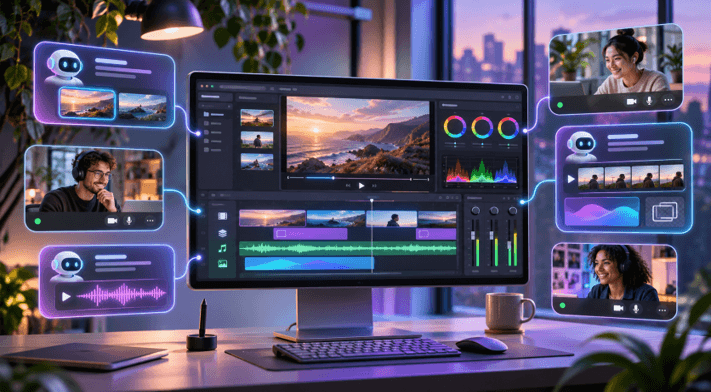
Which AI tools are best for distributed creative teams?
The right tool is going to be the one that suits what your team actually produce and where the work tends to slow down. These are five options each of which is focused on a particular need rather than trying to do it all.
Invideo supports teams working on edited recorded footage. AI agents can put together the cuts while the editors are reviewing the changes on the same timeline.
Kive is ideal for teams that are working with visual references and brand assets. It has a searchable library which enables people to find and re-use approved creative.
Visily helps product teams to go from early ideas to wireframes and clickable prototypes, with shared spaces for feedback.
Planable is for social teams who need AI writing assistance, a publishing calendar and clear approval workflows.
Taskade helps teams to organize their work, create project plans and automate all the boring bits of coordination with AI agents.
These tools cover production, design, publishing and management. Most teams will only require two or three. Start with the area where your work is normally getting stuck and only add another tool if it actually solves a problem.
How we evaluated the tools
We’ve compared the published AI features, collaboration tools, pricing and limits. Our focus has been on shared access, clear feedback and the ability for team members to keep editing. All of this is based on published info, not any actual testing we’ve done.
At a glance
| Tool | Best for | Main AI capability |
| Invideo | Video teams | Editable timeline work |
| Kive | Visual teams | Asset search and image generation |
| Visily | Product design | Wireframes and prototypes |
| Planable | Social teams | Copy creation and approvals |
| Taskade | Creative operations | Agents and workflow automation |
1. Invideo
InVideo Editor combines a browser timeline with agents to review footage, select takes, do the cleanup and put the edit together. Team members then refine the edits on a shared timeline.
With the invideo MCP server, Claude, ChatGPT, Cursor, and other clients can edit professional NLE timelines, color correct footage, mix audio, and generate images, video, or audio. Changes remain visible in invideo editor.
- Key features: Shared timeline, AI assembly, media generation.
- Best for: Editors, podcast producers, creative agencies.
- Use case: Turning interviews into social clips.
- Where it falls short: Agent tasks and generated media consume credits.
- Pricing: Manual editing is free; AI work costs credits.
2. Kive
Kive brings visual research, image generation, asset search, and team review into one workspace. A designer can locate a past campaign image using natural language while another teammate reviews new versions.
Its shared boards help teams keep visual references and finished assets together instead of searching through separate folders.
- Key features: AI asset search, image editing, shared boards.
- Best for: Brand designers and visual content teams.
- Use case: Reusing approved images across regional campaigns.
- Where it falls short: It is not a full video timeline editor; paid usage has credit limits.
- Pricing: Free tier; Basic starts at $15 per month, billed annually.
3. Visily
Visily helps teams turn an idea into an interface design without having to start from scratch. It has AI that can generate screens and diagrams and shared boards where team members can comment and review.
It’s useful when the product manager and the designer are in different places and need to agree on a layout prior to development starting.
- Key features: AI screen generation, wireframes, interactive prototypes.
- Best for: Product teams and early design discussions.
- Use case: Reviewing a new app flow with remote stakeholders.
- Where it falls short: It cannot replace specialist tools for detailed production design.
- Pricing: Free Starter plan; Pro from $11 per editor monthly, billed annually.
4. Planable
Planable puts social post drafting, feedback, approvals and scheduling into shared workspaces. Its AI assistant can suggest posts, rewrite captions, and generate ideas based on previous content.
A remote marketing team can have the campaign copy reviewed by the client prior to publishing rather than going through the usual email and team chat ‘chase’ for approvals.
- Key features: AI writing, visual calendar, approval workflows.
- Best for: Social teams and agencies managing clients.
- Use case: Coordinating a campaign across several social channels with clients.
- Where it falls short: Advanced approval options need higher plans; it does not produce finished videos.
- Pricing: Free trial covers 50 posts; Basic costs $39 per workspace monthly.
5. Taskade
Taskade brings shared projects together via AI agents which can plan tasks, leverage team knowledge and run automations. You can assign work and track project progress all in the same shared workspace.
For distributed creative teams it’s most useful for keeping the production schedules, the deliverables and the recurring requests all in one place rather than for actually producing the final visual assets.
- Key features: AI agents, shared projects, automated workflows.
- Best for: Remote creative leads managing several active workstreams.
- Use case: Tracking campaign assignments across global time zones.
- Where it falls short: Complex automations require setup, while heavy AI use consumes credits.
- Pricing: Free tier; Starter costs $6 per month.
How to choose the right tool
Choose Invideo for footage, Kive for visuals, Visily for interface concepts, Planable for content approval, or Taskade for coordination. A team publishing a rank higher on Google Maps guide might plan assignments in Taskade and approve social posts in Planable.
Test a real project. Check access, feedback, and handoffs before committing.
Common mistakes to avoid
- Buying tools before mapping your workflow.
- Publishing AI output without human review.
- Ignoring permissions, export formats, or credit limits.
- Paying for collaboration features nobody needs.
Final thoughts
Good AI tools just make your work easier without taking away the creative control. Start with the biggest bottleneck in your team’s workflow, do one project with it and see how it works before you go any further with any other software.
Frequently asked questions
Can AI tools replace a distributed creative team?
Not quite. AI can do the repetitive stuff really well (first drafts, file searches, basic tidying up, updating tasks etc). People still have to decide what is right, what is appropriate for the brand and what will work for the audience. The ideal arrangement is one that makes the review process easier, rather than just spitting out an automated result and publishing that without any further review.
Can ChatGPT or Claude edit a video timeline?
Yes if it’s connected to software that enables editing via a compatible connection. With invideo’s MCP connection an agent can arrange the footage, make the cuts, adjust picture and sound and produce the media. The editor can then view the timeline and make any changes required. What you can do is of course dependent on the client and account.
What matters most when teams work across time zones?
Look for shared project access, comments on the correct version, clear ownership and an obvious approval status. Live collaboration is useful but not necessarily required for every decision. A good tool should allow you to hand off work with sufficient context so the next person can just pick up where you left off without having to have another meeting.
Are free AI plans enough for small teams?
Sometimes the free plans are quite adequate for a quick test or a couple of occasional projects. They can be quite restrictive in terms of how much content you can produce, how many people you can have on board, storage and review options. Compare your anticipated monthly workload against the limitations of each plan. Also bear in mind whether clients can view and comment for free as that will have an impact on the actual cost.
How do teams keep AI-generated work consistent?
Start with approved examples, a short style guide and clear reviewers. Source files and the final decisions need to be in a shared location so everyone can see the rationale for past decisions. For every AI output you have to check the facts, the images, the usage rights and the audience. Consistency is achieved through a repeatable review process not just through a good prompt.
Popular on OTW Right Now!
-
 From Flat Images to Functional Prototypes: How AI Is Reshaping Rapid 3D Modeling
-
 4 Ways to Improve Your AI Prompts
-
 ImageUpscaler.ai vs Topaz Gigapixel: Which is Better for Upscaling Smartphone Macro Photos?
-
 Most Popular AI Visibility Products for SEO: What They Track, What They Miss, and How to Choose



About The Author

Gagan Bhangu
Founder of otechworld.com and managing editor. He is a tech geek, web-developer, and blogger. He holds a master's degree in computer applications and making money online since 2015.