
How to Use a Sports App as Second Screen: Various Scenarios
Today, fans use two screens. The first screen shows the game or show, and the second screen is next to it, adding more to the experience. The second screen is not a product by itself. It’s not a replacement for the broadcast. It’s the additional features that are running alongside the main event. The second screen can be:
- a live chat during a football match,
- trivia about the actors and the scenes during a movie,
- a puzzle, a prediction, a vote during a reality show.
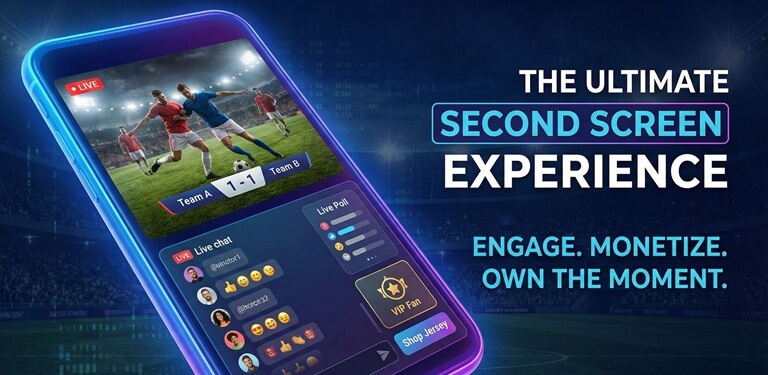
This kind of “second screen” behaviour is now taken for granted in most discussions about sports marketing trends. These are things that fans can do today, but they’re doing them on global social networks or in a messenger. The question for sports and media brands is: will fans be doing this in the brand’s own app, or in someone else’s app?
Scenario 1: The Broadcaster’s App as the Second Screen
In this scenario, the broadcaster owns both screens. The fan watches the match on the broadcaster’s TV channel or main app. At the same time, the fan uses the broadcaster’s app on a second device, such as a phone or a tablet. The second screen, in this case the app, does not replace the main video. It’s the same event, the same match, but with the addition of the second screen.
The second screen can be a live chat for the match, which is the most relevant way for the game’s second screen, live statistics, visualisations, polls, or predictions specific to certain moments in the game. Everything on the second screen is branded and connected to the same event and the same organisation. The fan does not have to leave this ecosystem to talk about a goal or a referee’s decision on X, WhatsApp, or other social media and messengers.
For the broadcaster, that means that attention, data, and emotion are retained within the brand. Second-screening is not an external, unconnected black box; it is part of the product: fans discuss the game in the same perimeter where they watch it.
Scenario 2: The League or Club App as the Second Screen
This is the scenario in which the main event is broadcast on one platform, while the second screen is owned by a different party — the league, the club, or another rights owner with its own app.
Here, the fan is watching the main event on any TV channel or generic streaming service, while the second screen is the league or club app. This app may not necessarily show the main event, but has become the place to:
- Get information on line-ups, stats, and head-to-heads,
- Participate in live chats with other fans of the same team or competition,
- Enjoy exclusive content such as dressing room scenes or reactions from the bench.
This is a viable model in its own right, in which the league or club promotes its app via its own channels, without any mention of second-screening from the broadcaster. This model can also be implemented in conjunction with the broadcaster, in which case promotion of the app as the official second screen to the main event is done by both parties.
In this case, the league or club owns the second-screen relationship with the fan, even if it does not control what the fan uses as the first screen. For example, La Liga adds a QR code to match broadcasts that leads fans to a chat in their app.
In both scenarios, the practical work is the same: the app has to become the place where the live event has its own spaces, context, and simple tools for participation.
How to Build a Second Screen Layer Inside a Sports App
In order for a brand to create a second screen in a sports app, there are four steps that need to be followed. First, the brand needs to give live events their own space. Next, the brand needs to give fans a simple context about what’s going on. Then, the brand needs to make it easy for fans to participate. Finally, the brand needs to make it easy for fans to get answers without having to leave the app.
It doesn’t matter who the app belongs to. It could belong to a broadcaster, a league, or a club. The second screen only really works as long as there is value for the fans beyond what is available on public social networks.
A simple second screen will have the following features:
Event-Specific Spaces
The first step in making a simple second screen is to give live events their own space. Instead of having a single “general” chat room that goes on forever, the brand should give each event its own room or channel. This room or channel should have a clear title, a brief description, and simple rules. This is where fans know to go when the event starts.
Context and Structure
After that, add some basic context for the live event. This could be a brief summary, a list of key moments so far, and a few basic stats. This helps fans understand what is going on without having to search or go somewhere else.
Light Interaction
Then add some light ways for fans to interact. This could be a quick poll, a prediction, a trivia question, or a simple game. This helps fans respond with a single tap, even if they are not ready to write a full message.
A Sports-Aware Assistant
Finally, give fans a way to ask a question without leaving the app. A sports-aware assistant helps fans understand what is happening. This could be as simple as “What was that foul?” or “How many goals has this player scored this season?”
Together, these features make the second screen more than just noise. Instead, understanding, emotion, and interaction come together in real time.
Why Owning the Second Screen Matters
The second screen is designed to be an extension of the main event. Fans will create it somehow. If it is not provided within the app, they will create it using global social platforms and messengers.
Owning the second screen within an app — whether it is a broadcaster’s app, a league’s app, or a club’s app — gives the brand control of that environment, makes it possible to understand the community’s norms, and, in practice, is where solutions like watchers.io help by providing an in-app social layer so that chats and reactions stay inside the brand’s own product rather than on external platforms. Most importantly, it keeps the moments when fans are at the highest levels of interaction and emotion.
It is not a question of whether fans use a second screen; it is a question of who they choose when they do.
Popular on OTW Right Now!

About The Author

Gagan Bhangu
Founder of otechworld.com and managing editor. He is a tech geek, web-developer, and blogger. He holds a master's degree in computer applications and making money online since 2015.