
How to Turn Long Videos Into Social Media Cutdowns
Turning long videos into social media cutdowns requires finding the strongest moments, adapting them for different platforms, and keeping the original message intact. AI video editing can speed up this process by helping with footage review, clip selection, captions, reframing, and version creation. The goal is not to replace creative decisions, but to make repetitive editing tasks faster so creators can focus on the final story.
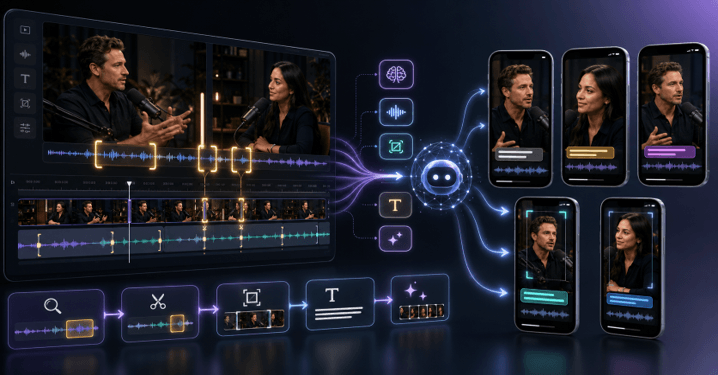
Long videos often contain more valuable moments than creators can publish. A one-hour podcast can have several short clips. A product demo can become multiple social posts. A webinar can turn into educational snippets, highlights, and teasers.
The challenge is finding those moments quickly and reshaping them for each platform.
Short-form video is still one of the best video formats for marketers. This has pushed creators and brands to find ways to make the same video content platform-ready faster.
AI video editing makes this process much easier by automating tasks like watching video footage, identifying scenes, making initial cuts, captioning videos, and producing multiple video versions. But the creative aspects of storytelling, pacing, and audience intent remain human-directed.
This guide explains how to turn long videos into social media cutdowns using a practical workflow, from selecting highlights to preparing final versions for Reels, Shorts, TikTok, and other platforms.
How can AI video edits turn long videos into cutdowns?
AI video editing can help you create shorter versions that are more suitable for social media platforms by analyzing the footage, identifying key moments, cutting out unnecessary parts, and helping you create shorter versions. It can help you edit clips more rapidly, such as selecting clips, editing captions, resizing clips, and creating versions.
To make cutdowns, it is important to understand the video that was created. Many topics and repeated statements, pauses, and full-length sections will be included in a long recording.
Instead of watching hours of footage manually, creators can use AI-assisted workflows to locate useful moments faster. These tools can help identify:
- Strong statements or key insights
- Audience questions and answers
- Emotional reactions
- Product demonstrations
- Important actions or visual moments
- Sections with high engagement potential
It’s the editor who still determines which clips will match the brand message and audience. AI can streamline the footage search and organization process.
For instance, if you have a two-hour interview for social media, you can pull several 30-second clips from it. Some clips can be about a great opinion, some a handy tip, and some a great story. Although they are all taken from the same source, each cutdown requires its own structure.
What steps are needed to create social media cutdowns?
Social media cutdowns are time-consuming and require reviewing the footage, selecting moments, adapting the format, adding captions, and optimizing for each social platform. A good cutdown is one that retains the original idea but makes it more accessible in a shorter format.
A simple workflow includes these steps:
1. Review the original footage
First, make sure to comprehend the intention behind the long video. Different highlight moments will appear in a podcast, webinar, interview, or product video.
Search for paragraphs that have an obvious introduction, body, and conclusion. Short clips work best when viewers can grasp the context quickly.
2. Select strong moments
The best cutdowns usually focus on one idea instead of trying to summarize the entire video.
Useful moments often include:
- A surprising statement
- A quick tutorial
- A problem and solution
- A customer reaction
- A memorable story
3. Adjust the pacing
Social platforms like Facebook like content that is succinct and to the point. Eliminate unnecessary repetitions, explanations, and lengthy sections that are not related to the central theme.
While AI video editing software can detect filler words, silence, and repeated parts, creators should review all changes to ensure the tone is preserved.
4. Create platform-specific versions
A video made for YouTube Shorts may need a different crop and pacing compared with an Instagram Reel or TikTok post.
Creators often need to adjust:
- Aspect ratio
- Caption style
- Opening hook
- Video length
- Visual emphasis
A single long video can become multiple social assets when each version is designed for its audience.
How does AI help find the best moments in long footage?
AI helps identify the best moments in extended clips by detecting speech, scenes, people, actions, and key moments within a video. It helps creators find useful snippets faster without sifting through hours of recordings manually. It can assist creators in finding helpful snippets more quickly without having to sift through hours of recordings manually.
In the conventional approach to editing, logging the footage and marking out useful sequences is the first phase of the editing process. This can be time-consuming for interviews, podcasts, and events.
AI-powered video editing tools can help organize video content based on its content. Makers can search for specific concepts, speakers, actions, or scenes to get started.
Invideo Editor’s AI editing agents automatically analyze video content to identify takes, trim out unusable footage,e and create an editable base cut by following creator instructions. The workflow can be applied to a variety of projects such as talking-head video, interviews, podcasts, multicam recordings, and social cutdowns.
It’s beneficial for creators who are handling massive recordings, as the initial version of the edit can be produced with organized footage instead of a blank timeline.
How do you prepare cutdowns for different social platforms?
When creating cutdowns for social networks, you need to change the framing, pacing, captions, and structure depending on how the content is consumed in each social network.
A good social cutdown isn’t just a cut or shortened version of the original video. It is a new edit for a specific viewing experience.
Common adjustments include:
- Vertical formatting: Convert horizontal footage into 9:16 videos for mobile platforms.
- Captions: Add readable subtitles because many users watch videos without sound.
- Faster openings: Start with the most interesting point instead of a long introduction.
- Visual changes: Add movement, transitions, or supporting visuals when needed.
For instance, a podcast scene might require cropping the speaker to fit, adding captions, and increasing the speaking rate for short-form. You may require a closer look, stronger benefits, and a better beginning for a product video.
An AI video editing workflow can help you create these versions faster and more easily while staying focused on the main project. Invideo Editor can assist with short-form edits from the main footage, cut down videos, add captions, and create versions for various platform sizes.
For creators handling frequent short-form edits, its agentic AI video editor can take this approach further by using AI agents to do real editing work based on direction. Agents view footage, make cuts on the timeline, and send back a cut that can be edited again. For short-form and cutdowns, this means content creators can see, edit, and tweak social versions without rebuilding each edit individually.
How can editors keep quality while creating more videos?
By leveraging AI for repetitive tasks, editors can improve efficiency and produce more videos while retaining creative ownership and control over the final output. Ideal workflows are found to be faster production along with human review.
Making lots of cutdowns is difficult because of the need for uniformity. Both versions should match the brand voice, visual identity, and message.
A practical workflow separates editing tasks into two parts:
Tasks AI can help with:
- Finding moments in footage
- Creating initial assemblies
- Removing pauses and filler words
- Generating captions
- Creating different platform versions
- Organizing edits
Tasks that need creative judgment:
- Choosing the strongest story angle
- Deciding the emotional tone
- Changing the pacing
- Selecting the final version
- Understanding audience expectations
Creators can also learn more about improving video edits with AI through guides like how to remove text and logo overlays from videos using AI, especially when preparing cleaner versions of existing footage.
Building a repeatable social cutdown workflow
A repeatable process helps creators turn every long video into multiple pieces of content.
A simple workflow looks like this:
- Upload and organize the original footage.
- Identify the audience and purpose of each cutdown.
- Find the strongest moments.
- Create a first edit.
- Adjust pacing and framing.
- Add captions, sound improvements, and visual changes.
- Export versions for each platform.
For more complex projects, timeline editing, collaborative, and version control tools can help make the job easier. Invideo Editor lets creators see how changes affect the project on an editable timeline, make manual edits, and adjust the project after the AI editing process is finished.
This enables the workflow to be flexible, as creators are not restricted to one final product. A single source video can be multiple clips for various audiences.
Conclusion
The key to converting long videos into social media skimmings is discovering the moments and presenting them in the correct format. AI video editing can speed this up with tools like footage review, clip selection, caption generation, and video version creation.
The best workflow is to utilize AI support and human creativity. Creators can still choose what to highlight, which moments matter, and how the audience should experience the content.
You can use a structured workflow to edit more content from any podcast, interview, webinar, or product video. What are you doing to make your long videos short?
Frequently Asked Questions
How long should social media cutdowns be?
The length will vary based on the platform and the content objective. Clips work best when they are short and to the point, delivering value quickly. The length of the cutdown will vary depending on the audience and platform and can range from a few seconds to several minutes.
Can AI video editing automatically find highlights?
Absolutely, AI video editing tools can assist in finding potential highlights by analyzing speech, scenes, and key moments within the footage. However, creators should use this advice as a starting point, since it still depends on context, audience expectations, and storytelling.
Can one long video create multiple social media clips?
Yes, it’s possible to make more than one social media clip from one long video. Interviews, podcasts, webinars, and tutorials may have several isolated ideas that can be turned into individual posts on various platforms.
Does Invideo Editor create social media cutdowns?
Invideo Editor can help create social media short-form videos with its video review feature, moment selection, video-cut preparation, reframing, captioning, and preparation of various video versions for social media. The edits are still in an editable timeline, enabling the creator to make more enhancements.
Can AI edit multicam videos?
Absolutely, AI-driven editing can aid in multicam productions by syncing footage, making angle changes, and arranging various camera angles. Invideo Editor can also sync angles and support multicam editing, which creators can fine-tune.
Do I need a script to create video cutdowns?
No, a script is NOT required. AI editing workflows can process scripted footage or even comprehend unscripted recordings, understand the content, and help structure an edit.
Popular on OTW Right Now!



About The Author

Gagan Bhangu
Founder of otechworld.com and managing editor. He is a tech geek, web-developer, and blogger. He holds a master's degree in computer applications and making money online since 2015.