
Open Source PDF Editor: Architecture & Developer Limits
One of the first steps for a software development team in integrating PDF editing capabilities into their product is to look for an open source PDF editor. Often, these teams determine high star count GitHub repos and utilize the code in their product, and then realize a painful technical reality: in the open source world, the term ‘editor’ doesn’t mean the same thing as it does in the commercial desktop software world.
The reality is that PDF is a visual rendering format and isn’t like a word-processing format. When developers aim to build an open source PDF editor workflow, they must decide between two distinct architectures. This article reviews each of these architectures, explains some of the hard limits of each of these architectures and of open source generally, and presents a practical framework to determine when to build versus adopt a complete editing solution.

How Open Source PDF Editor Libraries Actually Work? 2 architectures
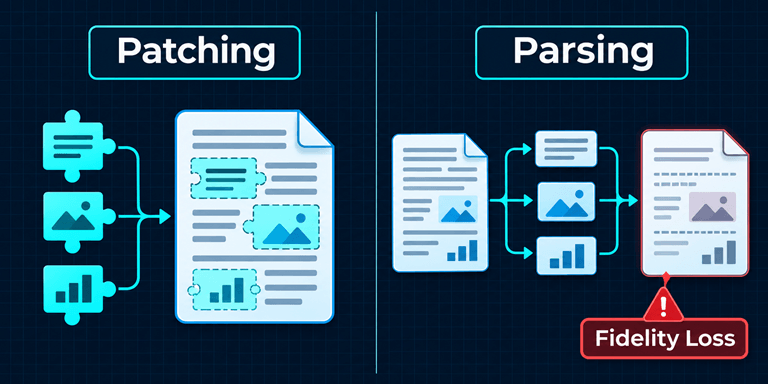
A fundamental architectural decision must be made to build a pdf editing tool. Will it parse and reconstruct the page? Or will the tool patch existing objects?
1. Patching the Objects (Incremental Updates)
PDF files are composed of a stream of bytes in a particular order, and those bytes typically define a page. To perform an edit, a developer has to be able to sort through the bytes and reconstruct the page. A library called pdf-editor is built this way.
- Strengths: Great for filling AcroForm fields, stamping signatures at specific coordinates, and adding standard annotations. It keeps the original document’s exact visual fidelity.
- Limitations: Cannot make layout changes. Text added using a drawing API becomes glyphs at specific coordinates and thus, it cannot define a paragraph. Hence it cannot reflow text, push content down etc. Ultimately, it is only drawing on a static image.
2. Parsing into Layers (Reconstruction)
This method reads the content stream of the PDF and attempts to identify what was drawn. Users carry out editing actions, and a new PDF is produced.
- Strengths: This method allows the most extensive editing and redesign of PDF documents, including changing the content and substituting assets.
- Limitations: There are questions regarding the fidelity of the layout, and the method is likely to break a complex layout.

The Hard Boundaries of an Open Source PDF Editor Project
In evaluating options to integrate an open source PDF editor, developers come across hard boundaries.
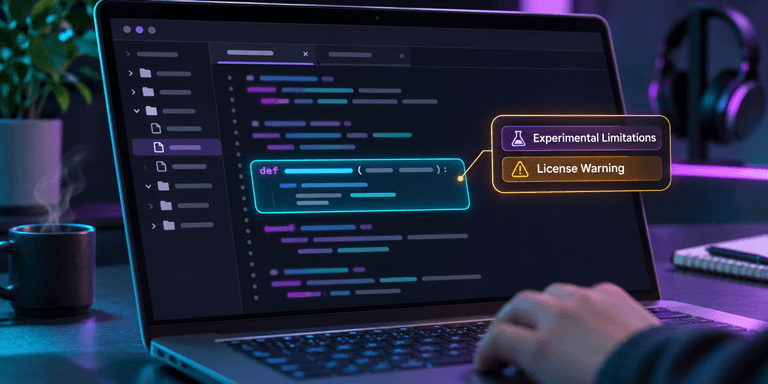
1. In-Place Text Editing is Experimental
Editing text in a PDF is difficult. Many open source solutions deal with this through text redaction and appending a new text stream. Documentation for some open source solutions warns that text replacement supports only isolated, horizontal text with a Base-14 font. This method completely rejects rotated text, paragraphs and other object flows. This is definitely not a word processing solution.
2. The Format Itself Resists Structure
According to the LibreOffice development team, one of the reasons PDF was developed was to represent the structural information needed for editing. However, structural information is not part of its design. It is made up of multiple boxes and rectangles. Reconstructing a paragraph from a collection of boxes and rectangles is illogical, and a computer program attempting to do so will make lots of errors. The Stack Overflow website has lots of posts from users seeking ways to create an open source PDF editor. Many of the users run into the problem of a “font size explosion” or paragraphs being clustered using a library like iText7.
3. Form and Signature Limitations
Although standard AcroForms can be modified, XFA forms are often unsupported. Additionally, a visual signature is an image, and a project using a certificate-based digital signature would depend on a person modifying the file, which would affect the cryptographic hash.
4. The License Trap
There are other considerations, such as the license. PyMuPDF is a highly capable library, but is released under the AGPL 3.0, or a commercial license. For closed-source Software as a Service (SaaS) products and applications using permissive licenses, integrating AGPL PyMuPDF can create immediate compliance problems, usually resulting in a rewrite.
A Pragmatic Selection Framework for Development Teams
To avoid architectural dead ends, development teams should reflect on the following questions:
- What does “edit” actually mean for the user? If a user wants to fill in a form or add a stamp, a patching library is sufficient. If the user wants to edit or modify text and possibly reflow a layout, a parsing library should be used, but should be heavily tested for fidelity.
- Is byte-level preservation a hard requirement? Breaking and rebuilding files can break digital signatures and/or legal compliance.
- Does the license align with the deployment model? AGPL is a hard block for most commercial SaaS apps.
When editing experiences are the main requirement, versus complex integrations, teams will go with commercially available alternatives. For instance, UPDF is a complete, native editing environment, and thus, is the best alternative to integrate multiple libraries for PDF editing. It does text editing and form fills locally, preserving the integrity of the document, and does OCR, all without having to build a parsing engine.
The Bottom Line
Integrating an open source PDF editor is a test of architecture. Libraries are good for annotations and forms, but parsing engines introduce risk of fidelity loss. Defining editing requirements and auditing licenses helps teams identify when risks of fidelity loss can’t be tolerated. Thus teams can choose the correct path, whether that be building and integrating open source components, or going with an end-to-end solution.
Popular on OTW Right Now!



About The Author

Gagan Bhangu
Founder of otechworld.com and managing editor. He is a tech geek, web-developer, and blogger. He holds a master's degree in computer applications and making money online since 2015.