
WiFi Smart Lock – How to Tell If You Need a Hub Too
You are standing at the front door with a screwdriver in one hand and a new lock in the other. The box says WiFi smart lock. The setup screen says connect bridge. That small surprise can mean another device to buy, another outlet to find, and another step between the lock and your router.
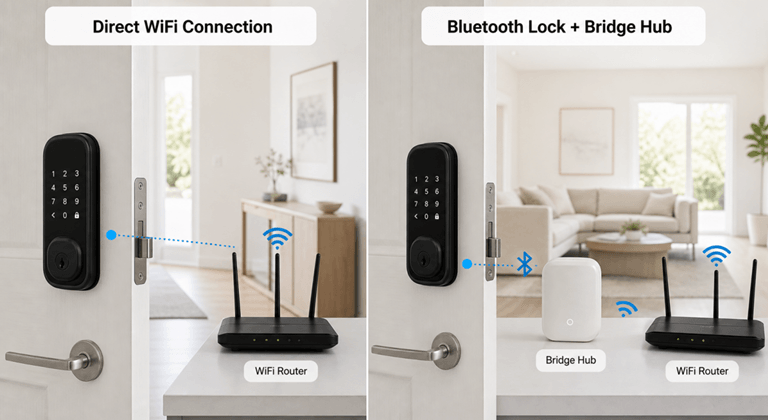
The words WiFi smart lock cover two arrangements that look much the same on a store page. One lock joins the home router on its own. Another uses Bluetooth or a different short-range connection at the door, leaving a separate bridge or hub to carry messages onto WiFi. Both may offer remote control. Only the first is direct WiFi.
The next step is to look past the label and verify the connection details in the specifications and box contents.
Understand What a WiFi Smart Lock Label Does Not Tell You
Remote control alone does not reveal architecture. With a direct model, the lock joins the home network through the manufacturer’s app and has no second device waiting to be paired near the door. Remote commands and event history may then travel through the router, although the available features still vary by model.
A bridged lock takes a longer route. The lock talks locally to a nearby hub that connects to the router, while a listing may still call the package WiFi compatible even though the lock does not reach WiFi alone.
The extra box becomes real when the nearest outlet sits behind a bookcase or across the hall. A bridge needs to stay within range of the lock and router, and moving it toward one can weaken the other connection. Its WiFi radio is not drawing from the lock’s batteries, though, and one hub may coordinate several compatible devices. Check the box contents. Some packages include the bridge; others treat it as a separate purchase.
At the category stage, a range of smart lock designs helps show how connection method, entry method, and door hardware vary, since smart and WiFi are only the beginning of the specification. The useful details sit farther down the page.
Use a One-Minute Check Before You Buy
A product photo cannot settle the connection question. Look at the official product page, the specifications panel, the what’s in the box list, or the outside of the retail package. One plain sentence is usually enough.
| Wording you find | What it usually means | What to confirm next |
| Built-in WiFi, direct WiFi, or no bridge required | The lock can join the router without a separate bridge | Supported WiFi band and signal strength at the door |
| Requires hub or requires bridge | A separate device is needed for remote WiFi features | Whether it is included and where it must be placed |
| Bridge included, or hub included | The system uses an extra device, but it should be in the package | Outlet, local range, and router compatibility |
| WiFi compatible with no further detail | The label is inconclusive | Manual, support page, or pre-purchase support answer |
Read the installation guide too. It may reveal a barely mentioned bridge along with door-thickness limits, deadbolt type, backset, and bore-hole requirements that turn an otherwise connected lock into the wrong lock for that door.
Check the router at the same time because many direct WiFi locks use 2.4GHz, which generally reaches farther than 5GHz. A modern dual-band router may combine both bands under one network name, which is often fine. Trouble starts when 2.4GHz is disabled, isolated, or weak at the front door. Test beside the closed door. Signal strength beside the router proves little.
Save the Manual before ordering. Product pages change, while the installation document gives you something concrete to check when the box contents or router requirements are unclear.
Decide Whether Direct WiFi Is a Good Idea for Your Home
This setup seems like it’s a no-brainer. The radio will continue to run on the lock’s batteries via direct WiFi, and the remote control will continue to work as long as there’s coverage at the entry point. The signal can be strong everywhere except near a metal front door in the living room. The problem has been transferred to another location.
Internet loss is not equal to “lock failure”. Local fingerprints and passcodes, and a physical key on most battery-powered models, can unlock the door in the event of an internet outage. Service disruptions such as remote commands, new access changes, cloud-based functionality, and push notifications may be suspended for the duration of the service interruption. When the power goes down, the lock’s batteries will power the lock while the unpowered router will go offline for remote access. Make sure that the real-world action is exactly what it says in the manual, not what you think or assume.
The same caution applies to subscriptions. Many smart locks provide central locking and local entry without a monthly fee, but no subscription says anything about the number of users or temporary codes, remote history, or required accessories. The comparison only contains one line for the recurring bill. If access controls are more important to a dog walker than cloud storage, then they may be better off with a temporary code.
Choose Retrofit or Full Replacement Based on the Door
It’s not just about the type; it’s the connection as well. The other half is the issues that occur to the other half of the door, namely the deadbolt, particularly if the exterior trim is not to be discarded.
While a retrofit installation might appear the same on the street, it will be different once you get inside. You can install the smart hardware under the existing deadbolt and leave the exterior deadbolt and keyway as is, which can be ideal for renters with permission or homeowners who want to keep their exterior trim. Fit is model-specific. The old deadbolt should also roll easily in advance of the motor.
The calculation changes if the deadbolt is worn. A full replacement smart lock involves removing all interior and exterior hardware, allowing for a keypad, fingerprint reader, new cylinder, or other controls to be placed outside. Installation: more from the door. Sometimes it’s still a good idea if the old lock needs to be replaced and more than one entry method is of importance rather than the trim.
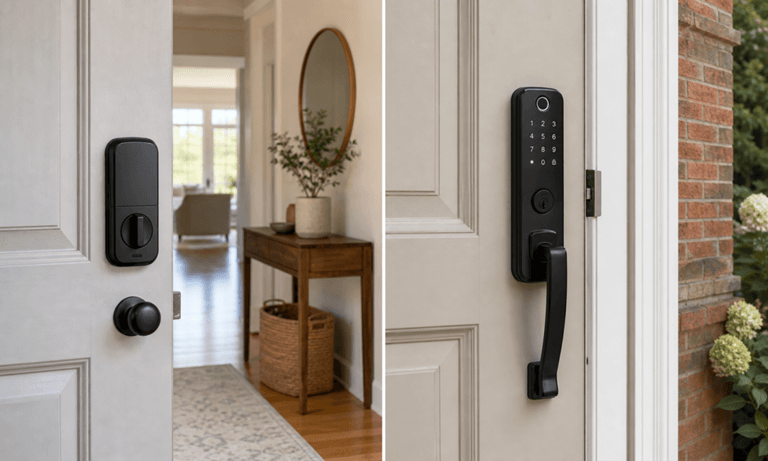
Retrofit if hardware is important and replace the entire lock if outside interface and other functionality are more important. Either way, it’s best to measure first. Don’t expect a smart motor to do the work of a rubbing door, misaligned strike plate, or a warped frame.
Judge Physical and Digital Security Separately
A connected lock is a lock system with two levels of security. Ensure that the equipment is physically tamper-proof after installation, and then verify the management of the account and equipment after installation.
For the hardware, look for an applicable ANSI/BHMA grade, clear installation instructions, and a sound door, frame, and strike. A BHMA grade reflects tested hardware performance, not app security. [Source: Builders Hardware Manufacturers Association, ANSI/BHMA Standards Overview]
On the digital front, consider a privacy or security policy, frequent firmware updates, vulnerability disclosure, and prudent account management. Use a different password at home; if available, use stronger sign-in protection and delete any old and unused credentials. NIST considers these capabilities distinct and refers to them as device identification, secure configuration, data protection, access control, software updates, and cybersecurity-state awareness. No single rating covers them all.[Source: National Institute of Standards and Technology, Profile of the IoT Core Baseline for Consumer IoT Products, NIST IR 8425]
Add Fingerprint Entry When Convenience Must Survive a Dead Phone
App control brings focus to product page. If it’s a flat phone or two bags of groceries at the door, the local options are more relevant. There’s no code to deal with; a keypad can be used by guests and for service visits, and a traditional key is the tried-and-tested alternative.
Fingerprint recognition is not standard on every WiFi model. People shopping for that mix can compare fingerprint-enabled door locks, then check storage limits, whether individual credentials can be removed, and what happens after repeated failed attempts. Capacity matters in a shared home.
The eufy Smart Lock C220 page states that WiFi is built in and no extra bridge is required. Fingerprint entry is used in addition to app control, password entry, voice control, and physical keys. The current listing reads it is able to recognize a fingerprint within 0.3 seconds, it can store up to 50 fingerprints and 100 passcodes, is IP53 water and dust resistant, and has ANSI/BHMA Grade 3 security. Those numbers have context when put in terms of Households.
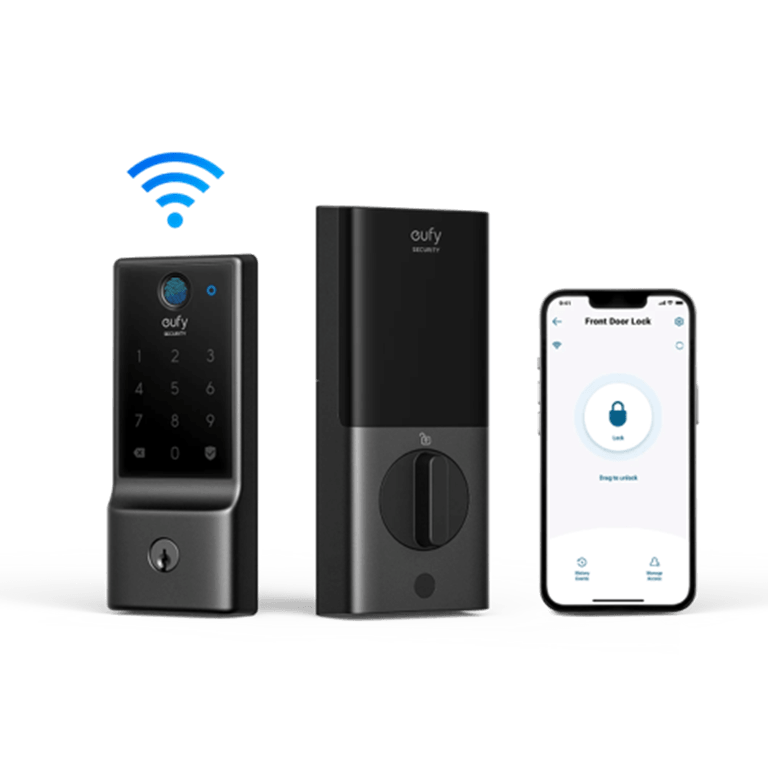
The C220 sits between a simple password lock and a camera-equipped door, but it may not solve every door problem. Confirm size and deadbolt type, ensure the current home network will cater to the lock’s needs, and check the current price before ordering. Video buyers may want a higher-quality video feed. If the goal is to have a camera that can log in without the fingerprint, that’s a problem households don’t have, and that’s where the camera premium will come into play.
Conclusion
The WiFi smart lock is not necessarily a direct WiFi lock. First, check whether the lock installs independently or connects to a bridge that is part of the router; then check the network signal strength at the door, the door’s compatibility, and whether you can open the lock offline.
A WiFi (direct) model can help you avoid extra equipment, while a bridged model can be useful if the hub is available or can support other devices. If fingerprint entry is also a key factor, the eufy Smart Lock C220 provides an alternate entry method that’s not dependent upon the phone app. The answer will vary based on your door, network, and what entryways you use in your home.
Popular on OTW Right Now!




About The Author

Gagan Bhangu
Founder of otechworld.com and managing editor. He is a tech geek, web-developer, and blogger. He holds a master's degree in computer applications and making money online since 2015.