
Why Moisture Is Ruining Your 3D Prints (And How to Prevent It)
The most overlooked variable in 3D printing that impacts your print performance is filament moisture. Moisture turns excellent filament bad for the 3D printer. Using wet filament can make your print weak and the surface rough. At times, you can even get broken prints. Today’s guide covers the way moisture changes filament, signs your filament is wet, and how to prevent it.
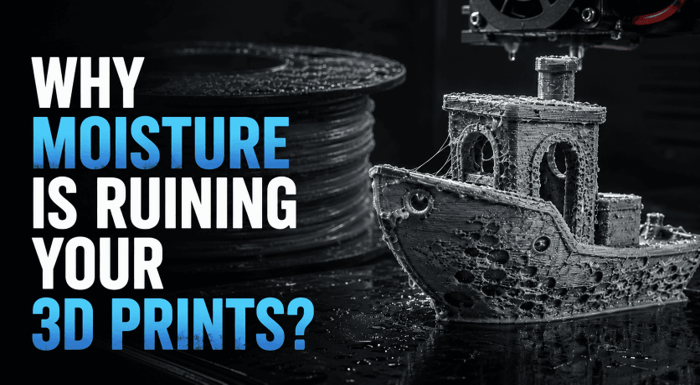
What Moisture Does to Filament?
Most filaments are hygroscopic; they absorb moisture from the surrounding air at a molecular level. This is not surface humidity you can see or feel; water bonds directly into the polymer structure of the filament itself.
When absorbed, that moisture does not evaporate during storage. It remains locked inside the material, hidden, undetectable from the outside, and fully capable of ruining each print the spool creates.
The moisture causes four direct problems:
- Bubbles and voids: steam pockets form inside the extruded material and on the surface as the filament exits the nozzle
- Inconsistent filament diameter: material expands where steam forms and contracts elsewhere, producing uneven line width across every layer
- Weakened layer bonds: steam disturbs the fusion between deposited layers, reducing adhesion and structural strength throughout the print
- Surface roughness and dimensional inaccuracy: the combination of gaps and inconsistent diameter produces a surface that looks rough and measures incorrectly
Signs Your Filament Has Absorbed Too Much Moisture
Before you change any settings or begin troubleshooting the printer, use this checklist. Wet filament creates a particular set of signs, and identifying them fast saves notable time and material.
During Printing
- Popping or crackling sounds from the hotend: Among the most reliable indicators of wet filament. When moisture vaporizes within the melt zone, it exits through the nozzle as little steam bursts, generating a loud snap, pop, or crackle with each impacted section of filament. The filament is wet if the hotend sounds like slowly popping bubble wrap. Stop the print instantly.
- Extreme stringing between parts: Moisture lowers filament consistency; it makes the material more fluid than it should be at the set temperature. That excess fluidity increases ooze during travel moves, even with retraction settings that previously removed stringing completely. If a print that ran clean last month is suddenly covered in strings with no setting change, check the filament before adjusting retraction.
- Surface bubbling or blistering: Steam gaps form as material exits the nozzle, leaving visible bubbles or blisters on outer walls and the top surface. This is particularly clear on large flat areas where the surface should be consistent and smooth.
- Inconsistent extrusion lines: Lines that vary in width, thick in a few spots, thin in others, across the same layer. This occurs as the filament diameter changes with steam formation and fails within the melt zone.
In the Finished Print
- Weak layer bonds: The finished print cracks or peels along layer lines under light pressure. Steam disturbs layer fusion during deposition, and the physical consequence is a print that’s notably weaker than it should be for the material.
- Rough, uneven surface texture: Especially visible on flat top surfaces and outer walls. The surface seems textured or pebbled instead of smooth, a direct result of empty spaces and extrusion inconsistency across each layer.
- Discoloration: PETG and PLA can show yellowing or slight cloudiness when moisture damage is serious. This is more visible in light-colored or transparent filaments.
- Unexpected stringing on previously clean prints: The same settings, same model, the same printer; however, suddenly stringing where there was none before. If nothing changed except time, the filament absorbed moisture while sitting open.
| Sign | Severity | Most Affected Filaments |
| Popping / crackling sounds | High | Nylon, PA, PETG, PVA |
| Excessive stringing | Medium | PETG, TPU, PLA |
| Surface bubbling | High | PVA, Nylon, PETG |
| Weak layer adhesion | High | All filaments |
| Rough surface texture | Medium | PLA, PETG, ABS |
| Discoloration | Medium-High | PLA, PETG |
Which Filaments Are Most at Risk?
A few filaments stay weeks in open air without obvious degradation. Others are compromised within hours. Here’s the detail:
| Filament | Moisture Sensitivity | Risk Level | Time to Noticeable Degradation |
| PVA | Extremely high | Critical | Hours |
| Nylon (PA6/PA12) | Very high | Critical | Hours to 1 day |
| PAHT / PA-CF | Very high | Critical | Hours to 1 day |
| PETG | High | High | 1–3 days |
| TPU | High | High | 1–3 days |
| ABS | Moderate | Medium | 3–7 days |
| PLA | Low-Moderate | Medium | 1–2 weeks |
| ASA | Low | Low | Weeks |
The takeaway from that table: nylon, PAHT, PA-CF, and PVA filaments absorb enough moisture in a single day of open-air exposure to produce noticeably degraded prints. They should never sit open on a desk between sessions, not even overnight.
PETG and TPU offer a bit more time, but exposure of 1-3 days in a standard room with open air exposure is sufficient to cause stringing and surface problems. If the humidity is low, PLA can be stored open for one week or two without significant degradation.
How to Dry Wet Filament?
Drying the wet filament is a useful technique if the temperature is correct, the drying process takes the required amount of time, and the drying process actually dehydrates the filament. A single mismatch results in betterment, if any, and a crooked spool, if anything.
Drying Temperature and Time by Filament
| Filament | Drying Temperature | Drying Time |
| PLA | 50°C | 4–6 hours |
| PETG | 60°C | 4–6 hours |
| TPU | 60°C | 4–6 hours |
| ABS/ASA | 70–80°C | 4–6 hours |
| PA/Nylon | 80°C | 8–12 hours |
| PAHT / PA-CF | 80–85°C | 4–8 hours |
| PC | 80–85°C | 6–10 hours |
| PVA | 45–55°C | 6–12 hours |
Temperature and time are synergistic. PLA dried for 10 hours at 40℃ is inferior to that dried for 5 hours at 50℃. If the filament is very wet, it may require a second complete drying cycle for it to recover fully.
Methods That Work
Dedicated filament dryer
It uses hot air to dry the product, maintains an accurate and constant temperature during the drying process, distributes the hot air evenly around the entire spool, and actively removes extruded moisture from the chamber. The temperature is maintained throughout the process, and that is what is needed for drying.
Food dehydrator
For those who don’t have a special dryer, this is a workable solution! Most available food dryers are able to heat up to the temperatures that are required for PLA, PETG, and TPU. The caution: use a separate thermometer for the actual chamber temperature; most food dehydrators have dial markings that aren’t precise enough to rely upon for drying the filaments. Most consumer dehydrators cannot withstand the higher temperatures required for nylon and engineering filaments, which is 80–85°C.
Conventional oven
Can be achieved at low temperatures, but is not easy to control accurately below 60°C in home ovens. Most ovens oscillate between temperature levels instead of maintaining a fixed temperature, so the hotter and cooler temperatures come and go. There’s a real threat of accidentally over-frying and warping the spool with PLA. It is not to be used first, but rather as a last resort.
Methods that don’t work are leaving filament in a warm room and using Ziploc bags with desiccant.
Why a Dedicated Filament Dryer Makes the Difference?
A dedicated 3D printer filament dryer removes any friction entirely. Here’s how:
- Keeps temperatures perfectly controlled throughout the drying cycle, without checking, guessing, or recalibrating.
- Blows warm air around the entire spool without leaving any ‘cold spots’ of moisture.
Removes moisture actively from the chamber, by means of special fans rather than simply heating air in a closed space. - Seals the filament after drying, so the spool can be dry inside the machine even before the printing begins.
- Allows print-while-drying through a PTFE tube connection from the dryer outlet directly to the printer, useful for long print sessions with engineering filaments that re-absorb quickly.
The Creality SpacePi X4 addresses every limitation of alternative drying methods in one unit.
Its SpaceDry 4.0™ system combines three things that most dryers handle separately:
- 360° hot air circulation, even heating throughout the chamber with no cold spots
- Active dehumidification: dual fans expel moisture from the chamber during drying, rather than allowing it to gather inside the heated space
- Automatic desiccant regeneration: the desiccant chamber connects to the heating airflow and recharges itself with every use. No replacing desiccant packs, no manual maintenance
Each independent chamber has a unique 200W PTC heater and can be used to dry two different types of filaments at two different temperatures simultaneously. Dry PLA at 50°C and PA-CF at 85°C. They have no impact on each other.
For engineering filaments that require 80–85°C, PA, PAHT, PC, and PLA-CF, the X4 reaches and holds that temperature consistently. At 85°C, it cuts drying time for PA-CF by up to 50% compared to a 70°C dryer, 4 hours instead of 8.
For those running multicolor or multi-material setups, the X4 holds 4 spools simultaneously, covering an entire session’s worth of filament in one drying cycle.
How to Store Filament to Prevent Moisture?
These problems are corrected by drying. It can’t get back into storage. A lot of filament moisture damage occurs when they are stored in the wrong conditions, rather than when they are used for printing. A perfectly dried-up spool this weekend can be compromised with moisture before the next session begins.
What effective storage requires:
- Airtight container, not a drawer or open shelf. The seal needs to hold completely against outside air.
- Desiccant, silica gel packs absorb residual moisture inside the container. Use indicating silica gel that changes color when saturated; recharge at 120°C for 1–2 hours when it does
- Humidity indicator, a small hygrometer inside the container confirms it’s actually dry, not just sealed. Target: below 15% RH for nylon and PVA, below 25% for everything else
- Temperature stability: don’t leave in garages or in attics. Over time, seasonal temperature changes weaken seals, while slowly drawing humid air into them.
Conclusion
Most issues with poor print quality are moisture-related, and when you know what to look for, it’s easy to get better prints. Use the symptom checklist to help diagnose. Dry at the appropriate temperature for the appropriate amount of time. Put away after each session, or the problem is sure to return next week. Moisture damage is 100% preventable if storage is taken as seriously as calibration.
Popular on OTW Right Now!




About The Author

Christie
I am a content writer with a passion for creating informative, engaging, and easy-to-understand content. I enjoy researching a wide range of topics and sharing insights that help readers learn, make informed decisions, and stay updated on subjects that matter to them.