
Why AI Video Generator Changes Your Subject, and How to Keep Character Consistent
You upload a photo and create the clip, and something doesn’t feel right. The face is somewhat unique. A new pattern is in use for the shirt. There’s an additional finger on your hand, or the backstory behind your subject has just sneaked its way into place. The video is moving on, but it’s not quite the same photo you began with anymore. One of the most frequent issues in creating AI-generated video is the lack of consistency in the characters depicted, and there’s a term for this: AI video character consistency.
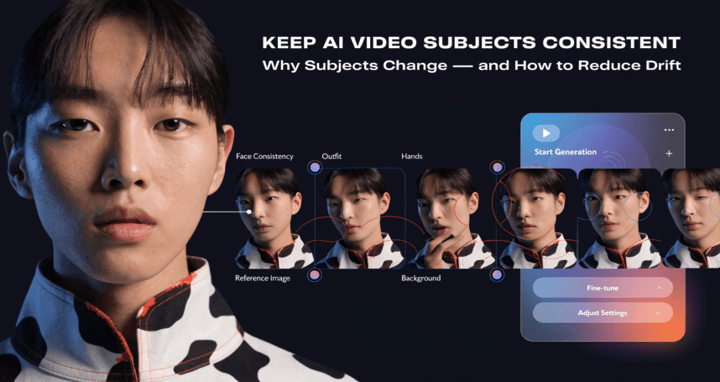
AIReel’s Refer-to-Video tool is built specifically around this problem. Your reference (character, product, outfit, or scene) is brought directly into the video generation process, rather than generated from a single flat image, providing the model with a greater anchor to remain consistent with the video than a single static image can provide. Why the drift occurs in the first place, and how to control it.
Why Your Subject Changes During Generation
If the image is not moving, then an AI video model is provided only one frame at a time. In order to make the model move, it needs to be able to predict all the frames that follow it, and predicting means inventing. The model is not making your photo, it’s creating a set of novel images that are similar to your photo, but very realistic.
The difference between “resemble” and “replicate” is where drift enters in:
- Faces The model is not based on a 3D person model, but instead is being regenerated frame by frame, shifting slightly.
- Clothing can alter texture, colour or pattern marginally as the model reinterprets fabric folds and lighting as they move.
- Objects Things that are close to the subject (jewelry, props, background objects) are not always taken into account and thus end up looking distorted or even invisible when the model is used to concentrate on the principal movement.
- Proportions (hands especially) are notoriously unstable, since hands have many overlapping joints and self-occlusions, which are still one of the hardest things for video models to render consistently across frames.
None of this is a bug specific to one tool. It’s a structural side effect of how single-image animation works: more motion and more frames mean more opportunities for the model to reinterpret details instead of preserving them.
A Quick Way to Keep a Subject Consistent With AIReel
Before getting into the finer points of AIReel what reduces drift- here’s the short version as a workflow:
- Upload a clear reference image instead of a low-quality or cropped one. Sharp focus and even lighting give the model less to guess at.
- Start from Refer-to-Video rather than a bare image-to-video generation, since the reference carries through the whole clip instead of being interpreted once at the start.
- Use the built-in prompt assistant to describe the subject’s key features and what should stay fixed, not just what should move.
- Keep the motion simple (a slight turn, a blink, a subtle push-in) rather than long, dramatic camera movement.
- If a failure case keeps repeating, switch models within the same workflow rather than starting over from scratch.
The sections below go into why each of these matters.
What Actually Reduces Drift
You can’t eliminate this reinterpretation, but you can control how much room the model has to improvise.
Start with a clear reference image. A sharp focus, well-lit, and no obstructions to the subject make the model easier to understand. A fuzzy, cropped or backlit source photo also makes it difficult for the model to discern details, and that is where drift begins..
Keep motion simpler. Each extra second of motion is another chance for the model to re-imagine the subject. A brief, short-ish animation (a slight turn, a blink, a subtle push-in) works much better than a lengthy sequence with dramatic action.
Control the camera, not just the subject. A major source of unwanted changes is wide and sweeping camera moves that require the model to re-render the subject from new angles that the model did not see in the original photo. A more stable and controlled camera movement maintains the subject closer to its original presentation throughout the clip.
Common Failure Cases to Watch For
A few patterns show up often enough that it helps to know them by name:
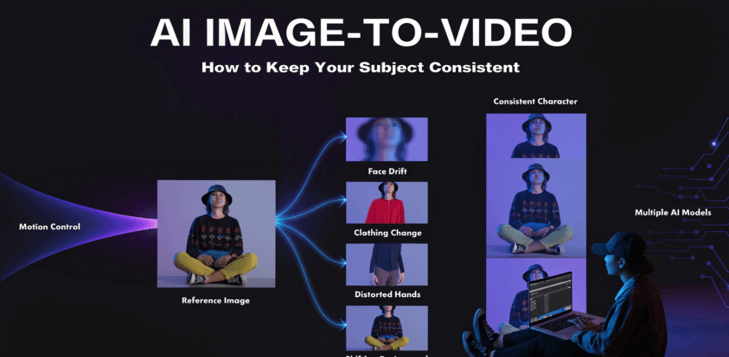
- Face drift: the subject’s face gradually looks like a different person by the end of the clip, especially in longer generations or extreme angles.
- Outfit changes: clothing color, pattern, or even style shifts mid-motion, particularly around folds, sleeves, or areas the camera briefly loses sight of.
- Distorted hands: extra or missing fingers, warped joints, or hands that blur into nearby objects, most common when hands move quickly or overlap with other elements.
- Inconsistent backgrounds: objects or architecture behind the subject shift, duplicate, or dissolve as the camera moves, since the model has to invent background geometry it never directly saw.
Knowing what type of failure case you have is helpful, as you can often handle the problem in different ways: drifts in face and outfit generally can be fixed with a prompt and reference change; hand distortion and inconsistencies in the background are more likely to indicate different models would work better for this specific scene.
When to Adjust the Prompt vs. When to Switch Models
Not all consistency issues are solved in the same manner.
If the model is having the correct general concept but beginning to stray from specific details, make sure to include explicit descriptions of the subject’s key features (hair color, precise clothing, distinguishing details) and include instructions to keep the key features the same for the duration of the clip. When clarifying what things remain constant, rather than what things change, it can resolve small drifts without having to begin again. AIReel’s built-in prompt assistants come in handy here, as they have been designed to describe movements with greater accuracy, not in the form of guesses.
Switch models if there is significant or regular drift: each generation of that model has the same type of failure (e.g. hands or a face that changes in the second half of the clip). At this stage, no amount of fiddling with the parameters of this specific model on this specific type of scene will be able to compensate for the fact that this particular model is limited for this particular type of scene. AIReel allows you to have several video models with one platform and thus be able to switch and compare without rebuilding your reference setup or changing the workflow.
Getting Consistent Results
When your videos continue to wander from the photo you began with, it’s typically not as simple as “try again with the same settings. It’s honing your reference, streamlining your action and if necessary, checking if another model is more effective in your particular subject. AIReel has been created to enable you to carry out all three without having to restart your workflow every time.
Popular on OTW Right Now!




About The Author

Gagan Bhangu
Founder of otechworld.com and managing editor. He is a tech geek, web-developer, and blogger. He holds a master's degree in computer applications and making money online since 2015.