
Invideo vs Luma AI: Which Is Better for AI Filmmaking?
AI video platforms are moving beyond generating isolated clips. For filmmakers, the bigger question is whether a platform can help plan scenes, maintain visual continuity, guide shots, work with references, and carry creative decisions through a longer production.
That makes invideo and Luma AI interesting to compare. Both now combine AI models with agent-based creative workflows, but they approach AI filmmaking from different angles. Luma AI puts strong emphasis on its Ray3.2 video model, direct video control, keyframes, modification, and creative agents. Invideo focuses more heavily on persistent project context, specialist agents, multi-model production, storyboarding, consistency, and moving from an idea toward a complete film.
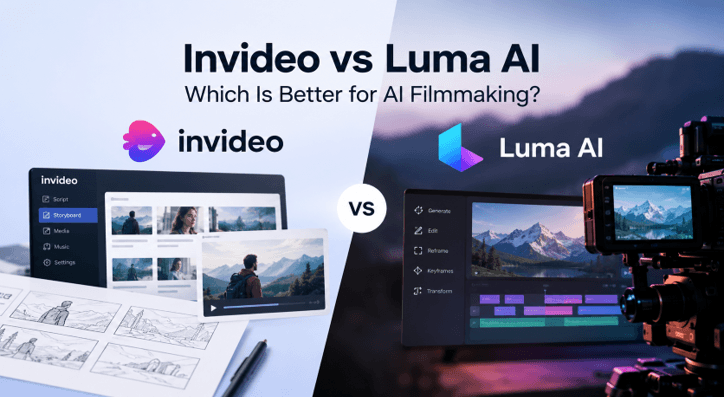
Neither approach is automatically better. The right choice depends on whether you want detailed control over generated footage or a broader production system that remembers and manages an evolving project.
Invideo vs Luma AI: Quick Overview
| Area | Invideo | Luma AI |
| Main approach | Agent-led production across a complete project | Creative agents combined with Luma’s video and image models |
| Current video focus | Access to 200+ image, video, audio, and music models | Ray3.2 plus selected third-party models |
| Project context | Persistent context across scenes, characters, locations, and creative rules | Shared context across creative workflows and teams |
| Storyboarding | Script or prompt to visual boards, angles, and consistent frames | Creative planning through agent-led generation and iteration |
| Video control | Directorial instructions, references, model routing, camera direction | Multi-Keyframe direction, Reframe, Modify Video V2 |
| Existing footage | Agent Two can read footage and creative references | Ray3.2 can transform and reframe existing footage |
| Best suited to | Longer multi-scene productions and coordinated workflows | Detailed generation, transformation, and visual experimentation |
Luma’s current Ray3.2 supports text-to-video, image-to-video, up to 16 keyframes, video transformation up to 20 seconds at 1080p, reframing, HDR generation, and production-oriented export options. Luma Agents can also plan, generate, refine, and coordinate work while carrying shared context.
Invideo takes a wider production-oriented approach. Its filmmaking Agent operates as a collaborator that works across development, pre-visualization, character and location continuity, shot creation, effects, editing, audio, and finishing.
How invideo Agent Approaches AI Filmmaking
Invideo Agent is designed around the idea of directing an AI crew rather than managing every generation independently.
A project has persistent context containing information such as scripts, character details, locations, references, visual rules, and previous creative decisions. When production continues into another scene or session, that information remains available instead of requiring the filmmaker to rebuild the same creative brief.
This matters most when AI filmmaking moves beyond a handful of shots. A character’s wardrobe, a location’s lighting, or a particular visual language can become part of the project rather than something the filmmaker has to restate each time.
The platform also supports specialist agents. A filmmaker can assign roles such as casting, cinematography, storyboarding, or production planning. The idea is that separate agents work with the same project knowledge and can pass relevant information between departments.
Rather than relying on a single generation model, invideo Agent can work across more than 200 image, video, audio, and music models. Current paid plans list access to models including Seedance 2.5, Veo 3.1, and Kling 3.0.
How Luma AI Approaches Filmmaking
Luma AI’s current system combines Luma Agents with Ray3.2 and UNI-1.1. This gives filmmakers an environment where an agent can help plan and refine a creative direction while Ray3.2 handles production-focused video generation.
Ray3.2 is especially relevant when filmmakers want direct control over how footage develops. Multi-Keyframe direction supports as many as 16 keyframes within a clip, while Reframe can adapt footage to another aspect ratio. Modify Video V2 can transform existing video while preserving useful motion and performance information.
That makes Luma attractive for filmmakers who spend significant time shaping individual shots. Instead of thinking only about text-to-video generation, a director can build from reference frames, transform existing footage, adjust framing, and explore different visual treatments.
Luma Agents broaden that workflow. According to Luma, they can plan, generate, iterate, and refine across a project while sharing context between creative formats and team members.
So the difference is no longer simply “agent versus video model.” Both platforms now include agent-led workflows. The practical distinction is where each system places more emphasis.
Storyboarding and Pre-Production
Pre-production is an important part of AI filmmaking because solving composition, continuity, and shot order before generating final footage can save repeated generations later.
Within invideo Agent, an AI storyboard can turn a script or text description into visual boards while keeping characters, lighting, art direction, and scene identity aligned. Filmmakers can explore close-ups, wide shots, over-the-shoulder views, and other angles before extracting a preferred frame for further production.
The larger advantage of this workflow is continuity between planning and production. Invideo Agent’s filmmaking workflow incorporates storyboards, animatics, shot lists, character design, environments, and visual rules as parts of the same persistent project rather than separate planning exercises.
Luma approaches planning more fluidly through its creative agents and generative environment. Its strength is the ability to move quickly between planning, visual generation, transformation, and refinement while keeping project context available.
For filmmakers who want clearly structured pre-production before shot generation, invideo Agent may feel closer to a conventional production pipeline. For creators who prefer exploring the film visually and refining ideas through generated results, Luma’s approach can be appealing.
Character and Scene Consistency
Consistency remains one of the practical challenges in AI filmmaking. A good single shot is less useful if a lead character, costume, room, or lighting style changes unexpectedly several shots later.
Invideo Agent’s filmmaking workflow puts significant attention on character sheets, location references, costume states, changing character appearances, and project-level continuity. These details remain connected to the wider project context so later generations can refer back to previously established decisions.
Luma also focuses strongly on continuity. Its current Ray3.2 positioning highlights continuity across cuts, while Luma Agents maintain shared context across project stages and creative formats.
The distinction is mainly workflow-based. Invideo Agent arranges continuity according to specialized roles and a continuous production context. Luma combines contextual agents with strong generation and shot-level control.
Invideo Agent Two: What Changed?
Invideo Agent Two expands the platform’s project-memory approach by allowing agents to understand more of the material filmmakers already work with.
Invideo Agent Two can read scripts, PDFs, reference material, video, and other project inputs. A filmmaker can provide a rough cut and have the agent interpret what has been completed, what remains, and where continuity may need attention.
It also introduces more connected specialist-agent workflows. For example, a cinematography agent can receive relevant information from casting, storyboarding, and costume agents without the filmmaker manually rebuilding the same brief or prompts for each department. It also integrates Playbooks for recurring creative rules and shared multiplayer projects for teams. Invideo Agent Two is four times faster and costs half as much as the earlier version.
For AI filmmaking, the more meaningful change is the ability to bring existing creative material into the agent’s understanding rather than continually translating everything into new prompts.
Invideo vs Luma AI Pricing
Pricing needs context because both platforms work with credits, and the cost of a project can depend heavily on the models and generation settings chosen.
As of August 2026, invideo lists its annual-billing prices at $17/month for Plus with 75 credits, $85/month for Max with 390 credits, $170/month for Generative with 800 credits, and $900/month for Elite with 4,250 credits. Paid tiers include access to the broader 200+ model collection, although individual models consume credits at different rates.
Luma currently lists Plus at $30/month with 10,000 credits, Pro at $90/month with 40,000 credits, and Ultra at $300/month with 150,000 credits. Annual totals are listed at $300, $900, and $3,000, respectively.
The credit numbers should not be compared directly because the two companies calculate and spend credits differently. For a real production budget, compare the expected number of shots, chosen models, resolution, iteration rate, and finishing needs instead of comparing credit totals alone.
What About AI Tools Startups Need to Automate Growth?
Video creation is only one part of the wider group of AI tools startups need to automate growth. A growing company may also rely on AI for customer support, analytics, campaign planning, sales workflows, research, and content operations.
Creative automation becomes useful when it connects with that wider system. A startup launching frequently may need product explainers, campaign videos, founder content, ads, and localized creative without building a large production department for every release.
In that setting, AI filmmaking platforms can become part of a wider growth rather than simply creative tools for occasional video generation.
Which Platform Is Better for You?
Choose invideo Agent if your priority is managing a longer production where scripts, characters, locations, visual rules, storyboards, multiple models, and specialist creative roles need to remain connected across many scenes.
Choose Luma AI if your work centers more heavily on creating and refining visually ambitious individual shots, controlling keyframes, transforming existing footage, reframing scenes, and working closely with Ray3.2.
For AI filmmaking, both can fit professional creative workflows, but they solve different parts of the process particularly well. Luma provides a strong model-centered production environment with increasingly capable creative agents. Invideo Agent puts more weight on project memory and coordinating the larger filmmaking process around multiple specialized models and agents.
FAQs
Is Invideo or Luma AI better for complete films?
Invideo is structured more around an end-to-end film or series workflow, including development, storyboards, continuity, production, and finishing. Luma can also support broader creative projects, but its Ray3.2 capabilities make it particularly strong for shot creation, transformation, and visual control.
Does Luma AI have creative agents?
Yes. Luma Agents can plan, generate, iterate, and refine creative work while maintaining shared project context across formats and teams.
Can both platforms work with multiple AI models?
Yes. Luma integrates Ray3.2 alongside several external video, image, and audio models. Invideo’s paid plans currently provide access to more than 200 image, video, audio, and music models.
Final Verdict
The invideo vs Luma AI decision depends less on which platform can make the most impressive isolated clip and more on how you want to work across an entire production.
Luma AI is well suited to filmmakers who value Ray3.2’s video controls, keyframe direction, transformation tools, reframing, and an agent-led environment for creative exploration. Invideo Agent is better aligned with filmmakers who want persistent project memory, specialist agents, structured pre-production, model choice, and continuity across a longer production.
As AI filmmaking develops, the more useful question is therefore not simply which platform generates better video. It is which workflow matches the way you want to direct, revise, and finish the project.
Popular on OTW Right Now!

About The Author

Gagan Bhangu
Founder of otechworld.com and managing editor. He is a tech geek, web-developer, and blogger. He holds a master's degree in computer applications and making money online since 2015.