
Why AI Video Creation Is Moving Beyond Single Prompts to Directed Workflows
The next useful leap in AI video is not just better generation. It is better planning, scene control, model choice, and revision across the whole production.
AI video has reached a point where a single prompt can produce a surprisingly convincing shot. That is impressive, but it also exposes the category’s next limitation: a strong clip is not the same thing as a strong video.
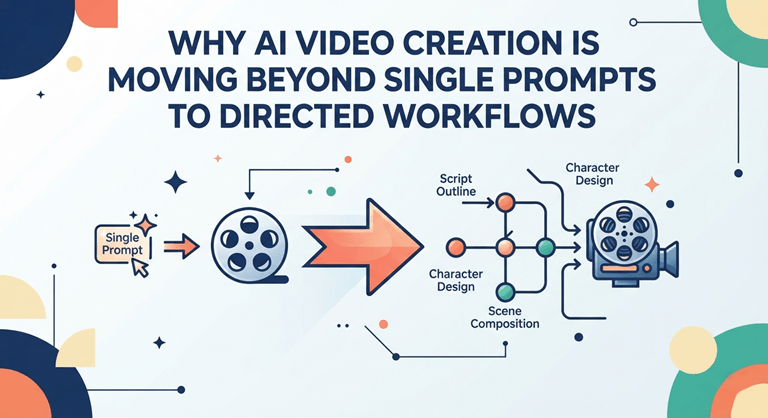
A completed product typically requires a hook, a clear scene structure, visual direction, sound and/or voice, editing, and a way to edit one poor part of the finished product without having to remake the rest. This has led to a shift in the AI video discussion from the quality of the prompt to the quality of the workflow.
| Key takeaway: The more capable video models become, the more valuable orchestration becomes: deciding what to make, how to break it into scenes, which method to use for each shot, and how to refine the result. |
A single prompt solves only one part of the job.
The first generation workflows were basic: Wrote a prompt, set a couple of settings, and waited for the clip. While this is good for a single visual, it can only be used when the purpose is for one visual; it becomes brittle when the project requires structure.
For instance, a 30-second product video could require a problem statement, product reveal, demonstration, proof, and call to action. The setting of a short story can include a few places, recurring characters, and controlled pacing. Vertical framing, captions, narration, and several variations are possible with a social ad.
In all of those examples, the actual question of production becomes, “Can the model make this scene?” It’s asking if these scenes can be combined into a cohesive video.
Planning is becoming part of generation.
The best workflow is before the generation button. A creator must determine the message of a video, its intended audience, the number of scenes needed, what should stay the same, and what inputs or how a video should be created for each shot.
This will become crucial as platforms provide access to multiple video models. Choices can enhance the output, but it can also lead to more decision-making. One model might be more suitable for a cinematic hero shot, a second for more controllable movement, and a third for a quick social variation.
The software value is thus moved up. It can also help a creator structure their model choices, rather than just presenting them.
From prompting to directing
That change is visible in platforms such as VlogMe, which treats planning, generation, and editing as connected stages of the same AI video workflow. It can help you refine an existing brief into a script and an editable scene plan before getting to the stage of generation and refinement, with its AI Director.
It’s crucial to understand the difference between prompting and directing. Prompting is an Output. Directing is about what happens throughout the sequence – the intent of each scene, the sequence, the visual cues, the sounds, and the move into the next scene.
The difference will be small in a five-second experiment. With a multi-scene project, it has the potential to either make it look like an organized scene or just like they had thrown it together.
Why image-to-video fits naturally into a directed workflow
While text-to-video is quite creative, the existing picture can play a significantly stronger visual anchor. The product image is already a product photo. A portrait sets the facial shape and clothing. A concept frame can establish the composition, color, and visual style.
That is why an image-to-video workflow is useful when the creator wants to introduce motion while preserving a specific starting frame. The model’s performance can be directed by the creator, who does not have to invent anything, but only move the model and the camera from a known image.
This is also a demonstration of the trend towards modular AI production today. The scene might start with text, followed by a product image, or actual footage. The complete video is a series of various generation and editing choices.
Model choice is becoming a creative decision.
Asking which is the “best” model becomes less important as more models become available; it becomes more important to ask which one fits a certain shot. Creators might consider quickness of adherence, movement, uniformity of images, camera actions, indigenous audio, generation time, duration, or cost.
This is similar to the way they were produced traditionally. No filmmaker uses the same lens, the same camera action, and the same lighting style throughout the movie. The latter choice will be based on the use of the shot. The AI video is starting to have the same sort of task-specific decision-making.
Generation is only half of the creative process.
Even a great generation might require a bit of trimming, subtitles, voiceover, rearranging the scenes, adding a new ending, or even replacing the one stumbly shot. However, as soon as you need to use another application to download the files and rebuild the context, the simplicity of AI is lost.
The friction can be eliminated by integrating generation into a more comprehensive editing workflow. The clip that is produced is not the final result, but it is to be used as material that can be placed, compared, revised, and/or replaced.
Multi-scene creation changes what an AI video tool needs to do.
The first generation of AI video tools answered the question: Can an AI model generate video from text or an image? The first generation of AI video tools provided an answer to a simple question: Can an AI model create video from text or an image? The next generation is going to have to be more practical and ask the question: Can the system assist a person in creating an entire video?
That’s not enough: it needs a generation endpoint. It involves planning, continuity, scene setup, choice of model, revision, and finishing. For marketers, agencies, and creators, those workflow details matter more than a marginal boost in a single showcase clip.
The real differentiator may be orchestration.
Video models will grow ever better, and models will become more readily available. That makes it more, not less important, to orchestrate. The creator still needs a way to decide what to create, keep track of context, and convert individual outputs into a coherent whole.
The best AI video workflow doesn’t necessarily have to have the most model buttons. Perhaps it’s the one that enables creators to get from the idea to a purposeful, modifiable sequence with the least superfluous struggle.
That is, the current era of AI video isn’t just about “prompt engineering. It is better to direct it than before.
Popular on OTW Right Now!


About The Author

Gagan Bhangu
Founder of otechworld.com and managing editor. He is a tech geek, web-developer, and blogger. He holds a master's degree in computer applications and making money online since 2015.