
PixAI Models Explained: How Different Models Change Your Anime Art
Ever put together the perfect prompt, added the right LoRA, dialed in all your settings, and still ended up with an image that looked nothing like what you wanted? It’s incredibly frustrating.
But before you throw away your hard work and rewrite your entire prompt, try changing the model.
PixAI models are one of the easiest things to overlook when using the platform. If you give Tsubaki 2, Haruka v2, and Serin the same prompt, you’re going to get three completely different interpretations. One might totally nail the composition, another might give you that perfect anime aesthetic, and the third might completely change the mood of the image.
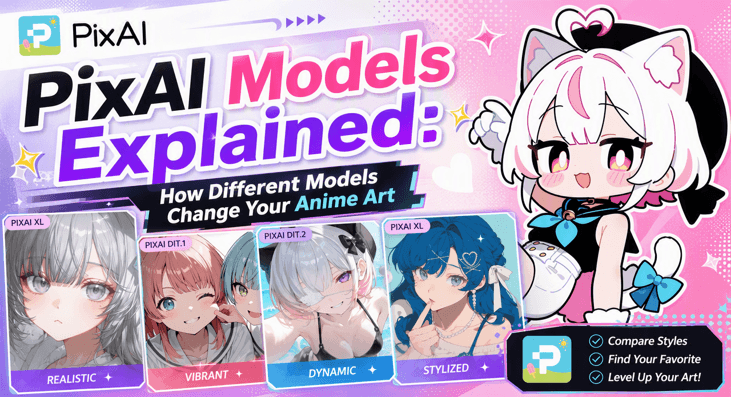
I’ve learned the hard way that picking the right model saves way more time than endlessly tweaking a single word in your prompt. The real trick is just knowing what each model is actually good at.
So, which PixAI model should you use? Here is a straight-to-the-point comparison to help you find the exact engine your style needs.
Quick Answer: Which PixAI Model Should You Use?
If you’re looking for the short version, here’s a simple starting point.
| The best all-round image quality | Tsubaki.2 |
| Traditional anime generation with excellent SDXL LoRA support | Haruka v2 |
| Korean-inspired Webtoon and Manhwa artwork | Serin |
| Edit or improve existing images | Reference Pro |
| Bold colors and energetic compositions | Hinata v2 |
| More mature-looking characters and cinematic scenes | Hoshino |
Although Tsubaki.2 will give you the best all-round image quality, there is no ‘best’ choice here. It all depends on what problem you are trying to solve.
Most creators who know what they are doing never stick to just one model anyway. Feel free to jump around based on the specific look they need.
Why Your Choice of Model Matters
Think of it like hiring different human illustrators. If you give five artists the exact same description, you’re going to end up with five totally unique pieces of art.
AI models work the same way. Because they’re trained on different images and have their own built-in artistic biases, the same instructions will give you completely different results.
Here is a good example of images I got from Tsubaki.2, Haruka v2, and Serin using the same prompt.
| Tsubaki.2 | Haruka v2 | Serin |
Tsubaki.2: The Best Starting Point for Most Creators
If you’re just starting out, this is definitely the model you should try first.
Tsubaki 2 is PixAI’s flagship model, and it does an amazing job of balancing awesome image quality with easy-to-use controls. Instead of forcing you to type out a massive, confusing wall of tags, it understands natural language incredibly well. You can basically describe a scene the same way you’d talk to a friend, and the model will likely understand what you mean without needing a million keywords.
That makes it super beginner-friendly. If you’ve ever felt totally overwhelmed by traditional AI prompting, Tsubaki.2 takes away a ton of that stress.
Tsubaki.2 is built on a next-generation Diffusion Transformer (DiT.2) architecture, which fundamentally changes how the AI interprets prompts and structures images compared to older Stable Diffusion XL (SDXL) anime models.
Something significant I’ve noticed with BiT.2 is how well it handles multiple characters in a single scene. While older models often show glitches like blending their limbs, swapping their clothes, or forcing characters into generic poses, Tsubaki.2 keeps everyone distinct and consistent. This is a lifesaver if you’re trying to make group art, webcomics, or story illustrations.
Another feature I really love is the built-in Style Presets. While most PixAI models rely on third-party LoRAs, Tsubaki.2 comes with 35+ native style presets, which allows you to change the entire look of your image with a single click.
PixAI gives you four different generation modes for Tsubaki 2:
- Lite: Perfect for quickly testing out ideas or brainstorming concepts.
- Standard: A great middle ground for regular generations.
- Pro: Ups the detail when you’re ready to lock in a final piece.
- Ultimate: Produces maximum quality, but it absolutely eats through your balance.
Keep in mind that these options aren’t just generic ‘low, medium, high’ quality toggles. They usually balance your rendering speed, final details, and credit expenditure.
Tsubaki.2 does a fantastic job with everything from simple portraits to action scenes and wide landscapes, and you don’t need much technical know-how in AI prompting to make it look great.
Haruka v2: Built for Classic Anime Workflows
While Tsubaki.2 represents PixAI’s newest generation of models, Haruka v2 remains the platform’s most used option, and for good reason.
While flagship DiT models like Tsubaki lean heavily toward cinematic illustration, Haruka is built for creators who want traditional, vibrant anime style with soft pastel undertones.
It also produces polished anime artwork with expressive eyes, cleaner hands, smoother hair rendering, and refined clothing details.
Since it’s based on SDXL, it works exceptionally well with the large library of community LoRAs already available. This makes it the better compatibility choice if your workflow revolves around Character LoRAs, Style LoRAs, or artist-inspired LoRAs.
While Haruka V2 does support natural language prompting, it performs best when you use a hybrid approach that mixes natural-language prompts with traditional anime Danbooru tags. If you’re an experienced AI artist who already uses descriptive tags, you’ll feel right at home.
Another reason Haruka v2 has remained so popular is that, rather than replacing existing SDXL workflows, it builds on them. If you enjoy experimenting with different LoRAs and adjusting prompt weights, Haruka v2 gives you plenty of flexibility without sacrificing image quality.
Serin: The Go-To Model for Korean-Inspired Artwork
Want your artwork to look less like a classic 90s anime and more like a modern Solo Leveling or True Beauty chapter? You need to try Serin.
Instead of copying the usual Japanese anime tropes, Serin is explicitly trained in the clean, ultra-polished look of modern Korean Manhwa. Expect more natural face shapes, soft cinematic lighting, highly expressive eyes, and incredibly detailed fashion. It gives your art an instantly refined, contemporary edge.
Just like Tsubaki.2, Serin thrives on natural language. Instead of stuffing your prompt with dozens of tags, simply describe the scene, the characters, and the mood you’re trying to create. In my experience, the model does a good job of understanding relationships between different elements, resulting in scenes that feel more cohesive.
I’ve also found Serin particularly good at emotional scenes. If your inspiration comes from romance Webtoons, Korean illustrations, or modern Manhwa, Serin is probably the easiest way to achieve that style without spending hours tweaking prompts.
Reference Pro: When You Need to Edit Instead of Generate
While Most PixAI models start with a blank canvas, Reference Pro takes the opposite approach.
Instead of asking, “What should I generate?” it asks, “What do you want to change?” All you have to do is upload your image, describe the edits you want in plain English, and let the model do its thing.
You can use PixAI’s Reference Pro to:
- Swap out a character’s clothes.
- Give them a completely new background.
- Change a standing pose to a sitting one.
- Fix up a messy composition.
- Upscale your art while keeping the same character design
Because the model can actually “see” your existing image, it does a much better job of preserving facial features, hairstyles, and overall character identity than trying to recreate everything from a text prompt.
This also makes Reference Pro a great companion to PixAI’s other models. For example, you might create your first image with Tsubaki.2, then switch to Reference Pro to refine the pose, improve the background, or prepare the artwork for higher-resolution printing.
If you’re happy with your character but want to improve the image itself, Reference Pro is almost always the better choice than starting over.
Other PixAI Models You Can Try
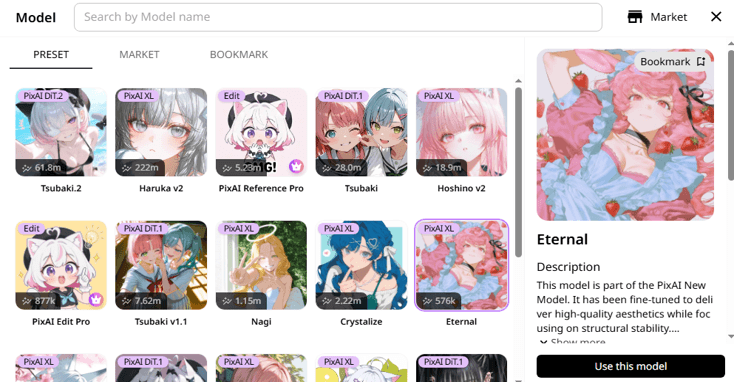
While the four models above cover most creative workflows, PixAI also offers several other official models worth trying.
Tsubaki
This is the predecessor to Tsubaki.2. It still benefits from natural-language prompting and delivers impressive anime artwork. It’s worth trying if you prefer its particular visual style or want to compare it with the newer Tsubaki.2.
Hoshino v2
Hoshino v2 is a PixAIXL model that’s tailored to capture a vibrant retro anime aesthetic. Offers enhanced anatomy and hands.
Hinata v2
Hinata v2 is a good option if you’re looking to create high-energy anime illustrations with rich lighting, crisp textures, and incredibly clean details at higher resolutions.
Tsubaki v1.1
Tsubaki v1.1 is an older Tsubaki model that still supports the natural-language workflow of the DiT family. It can be worth testing when you prefer its particular rendering style or want an alternative to the newer Tsubaki models.
Nagi
Nagi is aimed at general anime image generation. It offers a distinct art style that can give you fresh inspiration for your creations.
Crystalize
Crystalize is an SDXL model in the PixAIXL family that lets you try a different anime aesthetic. It’s worth trying when your usual model isn’t giving you the particular rendering, character appearance, or overall mood you’re after.
Eternal
Eternal is another model in the PixAIXL family. It was designed to prioritize great aesthetics while keeping things structurally sound so your characters don’t melt into the background. Rather than treating it as a replacement for the flagship models, I’d use it when you want to see how a different model interprets the same prompt.
Otome v2
Otome V2 is a specialized base model meticulously optimized for generating high-quality anime-style male characters. Most anime-focused AI generators lean heavily toward rendering female figures. Otome v2 fixes this imbalance, allowing you to get the male character you wanted.
Tsubaki Flash
This is the official high-speed, accelerated version of PixAI’s flagship Tsubaki model. It is specifically engineered to maximize generation speeds and reduce waiting times, making it ideal for brainstorming ideas or testing prompts rather than creating the final illustration.
Haruka
Haruka was PixAI’s first major, highly successful in-house base model built on the Stable Diffusion XL (SDXL) architecture. It was specifically designed to bridge the gap between heavy, high-tech digital illustrations and traditional 2D anime aesthetics.
PixAI Edit & Edit Pro
These are great options if you don’t want to build everything from scratch. Use the standard Edit model for quick, single-change fixes, and the Pro version for more complex, multi-layered adjustments.
Final Thoughts
There isn’t an all-in-one winner in PixAI models. Every single engine brings something completely different to the table, depending on what you want to create.
The right model for you depends entirely on what you’re trying to create, and half the fun is just experimenting to see which ones feel right to you.
Once you find a model that gives you the look you love, save that setup and build around it. It makes things so much easier, and you’ll spend way less time stressing over bad generations and more time actually creating.
You don’t need to become an expert on every single model PixAI offers. Your goal should be finding the exact combination of tools that takes your idea and turns it into art you actually want to show off.
Popular on OTW Right Now!

About The Author

Gagan Bhangu
Founder of otechworld.com and managing editor. He is a tech geek, web-developer, and blogger. He holds a master's degree in computer applications and making money online since 2015.