
How to Use a Digital Foil Printing Machine for High-Quality Prints
In today’s printing market, customers want products that look premium and attractive. Simple printing is not always enough. Adding a metallic finish can make a big difference. This is where a foil printing machine becomes very useful. It helps you create shiny, eye-catching designs that improve the value of your product.
Modern equipment, like a digital foil printing machine, is designed to make this process easy, fast, and cost-effective. You can use it for many products such as business cards, packaging boxes, book covers, certificates, and labels. In this article, we will focus on the machine, its features, and how to use it in detail.
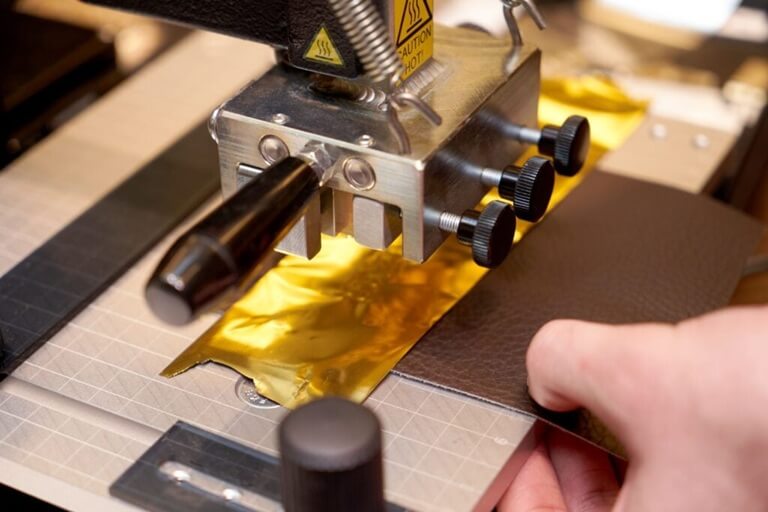
What Is a Digital Foil Printing Machine?
A foil printer machine is used to transfer metallic foil onto a surface using heat and pressure. The foil sticks only to selected areas of the design, creating a clean and shiny effect.
A flatbed foil printer has a flatbed on which you place the material. You can print on various flat materials like paper, cardboard, leather, plastic,c and coated sheets.
The main advantage of a digital foil printing machine is that it does not require plates or dies. You can transfer your design from a computer and print it. This saves time and reduces cost.
Important Features of a Digital Foil Printing Machine
Knowing about the machine makes it easier to operate it and get a good job.
1. Plate-Free Operation
Traditional foil printing requires metal plates. A modern foil printing machine works without plates. This makes the setup quick and simple.
2. Multi-Material Support
A good flatbed foil printer can work on many materials, including:
- Paper and thick cardstock
- Corrugated boxes
- Leather and PU materials
- PVC and plastic sheets
- Laminated surfaces
This versatility makes it possible to prepare a variety of printing tasks.
3. High Precision and Accuracy
A foil printer machine is designed to apply foil exactly where needed. It produces sharp edges and clear text, even for small details like logos or fine lines.
4. Adjustable Settings
You can set the temperature, pressure, and speed. This allows you to use different materials and foils.
5. Easy Operation
Most digital foil printing machines come with user-friendly software. You can connect the machine to your computer and send designs easily.
6. Compact Design
This machine is not big. It’s suitable for small shops, offices,s or workshops.
Step-by-Step Guide to Using the Machine
Using a digital foil printing machine correctly is important for getting the best results. Follow these steps in detail.
Step 1: Create and Prepare the Design
First, design your artwork on the computer. Adobe Illustrator, CorelDRAW, and Photoshop are all good choices.
- Keep the design clean and clear
- Use vector graphics if possible
- Mark the exact areas where foil is required
The better the design, the better the print.
Step 2: Select the Right Material
Choose a material that is flat and suitable for foil printing. A flatbed foil printer works best on smooth or slightly textured surfaces.
Examples of good materials:
- Art paper
- Cardboard
- Leather
- Plastic sheets
Ensure the work surface is dust-free.
Step 3: Load the Foil Roll
Insert the foil roll into the machine. Choose the foil you want, such as:
- Gold
- Silver
- Rose gold
- Holographic
Ensure foil is well aligned to prevent foil waste.
Step 4: Adjust Machine Settings
Set the correct values for:
- Temperature
- Pressure
- Speed
For example:
- Thick material may need more pressure
- Delicate material needs lower heat
It is always better to test on a sample before final printing.
Step 5: Place the Material on the Flatbed
Put the material carefully on the machine bed. A flatbed foil printer gives stable support, which helps in accurate printing.
Make sure:
- The material is straight
- It does not move during printing
Step 6: Start the Printing Process
Send your design from the computer to the foil printing machine. The machine will:
- Heat the selected area.
- Press the foil onto the surface.
- Transfer the metallic layer.
This is done automatically and is reliable.
Step 7: Check the Final Output
After printing, remove the material and check:
- Is the foil smooth and shiny?
- Are the edges clean?
- Is the design properly aligned?
If not, you can fine-tune and print again.
Practical Tips for High-Quality Results
For optimal results with your foil printer machine, keep these guidelines in mind:
Use High-Quality Designs
Make sure you use clear designs. The quality of the design will reflect on the product.
Test Before Production
Test Before Production. This helps get the right settings.
Keep the Machine Clean
Dirt may cause problems. Clean the machine regularly.
Choose Good Foil Material
High-quality foil gives better shine and stronger bonding.
Maintain the Machine
Good maintenance boosts productivity and extends the life of the machine.
Benefits of Using a Digital Foil Printing Machine
A digital foil printing machine offers many practical advantages.
Fast Production
You can start printing immediately because no plate is needed.
Lower Cost
It helps to lower the cost, particularly for small batch jobs.
Consistent Results
The quality of the print is consistent.
Wide Range of Applications
A flatbed foil printer can be used for:
- Business cards
- Wedding invitations
- Packaging boxes
- Certificates
- Labels and tags
Who Should Use This Machine?
A foil printing machine is suitable for:
- Print shops
- Packaging businesses
- Small business owners
- Graphic design studios
- Corporate offices
If you are looking to offer quality printing services, this is a good option.
Conclusion
A digital foil printing machine is a versatile and effective machine for printing. It is user-friendly, versatile,e and affordable. Its capabilities include plate-free printing, the use of different materials, and accurate printing, allowing you to achieve quality output.
When you know how to use it and keep it well-maintained, you will achieve great results. A foil printer machine is ideal for those seeking to produce eye-catching, high-quality, and premium printed products.
Popular on OTW Right Now!




About The Author

Gagan Bhangu
Founder of otechworld.com and managing editor. He is a tech geek, web-developer, and blogger. He holds a master's degree in computer applications and making money online since 2015.