
Best Free AI Image Tools for Creators
Creating stunning visuals for your business or personal brand used to require expensive software and years of design experience. Today, AI image generators have leveled the playing field, allowing anyone to produce high-quality graphics from simple text prompts. This guide breaks down the best free AI image tools available for small businesses and creators, helping you find the perfect fit for your projects.
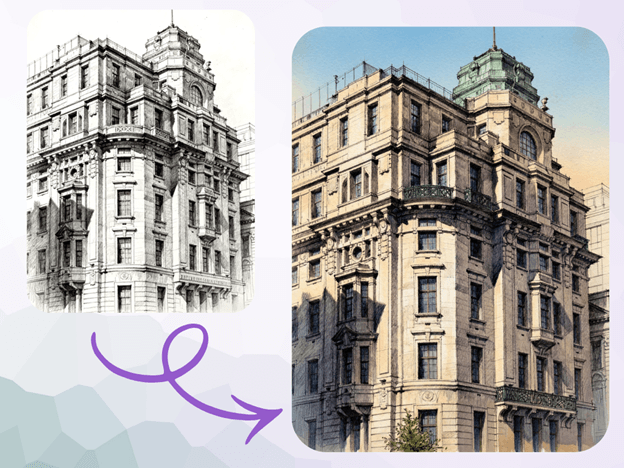
We will discuss the tools to transform your ideas into reality, providing a wide range of photo-realistic images and elaborating artistic styles. You may need blog images, social media content, or original marketing content, but such sites can save you both time and money and can enrich your content.
Top 5 Free AI Image Generators
Top 1: PhotoEditorAI.io
Overview
PhotoEditorAI.io stands out for its simplicity and direct approach to AI image creation. It’s a web-based tool designed for users who want quick, high-quality results without a steep learning curve. The interface is clean and focuses entirely on the generation process, making it an excellent starting point for anyone new to AI art. It offers a powerful Free AI Image Generator Online that is accessible to everyone. The site is created to accommodate a great variety of styles, including both realistic photos and digital paintings, depending on your text descriptions.
The platform also includes advanced capabilities for users who want to modify existing pictures. Its free image to image generator lets you upload a source image and use a text prompt to guide the AI in transforming it. The option is ideal to readjust photos, alter surroundings, or come up with new interpretations of an already existing image. Its lack of complication and strong capabilities make it a well-rounded option.
Key Features
- Text-to-Image Generation: Creates images from detailed text descriptions.
- Image-to-Image Transformation: Modifies uploaded images based on text prompts.
- Style Variety: Supports numerous artistic styles, including photorealistic, anime, fantasy, and more.
- Intuitive Interface: Simple, web-based tool with no complex menus or settings.
| Pros | Cons |
| Extremely easy for beginners to use. | Lacks advanced editing or post-production tools. |
| No software installation required. | Fewer community features compared to other platforms. |
| Generous free usage tier. | Limited control over fine-tuning models. |
Best For
Small business owners, marketers, and bloggers who need to create high-quality images for articles, social media, or advertisements quickly and without any design background.
Top 2: Bing Image Creator (Microsoft Designer)
Overview
The Bing Image Creator, which is part of Microsoft Designer now, is a free demonstration of the power of DALL-E 3. To begin creating images, all that is required is a Microsoft account. The fact that it grants free access to one of the most developed AI models is its greatest strength. The tool has a reputation of being promptly adherent i.e., it does a great job of comprehending and visualizing complex or detailed text descriptions.
The additional value is provided by the integration with Microsoft Designer. Once you create an image, you can simply drag it into a design project to produce social media posts, invitations, or digital postcards with pro templates. This complete workflow has made it an effective one-stop solution to content creation.
Key Features
- Powered by DALL-E 3: Access to OpenAI’s latest public model for high-quality results.
- Excellent Prompt Following: Accurately interprets long and detailed prompts.
- “Boosts” System: Provides a number of priority-speed generations that recharge over time.
- Integration with Microsoft Designer: Easily move generated images into a design project.
| Pros | Cons |
| Free access to the advanced DALL-E 3 model. | Generations can be slower without “boosts”. |
| Great at understanding natural language. | Requires a Microsoft account to use. |
| No cost for high-resolution image downloads. | Content filters can be restrictive at times. |
Best For
Creators who prioritize prompt accuracy and want to generate highly detailed or specific scenes. It’s also great for users already within the Microsoft ecosystem.
Top 3: Canva AI
Overview
Canva has always been the place where non-designers go, and its AI image generator called Magic Media is a logical expansion of its user-friendly system. It is not a separate tool, but it is integrated into the Canva editor. This enables you to create an image and instantly add it to a bigger image, such as a presentation, social media graphic, or brochure.
The tool has a credit system whereby free users are given an excellent initial deposit of credits. The AI in Canva is made in a way that allows easy approachability to the product by providing various default styles, such as Photo, Vibrant, and Anime, to assist in the output guidance. It is not the most powerful generator, but it is the most convenient among the millions of users of Canva to design their needs.
Key Features
- Full Design Suite Integration: Generate images directly inside the Canva editor.
- Pre-Set Styles: Select amongst different artistic styles and do that with just a single click.
- User-Friendly Interface: Canva is easy to use, especially when one already knows Canva.
- Credit-Based System: Free users get a set number of lifetime credits for image generation.
| Pros | Cons |
| Seamlessly integrates into a complete design workflow. | Image generation quality can be less consistent than specialized tools. |
| Very easy for beginners to get started. | The number of free generations is limited. |
| Access to a huge library of templates and assets. | Fewer advanced controls over the generation process. |
Best For
Marketers, social media managers, and small business owners who are already Canva users and are seeking a simple fully integrated AI tool to make personalized visuals for their projects.
Top 4: Adobe Firefly
Overview
Adobe Firefly is the solution to the boom in AI image generation by Adobe, whose primary selling point is that it has an ethical basis. Firefly was only trained on licensed library and public domain content of Adobe Stock, and this implies that the images generated by the AI are supposed to be commercially safe. This comes as a big advantage to the businesses that fear copyright matters.
Firefly has a few special functions, among which is Generative Fill, where you can choose an area of an image and reinvent it using a prompt, and Text to Pattern. The image quality is of a high standard, and one of the strong points is the ability to develop realistic and artistic images. It is based on a credit system, and the free user is given a monthly limit to produce images.
Key Features
- Commercially Safe: Trained using a licensable set of data to prevent copyright issues.
- Generative Fill: Edit and add content to existing images with AI.
- High-Quality Output: Gives out images of photorealistic quality and rich in artistry.
- Integration with Adobe Suite: Connects with Photoshop and other Adobe products (with a subscription).
| Pros | Cons |
| Designed for commercial use with less legal risk. | Free tier has monthly credit limits. |
| Powerful features like Generative Fill are included. | Requires an Adobe account to access. |
| Produces very high-quality, professional-looking images. | Generated images on the free plan may have a watermark. |
Best For
Professional creators, freelancers, and businesses that will require commercially safe AI images and prefer powerful and integrated editing features.
Top 5: Leonardo.AI
Overview
Leonardo.AI is a platform that is more focused on creativity, and it targets game developers, artists, and designers to gain further control over the generated AI. It can access many different fine-tuned models that can generate images according to a particular style, like isometric fantasy images, portrait images of characters, or old-fashioned sci-fi poster designs. Users are also able to create their own models using their own artwork.
The platform has a complete range of features in addition to its text-to-image, with the image-to-image generator, an AI Canvas to outpaint, inpaint, and perform other image-to-image tasks. The free membership has several tokens that are allocated on a daily basis and which can be inherited. Although its learning curve is steeper than the other tools on this list, it has unparalleled flexibility for those who will learn its systems.
Key Features
- Fine-Tuned Models: Access to dozens of community and official models trained for specific styles.
- User Model Training: Option to train a custom model on your own images.
- AI Canvas: An infinite canvas for editing, extending, and refining generated images.
- Community Feed: Get inspiration and copy prompts from a gallery of user-created images.
| Pros | Cons |
| Incredible stylistic control via fine-tuned models. | The interface can be overwhelming for beginners. |
| The ability to train custom models is a huge plus for artists. | The daily token system can feel limiting for heavy use. |
| Strong community features for inspiration. | Generating high-quality images can use up tokens quickly. |
Best For
Digital artists, game designers, and advanced users who want maximum control over the artistic style of their AI-generated images.
Comparison Summary
To help you choose, here’s a quick look at how these free AI image tools stack up against each other.
| Tool | Key Feature | Free Tier Limit | Best For |
| PhotoEditorAI.io | Simple text-to-image & image-to-image | Generous free usage | Beginners and quick content creation |
| Bing Image Creator | DALL-E 3 access | Recharging “boosts” | High-detail prompt accuracy |
| Canva AI | Integration with the design suite | 50 lifetime credits | Existing Canva users |
| Adobe Firefly | Commercially safe images | 25 monthly credits | Businesses need copyright safety |
| Leonardo.AI | Fine-tuned style models | 150 daily tokens | Artists wanting creative control
|
Final Recommendation
The selection of the appropriate free AI image tool will solely be based on the requirements.
PhotoEditorAI.io is a good place to start, in case you are a small business owner or a blogger who does not require a complex, no-fuss tool to make impressive-looking images fast. This makes it simple and thus without barriers to entry.
For those who need to create very specific, detailed scenes, the DALL-E 3 power of Bing Image Creator is unmatched in the free space. If you’re already designing marketing assets in Canva, using its integrated Canva AI is the most efficient choice.
Finally, for professional work where commercial safety is a top priority, Adobe Firefly is the clear winner. And for artists who want to push the creative boundaries and control every aspect of the style, Leonardo.AI provides
Popular on OTW Right Now!


About The Author

Gagan Bhangu
Founder of otechworld.com and managing editor. He is a tech geek, web-developer, and blogger. He holds a master's degree in computer applications and making money online since 2015.