
Simple Trick to Move Data from Android to iPhone/iPad
Growing Need for A Seamless Android to iPhone Transfer
Now is the best time to become an iPhone user. Recent market data shows that the brand loyalty of iPhone has risen to a record high, exceeding 95%. This percentage has steadily increased from 90.5% a few years ago. What’s even more noteworthy is that approximately 13.6% of Android users plan to switch to iPhone during their next upgrade; this figure is almost four times that of iPhone users considering the reverse transition (i.e., switching from iPhone to Android).
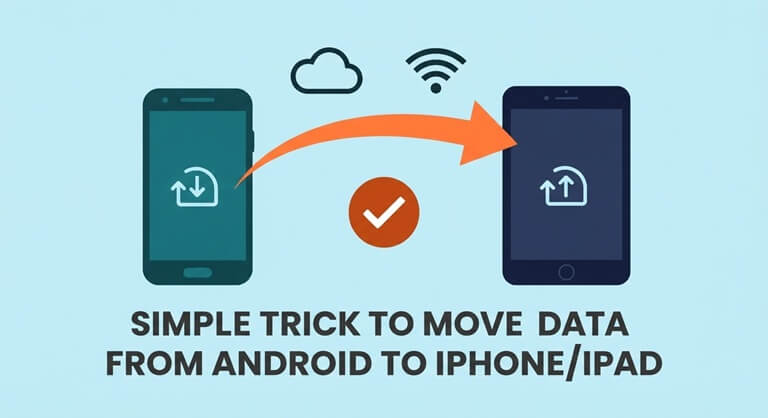
However, before you get too excited about the new iPhone, there is a significant obstacle standing in your way: data transfer. The Android and iOS systems are fundamentally different, and transferring your precious photos, music, and contacts across platforms can quickly become a hassle without the right tools. That’s where the FoneTool mobile app comes in – it can help you solve this problem.
Use FoneTool Mobile App for Cross-Platform Data Transfer
FoneTool is a specialized tool for iPhone data transfer and management. Its mobile app eliminates the complexity of cross-platform data transfer. With just a few clicks, you can wirelessly transfer important files from your Android device to your new iPhone – without the need for a computer, a data cable, or any complicated setup procedures.
Highlights of FoneTool Mobile App
- True Cross-Platform Freedom – FoneTool is perfectly compatible between Android and iOS systems, supporting multiple data types including photos, videos, music, contacts, and more. Whether you’re transferring from an older Samsung, Google Pixel, or any other Android-branded device, FoneTool can meet your needs.
- Zero Data Wireless Transfer – No more worrying about consuming your phone’s data. FoneTool supports direct file transfer between devices without a network connection. Throughout the process, your Wi-Fi or mobile data will not be affected.
- Preview and Select Files Before Sending – Not all data is worth migrating. You can preview each file before transferring and select what you need, thereby clearing out unnecessary digital information and saving time and storage space on your new device.
- Ultra-Fast Transfer Speeds – The proprietary transfer technology used in this app ensures your files transfer from Android devices to Apple devices at lightning speed. Whether you want to transfer dozens of songs or hundreds of photos, you don’t have to wait long.
- 100% Privacy Protection at the Core – Your data is always your own data. FoneTool does not collect any personal data, and the app strictly adheres to its privacy policy. You can confidently entrust your most important documents to it without any extra concerns.
How to Transfer from Android to iPhone Using FoneTool
Are you ready to give up on the Move to iOS option and choose FoneTool? The Android to iPhone transfer process can be completed in three simple steps:
Step 1. Download and install the FoneTool mobile application on both your Android phone and the new Apple phone. After installation, open the application on both devices.
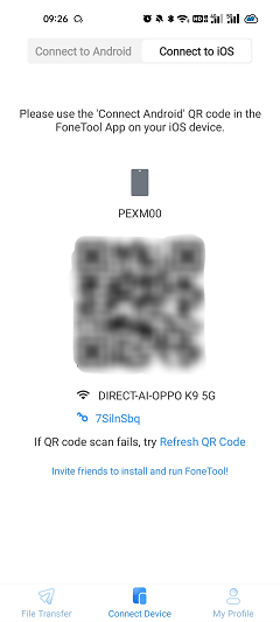
Step 2. Next, you need to establish a seamless wireless connection between the two devices. This is very simple. On your Android device, select “Connect to iOS“. The system will generate a QR code. Please use your iPhone to scan this QR code to establish a direct wireless connection.
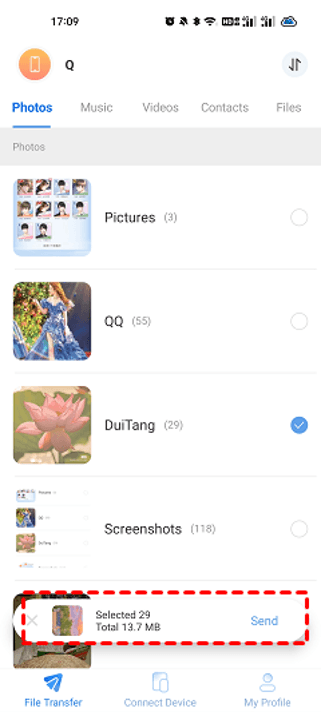
Step 3. On your Android phone, switch to the appropriate data category to select the photos, videos, music, contacts, files, or other content you want to transfer to your iPhone. Then click “Send” to start the transfer. In a short while, your data will appear on the new iPhone or iPad and be ready for use.
Final Words
Switching from Android to using an iPhone should have been an exciting milestone, not a technical challenge. With the FoneTool mobile app, you can focus on enjoying the smoothest transfer from Android to iPhone without worrying about compatibility issues. Easily receive the data you need on your new iPhone. This app is free to download and extremely easy to use, serving as a reliable bridge between these two worlds.
Additionally, you can try using FoneTool desktop software, an all-in-one iPhone manager that helps you back up data, transfer data between iPhone and PC, erase device privacy, and more.
Popular on OTW Right Now!


About The Author

Gagan Bhangu
Founder of otechworld.com and managing editor. He is a tech geek, web-developer, and blogger. He holds a master's degree in computer applications and making money online since 2015.