
How to Register a Messaging Account and Secure New Device Access
Messaging account registration may take only a few minutes, but the choices made during setup determine how easily the account can be protected or recovered later. Phone-number formatting, verification-code handling, recovery information, and device access all matter beyond the first successful login.
The Registration screen is just the first screen. Additional password protection, privacy, and contact information should be checked if available, and each connected device should be verified as coming from a trusted source. These measures protect against code theft, phishing, unlogged-on desktops, and unauthorized QR logins.
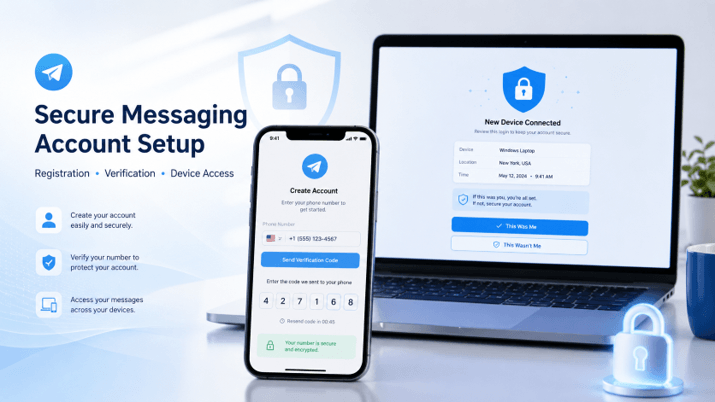
This guide includes a full security workflow when registering new devices, as well as useful information on Hong Kong and Taiwan number syntax, multilingual interfaces, and cross-device access.
Prepare the Phone Number and Trusted Device
Before beginning registration, make sure the phone number and device are ready.
The number must be online and responsive for messages or calls. If asked to enter, enter in international format. This generally involves choosing the correct country code and then typing in the local phone number, without adding extra spaces, symbols, or double prefix numbers.
For example, do not include the country code twice. If an application is already displaying the selected country code, then perhaps only the rest of the number needs to be displayed.
The device should also have:
- A stable internet connection
- Correct date and time settings
- Enough storage for the application
- A current operating-system version
- Access to SMS or phone calls
- A functioning SIM card or mobile service
- A trusted installation source
Sometimes incorrect system time can cause secure connections to fail or verification to fail. Generally, the easiest way to set the date and time is to choose automatic.
The messaging application should be from a credible app store, verified publisher, or downloaded from a known origin. Trust cannot be built on a copy of the familiar interface or logo. There should be an application that should be checked before entering a phone number or verification code.
Understand Messaging Account Registration
Most messaging-account registrations follow a similar sequence.
First, the user inputs the country and a phone number. The service then tries to verify that it has control of that number by sending a verification code. Once accepted, the user is prompted to set a display name, select a profile image, and may be prompted for initial permissions.
Common setup choices include:
- Contact synchronization
- Notification permission
- Access to photos and files
- Microphone permission
- Camera permission
- Background activity
- Location access
- Automatic media downloads
The permissions listed above should be considered on a case-by-case basis. For certain features,s a messaging app might require access to contacts, media, or microphone, but you don’t have to grant access to every message request right away.
Contact synchronization is a special case. If it is enabled, it will be easier to locate users of the service. Still, it will also require handing over address-book data to the application, as per its privacy policies. The option should not be selected automatically, but rather by the user’s choice.
Once registered, check the account information on the website and proceed to add other devices or start conversations only when you are certain all details shown are accurate.
Avoid Phone Number and Registration Mistakes
Many registration problems result from small errors rather than a service failure.
Users following a Telegram 注册 resource should confirm the country code, phone-number format, active device sessions, and the actual source of the verification message.
Common mistakes include:
- Selecting the wrong country
- Entering the country code twice
- Using an inactive number
- Requesting several codes too quickly
- Entering an expired code
- Checking only SMS when the code arrived on another device
- Sharing the code with someone claiming to provide support
- Registering through an unverified application
- Ignoring an unexpected login alert
One-time codes are generally time-limited and might be invalidated as soon as a new code is requested. Users should enter only the latest code, and NOT repeatedly request codes in a short span of time.
The other error is that all messages with a verification code are considered to be genuine. The code needs to match the one that the user tried to register or log in with. If an unexpected code is received, it means that someone else is logging in.
Understand Verification Code Delivery and Timing
Verification codes may arrive through different channels depending on the platform, account state, and available devices.
Possible delivery methods include:
- SMS
- An in-app message on an already logged-in device
- An automated phone call
- A confirmation prompt
- A QR-based authorization flow
The user needs to confirm if they have any mobile or desktop session before assuming that the SMS has failed. Certain services are delivered via an authenticated device so that that channel could be more secure than standard texting.
Repeated code requests can cause temporary limits. If so, the longer the delay, the more codes will be requested. The best bet is to double-check the phone number, verify the network, wait the specified amount of time, and then try again later.
Never pass on verification codes to other people. Any person claiming to be a support person or entity should never request a user logon code, second password, or recovery code over chat.
A code will be used for the login channel. Once anyone acquires it, they can authorize another device.
Set Up Two-Step Verification and Recovery
Phone-number verification alone may not provide enough protection.
Two-step verification is an additional password that is necessary if a new device tries to log in to the account. Even with the one-time code, if someone obtains it, they may not be able to log in without the password.
A strong secondary password should be:
- Unique to the messaging account
- Long enough to resist guessing
- Different from email and device passwords
- Stored securely
- Not shared through messages
- Not based on public personal information
If there is a recovery email option, use a secure, but monitored address. The recovery email should also have a strong password and multi-factor authentication, as it can be a part of the account-recovery process.
Users should also be aware that they risk losing the secondary password. Some platforms might require email access, a waiting period, or another verification process for recovery.
A password manager will enable you to keep credentials secure and eliminate the opportunity to use a familiar password.
Review Privacy, Contacts, and Profile Visibility
Registration often enables default privacy settings that may not match users’ needs.
Review who can see:
- The phone number
- Profile photos
- Online last-seen status
- Forwarded-message attribution
- Calls
- Group and channel invitations
- Public usernames or profile details
Users should also review who can find the account using the phone number. For people using a messaging service for work, community management, or public communication, a public username may be useful. Others may prefer to limit discoverability.
Group Invitations are also an important setting. When it comes to the groups that can include the account, it may result in spam, unwanted promotions, or suspicious communities. Limiting who can be invited or approved could help minimize the risk.
Contact synchronization is typically reviewable or can be disabled afterward. The users should be aware that if they have previously uploaded contacts in the service, they can also be removed from the service.
Privacy settings are not definitive. They should be reviewed again if the purpose of the account changes.
Secure New Mobile and Desktop Device Access
When connecting a desktop computer, tablet, replacement phone, or web session, it is considered a security event.
A complete Telegram account setup guide should include reviewing the new device name, login time, location information, recovery settings, and active sessions after registration.
When a new login is completed, check whether the service displays:
- Device type
- Operating system
- Application version
- Approximate location
- IP address
- Login date
- Recent activity
Location data may not be as accurate as it could be, since it is typically provided by the internet connection and not the device’s exact positioning. Nevertheless, an entirely new country name, operating system, or device name should be researched.
After connecting a new device:
- Confirm that the device appears in the active-session list.
- Remove old devices that are no longer used.
- Review any login notification.
- Confirm that two-step verification is active.
- Check recovery information.
- Log out of shared or temporary computers.
- Protect the device with a screen lock.
Users will not allow messaging accounts to be accessed on public computer systems, borrowed devices, hotel systems, or machines they don’t control.
Recognize Verification Code and QR Login Scams
Account-registration scams often imitate support, security alerts, or verification processes.
Common examples include:
- Fake support accounts requesting a login code
- Websites offering paid verification codes
- QR codes that authorize an attacker’s device
- Messages asking the user to share the screen
- Phishing emails pretending to be recovery notices
- Requests to approve an unfamiliar device
- Messages claiming the account will be deleted immediately
- Fake competitions requiring account confirmation
One of the most effective QR code scams may allow someone to log in without having to enter a password into the scammer’s page. Users should only scan login codes if they intend to connect a trusted device through the official app.
Also, requests to screen share can be dangerous. While another person is seeing this screen, they may get presented with a verification code or QR authorization.
The basic principle of verification information is that it should not be disclosed, even to those who say they are administrators and support staff.
Troubleshoot Messaging Account Registration
A failed registration does not necessarily mean the account or phone number is blocked permanently.
Start with basic checks:
- Confirm the country code
- Re-enter the phone number carefully
- Check mobile signal and internet access
- Restart the application
- Update the client
- Confirm the device date and time
- Check existing logged-in devices
- Wait if a temporary limit is displayed
Switching among a series of unofficial clients is not a good troubleshooting tool. It raises the possibility that they will key in account details into an untrusted app.
If SMS is not received, determine if the code was sent to an existing phone. If there is a telephone option, do not keep asking for new SMS messages to arrive, but wait for it to be available.
Temporary rates should be followed. If you’re making several attempts in quick succession, this could appear as automated or abusive activity.
If the issue persists, contact the recognized support and/or help channels provided by the platform. Never buy from third parties offering immediate registration, payment codes, account bypasses, etc.
Registration Details for Hong Kong and Taiwan Users
Please note that the phone number must be entered in the international format, and once the country code is correct, please request the verification code. Generally, +852 is used for numbers in Hong Kong, +886 for numbers in Taiwan, and the leading domestic zero is usually omitted when using +886. Do use the format that appears as the verified application – check the complete number before proceeding.
It is important to make sure users know the proper terms for privacy, recovery, two-step verification, and active sessions on the English and Traditional Chinese interface. Security settings should not be taken for granted, particularly when there is an added email address to recover or an extra password as well.
Secure Messaging Account Registration Checklist
Before considering the registration complete, confirm the following:
- The application came from a trusted source.
- The correct country code and phone number were used.
- The verification message came through an expected channel.
- The code was not shared with anyone.
- Contact synchronization was chosen deliberately.
- Application permissions were reviewed.
- Two-step verification was enabled.
- A secure recovery email was added when available.
- Phone-number visibility was reviewed.
- Group invitation and call settings were configured.
- The new device appears correctly in active sessions.
- Old or unfamiliar sessions were removed.
- A screen lock protects the device.
- Common login and QR-code scams are understood.
Frequently Asked Questions
Why did my verification code arrive inside the app instead of by SMS?
Certain messaging platforms send codes to an existing device before it connects. Verify the trusted sessions before asking for repeated SMS, and never send the code to another user
Should I share a verification code with support staff?
No. There should not be a need for your one-time login code, extra password, or QR authorization to get legitimate support. Don’t bother to provide these credentials if asked for them; it is likely fake.
What should I do after adding a new desktop device?
Open the list of active sessions and make sure the device name and session duration are correct; delete old or unknown active sessions; and lock the computer screen locally if desired. Conduct a review again following use of shared or temporary device.
Conclusion
Account registration is final once login, recovery, privacy, and access to devices are all reviewed. Properly formatting phone numbers and controlling codes early on can help eliminate many issues, and two-step protection and session control can minimize long-term risk.
For people in Hong Kong, Taiwan, and other multi-language areas, the meaning of the security label in the chosen interface is as crucial as enabling it. It can be a much harder process to recover from if a few conscious efforts are not made during the registration process.
Popular on OTW Right Now!



About The Author

Gagan Bhangu
Founder of otechworld.com and managing editor. He is a tech geek, web-developer, and blogger. He holds a master's degree in computer applications and making money online since 2015.