
How to Verify a Telegram Download Website and Avoid Lookalike Pages
Telegram is used for private chats, groups, channels, file sharing, and cross-device access, which also makes its name attractive to fake download pages and misleading advertisements. A copied logo or familiar interface screenshot can make an unrelated page look credible within seconds.
The look of this website isn’t sufficient. The user should check the exact domain behind each download button, information about the platform, the publisher of the Windows program, and the actions of the program. With each check, it becomes harder for a page that mimics it to duplicate the signal consistently.
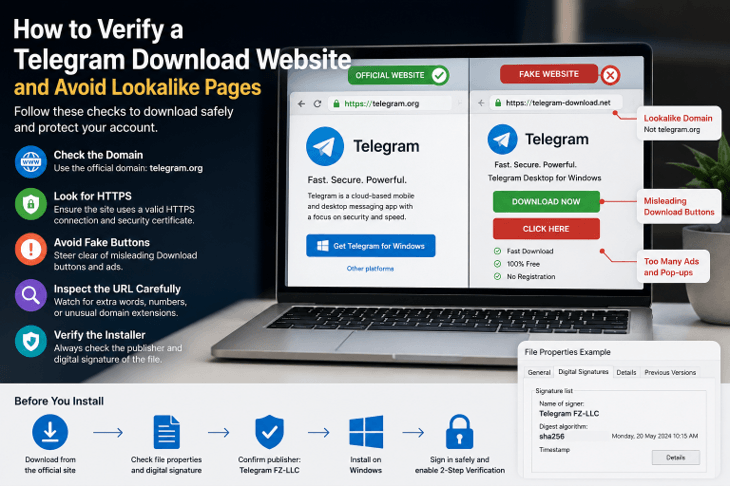
This page is a guide to checking a website before downloading software from Telegram, and also offers some tips for those in Hong Kong and Taiwan who might end up on a website that has English, Simplified Chinese, and Traditional Chinese pages on the same search path.
Why Telegram Attracts Fake Download Pages
Messaging apps like WhatsApp and others that are likely to be popular create a ton of downloads-related searches. Typically, users look for a Windows Installer, Android Package, Language Setting, Desktop Version, Web Login, or Installation Guide. With that demand, attackers and download portals can exploit it by developing pages geared toward the same keywords.
Messaging accounts are particularly valuable because they may contain:
- Private conversations
- Contact lists
- Shared documents
- Group membership
- Business discussions
- Customer information
- Login notifications
- Linked devices
If an attacker gains access to more than one application through the installer, it could be because the installer stole account info or changed the environment that the device runs in.
Installing this from a desktop also creates opportunities for deception. Mobile users may install the software from a trusted app store, while Windows users may download an .exe from a website. The user has to make a judgment call about the trustworthiness of the webpage and installer.
Another weakness is the lack of brand recognition. If a user is familiar with the Telegram logo, they might not bother with the domain, the publisher name, or the file destination. Fake pages can make use of that level of trust.
Common Telegram Lookalike Website Patterns
Lookalike domains often rely on small changes that are easy to miss.
Common patterns include:
- One letter replaced with a similar character
- An extra word before or after the product name
- Multiple hyphens
- Unusual abbreviations
- A country or language term added to the domain
- An unfamiliar domain extension
- A subdomain designed to resemble the main domain
- A domain name containing “official,” “secure,” or “download”
The page itself may reinforce the deception with urgent language such as:
- Download now
- Your version is outdated
- Update required
- Official desktop installer
- Secure download
- Limited-time download
- Start installation immediately
Be careful of countdown timers and automatic downloads! A valid software page usually lets the user view the platform and version before downloading. The ability to start a file transfer without intentional action is another important verification step that is skipped.
It is also important for the user to be careful if there are multiple similar download buttons on a single page. One button can open the desired file, another button might open an add-on, a system cleaner, or a download manager.
Check the Telegram Domain Before Downloading
The domain is one of the strongest clues about a website’s identity.
Users searching for a telegram 官网 resource should verify the exact domain independently instead of assuming that the first advertisement or software directory is operated by Telegram.
Read the entire talk from left to right. There’s no need to look for the name in the URL. It’s the domain name that is registered, not a deceptive word in a folder or subdomain.
A URL can contain the word “telegram” in the page path, and the domain name can be unrelated to the download service. Users are advised to recognize the primary domain before trusting the page.
A useful domain review includes:
- Checking the exact spelling
- Looking for additional words or characters
- Reviewing the domain extension
- Confirming that the page uses HTTPS
- Checking whether the navigation remains on the same domain
- Reviewing the site’s contact and policy pages
- Looking for inconsistent branding or company names
HTTPS ensures the security of the connection, but does not guarantee that the sender owns the website. The fake site can also be secure, such as HTTPS. It should not be viewed as a security mark of authenticity, but rather one security signal.
Do Not Trust Telegram Branding Alone
It’s easy to reproduce logos, screenshots, and color schemes. A webpage can be almost the same as a valid software page, yet spread a different file.
Visual elements should therefore be supported by other evidence.
Check whether the website includes:
- Clear product information
- Consistent platform pages
- A normal navigation structure
- Privacy and terms pages
- Contact information
- Version or update details
- A clear explanation of who operates the site
- Download links that match the product description
Just because it looks professional does not mean it’s a third-party information site. That does not necessarily mean it’s a problem when the relationship is explicitly defined. The issue is when the page knows that it is an official publisher and will make it look as though it is, but will conceal the identity of the operator.
The age of the site is also important to take into account, as is its consistency. A page that has been copied with the same name, but lacks navigation and policies, and has recently been created requires a higher degree of caution than a well-established resource with clear ownership.
Inspect Every Telegram Download Button
Inspect download buttons before you click them.
Hover over the button and see where it takes you in the browser. The URL should be appropriate to the page and software that are being reviewed.
Warning signs include:
- An unrelated advertising domain
- A shortened link
- Several redirect services
- An unfamiliar file-hosting website
- A browser-extension store
- A download-manager application
- A compressed archive with no explanation
- A file whose name does not match Telegram
Some sites have advertisement buttons above or below the actual download button. Some sites label their offers “Start Download”, “Play Now”, “Begin Trial,” etc.
Users should also verify whether the page clearly differentiates direct download links from app-store download links, access via the web, or installation instructions. The Windows installer shouldn’t suddenly switch to an Android package or an all-purpose software downloader.
Write down the name of the file that you would expect the download to be (and the platform and file type). This will help to identify the unexpected outcome.
Confirm the Correct Telegram Platform
Telegram can be accessed through several types of clients and platforms. A download page should clearly distinguish among them.
Common options include:
- Windows desktop application
- macOS application
- Linux desktop package
- Android application
- iPhone or iPad application
- Web-based access
- Portable Windows version
- Microsoft Store version
If you want to share a Windows installer for your application, you should not provide an Android .apk file, a browser extension, or an unexplainable archive.
The page should also specify if an installer is available for the 32-bit or 64-bit version of Windows, if applicable. Most modern Windows systems are 64-bit, but be sure to verify your system information before installing software.
Portable versions should be given particular focus as they might not be installed via a regular installer. This is valid, but the page must clearly explain the difference.
Store-based versions should be linked to the recognized store listing, not a page that mimics a store interface.
Verify the Telegram Installer Publisher
The installer should be verified separately from the website.
A responsible Telegram website verification guide should teach users how to inspect the installer publisher, digital signature, file properties, and application identity after installation.
Once downloaded, check it in the Windows Downloads folder—Right-click on the installer and press Properties.
Review information such as:
- Filename
- File type
- File size
- Product description
- Company name
- Product version
- Copyright information
- Digital signature
If the Digital Signatures tab is present, check the Signer and Signature Status. A valid signature indicates that the file has not been altered since it was signed.
If a User Account Control prompt appears on the Windows screen, verify the publisher’s name before clicking the Yes button. However, an unknown publisher doesn’t necessarily mean that a file is malicious; it should mean that it needs to be verified.
The installer name should also match the product. A random filename, unrelated company, or generic “setup” file with no product information is a reason to stop.
Warning Signs After Telegram Installation
Some problems only become visible after the installer runs.
Warning signs may include:
- The browser homepage changes unexpectedly
- A new search engine becomes the default
- Unknown browser extensions appear
- Advertising pop-ups begin appearing
- Additional programs are installed
- The computer starts more slowly
- A background process uses unusual resources
- Security software displays alerts
- The messaging account reports an unfamiliar login
- The installed application name or icon does not match the expected product
It’s also recommended that the user review the Windows start menu and list of installed applications. Multiple unrelated tools may have been installed if they were shown during the installation.
Open the application carefully and check that the interface, account logon, and version information match. Never type in information that a familiar program wouldn’t ask for or information that appears to belong to an unfamiliar program.
What to Do After a Suspicious Telegram Download
If your file has not been opened, the best thing to do is to refrain from running it.
Remove the installer, empty the Recycle Bin, and use Windows Security or a reliable security program to scan the Downloads folder.
If the installer has already been opened, take additional steps:
- Disconnect from sensitive accounts if unusual behavior appears.
- Run a full security scan.
- Review recently installed applications.
- Remove unknown browser extensions.
- Restore browser settings when necessary.
- Check startup applications and background processes.
- Change important passwords from a trusted device.
- Review Telegram active sessions.
- Remove any unfamiliar device.
- Enable additional account protection when available.
Users must never give a Telegram login code, recovery password, or QR authorization to anyone who says they are helping with the installation.
When a suspicious installer asks for administrative privileges, usernames and passwords, or security exceptions, take it seriously, even if there may be no apparent problem.
Telegram Download Verification in Hong Kong and Taiwan
Ownership is not determined by language. Traditional Chinese may be used in a page that is an independent guide, and an authentic global page may default to English. Users should be able to tell the difference between a message indicating what the app is localizing and the publisher of the app used to download it, and ensure that the downloaded file contains the expected publisher name.
The search results in Hong Kong and Taiwan may contain regional guides, app directories, ads, and mirrors. Verify each character of the address; do not press any “update now” prompts, and don’t be taken aback by any pages asking you to install a browser extension, configuration profile, or unrelated utility before you can be given the desktop client.
Telegram Website and Download Verification Checklist
Before downloading Telegram-related software, confirm the following:
- The full domain has been checked carefully.
- The page does not rely only on copied branding.
- The site clearly explains its role and ownership.
- The correct platform has been selected.
- The download button destination has been inspected.
- The expected filename and file type are known.
- The installer publisher has been reviewed.
- The digital signature has been checked when available.
- The file has been scanned with Windows Security.
- No unrelated software or browser extension is required.
- The installed application identity has been confirmed.
- Active account sessions have been reviewed after login.
Frequently Asked Questions
Can a fake Telegram page use HTTPS and the real logo?
Yes. It only secures the connection, and logos can be copied. Check the domain, download location, installer publisher, digital signature (if available), and the account session created upon logging in.
What should I do if a download button redirects to another domain?
Stop and check the place. It is acceptable for legitimate downloads using an authorized distribution domain. Still, it is a red flag when there is an unknown advertising network, file-sharing host, short link, or repeated redirects.
How can I check the application after installation?
Open it from the Windows Start menu, check the app identity and the version, explore what is starting up, see installed programs and active Telegram sessions after login. Get rid of any strange items promptly.
Conclusion
Pages that look alike work when users have faith in one cue – like a logo, the search location, or a big download button. Safer verification includes the domain, the destination URL, platform information, the publisher’s identity, file properties, and post-installation behavior.
This multi-layered approach works both with the result sets returned for global and local search. It lets users in Hong Kong, Taiwan, and beyond distinguish informative pages from the page that provides the software.
Popular on OTW Right Now!


About The Author

Gagan Bhangu
Founder of otechworld.com and managing editor. He is a tech geek, web-developer, and blogger. He holds a master's degree in computer applications and making money online since 2015.