
How 2extract MCP Helps AI Agents Manage Web Scraping
The first version of the scraper failed at 09.12.
Not loudly.
No server fire. No angry team chat. No investor coming to us and asking, ‘does the demo still work’?
Just a tiny AI pipeline that was meant to pull the public product pages, compare prices across the various countries, and then produce a report.
It made 317 requests.
Then the target site asked it to prove it was human.
The agent tried everything it had at that point: reload the page, start a fresh session, change IP, change browser settings, and try again. Nothing worked. It had just spent more money, brought in more traffic, and given the site owner yet another reason to hate AI scraping companies.
The LLM wasn’t the problem.
The prompt wasn’t the issue.
The issue was that we gave the agent a goal, a browser, and some proxy credentials, but we didn’t give it a way to actually control how it accessed the public web.
Here comes MCP into play
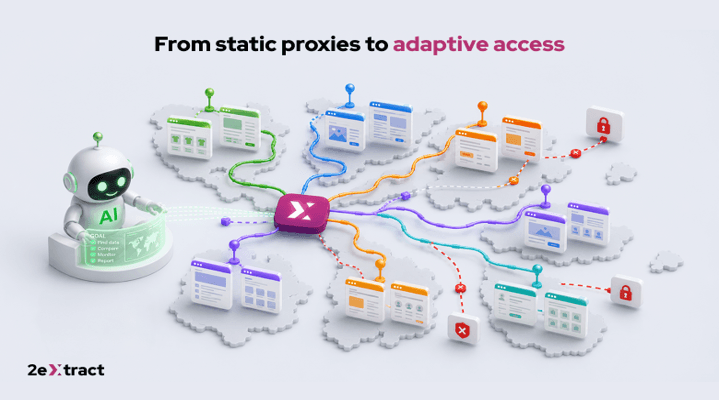
The Model Context Protocol (MCP) acts like a universal key that lets AI agents interact with external systems in a structured way. The MCP server provides clear tools, parameters, and errors for the agent to use and understand. This approach is easier and more effective than putting proxy logic inside scripts and hoping the model will figure it out.
The new 2extract MCP connects agents to ethically sourced residential proxy infrastructure with geo-targeting, session controls, usage limits, and other operational guardrails.
It’s still not a silver bullet for getting around CAPTCHA, but it is a massive step in that direction.
The Missing Piece
The agents can use browsers, call tools, search files, open spreadsheets, write code, test interfaces and so on.
That part is real.
But every useful data collection agent eventually comes up against the same question: where do we collect the data?
If it’s our database, then life is quiet.
If it’s some clean API with full specs, limits etc then it’s fine.
But if it is “public pages across multiple countries, layouts, sessions, and anti-bot systems,” then it is where the 2extract service comes in handy.
If we were to draw an agent architecture diagram, it would have a box for the model, a box for memory, a couple of tools, and an arrow pointing towards the web.
That final arrow has a major infrastructure issue.
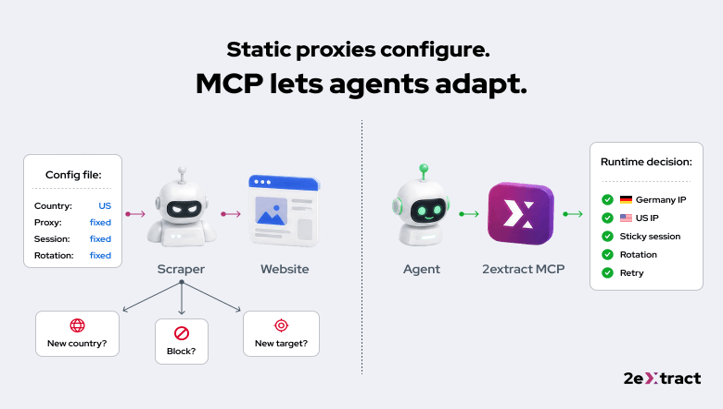
It’s still very difficult for an agent to work out a reliable access policy from a raw proxy string.
It does not automatically understand:
- Which country the request should originate from.
- Whether the workflow requires a stable or a rotating session.
- Which targets it is permitted to access.
- Whether a failed request should be retried.
- How much traffic the job will consume.
- When it should stop.
No clear set of tools or rules; the agent just makes up its own mind, and that’s often not what you want in a production environment.
How MCP helps
An MCP server facilitates the communication between the agent and the proxy.
A proxy URL is simply a URL with credentials. MCP enables agents to talk directly and reliably to the proxy service. They can set up access, manage sessions, switch when required, monitor usage, and explain failures.
This is crucial as agents need to understand how the available tools work and how to adjust their settings.
Instead, it can provide useful operations. It can configure access for a market, keep a session alive, rotate when required, check usage and report why a request can’t go any further.
That distinction is important because an agent doesn’t just consume an API response. It also consumes the tool description, the parameters, the constraints and the errors.
Consider two messages:
407 Proxy Authentication Required
And:
This proxy is suspended as it has hit its spending limit. Either stop the job or request a higher limit.
A dev can look at the first message.
An agent can act on the second one.
This is why a good MCP server is far more than just an API with all the fashionable jargon. It’s a contract between the model and the external system, written in the language of how agents actually make decisions.
Why Agents Make the Problem Harder
Traditional scrapers were a pain, but at least you could usually predict what they’d do.
A script had a loop.
A queue had workers.
A crawler had a schedule.
You could look at the code and get a pretty good idea of how much traffic it would generate.
Agents are different.
An agent may retry as it thinks the page is ‘almost there’.
It might have opened a browser as an API response appeared to be incomplete.
It might run the same search again as the user has rephrased the question.
It may switch tasks whilst still using the same credentials and budget underneath.
This is how a benign prototype becomes a noise machine.
Not in any intention of abusing anyone’s site.
Because no one ever told the agent when to stop trying and when it was no longer of any use.
MCP doesn’t take away autonomy. It gives autonomy within a clear contract.
The MCP server tells the agent what it can do. The surrounding workflow still tells it when to do it, in what order and what should happen if something fails.
Both parts matter.
A tool without a workflow is just another way of making requests go faster.
More Rotation Is Not the Fix
When a collection pipeline starts failing, the instinctive response is often:
More proxies.
More regions.
More rotation.
More retries.
More threads.
This is like buying more umbrellas when the roof is leaking. It may seem like a sensible thing to do at first, but the floor’s still going to be wet.
If the system can’t deal with sessions, targeting, caching, retries, and limits, then a bigger proxy pool just results in a bigger unmanaged system.
The agent should start with the cheapest and least intrusive source.
If the target has an official API or feed that gives you the right data, use that.
If the cached data is still valid, then just use it.
If a public page is required, as the result varies by country, by session, or by user view, then use controlled residential access.
MCP offers that as a very clear tool, but it shouldn’t be the default answer to every problem.
What an Agent Should Be Able to Do
Imagine a retailer wanting to compare public prices in France, Germany and Japan.
The bad instruction is short:
Scrape every product page every hour. Rotate IPs. Retry any failures.
It works perfectly right up until it doesn’t.
Then no one has any idea whether it’s the scraper, the proxy, the target site, the model, the product feed, or the CSS selector that someone changed last Friday.
A better workflow looks like this:
Use the official feeds where they have the required data.
Request live pages only when the localized user view is in fact important.
Use the 2extract MCP to select access for the required country.
Keep the sessions stable for pagination and multi-step checks.
Rotate only when the task in fact requires a new public perspective.
Cache pages that haven’t changed.
Cap retries and stop if the target is clearly refusing access.
Restrict credentials to approved systems and approved domains.
Give each job/customer a clear spending limit.
Record enough information to be able to explain every failure afterward.
None of this looks like magic.
It’s more like plumbing.
That’s why it works.
Where 2extract Fits
2extract is built around a few straightforward ideas:
- Ethically sourced residential desktop IPs.
- Precise geo-targeting.
- Sticky and rotating sessions.
- Whitelists.
- Spending limits.
- Transparent Pay-As-You-Go pricing.
- Direct access to technical support.
The MCP brings these capabilities into the environment where the agents are already operating.
Instead of a developer writing separate integration code for every agent, the agent receives a common, structured interface to 2extract. It can understand the available controls, supply valid parameters, and respond to useful errors.
This in no way makes every scraping workflow ethical.
It does make the workflow much easier to constrain, inspect and improve.
That’s a far more useful promise.
Popular on OTW Right Now!



About The Author

Gagan Bhangu
Founder of otechworld.com and managing editor. He is a tech geek, web-developer, and blogger. He holds a master's degree in computer applications and making money online since 2015.