
Why Your Smartwatch Stopped Charging: Guide to Pogo Pins
You put the watch on the charger before bed. In the morning, it’s sitting at 11%, the puck is slightly warm, and nothing in the settings menu explains what went wrong. Before you start pricing up a replacement, it’s worth understanding the component that almost certainly failed. It’s smaller than a grain of rice.
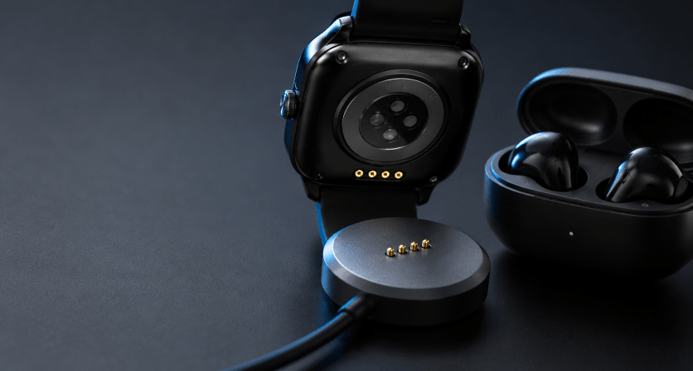
Turn your smartwatch over. If it’s not wireless, it will have two or four small metal dots in the back of the case. Those are pogo pin contacts, and they conduct all of the mA that hit your battery. Those dots are in your earbud case, your electric shaver base, on the docking edge of a rugged tablet, and on the cordless vacuum pack. After you know how they look, you will see them all over.
What a pogo pin actually is
A pogo pin, or spring-loaded connector as engineers call it, is a miniature piston with three parts. There’s an outer barrel, a plunger that slides in and out of it, and a tiny coiled spring inside pushing that plunger outward. When two devices are pressed together, they retract just a few millimeters, and the spring expands back, creating constant pressure between the two contact surfaces without needing to adjust anything.
It is all about that self-adjusting bit! Two flat metal surfaces that are touching each other make a poor connection. Dust, flex of the plastic housing, any tolerance stack-up at the factory, and the circuit is open. It is absorbed by a sprung pin. It keeps pushing and pushing.
Why manufacturers use them instead of a port
A charging port is an opening on your device, and holes don’t work for water-resistant devices. All USB-C ports must have a gasket, a drainage feature, and a robust mechanical design to withstand being pushed into at an angle. Pogo pins don’t need that! The contacts are flush with the case and are sealed below, allowing a watch to be IP68 rated without a rubber flap.
They also allow blind mating. Closed correctly without needing to open the earbud case and look at the pins. The lid drops closed and the pins land; charging begins. A couple of magnets and it’s an automatic alignment, which is why magnetic charging cables are so satisfying. Furthermore, the pin also absorbs tolerance in the Z axis, which allows designers to create devices that are thin enough that a USB-C receptacle wouldn’t physically fit in the case.
Five reasons yours stopped working
- Grime. This is the all-time most popular. A layer of skin oil, sunscreen moisturizere, moisturizer, and pocket lint coats the contact pads. Often it is not visible to the naked eye.
- Corrosion. Sweat is salty, and salt plus a small DC voltage is a recipe for electrochemical corrosion. If you see green or white powder around the pins, that’s what happened.
- A tired spring. Each pogo pin has a cycle life rating: the number of compressions it will withstand before it becomes loose. Budget pins can last for 10,000 cycles, while high-quality pins can endure for 100,000 cycles or more. A low-cost pin can actually become worn within its warranty with two charges per day.
- Worn plating. The thickness of gold on the tip is expressed in microinches. Upon contact with the underlying nickel, contact resistance rises and charging becomes sporadic, and eventually ceases altogether.
- Misalignment. Often the window of a few hundredths of a millimeter is too narrow to allow the pin to go back into its working stroke, as it can be pulled out by using a weakened magnet, warping the charging dock, or a slightly swollen battery lifting the case back.
How to clean them without causing damage
Turn off all power sources first. Use 99% isopropyl alcohol, NOT water and NOT household cleaner to dampen the cotton bud, then wipe both the pins and the flat pads they connect with before allowing everything to dry thoroughly before reconnecting.
A wooden toothpick or plastic spudger will help pick up stubborn dirt. Avoid using a metal pin, a needle, or a knife blade: you will end up scraping through the gold plating and create a permanent fault in your appliance. It’s best not to press the plunger too far either. It is meant to move less than a millimeter, and pushing it flat against the barrel can destroy the spring.
This is where cleaning can come in and resolve the issue much more frequently than expected. It will take 10 minutes before you spend any money.
What separates a good pin from a cheap one
If you ever spec hardware, buy replacement docks, or want to know why one charger lasts three years and another dies in six months, four numbers matter: contact resistance (good pins sit comfortably under 50 milliohms, precision test-grade parts under 10), cycle life, current rating, and spring force consistency across the production run.
Serious manufacturers publish all of it. Promax Pogo Pin will offer plating options like gold, palladium, and nickel, and will maintain low tolerances for aerospace, automotive, and medical applications, as well as power applications, ranging from a few amps to 40A. The stats are typically absent from marketplace pins that are not branded, which is often the reason for a pin’s downfall.
Where else they turn up
After proving its worth in consumer products, the form factor proliferated. Today, pogo pins are used for docking contacts on warehouse robots and drones, charging connections in EV infrastructure, monitoring taps testing circuit boards before they’re mated into a product in the manufacturing line, and much more—same piston, scaled up or down as desired, barrel and plunger and spring.
The practical takeaway
If a device that charges via a cable or dock is acting suspiciously, follow this troubleshooting sequence: clean the two sets of contacts with isopropyl alcohol, press gently and observe if the pins still snap back, then test with another cable or dock, and finally, don’t blame the device. But nine times out of 10, it’s not the product you are about to replace; try a film of grime or a worn-out charger instead.
Popular on OTW Right Now!



About The Author

Gagan Bhangu
Founder of otechworld.com and managing editor. He is a tech geek, web-developer, and blogger. He holds a master's degree in computer applications and making money online since 2015.