
Why AI Product Mockups Fail Brand Review (and How to Fix Them)
An AI product mockup can look polished at first glance and still be unusable. The bottle is a little taller than the real one. The logo has shifted. A legal line has become decorative nonsense. Even the shadow may suggest a package shape that does not exist.
These failures are easy to miss when a team judges the image only by mood. A useful mockup has two jobs: it must attract attention and represent the product accurately enough for its intended channel. The way to get there is not one enormous prompt. It is a controlled process that separates fixed brand details from creative choices, changes one variable at a time, and gives a human reviewer clear reasons to approve or reject the result.
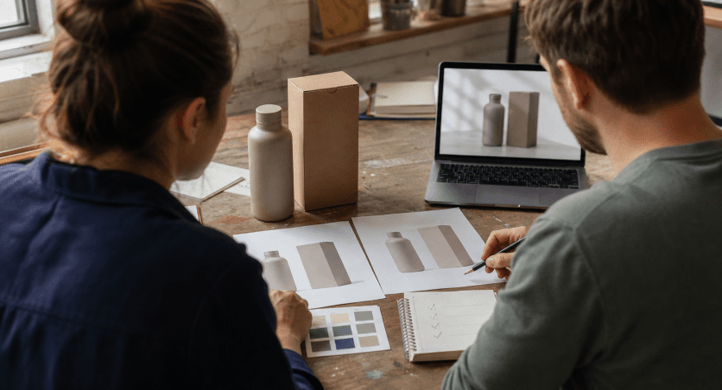
Start With a Fixed-Versus-Flexible Brief
Before opening an image tool, divide the brief into two lists. The first contains facts the model must not reinterpret. The second contains choices that can change during exploration.
| Keep fixed | Allow to vary |
| Product shape and proportions | Camera angle and crop |
| Cap, handle, seal, or closure | Background surface |
| Approved brand colors | Lighting direction |
| Number of products in the scene | Supporting props |
| Logo position and clear space | Depth of field |
| Required pack size and variant | Amount of negative space |
This separation is with purpose and will enable feedback to be useful. “It does not feel right” provides no guidance to the following edit. A test is defined as “Keep the bottle, label area, and cap the same; replace only the marble surface with pale wood”.
Utilize files that belong to you or that you have the rights to. Take a front view, a side view, and a photo of the closure or material for a physical product. Put approved packaging artwork as an additional reference, but don’t rely on your generator to make a perfect copy of dense artwork. Normal typography can be added at a later stage in a normal design tool.
Build the First Prompt in Layers
A strong product prompt is closer to a production note than a string of style keywords. Give each part one job:
Task: Create a 4:5 product-page mockup using the attached bottle and box references.
Keep unchanged: bottle proportions, cap shape, box dimensions, label area, and the number of products.
Change: place both items on a light oak surface with soft window light from the left.
Composition: bottle in front, box slightly behind, enough empty space above for page copy.
Do not add: extra packaging, logos, certification marks, ingredients, water droplets, or text.
Output: realistic materials, neutral color balance, clean product edges, and a natural contact shadow.
References are attached that establish identity. This is a description of the shot given by the prompt. The exclusion line helps avoid the creation of a “bikini” by making sure that the model doesn’t end up with a bunch of features that happen to look plausibly real but aren’t approved.
A browser workspace such as Nano Banana AI can be useful at this stage because its current interface brings reference-image upload, model choice, aspect ratio, resolution, and prompt-based editing into one place. Don’t use those controls as an approval system. An error can be sharper when presented at a higher resolution, but it can’t make the package more accurate.
Change One Variable Per Revision
If the prompt is close, do not rush to come up with a new prompt. Keep the highest-quality copy as the master copy, and ask for one change at a time. The changes to be made in a revision may be: “Product, crop angle, camera angle, and shadows remain the same; background changed from light wood to warm paper.”
If so, branch off of the new version. In the event that it is not able to repair a repair, go back to the parent rather than attempt to repair a repair. The decision trail is maintained better with simple names like mockup-a, mockup-a-light, mockup-a-light-crop than if all the files were in a folder named final-7.
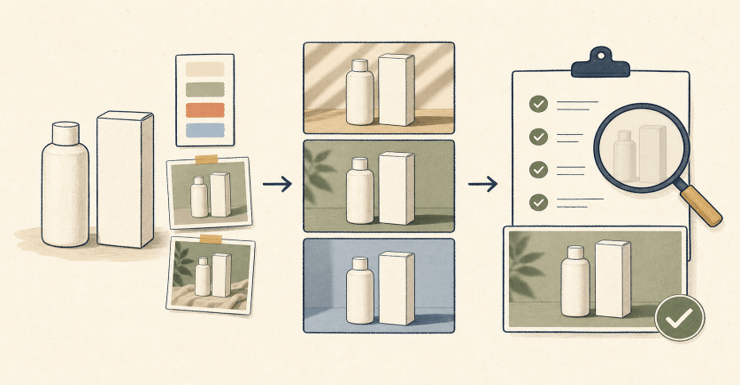
The table below turns common defects into a next action.
| What went wrong | Likely cause | Next edit |
| Bottle or box shape drifted | Identity was described, not locked to a clear reference | Reattach the clean reference and repeat the fixed geometry |
| Brand color looks different | Lighting and surface color contaminated the appearance | Neutralize the light first; correct exact color later with deterministic controls |
| Label contains broken words | The prompt asked the model to typeset production copy | Generate a clean label area, then add approved text in a design tool |
| Extra props appeared | The scene was open-ended | List the only permitted objects and state “no additional items” |
| The revision fixed one issue but created three more | Too many variables changed together | Roll back and request one change from the last accepted parent |
Borrow Prompt Structure, Not Finished Prompts
Prompt galleries are most useful when they reveal a pattern you can adapt. The current Nano Banana prompts gallery groups examples under areas such as e-commerce, photo editing, logos, and creative work. Use those examples to notice how a prompt handles subject, setting, light, framing, and exclusions. Do not assume that copying a finished prompt will preserve your product.
For instance, “make a premium skincare ad” leaves almost all choices up to you. A better version would be:
Only use the provided unbranded pump bottle for use. Maintain its proportions, pump shape, shoulder curve, and material. Set it on a warm gray paper sweep, snap a photo at eye level, and catch a soft shadow on the right side. Do not use flowers, water, fruit, additional containers, logos, or text. Make space on the left for layout work. Create one 4:5 image.
The second prompt is not more useful, as it’s longer. It is helpful because the reviewer will be able to look at each instruction and determine if the output follows that instruction.
Review at Three Viewing Sizes
The same mockup can pass at one size and fail at another. Review it in this order:
- At 100 percent: inspect edges, closures, reflections, label boundaries, shadows, repeated objects, hands, and fine material details.
- At its intended placement size: check whether the product remains recognizable and whether any temporary text is actually legible.
- As a thumbnail: confirm that the silhouette, contrast, and focal point survive on a crowded store page or social feed.
Do not rely on one review to cover all approvals. A brand owner can verify identity and color. Crop, hierarchy, and export quality can be assessed by the designer. Compliance should be verified by someone responsible for compliance: claims, required marks, price copy, and disclosure. A quick acceptance checklist for high-volume work to avoid changing standards between assets:
- The product geometry matches the approved reference.
- The scene contains only permitted objects.
- Final logos and copy come from approved source files.
- Claims, prices, ingredients, and certification marks were checked by a person.
- Reflections, shadows, anatomy, and perspective are physically plausible.
- The crop works at the channel’s real dimensions.
- Reference rights, prompt history, and the approved version are recorded.
Know When to Stop Generating
AI is ideal for early concepts, background research, crop variations, and low-risk scenario shifts. It’s not a reliable final authority for packaging copy, regulated claims, trademark information, or product features the customer will rely on. If the shape is crucial, start with real photos or a verified 3D model and generate around it.
The final test is easy: can the team state what changed, what remained constant, and who verified it? Even if the image looks complete, if those answers are not there, it’s still a draft.
Popular on OTW Right Now!


About The Author

Gagan Bhangu
Founder of otechworld.com and managing editor. He is a tech geek, web-developer, and blogger. He holds a master's degree in computer applications and making money online since 2015.