
What Is Mobile Device Management? A Practical Guide for Android and Windows Devices
Businesses today use far more endpoints than traditional desktop computers.
Employees may work with Android phones, tablets, rugged handheld devices, Windows laptops, point-of-sale terminals, shared devices, and dedicated kiosks. Many of these endpoints access company applications and data from locations outside the traditional office network.
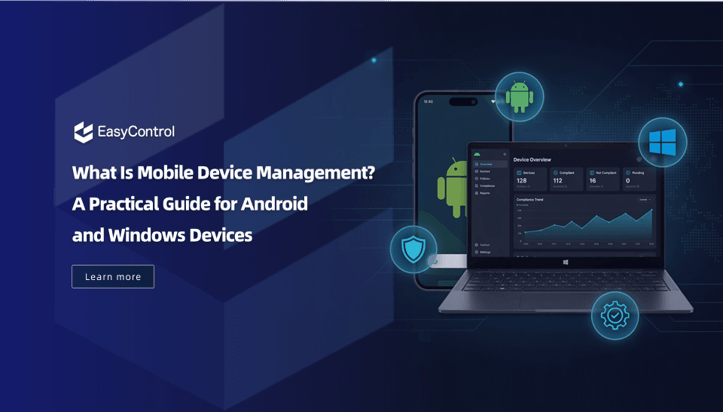
Managing these devices individually becomes increasingly difficult as an organization grows.
This is where mobile device management, commonly known as MDM, becomes useful.
Mobile device management gives IT administrators a centralized way to enroll, configure, monitor, secure, and maintain business devices throughout their lifecycle.
But what exactly does an MDM solution do, and why are businesses using it for Android and Windows devices?
What Is Mobile Device Management?
Mobile device management is a technology used by organizations to centrally manage smartphones, tablets, computers, and other business endpoints.
An MDM platform typically consists of two main components:
- A centralized management console used by IT administrators.
- Device-side management capabilities that receive and enforce configurations.
The exact technical implementation differs between operating systems and device-management models.
However, the basic workflow is similar:
Enroll the device → Apply configurations → Install applications → Monitor device status → Perform ongoing management
Instead of configuring each device manually, IT teams can create policies and apply them to many devices from one management system.
This becomes especially valuable when an organization manages hundreds or thousands of endpoints.
How Does MDM Work?
An MDM deployment generally begins with device enrollment.
During enrollment, a device establishes a management relationship with the organization’s MDM environment.
Once enrolled, the administrator may be able to configure settings such as:
- Wi-Fi
- Security policies
- Password requirements
- Applications
- Device restrictions
- Kiosk mode
- Certificates
- System configurations
The device periodically communicates with the management service to receive updated policies and report relevant status information.
For example, an administrator could create a policy for warehouse Android devices that installs a logistics application, restricts access to system settings, and configures the devices for dedicated use.
Instead of manually setting up 500 devices, the organization can apply the configuration centrally.
What Can Businesses Manage with MDM?
Modern MDM systems go beyond simple device registration.
Although capabilities vary by operating system and management mode, several functions are common across enterprise deployments.
Device Inventory
An MDM console can provide administrators with a centralized inventory of managed devices.
Depending on the platform and device, inventory information may include:
- Device model
- Serial number
- Operating system version
- Device ownership
- Assigned user
- Installed applications
- Battery information
- Storage information
- Security status
- Last communication time
Without centralized inventory, IT teams may struggle to answer even basic questions such as how many devices the organization owns or which devices are running outdated software.
Application Management
Businesses frequently need to distribute applications to large numbers of devices.
MDM can simplify this process by allowing administrators to manage applications centrally.
Common functions include:
- Installing business applications
- Removing applications
- Updating applications
- Managing private enterprise apps
- Restricting unauthorized apps
- Assigning apps to device groups
Application management is particularly important for shared devices and dedicated business terminals where employees should only use approved software.
Security Policy Management
Security configurations can also be managed centrally.
Depending on the operating system and management model, organizations may enforce controls such as:
- Password requirements
- Screen-lock settings
- Camera restrictions
- USB restrictions
- Screen-capture controls
- Bluetooth settings
- Network configurations
- Application installation restrictions
Beyond basic device restrictions, organizations can also use a Conditional Access System to apply access rules based on device security, user context, and predefined organizational policies. This helps ensure that only compliant devices and authorized users can access business resources.
Kiosk Mode
Kiosk management allows businesses to limit a device to a specific application or set of applications.
This is widely used for dedicated devices such as:
- Retail terminals
- Restaurant ordering tablets
- Warehouse scanners
- Digital signage
- School tablets
- Healthcare terminals
- Reception check-in devices
A single-app kiosk may keep one application continuously available, while multi-app kiosk configurations can create a controlled business workspace. This can reduce distractions and prevent employees or customers from changing system settings.
Remote Device Actions
One advantage of centralized device management is that administrators do not always need physical access to a device.
Depending on platform support, remote actions may include:
- Device lock
- Data synchronization
- Application installation
- Application removal
- Configuration updates
- Device restart
- Enterprise data removal
- Device wipe
- Remote troubleshooting
Remote capabilities become particularly valuable for distributed organizations whose devices may be located across different offices, cities, or countries.
Android Device Management
Android is used across a wide range of enterprise devices, from standard smartphones to specialized rugged terminals and tablets.
Android device management can support different ownership and deployment scenarios.
A company-owned Android device, for example, may be configured for full enterprise management, while a dedicated Android terminal may operate in kiosk mode.
Depending on the supported management model, businesses may use enrollment methods such as:
- QR codes
- Zero-touch enrollment
- NFC
- Device provisioning
- OEM-specific enrollment methods
After enrollment, administrators can apply device policies, distribute applications, and monitor the endpoint from the MDM console.
This is particularly useful when companies purchase large numbers of Android devices that require identical configurations.
Windows Device Management
MDM is not limited to smartphones.
Windows laptops and tablets are also important enterprise endpoints, especially in hybrid and remote-working environments.
Windows device management can help organizations centrally configure and maintain business PCs.
Depending on the management solution and Windows environment, IT teams may manage:
- Security settings
- Applications
- Device configurations
- Network settings
- Update policies
- Restrictions
- Inventory information
- Remote operations
This allows administrators to apply standardized configurations across distributed Windows endpoints. For organizations operating Android and Windows devices together, a unified management platform can also reduce the number of separate administrative tools required.
MDM vs. Antivirus: What Is the Difference?
MDM and antivirus software solve different problems.
Antivirus and endpoint-security products primarily focus on detecting malicious software, suspicious activity, and security threats.
MDM focuses more heavily on managing device configurations and enforcing organizational policies.
For example, antivirus software may detect malware, while MDM can help prevent users from installing unauthorized applications in the first place.
A company may therefore use both technologies.
A simplified comparison looks like this:
| Capability | MDM | Antivirus / Endpoint Security |
| Device enrollment | Yes | Usually no |
| Application deployment | Yes | Limited |
| Configuration policies | Yes | Limited |
| Kiosk management | Often | No |
| Remote device management | Yes | Limited |
| Malware detection | Limited / platform dependent | Yes |
| Threat detection | Limited / integrated | Yes |
The technologies can complement each other rather than compete directly.
Why Businesses Use Mobile Device Management
The benefit of MDM becomes apparent as the number of business devices increases.
Suppose that there are 1000 tablets spread out in retail stores.
If IT requires access to the devices to troubleshoot, they could be forced to configure devices individually, have local employees install applications, manually check software versions, and physically retrieve devices.
The centralized management allows the organization to make device groups and remotely apply policies to them.
For example:
Retail Devices
- Install point-of-sale application
- Enable kiosk mode
- Disable unnecessary settings
Warehouse Devices
- Install warehouse management application
- Configure Wi-Fi
- Restrict unauthorized applications
Office Devices
- Configure business applications
- Apply security policies
- Maintain device inventory
The result is not simply better security. It can also reduce repetitive IT work and improve configuration consistency.
What Should You Look for in an MDM Solution?
There is no single MDM platform that is ideal for every organization.
Before selecting a solution, businesses should evaluate several areas.
Operating System Support
Check whether the platform supports the operating systems used by the organization, such as:
- Android
- Windows
- iOS
- macOS
Support should be packaged at the feature level, too, as capabilities may vary greatly between operating systems
Device Manufacturer Compatibility
It’s particularly crucial on Android.
Some manufacturers may offer varied enterprise features, system extensions, or enrollment processes.
If you are deploying your organization’s specialized Android devices, you need to verify their compatibility.
Enrollment Options
If you’re deploying to a large number of users, you’ll require scalable enrollment.
You don’t want hundreds of devices to be manually enrolled.
Search for suitable automated and/or streamlined enrollment approaches according to the device system.
Application Management
Consider how the organization will distribute public and private applications.
Questions to ask include:
- Can applications be installed remotely?
- Can critical applications be kept installed?
- Can unauthorized applications be restricted?
- Can groups assign applications?
Kiosk and Dedicated Device Support
If the organization is going to use its tablets or terminals for a particular purpose, then kiosk capabilities should be taken into consideration.
The platform should be suitable to the required level of restriction on the device and the desired user experience.
Remote Management
For geographically distributed devices, remotely operated devices can save support expenses and time to resolve issues.
Think about whether there are functions that the administrators would require, like remote commands, diagnostics, viewing screens, or other troubleshooting.
Deployment Model
Some organizations choose to have their MDM in the cloud. In contrast, others might need it to be on a private or on-premises network due to a variety of regulatory, network, or data-governance needs.
This decision should be considered early in the evaluation process.
Where Does Unified Device Management Fit In?
The smartphone and tablet were traditionally the domains of traditional MDM.
Today’s businesses, on the other hand, are required to handle various kinds of endpoints from the same management framework. This has resulted in wider strategies such as unified endpoint management or unified device management.
Solutions like EasyControl aim to offer centralized control across a range of endpoint scenarios, such as Android and Windows devices, and enable features like device administration, device policy configuration, application distribution, kiosk administration, and remote operations.
For enterprises with a diverse mix of devices, enterprise endpoint management consolidation can give the administrator a more uniform view of the enterprise endpoints.
Organizations should still check the compatibility of all the features on each of the platforms for each operating system, device manufacturer, enrollment model, and deployment scenario before they choose a platform.
Is MDM Only for Large Enterprises?
No.
MDM is helpful with larger companies due to the scale, but it can be helpful for smaller companies when devices are used for critical business elements.
While the company can only hold 50 tablets, centralized management could still be beneficial when those tablets are being used for payment, customer check-in, logistics, or field operations.
There should be a balance between the number of devices used and operational requirements.
MDM becomes particularly useful when an organization needs:
- Consistent device configurations
- Centralized application distribution
- Dedicated-device or kiosk management
- Remote security controls
- Device inventory
- Remote troubleshooting
- Standardized onboarding
Final Thoughts
While mobile devices and computers are very important components of business operations, there is another device, another configuration, and yet another security concern for IT teams.
Mobile device management is an organized approach to managing those endpoints during their entire lifecycle.
An MDM platform can standardize the processes of enrolment, app deployment, security policy implementation, inventory tracking, and remote management from a single console, spanning devices ranging from Android tablets and rugged devices to Windows laptops and dedicated kiosks.
The most crucial step is not only selecting an MDM product. It takes knowledge of how devices are being used, who owns them, which operating systems and manufacturers are concerned, what level of security and control the business needs, and more.
After meeting those requirements, the organization can develop a device management strategy that is easier to scale, secure, and maintain.
Popular on OTW Right Now!

About The Author

Christie
I am a content writer with a passion for creating informative, engaging, and easy-to-understand content. I enjoy researching a wide range of topics and sharing insights that help readers learn, make informed decisions, and stay updated on subjects that matter to them.