
Quickly Convert OST Files to PST Format Without Software Installation
Introduction:
Every executive who works on Outlook email client must be familiar with OST and PST file formats. The Offline Storage Table (.ost) file is the key player that is entrusted with the task of synchronizing the mailbox data between your device and the server. It also facilitates users to operate even without an Internet connection. The modifications done during the offline period are synced with the restoration of the Internet. On the other hand, the personal storage table (.pst) files store data locally. It may be opined that .ost files are tied with mail servers, while the portable .pst files are not server dependent.

Certain situations demand conversion of Outlook data files .ost to .pst format. Events like server crash or severe data file corruption require instant import of OST into PST files. Microsoft Outlook doesn’t provide any tool for such conversion. Although, there are some manual methods to perform this task. But this time-consuming process needs a level of technical expertise. Additionally, it may corrupt the valuable data stored in .ost file. Another smart way is to utilize an Online OST to PST Converter. Such platforms perform data file conversion directly online without the need of downloading converter software. Stay tuned to this guide titled “Quickly Convert OST Files to PST Format Without Software Installation” to update your knowledge.
Events that Require OST to PST Conversion:
Before clearing up the haze from an Online OST Converter, let’s discuss circumstances or need for such conversion. Some of common scenarios are discussed below:
- Accessing OST files on a different system: If the user needs to access the data files stored in OST on a different system, the need of such conversion arises.
- Exchange server crash: Such conversion becomes essential in the event of the Exchange Server crash.
- Server downtime: Outlook users may require OST to PST conversion when they need to access files in the event of server downtime or maintenance.
- Accessing data of an oversized/ inaccessible OST file: Many users face a scenario where their OST files become orphaned/ inaccessible due to technical issues. In such a case, the conversion becomes essential.
- Data Transfer: The user requires to convert OST to PST while migrating from one email client to another.
Manual Methods to Convert OST to PST:
In this part of the guide, we will shed light on utilizing some manual methods to convert Outlook data file .ost to .pst format.
Method 1: Import/ Export Wizard: Just login to the Outlook with the same Exchange account and follow the below instructions:
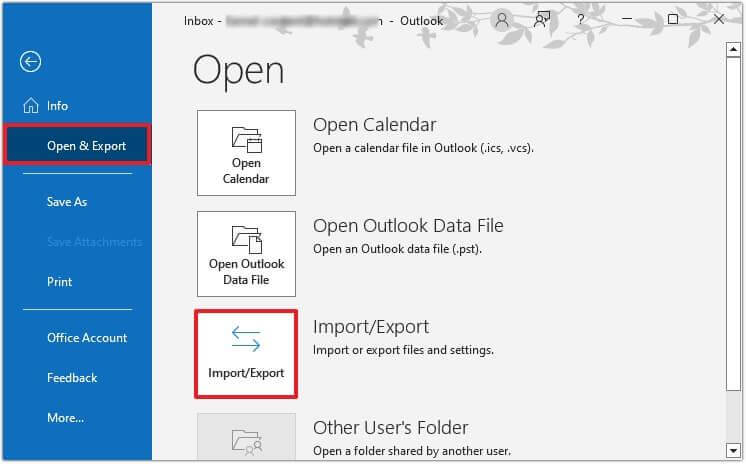
- Browse Files.
- Then press Open & Export.
- After this hit on the ‘Import & Export’.


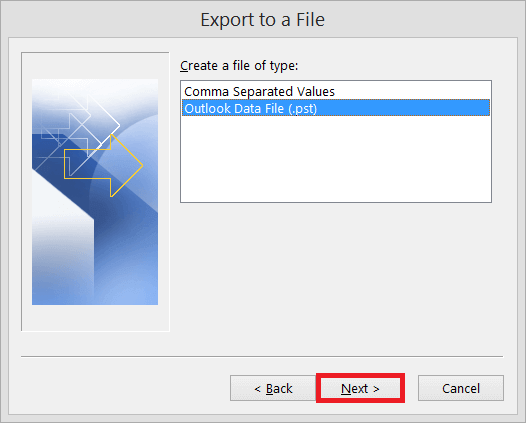
- Select ‘Export to a file’ action. Press ‘Next’ to proceed.
- Now an ‘Export to a File’ box will appear.
- Select the Outlook Data File (.pst) option. Then press Next.
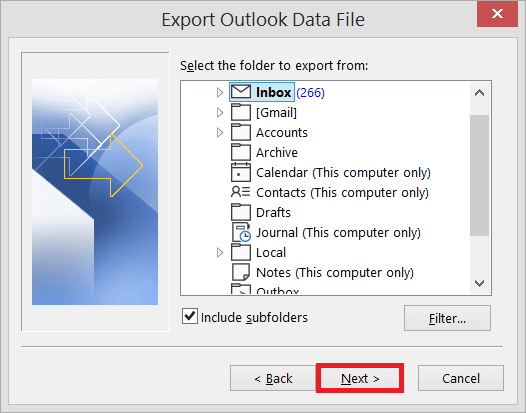
- Select folders as well as sub-folders for the export. Press Next.

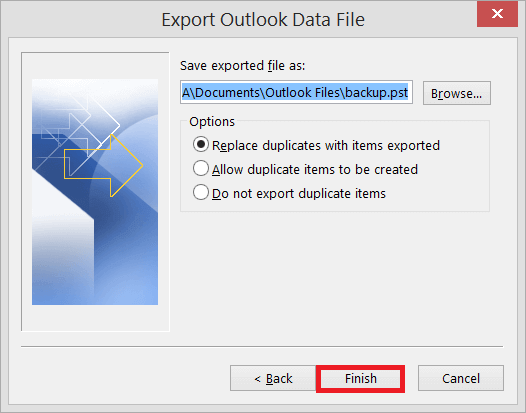
- Now browse the file path where you wish to export/save the new PST file. Also select the ‘Replace duplicates with items exported’ option.
- After this click the ‘Finish’ tab.

Method 2: Drag & Drop Method: It is the easiest, hassle-free way for data file conversion. The user first needs to create a blank PST file in Microsoft Outlook. Then select the desired OST mailbox items. After this drop the qualified folders to the newly created PST file. It is perfect for exporting selective mailbox data.
Shortcomings of Manual OST to PST Conversion:
- Complex: Non-technical users may find such methods complex, risky and uneasy.
- Time Consumption: Manual methods always consume substantial productive hours. The users tend to export every folder individually.
- Large Mailboxes: Manual methods are not suitable to export large mailboxes.
- Distort Hierarchy: Manual approaches may disturb folder structure and hierarchy.
- Orphaned Files: These approaches will not work in case of orphaned, inaccessible .ost files.
Hassle-free Way to Convert OST Files to PST Format?
Many users and businesses query how to quickly convert OST files to PST format without software installation. Well, the easiest and smartest way for such conversion is utilizing some Online OST Converter. Such software provides easy conversion in just three steps:
- Upload the targeted data file (.ost)
- Convert to PST format
- Download the converted data file (.pst)
Benefits of Online OST to PST Converter:
- Outlook installation not required
- Facilitates conversion even if the Exchange Server is not available
- Adherence to customer privacy regulations
- Easy conversion process, perfect for non-technical users
- Doesn’t require software download and installation
- Maintains hierarchy of the folders
- Ensures an organized PST file with full integrity
Conclusion:
We have discussed that how circumstances like server crash, email client migration, or corruption in ost file demand conversion to .pst file format. We have explored two manual methods for the same. The first one was The Import/ Export Wizard, while the second was the Drag & Drop method. But these manual methods don’t work on orphaned or inaccessible data files (.ost). In such a case, explore how to quickly convert OST files to PST format without software installation using an Online OST Converter.
Popular on OTW Right Now!




About The Author

Gagan Bhangu
Founder of otechworld.com and managing editor. He is a tech geek, web-developer, and blogger. He holds a master's degree in computer applications and making money online since 2015.
Quickly convert OST files to PST without installing software by using Outlook’s built-in Import/Export feature (if the account is active) or free online converters for orphan files. Reliable online options include ToolsGround OST to PST Converter.