
I Was Wasting Minutes Finding Files Every Day – Here’s the Trick That Organized My Entire Screen
For a long time, I thought searching for files on my computer was just part of my daily routine. Every morning, I would spend several minutes looking for documents, screenshots, folders, and shortcuts scattered across my desktop.
At first, it didn’t seem like a major problem. However, those lost minutes quickly added up. Constantly searching for files interrupted my workflow, reduced my productivity, and made simple tasks feel unnecessarily frustrating.
When I had too many icons on my desktop, I manually made folders and moved icons. Sadly, the organisation never lasted. New files would accumulate, screenshots would come in, and before I knew it, my desktop had fallen back into chaos.
I realized I needed a better solution—one that could help me stay organized without requiring constant maintenance.
That’s when I discovered iTop Easy Desktop, a desktop organizer software designed to simplify file management and create a cleaner workspace.
Why a Cluttered Desktop Hurts Productivity
People often don’t realize how a cluttered desktop can impact productivity.
If there are dozens, or even hundreds of icons to be distracted by, it’s more difficult to see what matters. Searching for the appropriate file is more time-consuming, and the focus, time, nerves, and work time are lost throughout the day.
Some common problems I experienced included:
- Spending too much time searching for files
- Forgetting where important documents were saved
- Losing track of screenshots and downloads
- Feeling distracted by visual clutter
- Interrupting my workflow repeatedly
Each issue was small on its own, but when combined, it was an incredibly aggravating experience.
My Failed Attempts to Stay Organized
I have tried a couple of solutions, but not a dedicated one, before I try a dedicated solution.
I made several folders, grouped all my files according to project, and even fixed weekly cleaning sessions! It took some time to implement these strategies, but they seemed to help at the time.
The most difficult aspect was the consistency. As I got busier, keeping my desktop organised wasn’t as important. In days, files will again start to pile up. I was looking for a system that could enable me to stay organized automatically.
Discovering iTop Easy Desktop
While looking for ways to simplify my workspace, I came across iTop Easy Desktop.
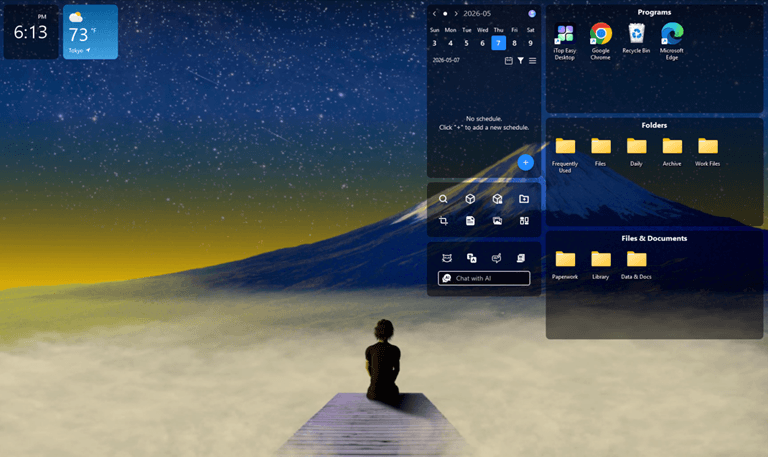
What I noticed is its ability to visualize files graphically, without altering the way I work with my computer. Users can select the items they want to put in a box or category from a list without having to manually sort each item, as the software lets them create them on the desktop.
It is a desktop organizer software that mainly provides the feature to speed up the process of accessing files and minimize clutter. The setup was easy, and I was able to get on to organizing my workspace in a matter of a few minutes.
How I Organized My Desktop
After installing the software, I created separate sections for different types of files, including:
- Work documents
- Screenshots
- Frequently used applications
- Downloads
- Personal files
- Project folders
Grouping similar items together made a significant difference.
I was able to search by category and find the information that I wanted, instead of going to dozens of icons. Also, I made a few changes to the layout, which seemed to make the navigation process more intuitive, given my workflow.
The Improvements I Noticed
Immediate results were seen. My desktop was cleaner, and I saved a lot of time looking up files. The largest gains were in the areas of:
- Faster access to important documents
- Reduced visual distractions
- Improved workflow efficiency
- Better organization across projects
- Less time spent cleaning up my desktop
The small-time savings during the week accumulate over a period of time. Most important of all was that I did not feel as frustrated as I had been, and my work sessions were more focused.
Features That Stood Out
Several features made iTop Easy Desktop particularly useful.
Customizable Desktop Boxes
Having specific areas for various types of files greatly facilitated organization.
Automatic Organization
The software was used to ensure order was maintained, without having to make manual adjustments frequently.
Flexible Layout Options
I could organize categories in a way that was similar to my individual working flow. Easy to use and can be used by both hobbyists and experts.
Quick Access to Important Items
Frequently used files and applications became easier to locate.
Integrated AI Assistant
AI on my desktop allows me to draft, translate, and summarize information in seconds, making my workflow so much easier.
Personalized Desktop Backgrounds
Being able to find lots of quality wallpapers lets me easily create the right atmosphere for my workspace, with a fresh and inspiring environment.
Quick-Access Widgets and Notes
Having the most important notes, schedule, and interactive widgets pinned to the top of the screen means I have access to my most important tasks and am able to keep an eye on them all day long.
Clean and Modern UI
I now have my icons, taskbar, and themes all in one place and can easily customize my desktop in every way to be functional and aesthetically pleasing.
Who Can Benefit From Desktop Organizer Software?
My experience showed me that desktop organization isn’t just about aesthetics—it’s about improving efficiency. A reliable desktop organizer software can be helpful for:
- Remote workers
- Students
- Content creators
- Business professionals
- Freelancers
- Anyone who manages large numbers of files
If your desktop regularly becomes cluttered, a dedicated organization tool may save you more time than you expect.
Tips for Maintaining an Organized Desktop
Even with helpful software, a few simple habits can improve long-term organization. I now try to:
- Remove unnecessary files regularly
- Create clear categories for different projects
- Archive completed work
- Limit the number of icons on my desktop
- Keep important files grouped together
Having these habits with iTop Easy Desktop has made my workspace cleaner and tidier with much less maintenance for me.
Final Thoughts
The more I thought about it, the more I realized how much time I was wasting until I discovered a better way to organize my desktop.
I didn’t realize how much of a productivity impact it would have. With iTop Easy Desktop, I have been able to make my digital workspace more organized, minimize my distractions, and save precious time finding the files I need.
For those who always need to find a document or are having trouble keeping their desktops organized, having a software program to manage them specifically may be an easy yet efficient way to streamline your day.
Popular on OTW Right Now!




About The Author

Gagan Bhangu
Founder of otechworld.com and managing editor. He is a tech geek, web-developer, and blogger. He holds a master's degree in computer applications and making money online since 2015.