
How to Write Seedance Prompts for 30 Second Scenes
A 5-second prompt only needs a subject and one action. For a 30-second prompt, you need a sequence. The model needs to know what happens first, what changes, how the camera moves with the action, and where the scene finishes.
The best way is to write your prompt as a short scene plan and then strip out anything that doesn’t alter what you see.
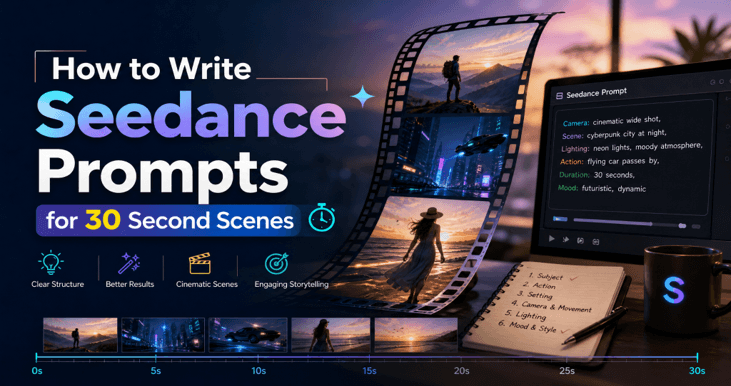
Give the scene a timeline
Focus on the key actions rather than going down the adjectives route. A good 30-second scene will typically have three parts: an opening which establishes the subject, a middle section where something changes, and a conclusion which leaves you with a very clear final image.
| Time | Job of the beat | Example |
| 0-5 seconds | Establish subject, setting, and visual direction. | A woman stands at a rain-streaked window, lit by cool city light. |
| 5-15 seconds | Introduce the main action or change. | She turns as a train enters the station and a red coat moves through the crowd. |
| 15-30 seconds | Resolve the action and end on a deliberate frame. | She steps onto the platform, looks back, and the camera holds as the doors close. |
You don’t need to put time codes in every prompt. What’s important is knowing what the change is and in what order. The model can follow a sequence far better than a list of mood words.
Use a simple prompt structure
A practical structure is:
Subject and setting » action sequence » camera » lighting and style » audio » what must stay unchanged » ending
This order gets the key bits out front and helps the model work through the scene. It also makes it much easier to see what’s gone wrong if the output isn’t right. If the face has changed then the subject description is flawed. If the action is unclear, then the timeline is too vague. If the camera has moved in a weird way, then the movement instruction was overcomplicated.
Example prompt
A woman in a blue coat walks through a rain-slick Tokyo alleyway at night. She stops under a neon sign, looks down the street and then carries on towards the bright doorway at the end of the alley. The camera is at eye level with her and follows her as she walks, then moves to a side view as she gets to the door. Keep her face, her coat and the alleyway itself in frame. Cool blue and magenta light, wet pavement reflections, shallow depth of field, cinematic 35mm look. Ambient rain and distant city traffic. Finish on her hand reaching for the door handle.
This prompt has one subject, one setting, a three-part action, one camera move, one lighting style, and a clear finish. It doesn’t ask for a new character, a costume change or a location change in the same shot.
Describe the camera once
It’s easier to work from one camera instruction than several at the same time. “Slow push-in”, “handheld follow” and “orbit” are all perfectly valid camera instructions in their own right but if you’re asking for all three in one shot it becomes a bit of a mess.
If you’re changing the camera at all do it at a clear moment. For instance, “start on a close-up and pull back as she walks into the room.” That gives the model a reason to move the camera. If it changes direction without any clear reason, it just feels random.
Use constraints for identity
Tell the model what details should remain the same. For a character, that would be the face, hair, outfit, and body shape. For a product, the logo, label, material, and color. For a setting it would be the room layout or the position of a key object.
Clear rules are better than compliments. “Keep the same face and blue jacket” is something the model can actually check. “Make it absolutely realistic and absolutely stunning” is of little help.
Use references with a job
When you add references, just say what each one is for. One reference might be for the character, one for the room, one for the camera move etc. If you don’t assign a purpose to each reference, they can actually work at odds with each other.
A useful reference instruction looks like this:
Use image 1 for the character’s face and clothing. Use image 2 for the room and the window light. Use video 1 for the slow follow. The character’s face, hair and coat are all to remain the same.
Seedance 2.5 allows you to use up to 50 references, but the key thing is that each reference has a clear purpose. If you can’t articulate why a reference is there, then don’t include it at all.
Write audio as part of the scene
Sound can certainly give a 30-second scene more purpose, but it has to be specific. “Cinematic music” is too broad. “Low ambient rain, a distant train announcement and one soft door click at the end” is a very specific sound plan that matches the action.
If dialogue is important, then keep it brief. One or two lines are far easier to fit into a 30-second scene than a lengthy speech. If you need lip sync, then use a workflow designed for talking photos/characters rather than hoping that a generic scene prompt will be able to deal with the exact speech you require.
Choose a visual style that supports the motion
Style words should serve the scene rather than work against it. A soft documentary look, a clean commercial look, and a stylized animation look all suggest very different camera and lighting approaches. Pick one style and go with it.
For anime or illustration, the Seedance 2.5 anime examples are useful because they show how style, character consistency, and motion can be described together. A style reference can hold the look while the prompt directs the action.
Common prompt mistakes
- No ending. The model keeps inventing action because the scene has no destination.
- Too many subjects. Each new character adds another identity to preserve.
- Contradictory camera moves. A static shot and a fast orbit cannot both control the same moment.
- Style words without visual details. “Epic” and “beautiful” do not tell the model what to render.
- Long backstory. The model needs visible action, not a character biography.
- No priority. If everything must stay unchanged, the scene cannot move.
If your result doesn’t work then try simplifying the scene first. A shorter clearer scene will often give you a better draft than a long prompt with loads of instructions in it.
Build a small prompt library
Save the prompts that work (along with the images and settings you used). A prompt you can re-use is worth far more than a one off result as it shows you exactly which elements of the scene you were able to control.
If you want a broader set of tested starting points, this collection of Seedance prompts includes examples for products, characters, camera movement, audio, and longer scenes. Use them as structures, then replace the subject and action with your own.
A final prompt checklist
- The subject and setting are absolutely clear in the first sentence.
- It has a beginning, a middle and an end.
- The camera has one clear direction.
- Lighting and styling are all in support of the action.
- Audio is very specific and matches the scene.
- The prompt lists the details that must be consistent.
- The last frame is described.
- Every reference has a purpose.
A 30-second scene isn’t just a longer caption. It’s a short production plan. Once you’ve got the timeline, the camera, the constraints and the ending all defined then the model is far more likely to produce a clip that feels purposeful from start to finish.
Popular on OTW Right Now!
-
 Change WhatsApp Profile Pic Of Your Friend On your Phone
-
 How to Turn Product Images into Marketing Videos with Runway Model on Pollo AI
-
 How to Set Up an AI Voice Agent Platform for Patient Intake (No-Code Walkthrough)
-
 Is a Free AI Humanizer Enough, or Do You Need the Best One? A Smarter Look with StarWriter AI



About The Author

Gagan Bhangu
Founder of otechworld.com and managing editor. He is a tech geek, web-developer, and blogger. He holds a master's degree in computer applications and making money online since 2015.