
How AI Can Simplify the Podcast Production Workflow
TL;DR: AI can do the repetitive podcast editing stuff (camera sync, finding the pauses, cleaning up the dialogue, making the short clips, etc.). Start with very clear instructions, have the AI produce an editable first cut, and then you’re left with all the decisions around pace, sound, and story. Always listen to the full episode before you publish and check every clip, every caption, and every export.
Turning a great podcast discussion into a finished episode can take hours. You could be syncing multiple cameras, cutting out the repeats, balancing voices, adding captions, making short clips for social media etc. It can be a very slow process if you’re a small team doing it all manually.
There’s a massive audience for podcasts. A 2025 Edison Research report found that 70% of people 12 and over in the US have listened to a podcast. Forbes has the same stats. The more ways you have to get to your audience the more versions of each episode you’ll end up having to produce.
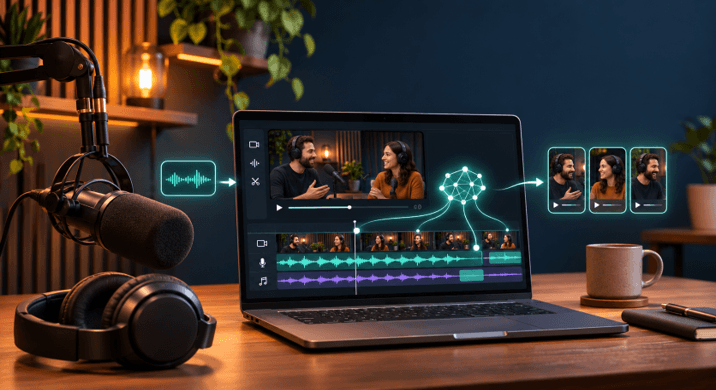
A podcast editor AI tool can be of huge help with the very repetitive bits of the job. It can match camera angles to your audio track, find the long silences, clean up the voices and get you a first cut to review. You’re still in complete control of what makes the episode work, what you want to keep, and how each moment should feel. This guide walks you through a practical workflow from recording to finished episode and social clips.
How a podcast editor saves editing time
A podcast editor AI tool can speed up the production process by doing the job of editing when you give it a clear set of instructions. It can sync your camera files, remove the dead air, clean up the dialogue and put together an editable first cut. You can then go in and review that, make any necessary corrections and shape the episode to your own taste.
Start by getting your recordings sorted. Name your camera files and your mic tracks clearly and note which audio recording you’re going to use to sync to. If you’ve got an episode outline, a transcript, or a list of moments you want to keep, then get that all ready as well.
Next is to give the editing agent very clear instructions. For instance: use the recorder track as your main audio, switch to the person speaking, get rid of all the false starts and keep the full answers. The more specific you are the easier it is to look at the first cut.
A podcast editor AI tool can also mark topic changes or find moments for short clips. Those results are starting points. Check that each clip makes sense on its own and that it doesn’t leave out context that changes the speaker’s meaning.
A workflow from recording to release
A straightforward process will pick up any errors prior to an episode going live and provide you with clear steps that someone can go through to check the work.
- Gather and label the files. Put the camera recordings, the separate mic tracks, the music and any notes into one project. Pick the cleanest audio track to sync to.
- Set the editing direction. Tell it what the episode is about, what points need to stay and what kind of pauses/repeated lines it should remove. If you don’t have an outline then just describe the flow you want in plain English.
- Review the first cut. Look out for camera changes and listen for any missing words, abrupt edits or answers that are just a bit too short. Make the necessary corrections on the timeline or ask the agent to fix the relevant bits.
- Finish the sound and versions. Check the voice levels, the music and the captions. Then prepare the full episode and any social clips in the formats required.
This workflow gives the AI a very clear job and you can then go through each result prior to release. A video editor with a timeline is ideal as it allows you to keep your cutting, your captions and your audio all in one project.
Use AI for repeatable cleanup
AI works at its best when there’s a very clear objective and the outcome is easily verifiable. Begin by eliminating long silences, cutting the filler, aligning camera angles and balancing the voice levels. The story choices still need a human to look at them.
For instance, an editing agent might come across a pause that’s several seconds long. There are times when a pause actually enhances the impact of the guest’s answer. Always look at the edit in context before you remove it and don’t be in a rush to cut a pause just because it’s there. Sometimes the pause is what makes the conversation feel genuine.
The same applies to filler words and repeated lines. Some you can get rid of without affecting the meaning at all, others may be there to make the speaker sound more relaxed or to keep their full thought. Listen to the edit rather than just go by the transcript.
Start by giving the podcast editor AI tool one job at a time. Ask it to sync the cameras, then check the sync. Ask it to clean the dialogue, then listen out for any clipped words or uneven volume. That way the errors are much easier to spot and you can refine your instructions.
Podcast editor tools in an editable project
An AI editing tool is far more credible when you can actually see and make the changes to the output. Invideo Editor uses editing agents with a multitrack timeline so you can look at and alter camera cuts, trims, captions, and audio. It’s very useful for interviews, video podcasts and any show that you’re producing both a full episode and a number of shorter clips.
Its podcast editor AI tool can let you ask agents to sync cameras to a selected audio track, remove fillers and silences, clean and level voices, and prepare highlight clips. It’s an online podcast editor that runs on a desktop, laptop, tablet, or phone. Agent jobs keep running if you close the tab.
You can also connect invideo MCP to your preferred LLM (Claude, ChatGPT, Cursor or whatever other MCP client you like) and have your own agent make the edit. You can then give the agent the instructions to make the edit and the work gets done in the project.
InVideo Editor keeps the first cut open so you can make changes to it. You can go back and review your camera switches, restore a pause, adjust a trim, tweak the sound on the timeline etc.
Keep editorial judgment in human hands
AI can speed up podcast editing, but it won’t know what your audience need unless you tell it. You’re the one who knows which guest stories are important, when a joke needs to be given space and when a short clip is a fair representation of the whole thing.
Before accepting a cut, check these points:
- Does the episode keep each main idea and complete answer?
- Do the camera switches follow the active speaker?
- Do edits sound smooth, without clipped words or sudden changes?
- Can listeners hear each voice clearly over music?
- Do captions match the spoken words?
- Does each social clip make sense without the full episode?
Human review is key when the edit changes the meaning or the tone. Let the AI do the first pass, then listen to the full episode and watch the final clips before you share.
Prepare the episode for every platform
A finished podcast may well need more than one version. The full episode could be audio only or it could be a full audio/video package. Social clips will almost certainly need captions, a shortened version of the opening, and a frame that works for the platform.
Ask the podcast editor AI tool to find the moments around a clear topic or exchange and then go through each suggestion. Make sure there’s sufficient setup for the viewer to understand the clip. Check the names, the captions and the in and out points before you export.
It’s useful to keep the full episode as the master and then treat the clips as separate versions. That way if you make a change to a short clip it won’t impact the episode. Save a clean final version and note which files are ready for each platform.
Conclusion
AI can be used to make podcast production easier in a number of ways, particularly in the area of editing. It can be used to do the boring, repetitive editing tasks such as camera sync, cleaning up dialogue, removing the dead air, and preparing social clips. The key to getting the most out of the AI is to have a clear process. You need to organize your files, give the AI agent very specific instructions and then go through the first cut on an editable timeline.
A podcast editor AI tool is meant to support your editorial decisions not to make them for you. Listen out for missing context, keep the pauses that are part of the conversation and check every version before you send it out. Try that workflow on one episode and see which of the steps ends up saving your team the most time. Which stage of podcast production would you be most tempted to hand off first?
Frequently Asked Questions
What can a podcast editor do?
A podcast editor AI tool can help with synchronizing camera angles, spotting pauses and filler words, cleaning up the dialogue, balancing the voices, and creating short clips. Some of the tools will even add captions or flag topic changes. The results will vary from editor to editor so it’s worth checking what the tool is capable of and having a look at the output prior to publishing.
Can AI edit a podcast with more than one camera?
Yes. Some editing tools can line up the camera recording with a selected audio track and will switch the camera as the speaker changes. It’s important to check that the files stay in sync throughout the episode. You’ll need to check the camera changes on the timeline, particularly around any interruptions or overlapping speech.
Will AI remove pauses and filler words automatically?
Some editors will go in and find and cut the pauses and filler words. You need to look at those edits in context. A pause may be necessary to give an answer room to land and a filler word may be essential to maintaining the speaker’s natural tone. Decide whether to keep it, restore it or adjust it based on what sounds right.
Can I use AI to make social clips from a podcast?
Yes. You can have an editing agent identify moments around a topic, guest answer, or key exchange and then produce the clips for the social platforms. Just make sure each clip has sufficient context, the captions are correct, and they start and finish cleanly.
Do I still need to review an AI-edited episode?
Yes. Listen to the full episode and check the video, captions, and sound. Look for clipped words, missing context, uneven voices, and camera changes that distract from the conversation. Human review helps protect the meaning and tone of the show.
Popular on OTW Right Now!


About The Author

Gagan Bhangu
Founder of otechworld.com and managing editor. He is a tech geek, web-developer, and blogger. He holds a master's degree in computer applications and making money online since 2015.