
Chrome Dino Game Cheat Guide: Master the Dino with Tricks & Codes
Are you searching for the Chrome Dino game cheat codes? If yes, then you’re on the right page.
Google provides a built-in and hidden game in its Chrome browser. The game started as a simple offline Easter egg that evolved into an iconic mini-game enjoyed by millions. However, you can enjoy this game even when your Wi-Fi is perfectly fine. However, like other games, it is not a game that can be mastered with ease. Because the Dino speeds up relentlessly, obstacles multiply, frustration increases… and then? You crash into a cactus again.
This is where this Chrome Game Cheat Guide comes in.

So, in this guide, I’ll show you what the Chrome Dino game is, how to access it, how to cheat using browser extensions, and powerful JavaScript commands that you can inject directly into your browser. This cheat guide helps you to get unlimited lives, God mode, insane jump height, or a custom speed boost.
What Is the Chrome Dino Game?
Chrome Dino Game (also known as Chrome Dino Runner, T-Rex Game, or No Internet Game) is an in-built hidden game in Google Chrome.
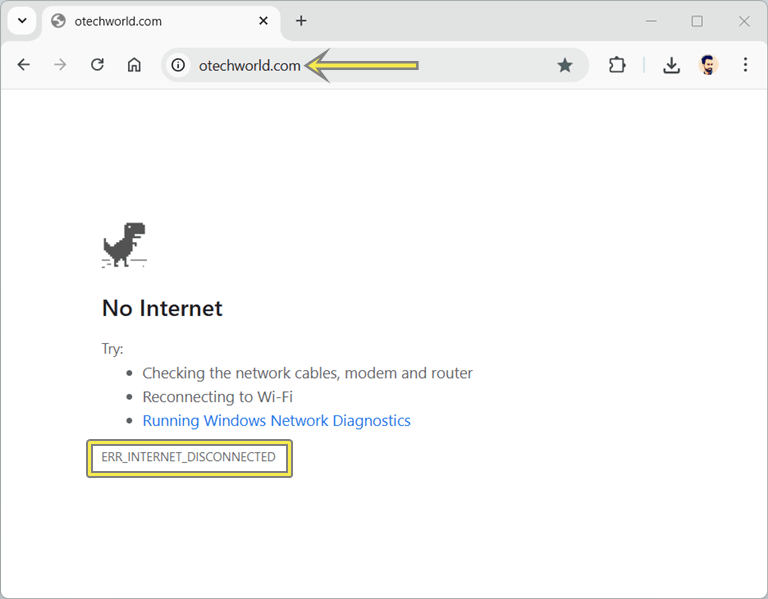
It appears that every time you lose your internet connection, the No Internet error page shows up. Just press the spacebar button on the keyboard, and the game begins.
The game was originally developed by the Chrome UX team. Its intention was simple:
Give users something fun to do when they’re offline.
However, with time, the Dino game has grown to be a lot more, with speed-running records, mods, cheats, high-score challenges, and even various versions of the game on the web.
How to Access Chrome Dino Game
There are two ways to access the Dino game in the Google Chrome browser. It doesn’t matter whether you’re online or offline; you can access the Dino game easily.
Method 1: Access Chrome Dino with Internal URL (Online or Offline)
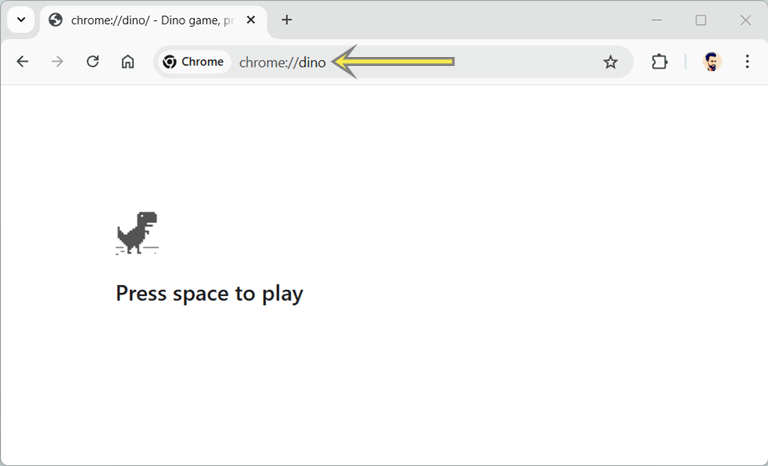
Google Chrome provides an internal URL that allows us to access its internal functions. So, it also provides an internal URL to access the Dino game. Using the internal URL, you can access the game even while you’re online or offline.
Steps are given below:
- Open Google Chrome on your PC.
- Type chrome://dino/ into the address bar (omnibox) and press the Enter button.
- Now the game page will be open. Click Spacebar to start.

- That’s it.
Method 2: Access Chrome Dino When You’re Offline
- Open Google Chrome on your computer and open any URL.
- You’ll see the No Internet Connection page with the T-Rex (Dinosaur).
- Press the Spacebar button on the keyboard to start.

Note: To use JavaScript Cheat Codes, you need to use the 2nd method. Just turn off your WiFi or internet connection and open any URL to see the No Internet Connection page with the Dino game.
Chrome Dino Game Cheat Guide
You can use a browser extension or JavaScript code as a cheat code for the Chrome Dino game. However, the browser extension provides its own dinosaur game, which is similar to the original one. But you can get more cheats.
The game may look simple, but the cheats available for it are surprisingly powerful.
Method 1: Use a Browser Extension for Chrome Dino Cheat
In chrome web store, you can find plenty of cheat extensions for dino game. But “Dino Game Cheat” is one of the best extensions with the best UI. You can easily use this extension, and it offers cool features that are given below:
- Invincibility Mode: You will not be stopped by cactus or any flying dinosaur.
- Infinite Speed: Travel at the speed of a Super Dinosaur.
- Slow Motion Mode: If you would like to go slower. Try this mode.
- More Jumps: Jump over anything, including the moon.
- Flying in the Sky: easy flying and setting records with ease.
- Auto-Play: Let the extension take a break as you watch your score increase.
How to install and use the Dino Game Cheat Extension in Google Chrome?
The installation and use of the extension is simple and easy. The step-by-step guide is given below.
Note: The extension doesn’t affect the original browser game. So, your higher score will not be added.
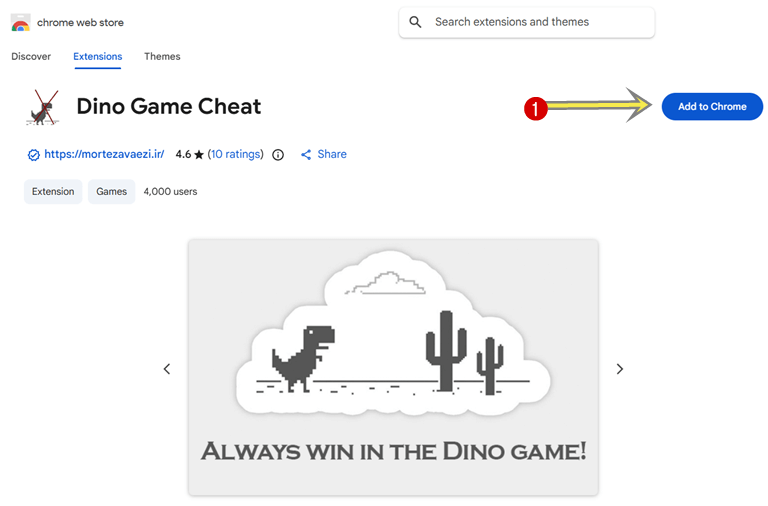
- Open the Chrome web store and install the “Dino Game Cheat” extension. The link is given below.
Install Dino Game Cheat on Chrome
After opening the web store page, just click on Add to Chrome button.
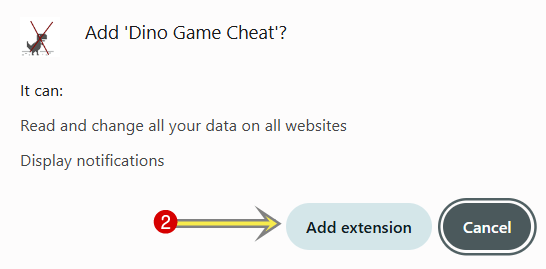
- Select the “Add extension” button from popup.

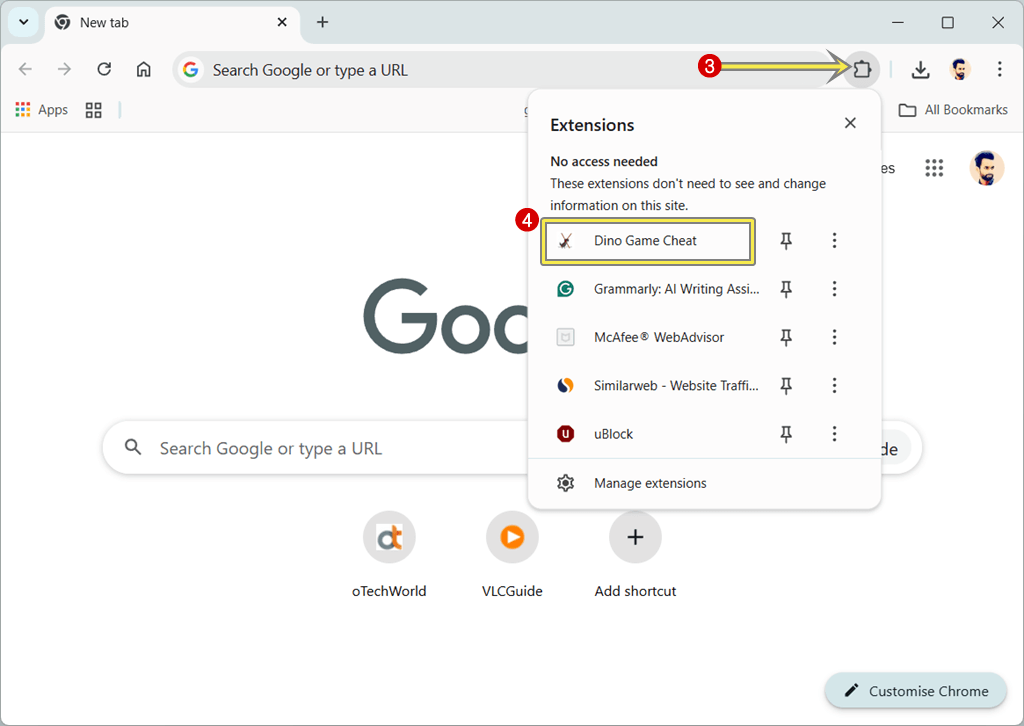
- After installing the extension, click on the Extension icon and then click on the Dino Game Cheat extension from the list.

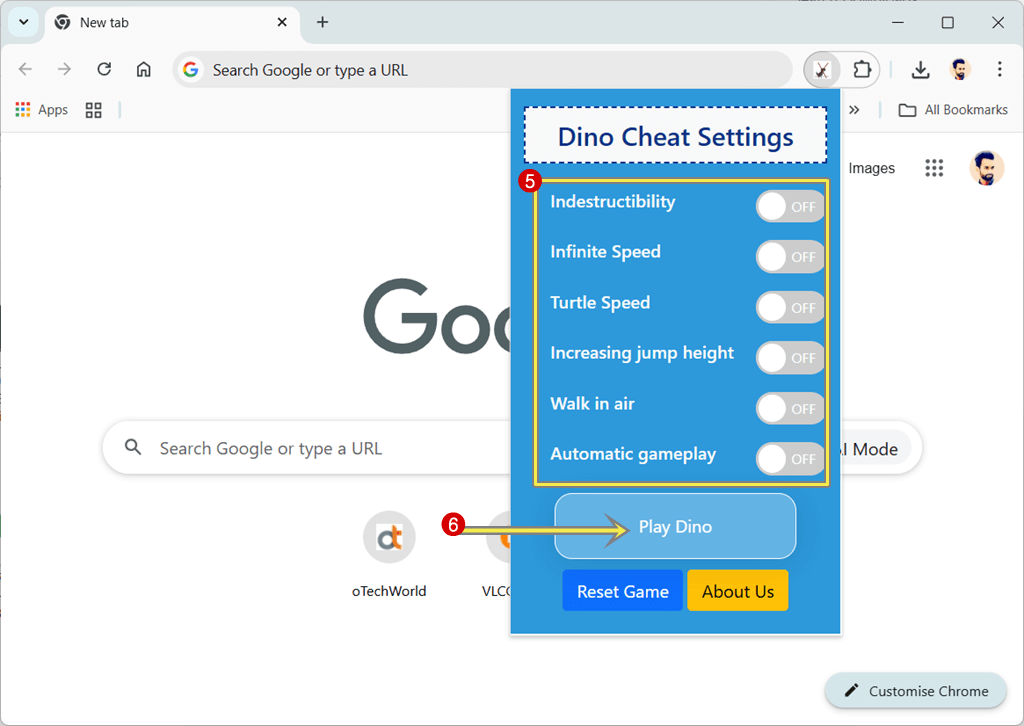
- Now you’ll see the list of options, and turn on the options you require. You’ll see the Indestructibility, Infinite Speed, Turtle Speed, increasing jump height, Walk in ai, and Automatic gameplay.
- After enabling or turning on the options, click on the Play Dino button.
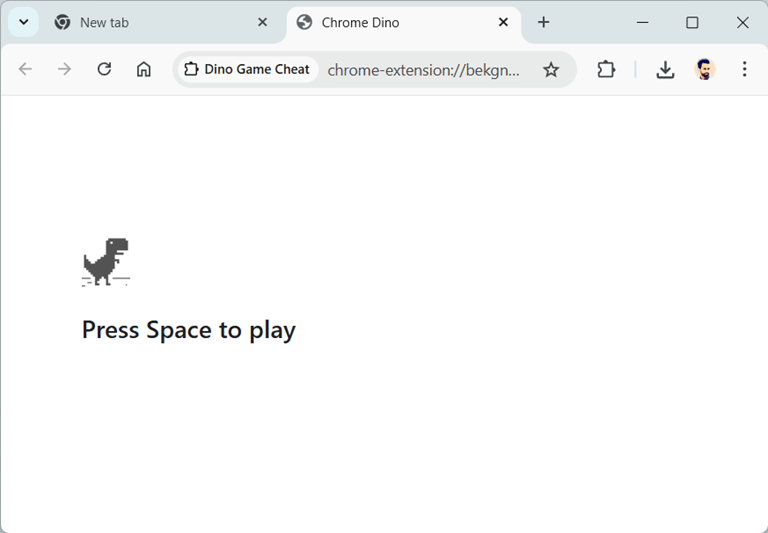
- Now the Dino game tab will be open. Just press the spacebar button to play the game.

- That’s it.
Method 2: Chrome Dino JavaScript Cheat Commands
Note: To use JavaScript Cheat Codes, you need to use the 2nd method. Just turn off your WiFi or internet connection and open any URL to see the No Internet Connection page with the Dino game.
However, Chrome Dino cheat extensions may look convenient and easy to use, but they often come with a major limitation; one of the main limitations is extension don’t modify the original Chrome Dino game.
Most extensions load their own recreated version of the Dino game that looks similar to the original one, but is technically a different game. This is where JavaScript direct injection cheats clearly stand out.
JavaScript cheats work by directly manipulating the original Chrome Dino game engine that is already built into your browser.
JavaScript cheats work by directly manipulating the original Chrome Dino game, which is built into your browser. So, you are not playing a clone or a remake version; you are manipulating the real, native Chrome Dino game itself.
Note: On the web, there are numerous JavaScript codes available, but they no longer work because of browser updates. So, in this article, I’ll show you the latest JavaScript that works for 2025 and 2026.
Here is the step-by-step guide and the most effective JavaScript cheat codes.
Before applying any cheat code, make sure you are running the original Chrome Dino game, not a cloned version from an extension.
Steps to Apply the Cheat Code JavaScript:
- Turn off your Wi-Fi or internet connection and Open Google Chrome browser.
- Open any URL using Omnibox, and you’ll see No internet error page with dino game.
- Press the spacebar to start the game.
- Once the game starts, Right-click anywhere on the page. Select Inspect and click the Console tab. Paste the cheat code and press the Enter button.
Alternatively, start the game by pressing the spacebar and pressing Ctrl+Shift+I to open the console tab directly. - After pressing the Enter button. The code will be executed; the cheat activates instantly.
1. God Mode (Invincibility Cheat / No Game Over)
JavaScript:
Runner.prototype.gameOver = function(){};
Once this cheat code is used, the “Game Over” feature of the game will be disabled. Dino is unable to bang against any obstacle and keep running. The score itself is also increasing indefinitely.
It is among the most popular cheats since it does not alter the appearance, but the underlying logic of the game.
2. Speed Control Cheat (Ultra-Fast or Slow Gameplay)
JavaScript:
Runner.instance_.setSpeed(50);
You can change the number:
- 10 – Easy mode.
- 50 – Extreme speed.
- 1000 – Nearly uncontrollable.
The speed is controlled by Chrome’s internal game engine, which JavaScript directly overrides.
3. Slow Motion Mode (Precision Control Cheat)
JavaScript:
Runner.instance_.setSpeed(1);
Effect:
- Dino moves in slow motion.
- Easier to time jumps.
- Great for learning obstacle patterns
This cheat is especially useful for beginners. It slows down the game speed.
4. Super Jump Height Cheat
JavaScript:
Runner.instance_.tRex.config.JUMP_HEIGHT = 250;
Result:
- Dino jumps significantly higher.
- Easily clears multiple obstacles.
- Reduces the need for precise timing.
- You can experiment with values like 150, 300, or even 500.
5. Gravity Control Cheat (Float Mode / Jetpack Effect)
JavaScript:
Runner.instance_.tRex.config.GRAVITY = 0.2;
What It Does:
- Reduces gravity.
- Dino floats longer in the air.
- Creates smooth, slow landings.
- Combine this with Super Jump for advanced gameplay.
6. Lock Day or Night Mode Permanently
JavaScript:
Runner.instance_.setDarkMode(true);
or
Runner.instance_.setDarkMode(false);
Effect:
- Forces permanent night or day mode.
- Prevents screen flicker.
- Improves visual comfort.
7. Freeze Obstacles Cheat
JavaScript:
Runner.instance_.horizon.obstacles.forEach(o => o.speedOffset = 0);
Result:
- Obstacles stop moving.
- Dino keeps running.
- Useful for screenshots or testing.
8. Auto-Jump Bot (Smart JavaScript AI Cheat)
JavaScript:
setInterval(() => {

  const obs = Runner.instance_.horizon.obstacles;

  if (obs.length && obs[0].xPos < 120) {

    Runner.instance_.tRex.startJump();

  }

}, 10);
What Happens:
- The script scans obstacle distance.
- Dino jumps automatically.
- AI plays the game perfectly.
- This cheat works only because it reads real-time obstacle data from the original engine.
9. Instant High Score Cheat
JavaScript:
Runner.instance_.distanceRan = 99999 / Runner.instance_.config.COEFFICIENT;
Result:
- Score jumps instantly to near max.
- Works only in the current session.
- Refresh resets everything.
10. Dino Walk in the Air
This hack enables the Dino to walk on top of the ground and look as though it was walking or floating in air. This is in contrast to speed or invincibility cheats, which alter the positioning of the Dino vertically in the game world.
JavaScript:
Runner.instance_.tRex.groundYPos = 0
As a result:
- The Dino floats above most obstacles.
- Collisions are reduced or completely avoided.
- The game becomes much easier.
11. Reset & Remove All Cheats
JavaScript:
location.reload();
Effect:
- Game reloads cleanly.
- All cheats removed.
- Dino returns to original behavior.
Why are some Dino cheat codes not working and getting “Uncaught TypeError”:
Note that the Runner.instance_ no longer works before the game starts.
Old Chrome (Before the 2024–2025 Update)
In older versions of Chrome (before 2023–2024), Dino game hacks worked because the game engine was loaded as soon as the page opened. The Runner.instance_ object already existed, so cheat scripts could be pasted and run even before starting the game.
New Chrome (2024–2025 Update)
The loading of the game changed in the newer versions of Chrome (2024-2025). At this point, Runner.instance_ is only generated once you press the spatially separated bar to begin the game. Before that time, the object does not exist, hence it appears as undefined, and old cheat codes do not work.
Frequently Asked Questions (FAQs)
1. Is it safe to use Chrome Dino cheat codes?
Yes. These JavaScript cheats only modify your local browser session. They do not harm your device.
2. Do extensions harm browser performance?
A majority of the Dino cheat extensions are lightweight. However, excessive installation may cripple Chrome.
3. Can Google ban my Google account for using cheats?
No. The Dino game is offline/local. No account is used.
4. How do I remove all cheats and restart the game normally?
Just refresh the page (Ctrl + R).
5. Can these cheats work on mobile Chrome?
JavaScript cheats depend on Dev Tools, and this cannot be used on mobile Chrome.
However, desktop mode or remote debugging is available to you.
6. Does Chrome remember my hacked high score?
No. Score resets every time you refresh unless you manually edit local storage.
7. How long can the Dino game go?
The max score display stops at 99,999, but the game continues infinitely.
Final Words
I hope this guide helps you to know about Chrome Dino Game Cheats. However, extensions are easy to use, but extensions provide their own dino game, which is similar to the original one. So, JavaScript is one of the best methods. But this method works perfectly when you turn off your WiFi or Internet connection. Because some JavaScript cheat code command not work when you’re online.
The Chrome Dino game may look like a simple distraction, but it’s become an iconic symbol of browser culture. With cheat codes, mods, unique hacks, and creative JavaScript injections, you can transform this simple offline runner into a fully customizable playground.
Whether you want God mode, infinite speed, jetpack jumps, AI auto-play, or weapon mods, this guide gives you everything you need.
So the next time your Wi-Fi goes down—or even if it doesn’t—you’ll know exactly how to dominate the desert like a true Dino champion.
If you need more cheats, custom mods, or a downloadable HTML version of the Dino game, feel free to ask!
Popular on OTW Right Now!


About The Author

Gagan Bhangu
Founder of otechworld.com and managing editor. He is a tech geek, web-developer, and blogger. He holds a master's degree in computer applications and making money online since 2015.