
Make It Pop: Boost Colors and Lighting for Scroll-Stopping Visuals
If your content isn’t glowing, gleaming, or grabbing attention within a half-second, it’s already lost in the scroll. Today’s digital visuals need to pop—visually, emotionally, and algorithmically. Whether it’s a TikTok teaser, an Instagram carousel cover, or a YouTube thumbnail screaming for clicks, brightness and saturation can make or break your content’s success.
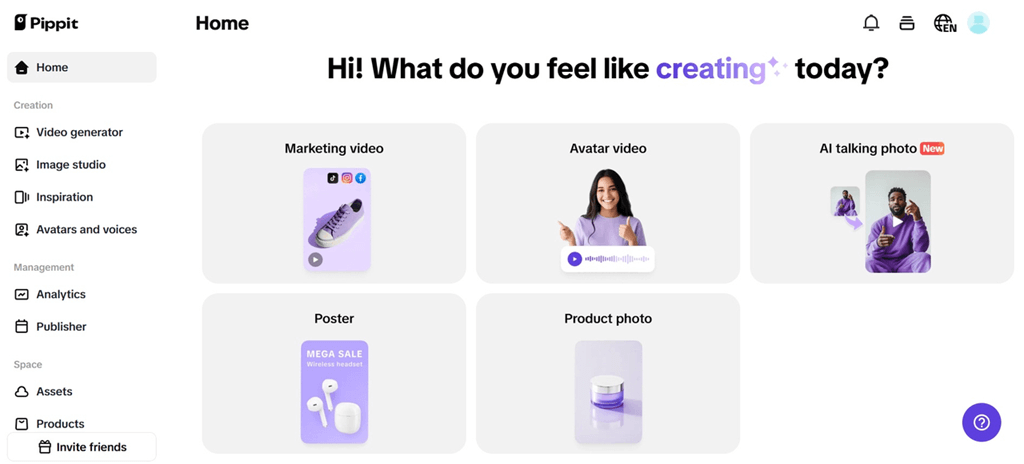
Enter Pippit’s image enhancer—your AI-powered secret weapon for turning flat visuals into luminous assets. Tools like Pippit do more than just adjust contrast; they inject mood, clarity, and energy into your photos so they shine exactly where it matters: on the feed.
Let’s dive into how color enhancement became the language of virality—and how you can speak it fluently!
Why saturated images stop your thumb in mid-scroll
Your brain is hardwired to notice vibrant things. Bright colors signal freshness, danger, energy—all the things that capture our lizard-brain attention.
That’s why desaturated or dim images tend to get ignored. They’re read as dull, passive, or simply too subtle for platforms where bold wins eyeballs.
Here’s what boosted visuals communicate instantly:
- High brightness says the content is fresh and modern
- Deep contrast adds drama, depth, and clarity
- Strong saturation triggers excitement and urgency
- Accurate skin tones increase trust and relatability
- Color harmony makes it easier to remember the image (and act on it)
It’s not about being loud—it’s about being intentional. An image that’s been retouched with clarity and purpose tells the viewer, “This is worth your attention.”
The secret life of colors on tiktok, reels & thumbnails
The wild success of visual-first content isn’t random. If you’ve ever wondered why some people’s posts look so “polished” or “clean,” it’s usually not just good lighting—it’s clever AI editing.
Here’s how different platforms respond to enhanced images:
- TikTok: Bold colors in thumbnails increase the chance of a viewer tapping on a video in grid view. Think saturated skies, rich contrast, and clean outlines.
- Instagram: Reels and carousels that follow trending aesthetic cues—like glowing skin, warm filters, or pastel overlays—are more likely to be saved or shared.
- YouTube: Thumbnails with extreme contrast (dark shadows + bright highlights) get up to double the click-through rate compared to washed-out frames.
The point? Your image doesn’t need more makeup—it needs more pop. And this is where AI tools outshine manual editing: they can analyze and auto-adjust without losing quality.
Make every frame sing: how to enhance images with Pippit
Here’s how to take your visuals from “meh” to magnetic using Pippit’s AI tools. Here’s how:
Step 1: Upload your images
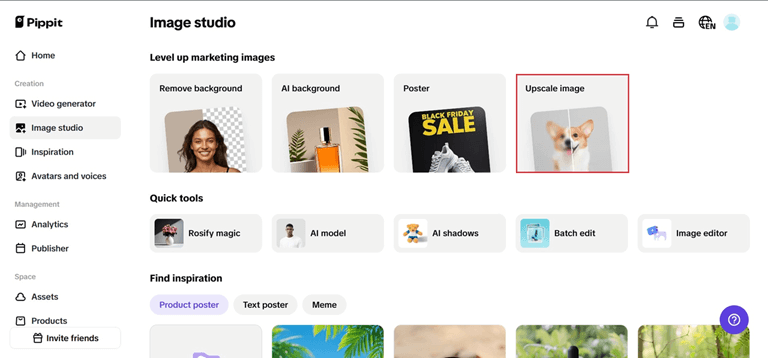
Begin by logging into your Pippit image resolution enhancer. Go to “Image Studio” from the sidebar and select “Upscale Image” if you prefer instantaneous enhancements. Alternatively, go to “Image Editor” and navigate to “Smart Tools” > “Image Upscaler” for greater control. Upload images from your device or connected sources—it’s completely flexible.
Step 2: Upscale and edit your images
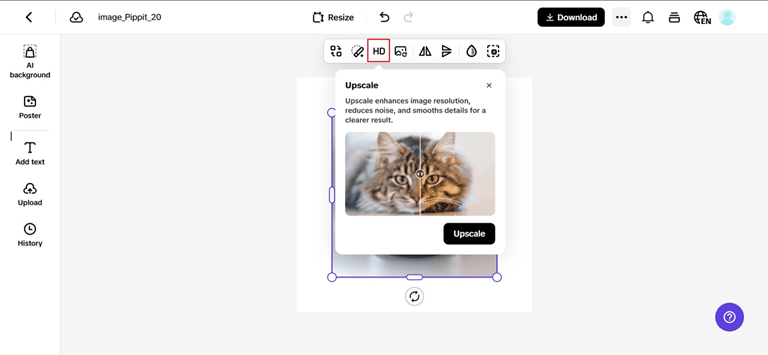
Now it’s your turn to make your magic happen. Get “Retouch” to touch up facial beautification, use “Effects” to add color mood or glow, or the “Low-Light Image Enhancer” to take out-of-focus shots and give them more light. Add fun stickers, collage pieces, and vibrant text overlays. Don’t even forget to tweak texture, contrast, or even apply blur to downplay areas you prefer.
Step 3: Export your images
When your graphics are lighting up just so, tap “Download All” in the top-right corner. Select your preferred resolution and format, and then save your content, ready to post, publish, or promote.

Visual personality starts in the background
It’s easy to obsess over the subject of your photo, but what’s behind your product matters just as much. A flat, cluttered, or poorly lit background can drag down the entire visual.
That’s where using Pippit’s AI background generator makes a dramatic difference. With Pippit’s smart features, you can replace dull backdrops with vibrant scenes that emphasize your subject, build brand identity, or evoke emotion—all while syncing color and light with your main asset.
Here’s how it changes the game:
- Need a dreamy cottagecore theme? Generate a pastel field or vintage room with soft, airy light.
- Want a bold cyber glam mood? Swap your background with something high-contrast, neon-lit, and futuristic.
- Shooting a product in poor light? The AI will match and lift your scene into something ready for spotlight.
When your backdrop aligns with the image’s vibe, the result feels intentional and elevated—not accidental.
Bring the glow: tools that give your visuals a second life
Let’s say you have a good photo—it’s well-framed, the subject looks great, but it just feels… dull. This is the perfect moment to reach for AI-driven enhancement tools.
With Pippit, you can unlock:
- Low-light correction for night shots or indoor scenes
- Skin smoothing and tone correction for portraits and thumbnails
- Texture sharpening to give life to fabrics, packaging, or hair
- Color balance to remove odd tints or camera-induced dullness
If you’re working with reused content, screenshots, or older visuals, a few enhancements can restore quality and mood in seconds—no Photoshop skills needed.
Final frame: let your visuals speak in color
If you’re ready to ditch flat, lifeless images and start publishing content that jumps off the feed, Pippit is your creative partner. From image enhancer tools to AI background generator features, every part of the visual journey is optimized for digital impact.
Try Pippit today and make your content pop in every pixel. Your next viral moment starts with the glow.
Popular on OTW Right Now!




About The Author

Gagan Bhangu
Founder of otechworld.com and managing editor. He is a tech geek, web-developer, and blogger. He holds a master's degree in computer applications and making money online since 2015.