
Best AI Video Generators for Small Businesses and Online Sellers: 7 Tools Compared
Imagine a very ordinary online seller. The product is not complicated: socks. The main channel is TikTok. There are already a few product photos, maybe one or two lifestyle images, and a simple selling point such as “soft everyday socks” or “comfortable socks for long workdays.”
Until the seller actually requires videos, that seems like a breeze.
A still product photo will do when listing, but that doesn’t always prevent someone from scrolling. A TikTok video should have some movement, a good hook, captions,s and, typically, a bit of editing before it’s ready for posting. Most of the small retailers don’t have a video team on standby for that. They want to utilize what they have, without spending half a day.
The lens that I used in this comparison is the one shown. I didn’t need to find the tool that can have the most amazing demo reel. I had a smaller, more useful question to ponder: which AI video tool actually assists with which aspect of a simple online product sales business?
Some tools are better suited to animating a product image. Some are better for captions and final editing. They aren’t all good for templates. A few are interesting but may be too much for routine batch content. The following is a list of steps in a typical small-business workflow.
1. Medeo: Best for Turning Product Images and Marketing Assets Into Short Videos
The starting point for an online seller isn’t always a clean script. It can be a product shot, lifestyle picture, marketing campaign visual, or an existing marketing asset.
That is where Medeo is especially useful. It is a good fit for small businesses that want to turn product images, promotional visuals, or creative concepts into short AI videos without building a full video workflow from the ground up.
For example, a seller could start with a clean product image and create a short clip for a product page, paid social ad, TikTok-style post, or Instagram Reel. A small brand could also use existing campaign visuals to test several short video directions before deciding which one is worth polishing.
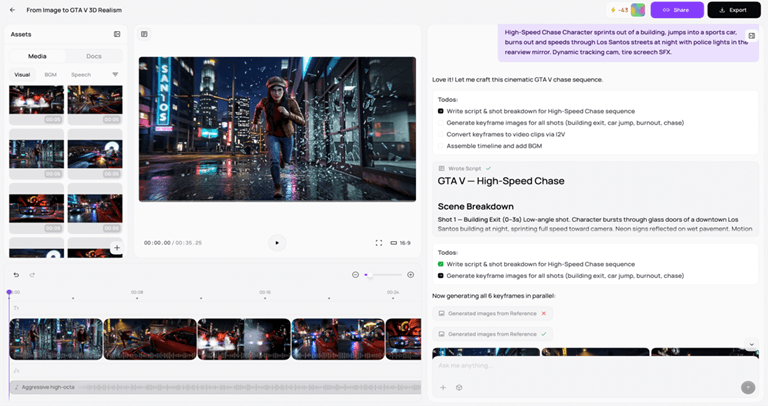
When the business already has a lot of visual assets and wants to get them moving, Medeo is the most useful. Which means it’s a great choice for ecommerce stores, beauty brands, fashion retailers, food products, digital products, creator shops, and small teams looking for more short-form video content but who don’t want to create each video from the ground up.
This is mostly because one of the things that was noted is that Medeo isn’t just a prompt box. The user can drag clips on the editing track, change the length of a video segment, and alter a part of the video without having to re-create the idea from scratch. It’s more useful for a seller who is attempting to generate multiple TikTok videos from product images than it might initially appear.
However, the finishing work is best performed using a dedicated editor that is the most accurate. I would use Medeo to start moving the product image around and try out the directions for short videos, and use CapCut when I wanted to make tighter cuts, put captions on the video, adjust the pace,e and add polish for the platform.
Best for:
- Product image to video workflows.
- Short marketing clips from existing visuals.
- Ecommerce sellers that need lightweight product videos.
- Small teams testing creative ideas quickly.
Things to keep in mind:
AI video still is awaiting review. Product labels, hands, faces, text,xt and fine details may and will shift over the generations, and so will the best results typically be from clean source images, straightforward motion, and human editing before publication.
2. CapCut: Best for Social Media Editing
It is not only powerful in its artificial intelligence generation. CapCut is extremely helpful because it offers all the normal attributes of an editing program, along with social media-friendly features like captions, templates, music, transitions, filters, resizing, and quick exports. That can be more beneficial than a complicated video platform for a small business owner.
For an online seller, CapCut could be a solution suitable for editing a product demo, creating a caption for a founder video, making a brief sale announcement, etc., or even making a quick montage from customer photos. It’s also useful across different platforms.
For the sock seller scenario, after utilizing an AI video manufacturer, I would leave CapCut running. If a clip has been created, CapCut is still a more suitable option to cut the first and second, tighten the hook, add text and music, and make the video look and feel like a TikTok original video.
Best for:
- TikTok, Reels, and Shorts editing.
- Captions, cuts, music, and transitions.
- Quick mobile video workflows.
- Small teams that need fast social content.
Things to keep in mind:
CapCut is best known for its video editing and social functionality. For more creative, innovative video ideas, or for more advanced video production, you might need to use it with another AI video generator.
3. InVideo: Best for Template-Based Marketing Videos
If businesses are looking for structured videos and don’t want to build all the videos, InVideo is an appropriate option. It is very helpful for content that is produced based on a template, like a promo, explainer, ads, presentations, list videos, or social posts.
Templates can be a good time-saver for small businesses. A seller doesn’t have to create a blank timeline; they can select a format, add product information and copy, arrange the copy, incorporate brand elements, and export a video that looks organized.
This is because businesses that require frequent marketing videos but don’t have anyone on staff who knows how to edit video may find InVideo useful. It is great for product announcements, seasonal promotions, service explanations, real estate promotions, ads for local businesses, and educational content.
Best for:
- Template-driven marketing videos.
- Promotional clips and explainers.
- Teams that want structure and speed.
- Repurposing written content into video.
Things to keep in mind:
If not customized, template videos might look similar. They should change colors, content speed, copy, fonts, product photos, and calls to action rather than just using a default layout to make the content feel more brandable.
4. Runway: Best for Advanced Creative Video
If you’re a creator or a team looking for more powerful AI video platforms to drive creative control, you’ll find Runway as one of the most suitable options available. It’s frequently utilized for generative video, video-to-image generation experiments, cinematic shots, visual effects, and more sophisticated creative processes.
Runway could be overkill for small businesses when it comes to regular posts on their products. But it can be beneficial if a brand is looking to produce more unique material. A fashion company may conduct a marketing campaign test of a fashionised marketing clip. A design studio may produce a “mood video”. Some creative agencies might employ it to concept before a shoot.
Runway is a more creative way of generating, rather than a simple template. That’s ideal for those who wish to try out and customize prompts.
Best for:
- Advanced creative video generation.
- Cinematic AI clips and visual ideas.
- Campaign concepting.
- Teams with stronger creative direction.
Things to keep in mind:
This may result in a steeper learning curve than simpler tools. Small businesses should allow time for testing, refining, and editing. Runway can be a great tool, but I wouldn’t rely on it as my primary batch product video tool. For different socks, a seller might need 20 simple variations – and Runway is proving to be more creative than the job requires.
5. Pika: Best for Short Creative Video Ideas
When it comes to short, fun, and eye-catching AI-generated videos, Pika steps in as a valuable asset. For online sellers, it’s most appropriate when the purpose isn’t essentially to give a product demo, but to hook them in creatively.
For a sock brand, perhaps a fun seasonal reveal or a quick social concept can be accomplished using Pika. I wouldn’t use it for all product videos, but when I am looking for something a bit more visual and experimental, I will use it.
Best for:
- Short creative video clips.
- Social media experiments.
- Visual hooks and playful concepts.
- Fast idea testing.
Things to keep in mind:
Captivating AI video snippets are possible but must align with the product and its target audience. A fun visual is only helpful when it supports the message. Relying on unusual effects just because they are available isn’t something a small business should do.
6. Synthesia: Best for Explainer, Training, and Avatar Videos
It’s not always necessary to have a cinematic scene or product animation for a business video. Sometimes, the task is to write something understandably.
Synthesia is most famous for its avatar videos, which apply to training, onboarding, tutorials, internal communication, product explainer, and education. A small business can write a script, select an avatar,r and produce a video that is presented by the avatar instead of by a person on camera.
While Synthesia can be beneficial for product hype, it’s more valuable for simple ecommerce sellers when it comes to education. It can be used for FAQ videos, size guides, care instructions, or training videos, os but it is not the first tool that springs to mind for TikTok videos of products.
Best for:
- Avatar-led explainers.
- Training and onboarding videos.
- Product education.
- Script-based business communication.
Things to keep in mind:
For some brands, avatar videos just don’t fit the bill. Their strengths lie in clarity, not personality. If they’re creating videos in a more emotional style or they’re the kind of content creator who wants to be the face in the video, a real human video might be the better option.
7. Canva: Best for Simple Branded Video Assets
Many small business owners are already familiar with Canva because it makes design accessible. Its video tools can be very helpful for creating simple branded content like announcements, product slideshows, sale posts, Instagram Stories, presentations, and short social videos.
If you’re a seller selling items online, Canva can help you create simple graphics: adding text to a product image, designing a branded sale post, making a quick slideshow, and formatting consistent images for various channels.
.
Best for:
- Simple branded video content.
- Social graphics with motion.
- Product slideshows and announcements.
- Small teams that already use Canva for design.
Things to keep in mind:
For simple, neat, brand-appropriate assets, Canva is best. Not for complex AI video production – at this time,ime that’s not its strength. With real editing, especially if you want to post the video on TikTok, CapCut is still a better video finisher.
How to Choose the Right AI Video Generator
The best AI video generator depends on the type of video a business needs to make.
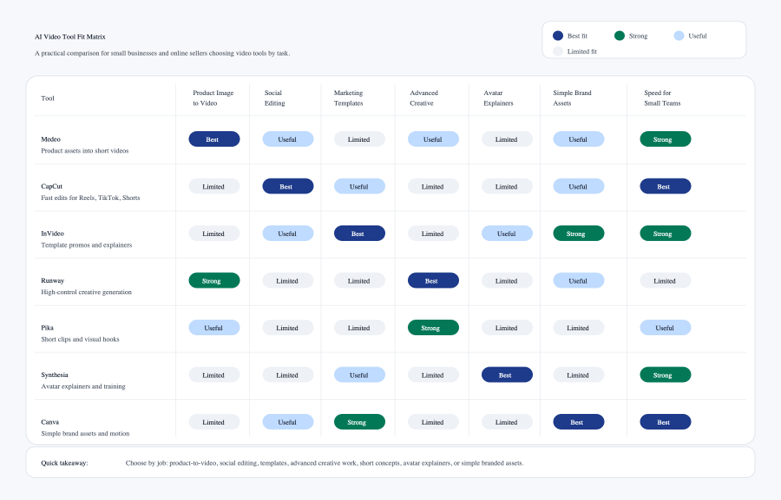
When it comes to creating small video clips from product images or marketing photos, Medeo is a viable option. For fast social clips, CapCut shouldn’t be overlooked when it comes to editing. InVideo can save time if the business requires marketing videos that are based on templates. Runway is more powerful for more complicated creative projects. If you are looking to create short experimental videos, then Pika is worth a shot to test. Synthesia is more suitable for training and explainer videos. Canva can easily be used for simple branded assets.
Small businesses should also think about the full workflow, not just the generation step:
- What assets do you already have?
- Do you need product videos, ads, explainers, or social clips?
- Will the video be used on TikTok, Instagram, YouTube, a product page, or in email?
- How much editing control do you need?
- Does the tool support your brand style and aspect ratios?
- Can your team review and improve the output quickly?
It is essential to answer these questions because AI video is no longer a single type of video. Some tools are more suited to generation. Some are more suitable for editing. Some are better for templates. Some are better for business communication.
My Practical Pick
If I were a small online business, then I would not use one tool for all of my needs. I would use Medeo or another image-to-video conversion tool to create animated product photos, CapCut for the “real” editing and TikTok style, Canva for basic branded posts, and only use Synthesia when I need an explainer voiced by a presenter.
I would use Runway or Pika for more creative campaigns, but I would not rely on them for a typical batch of campaigns. This is important for small businesses since not all tools are the most powerful ones. It’s thIts the group to create actionable videos regularly.
Practical Tips for Better AI Videos
AI video tools are simpler to use than old production software; however, quality depends on the input and approach.
Keep a clear objective. The video to accompany a product page should generally be more informative and slower than a TikTok hook. A paid ad requires a powerful initial few seconds. Clarity is a requirement for a training video. The brand announcement must be consistent.
Make sure that your source material is robust. Unless the subject or scene is complex, messy product pictures are unlikely to perform as well as clean, well-lit shots with simple backgrounds. The confusion in the input streams is sometimes echoed in the output streams of the video.
Start with short clips initially. Since these AI videos are shorter, it is easier to review, edit, and improve them. They also minimize the risk of visual drift, particularly if a product, face, label and/or object needs to remain consistent.
Edit before publishing. Sometimes good AI-generated material requires captioning, music, editing, color correction and/or a stronger call to action. The best AI video process is typically not “Create and Upload. The process is “generate, choose the best version, edit, and publish”.
Test different versions. A primary strength with small businesses is velocity. Teams can design multiple hooks, formats, and visuals to find out which one works best, rather than creating one video and hoping it works, or will work.
Final Thoughts
With their ability to reduce the time and expense of video production, AI video generators are quickly transforming into a viable solution for small companies and online retailers. They simplify the process of converting product images, text-based concepts, brand assets,s and scripts into something visual.
Not magic – and they certainly don’t obviate taste. There is still a need for the business to have an understanding of its audience, select the message, assess the product,ct and carefully edit it.
However, with small teams requiring additional product videos, social videos, ads, explainer videos, and branded content, AI video tools can help make the process much simpler.
The ideal selection is to take the tool based on the work. For product image and marketing asset videos, use Medeo; for social editing videos, use CapCut; for templates, use InVideo; for advanced creative videos, use Runway; for short visual experiments, use Pika; for explainer videos, use Synthesia; and for simple branded content videos, use Canva.
With the right approach, these can be used to boost small business video production without the scale of a full production project.
Popular on OTW Right Now!




About The Author

Gagan Bhangu
Founder of otechworld.com and managing editor. He is a tech geek, web-developer, and blogger. He holds a master's degree in computer applications and making money online since 2015.