
AI in Recruiting for Small Businesses: Tools, Compliance Risks, and Best Practices
AI recruiting tools can help small businesses source candidates, screen resumes, write job descriptions, schedule interviews, and manage hiring workflows without adding a large recruiting team. The challenge is choosing tools that fit the company’s hiring volume while keeping humans involved in consequential decisions.
For a small employer, the best approach is not to automate hiring end to end. It is to automate repetitive work while keeping candidate evaluation, accommodation, and final hiring decisions under meaningful human oversight.
What are the best ai hiring tools?
The best AI hiring tools for small businesses are Zoho Recruit, Workable, Manatal, Recruiterflow, and sourcing-focused platforms such as Juicebox, depending on the hiring workflow.
Current software comparisons show a large and increasingly fragmented market. G2 tracks hundreds of AI recruiting products, while recent recruiting-software comparisons highlight different winners depending on whether the priority is applicant tracking, sourcing, screening, or automation.
For a small business, evaluate tools against five practical requirements:
- Applicant tracking: Can it centralize applications instead of leaving candidates across email and spreadsheets?
- Sourcing: Can it identify candidates from existing databases or external sources?
- Screening: Does it help organize qualifications without making opaque automatic rejection decisions?
- Automation: Can it handle scheduling, candidate communication, and administrative work?
- Controls: Can recruiters review, override, document, and audit AI-generated recommendations?
For many small employers, an affordable ATS with useful AI features is more practical than purchasing a standalone AI hiring platform.
Are there ai hiring tools free to use?
Yes, there are AI recruiting tools with free plans or free trials, although genuinely free AI functionality is usually more limited than paid enterprise features.
Zoho Recruit currently offers a Forever Free plan for basic recruiting, with one active job and candidate-management capabilities. Its paid Enterprise edition adds AI-oriented capabilities such as candidate matching and recruitment automation.
Free options are most useful when a business is hiring occasionally. Before choosing one, check whether the free tier limits:
- Active job openings
- Candidate records
- Resume parsing
- AI matching
- Integrations
- Automation
- Reporting
- User accounts
A free ATS can be enough for a small company hiring a handful of employees each year, but businesses hiring continuously will usually outgrow the limitations.
What are the top ai recruiting tools?
The top AI recruiting tools in 2026 fall into several categories rather than one universal ranking.
Best for an all-in-one small-business ATS: Zoho Recruit is a strong option because it combines applicant tracking, recruiting workflows, candidate management, and AI features. Its Zia system can assist with candidate matching, job-description creation, profile summaries, assessments, and candidate engagement.
Best for broader ATS and CRM workflows: Lever is designed around recruiting operations, candidate relationship management, and AI-assisted workflows.
Best for skills-based talent intelligence: Eightfold AI focuses on matching people and jobs using skills and talent data.
Best for sourcing: SeekOut, hireEZ, and Juicebox are designed around finding and engaging candidates rather than replacing the entire ATS.
Best for high-volume interviewing: HireVue is positioned around assessments and video interviewing.
The key point is that “top” depends on the bottleneck. A ten-person company that receives 40 applications for a role needs a different tool from a company processing thousands of applications.
Are there ai recruiting tools free to use?
There are free recruiting platforms, but “free” does not necessarily mean that every AI feature is free.
For example, Zoho Recruit’s free edition supports basic recruiting, while more advanced functionality is available in paid editions.
For a small business, start with the free or trial version and test one complete hiring workflow: publish a job, collect applications, screen candidates, schedule interviews, communicate with applicants, and document the decision. If the tool cannot handle that workflow without excessive manual work, paying for additional AI features probably will not solve the underlying problem.
What is the latest ai hiring tools lawsuit?
The most closely watched current AI hiring litigation involves Workday, where applicants allege that AI-powered recruiting technology produced discriminatory outcomes.
In September 2026, Reuters reported that plaintiffs were seeking class certification in litigation involving Workday’s hiring technology. The allegations include disparate impact on Black applicants, women, older applicants, and people with disabilities. Workday denies wrongdoing and says its tools evaluate qualifications rather than protected characteristics.
The case matters to small businesses because it reinforces an important principle: buying an AI hiring product does not automatically transfer the employer’s employment-law responsibilities to the vendor.
The practical lesson is to document how AI is being used, validate screening criteria, monitor outcomes, and ensure humans can review decisions.
How do ai recruitment tools bias hiring decisions?
AI recruitment tools can bias hiring decisions when their training data, scoring criteria, proxy variables, or implementation systematically disadvantage certain groups.
The problem does not require an algorithm to explicitly ask for race, age, sex, or disability. A system can potentially rely on other variables that correlate with protected characteristics or reproduce patterns contained in historical hiring data.
The EEOC has specifically warned that existing federal employment-discrimination laws apply when employers use software, algorithms, and AI in recruiting and employment decisions.
Small businesses should therefore avoid treating an AI score as an objective hiring decision. Instead:
- Define job-related selection criteria before reviewing candidates.
- Test whether the AI’s recommendations make sense against those criteria.
- Give recruiters the ability to override recommendations.
- Keep records explaining important hiring decisions.
- Review outcomes for unexpected disparities.
- Provide appropriate accommodation processes.
This is especially important for automated resume rejection, personality assessments, facial analysis, voice analysis, and other systems that can affect who progresses through the hiring process.
What are the best ai recruiting tools small business owners use?
The best AI recruiting tools small business owners use are usually affordable ATS platforms with AI assistance rather than complex enterprise systems.
A sensible shortlist is:
- Zoho Recruit: Best for combining affordability, ATS functionality, and AI assistance.
- Manatal: Best for small teams wanting an ATS with AI-supported candidate recommendations.
- Workable: Best for businesses wanting recruiting workflows and published pricing.
- Recruiterflow: Best suited to teams that need stronger recruiting CRM and automation capabilities.
- Juicebox: Best when candidate sourcing is the primary problem.
The right choice depends on whether the business needs more candidates, faster screening, better organization, or less administrative work.
What is an ai recruiting agent?
An AI recruiting agent is software that can perform a sequence of recruiting tasks with less step-by-step human instruction than conventional automation.
Instead of simply following a rule such as “send this email when a candidate applies,” an agent may interpret a recruiting request, search for candidates, summarize profiles, draft outreach, schedule interactions, and update recruiting records.
That makes agents potentially more powerful but also increases the need for controls.
For small businesses, the safest early use cases are administrative: sourcing assistance, interview scheduling, candidate communications, job-description drafting, and resume summarization. Fully autonomous candidate rejection or hiring decisions create substantially greater compliance and quality risks.
What is the ai hiring tools job market impact?
AI hiring tools are likely to change recruiting work more than eliminate the need for recruiters.
The biggest impact is on repetitive tasks such as resume review, candidate communication, scheduling, sourcing, interview transcription, and recruiting analytics. AI can allow a small company to perform more recruiting work with fewer administrative resources.
However, efficiency does not automatically produce better hiring. If a company uses AI to process more candidates without improving its job criteria or evaluation process, it can simply make poor decisions faster.
That is why small businesses should measure outcomes such as time-to-hire, qualified applicants per opening, interview-to-offer conversion, candidate experience, and retention rather than AI usage alone.
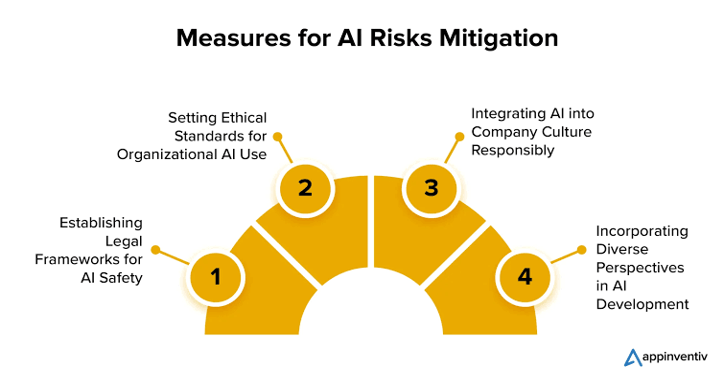
Build a small-business AI recruiting workflow with human control
Small businesses should begin with the lowest-risk recruiting tasks and expand automation only after the workflow is reliable.
Start by using AI to draft job descriptions and organize applications. Add sourcing and candidate summarization next. Then automate scheduling and routine communication. Keep candidate advancement, accommodation decisions, and final hiring decisions subject to human review.
For employers operating in New York City, additional requirements can apply. NYC’s Automated Employment Decision Tools rules require covered employers and employment agencies to meet requirements including a bias audit, public availability of audit information, and candidate or employee notices before using a covered AEDT.
That makes compliance review part of software selection, not something to address after implementation.
Make AI recruiting useful before making it autonomous
The best AI recruiting strategy for a small business is to automate recruiting administration first and automate judgment last.
Choose an affordable platform, test its AI recommendations against clearly defined job criteria, document human decisions, and regularly review whether the system is producing unexpected patterns. A small business does not need the most sophisticated AI recruiting stack; it needs a controlled workflow that saves recruiters time without turning hiring decisions into an unexplained algorithmic process.
Popular on OTW Right Now!
-
 How Battery Technology Limits the Intelligence Capabilities of AI Glasses
-
 The 8 Best AI Software Development Companies Right Now — And Why Most of Them Don’t Deserve the Title
-
AI Video Marketing in 2026: How Brands Are Creating More Content With Less Production
-
 Enjoy Fast Rendering Speeds with AI Picture to Video

About The Author

Gagan Bhangu
Founder of otechworld.com and managing editor. He is a tech geek, web-developer, and blogger. He holds a master's degree in computer applications and making money online since 2015.