
How to Turn Your Lyrics Into a Song With AI: A Practical Guide
Yes, you can use an AI music generator to take your written lyrics and turn them into a song with melody, arrangement, and vocals. To get the best results, you want to be in the mode where you can input your own words, structure your lyrics into sections, and describe the sound you’re after rather than just name a genre.
Can AI Turn Written Lyrics Into a Song?
Some AI music tools allow you to input your own lyrics and have it generate a sung track from them. That’s quite different from just feeding the tool a theme (e.g. “a song about moving to a new city”) and having it write the lyrics for you. If you want to use your own lyrics, then you’ll need to look for a lyrics or custom mode that will take your text as the song lyrics.
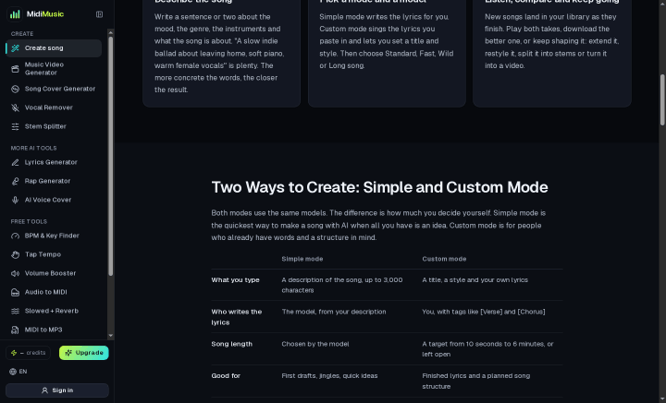
MidiMusic AI offers a Custom mode for a title, style, and user-provided lyrics. Its Simple mode is designed for a description and lets the model create the lyrics. Choose the mode that matches what you already have.
Prepare Your Lyrics Before Generating a Song
Before you paste your lyrics into a generator, take a few minutes to format them:
- Separate the sections with labels such as [Verse], [Chorus], and [Bridge].
- Make sure every line is easy to sing. Lines that are too long are going to be difficult to fit into a melody.
- If you want the chorus to come back with the same words, then just repeat it exactly.
- Read your lyrics out loud to pick up any awkward phrases or words that might be difficult to say.
- Use the lyrics you’ve written or that you have permission to use.
Section labels help the model to understand the structure of your song. They’re just notes for organization really and aren’t anything you sing.
How to Turn Lyrics Into a Song
- Open the song generator. Go to MidiMusic AI and select Custom mode.
- Add a title and lyrics. Paste in the sections in order using [Verse], [Chorus] etc as appropriate. MidiMusic currently allows for 5,000 characters of lyrics.
- Describe the musical style. Genre, feel, tempo, instruments, and type of vocal delivery are all things you should mention.
- Choose vocals or instrumental. If you want the lyrics to be sung, then leave ‘vocals’ on. If you just want the lyrics to inform the music and don’t actually need a singer then select ‘Instrumental’.
- Choose the model and target length. Check the credit cost prior to generating the song.
- Generate and compare. You’ll typically end up with two versions. Listen to both in your library and keep the one that best fits your lyrics and style.
How to Write a Better Music Prompt
A useful starting formula is:
Genre + mood + tempo feel + instruments + vocal style
For example:
Gentle indie folk, a reflective and hopeful sort of mood, mid-tempo with acoustic guitar and soft piano, warm and intimate lead vocal.
This is the way you describe the sound you’re after rather than asking the model to reproduce a particular artist or song. If the first result is too bright, change the mood. If the arrangement is too full, take some instruments out of the prompt. Make one or two changes at a time so you can actually hear the difference.
What to Do When the First Song Is Not Quite Right
| What you hear | What to try |
| The genre is too broad or not quite right | Add a more specific subgenre and name a few instruments. |
| The mood feels wrong | Replace general words such as “good” or “sad” with a clearer emotional direction, such as “restrained and nostalgic.” |
| The vocal delivery does not fit | Describe the delivery in plain terms, such as “soft and close” or “energetic and clear.” |
| The lyric sounds rushed | Shorten long lines, add section breaks, or simplify phrases with many syllables. |
| The song ends before the idea feels complete | Review the lyric structure and length settings, or use an available extend feature on the generated track. |
| You want to compare different arrangements | Keep the lyrics fixed and change only the style description for the next version. |
What to Check Before Sharing an AI-Generated Song
Before you go and publish it, make sure you actually own the lyrics and any audio that you’ve uploaded or that you’re uploading, or that you have the appropriate permission to use them. The MidiMusic terms state that commercial use is dependent on the plan you had when you made the song, so you need to check the current rules for monetized videos, client work, and commercial releases. Also be sure to listen to your song to make sure it doesn’t sound like another song to the point of being unoriginal before you go and share it.
Frequently Asked Questions
Do I need to know music theory?
No, you don’t need to know any music theory at all. You can just describe the sound you’re after in normal everyday language. Genre, mood, tempo, instruments and vocal style are all good places to start.
Can I use my own lyrics?
Yes, you can. Use the custom/lyrics mode to enter your own words and make sure you have the rights to use those lyrics.
Can I choose the music style?
Yes, you can specify the genre and tone you’re after. The more precise you are the better the generator will understand what you’re looking for.
Can I make an instrumental version?
Yes, you can. Select the instrumental option when you’re generating your song. If you already have a vocal track then you can use a vocal remover to create a separate backing track.
Can I use the generated song commercially?
Check which plan you were on when you created the track. Commercial use is linked to the plan you were on at the time of track creation under MidiMusic’s Terms of Service.
Popular on OTW Right Now!



About The Author

Gagan Bhangu
Founder of otechworld.com and managing editor. He is a tech geek, web-developer, and blogger. He holds a master's degree in computer applications and making money online since 2015.