
What Should You Look for When Choosing a Mid-Range Gaming Laptop?
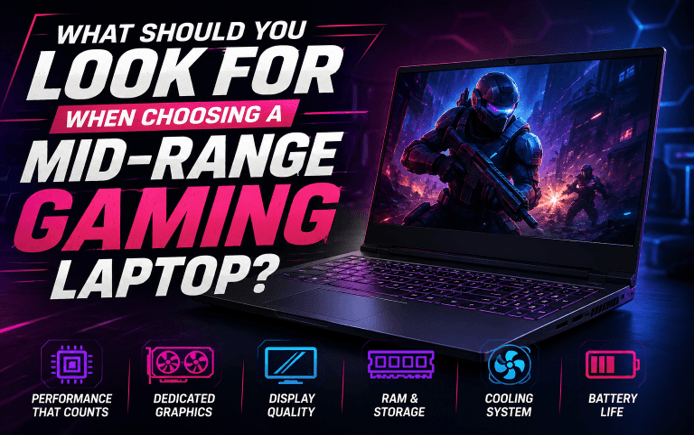
Choosing a mid-range gaming laptop can be more complicated than simply comparing prices and processor names. Manufacturers offer many combinations of CPUs, GPUs, memory, storage, displays, and cooling systems, and two laptops with similar specifications can deliver noticeably different gaming experiences.
A good mid-range gaming laptop should provide a sensible balance between gaming performance, display quality, thermals, portability, storage, and price. The goal is not necessarily to buy the most powerful hardware available, but to choose a configuration that matches the games and applications you actually use.
This matters because most gaming laptops offer limited upgrade flexibility compared with desktop PCs. CPU and GPU upgrades are generally not practical, so choosing the right core hardware at the time of purchase matters.
What Makes a Gaming Laptop “Mid-Range”?
There is no universal specification that officially defines a mid-range gaming laptop. The category generally describes systems positioned between entry-level gaming machines and premium or enthusiast models.
A mid-range model typically aims to deliver strong 1080p gaming performance while providing enough processing power for everyday productivity, content creation, streaming, and other demanding applications.
Instead of focusing only on the laptop’s advertised price, consider whether its CPU, GPU, memory, storage, display, and thermal design are balanced. A powerful component paired with significantly weaker supporting hardware may not provide the best overall value.
Which GPU Should You Prioritize for Mid-Range Gaming?
The graphics processing unit (GPU) is one of the most important components in a gaming laptop because it handles the rendering of game visuals and has a major influence on frame rates and graphics settings.
When comparing laptops, don’t look only at the GPU family name. Check the specific GPU configuration, available VRAM, power limits, and independent performance benchmarks.
Your target resolution also matters. A laptop intended primarily for 1080p gaming has different requirements from one expected to drive a 1440p external monitor at high settings.
Modern graphics technologies such as ray tracing and AI-assisted upscaling can also influence your choice. If these features matter to you, check whether the GPU supports the technologies used by the games you intend to play.
How Much VRAM Do You Need?
VRAM is dedicated memory used by the GPU to store graphics data. The amount you need depends on the games, resolution, texture quality, and graphics settings you plan to use. Higher resolutions and demanding settings can require more VRAM.
Rather than choosing a laptop solely because it has a certain VRAM number, compare real-world benchmarks for the games you care about.
How Important Is the CPU in a Gaming Laptop?
The CPU handles game logic, system processes, background applications, and many other computing tasks. It also becomes increasingly important when you’re gaming while streaming, recording gameplay, using voice chat, or running other applications at the same time.
Look at the processor’s generation or series, core and thread configuration, and performance benchmarks rather than relying only on the model name. CPU performance can affect frame rates, application responsiveness, and multitasking.
For a balanced mid-range system, the CPU should complement the GPU rather than significantly overpowering or limiting it.
How Much RAM Should a Mid-Range Gaming Laptop Have?
For a best gaming laptop, 16GB of RAM is a practical starting point for many users. It provides more flexibility for modern games alongside applications such as browsers, Discord, game launchers, and recording or streaming software. Intel also identifies 16GB as a useful level for newer games and multitasking.
Consider 32GB if you regularly perform memory-intensive tasks such as:
- Video editing
- 3D rendering
- Game development
- Heavy multitasking
- Streaming while gaming
- Running virtual machines
Also check whether the laptop allows RAM upgrades. Laptop upgradeability varies significantly between models, and some systems have memory that cannot easily be replaced.
What Type and Amount of Storage Should You Choose?
The choice of storage in a modern gaming laptop is usually an NVMe SSD. SSDs are also much faster in accessing data than mechanical hard drives, leading to faster boot times, application loading, and game loading. NVMe drives take advantage of the PCIe interface to achieve fast storage speeds.
But it’s also crucial to consider capacity. With today’s games, a laptop with a small SSD can fill up quickly.
Before purchasing, check:
- SSD capacity
- NVMe/PCIe interface
- Number of storage slots
- Whether the SSD can be replaced
- Cost of upgrading storage later
For many buyers, premium features may not make sense when they could be bettering their value by investing in extra SSD storage.
Which Display Features Matter Most for Gaming?
Take into account resolution, refresh rate, response, panel technology, brightness, color quality, and screen size. A higher refresh rate will result in smoother, fast-moving action, and a higher resolution, sharper image.
A high refresh rate, good 1080p resolution display can provide an ideal balance to many mid-range buyers for both image quality and gaming experience.
But if you are buying a laptop for gaming at 1440p, be sure the graphics card is capable of handling 1440p at all times.
Also, you need to take into account whether or not you’ll be linking an external gaming monitor. If it does, verify if the laptop is capable of the necessary video output and hardware compatibility with the resolution and refresh rate you wish to use.
Why Does Cooling Matter So Much?
The CPU and GPU are under heavy load with games and produce a fair amount of heat. So there is a direct connection between a laptop’s cooling system and its performance.
Cooling systems typically use combinations of:
- Fans
- Heat pipes
- Heatsinks
- Air vents
- Thermal management software
A fast-running laptop for a couple of minutes, but only a fraction of that speed when under prolonged use, might not be a wise long-term investment.
The specification details provided by manufacturers may not be the most telling when it comes to comparing gaming laptops, so an independent review and prolonged load testing can help.
How Important Are Battery Life and Portability?
A gaming laptop is created around a compromise between performance and mobility.
While a powerful gaming machine may be beneficial in heavy usage, bigger cooling mechanisms and top-of-the-line parts may make it heavier and less portable. However, a thinner system might be easier to transport but may come with performance and thermal trade-offs.
Battery life should also be evaluated according to your actual usage. Also, battery life during gaming won’t be the same as when browsing the web or working on a document, since gaming can drain a battery much faster than productivity tasks.
If you mostly game at a desk, performance and cooling may deserve higher priority than maximum battery life.
Which Ports and Connectivity Options Should You Check?
A gaming laptop should provide enough connectivity for the way you plan to use it.
Check for ports such as:
- USB-A and USB-C
- HDMI or another display output
- Ethernet, if important to your setup
- Headphone/microphone connectivity
- High-speed external storage support
Also consider wireless connectivity. Depending on the laptop, Wi-Fi 6 or Wi-Fi 7 can provide modern wireless networking capabilities.
Having enough compatible ports can make a world of difference if you’re using an external monitor, gaming mouse, keyboard, headset, controller, and external SSD.
How Can You Tell Whether a Laptop Offers Good Value?
Instead of asking, “Which laptop has the best specifications?” ask:
“Which laptop gives me the performance and features I actually need for the money?”
Create a priority list before shopping:
- Target games and expected resolution
- GPU performance
- CPU performance
- RAM capacity
- SSD capacity
- Display quality
- Cooling performance
- Upgradeability
- Ports and wireless connectivity
- Battery life and portability
This way, you avoid wasting any extra cash on features that don’t make much of a difference to the actual gamer.
Use Case:
Imagine that a student wants to use one laptop for playing games, university business, programming, and even for occasional video editing.
They can consider a more balanced CPU-GPU setup, rather than the highest-priced option, 16GB or greater of RAM, an NVMe SSD, a high-refresh-rate screen, adequate cooling, and ports.
This setup can offer a high-performance gaming experience and simultaneously be advantageous for productivity and technical tasks.
Conclusion:
The mid-range gaming laptop doesn’t necessarily have to be the most powerful one on the market. It’s the one that has the right balance of GPU power, CPU power, RAM, storage, display quality, cooling, connections, and portability that fits your needs.
Start with the games and apps you plan to play. Next, select the GPU and CPU for the game, RAM for working memory, and quick SSD storage for loading games on the fly. After that, evaluate the display, cooling system, ports, upgradeability, and battery life. For a well-balanced system, Tech Solutions can also help you compare compatible hardware and performance requirements based on your intended workload.
Above all, look at real-world benchmarks and reviews, rather than manufacturer specs. A laptop that is well-balanced can provide a superior experience and a superior long-term value when compared to a well-designed laptop that falls short in some key areas.
FAQs:
1. What is the most important component in a gaming laptop?
For gaming, the GPU is often among the most crucial parts, as it can significantly affect graphics performance and frames per second. But it should go hand in hand with a powerful CPU and ample RAM.
2. Is 16GB RAM enough for a gaming laptop?
If you’re looking to start gaming or handle typical daily workloads, 16GB is a good amount to start with. For users streaming, editing video, running virtual machines, or heavy multitasking, 32GB is beneficial.
3. Is a gaming laptop worth buying instead of a gaming PC?
If portability and a single device that provides gaming performance are on your agenda, a gaming laptop is a good option. The desktop will have more upgrade potential, and the laptop will have both mobility and performance.
Popular on OTW Right Now!



About The Author

Gagan Bhangu
Founder of otechworld.com and managing editor. He is a tech geek, web-developer, and blogger. He holds a master's degree in computer applications and making money online since 2015.