
7 Best AI Text to Video Generators in 2026
AI video generation allows you to turn your ideas into videos using text prompts. The output can be a video clip, a video with narration and sound, an animated image, a sequence of scenes connected together, or even a full-length video. In this guide we look at seven AI video tools, what they do best and how you can pick the right one for your project.
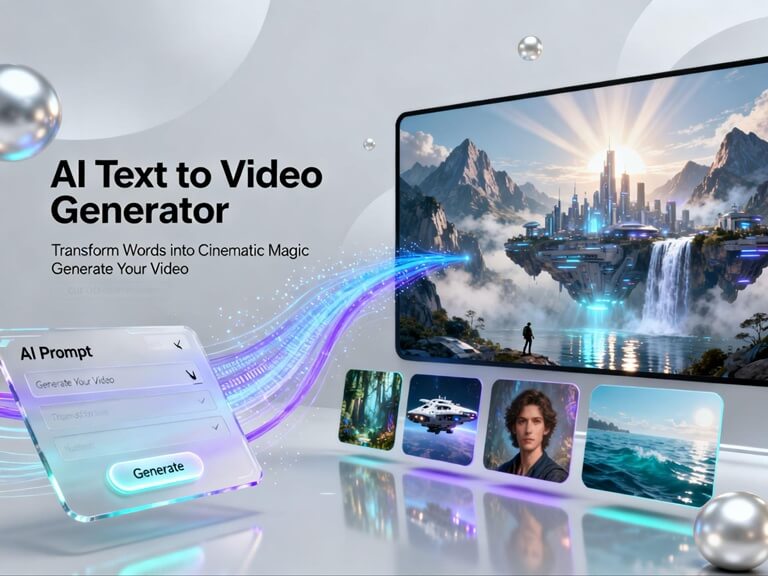
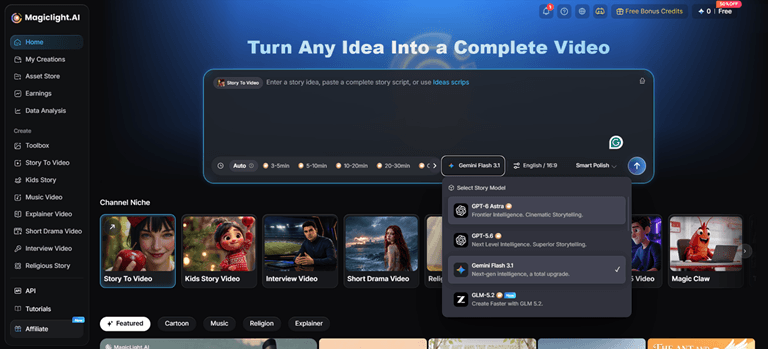
1. Magiclight AI — Best for Long-Form Storytelling
Best for: YouTube stories, educational explainers, kids’ stories, and narrative videos.
Magiclight AI is designed to help creators turn ideas, scripts, and stories into complete videos. For creators who need a complete storytelling workflow, its main appeal is bringing multiple production steps into one place.
Key features include:
- Story to Video: Supports scripts up to 12,000 characters, 9 story models, 11 languages, and videos up to 50 minutes.
- AI Character Creation: Create reusable characters from text descriptions of up to 1,000 characters or reference images to support visual consistency.
- Storyboard Preview: Review and edit scripts, scenes, and character appearances before video generation.
- Voiceover and Subtitles: Includes 37 AI voices, voice cloning, and 16 subtitle styles.
- AI Video Models: Offers 9 AI models, including GPT-series and Gemini models, for video generation.
- MagicLight Agent:Helps you to organize your scripts, storyboards, and budgets prior to making your video. Can suggest formats such as explainer videos, kids stories or religious stories. You can then go on to set up your character visuals and voices once you’ve approved the script.
Keep in mind that the final video will be determined by your script, the style you choose and the settings you employ. Always check the output prior to publishing, particularly if character consistency and the accuracy of the scenes are important to you.
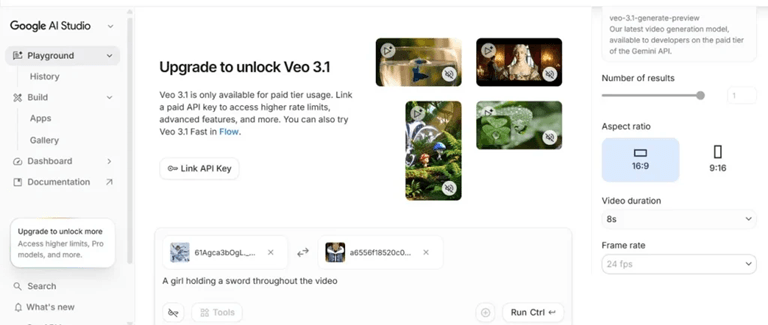
2. Google Veo — Best for Cinematic Video Generation
Best for: Realistic scenes, cinematic visuals, and videos with generated audio
This AI text-to-video tool is very good for pros as it understands the prompts for zooms, pans, and aerials. It’s a good option if you’re after a certain kind of cinematic shot with a particular kind of lighting, atmosphere and movement.
Key features include:
- Text-to-video and image-guided generation options depending on the workflow.
- Detailed scene descriptions and camera movement.
- Native dialogue, ambiance, and sound effects in the supported versions.
- Creative controls for the development and extension of scenes.
Potential limitation: Keep in mind that access, generation limits, video length and features will vary by product and model. You may well need to piece the generated shots together to make up a full story.
3. Runway — Best for Creative Video Workflows
Best for: Filmmakers, designers, and creative production teams
Runway is a good option if you’re using AI as part of a wider creative process. You can generate video ideas from prompts or images and then go on to refine the visuals. It’s useful for producing visual concepts, playing around with various ideas or creating shots to use as part of a larger project.
Its strengths may include:
- AI video generation for visual concepts and scenes.
- Creative controls for shaping motion and appearance.
- Workflows that combine generated content with further editing.
- Applications in concept development, advertising and short films.
Potential limitation: The controls, video length, and usage limits will vary by model and subscription. Always check your plan details prior to commencing a project.
4. Kling AI — Best for Dynamic Motion and Detailed Scenes
Best for: Cinematic clips, character movement, and visually detailed scenes
Kling AI is another option for creators who want to generate video from text prompts or use images as a starting point. Its appeal is the ability to explore detailed visual scenes and dynamic movement, depending on the model selected.
Potential strengths include:
- Text-to-video and image-to-video workflows.
- Generation of character actions and environmental movement.
- Cinematic visual styles and scene composition.
- Different generation settings across the various supported models.
Potential limitation: Keep in mind that motion quality, character consistency, video length, resolution and audio characteristics can vary from model to model. You may well need to try a few times to get a complex action just right.
5. Hailuo — Best for long, detailed directions.
Best For: Stylized short videos with smooth character motion, expressive facial details, and stable visual styles.
With Hailuo AI you can generate multiple videos at once (same script) and it’s up to 2.5x faster than a lot of other AI video models and maintains a consistent visual style across all the frames, no warping or glitches.
Potential strengths include:
- AI Video Generation – Turn text prompts into dynamic AI-generated videos with cinematic visuals and motion.
- Start & End Frame Control – Define the beginning and ending frames to guide video transitions and scene progression.
- Flexible Video Settings – Choose supported resolutions and video durations to fit different creative needs.
- Hailuo AI Agent – Explore AI-powered creative workflows to simplify video creation and bring ideas to life.
Potential limitation: Individual generations and reference videos are limited to a maximum of 15 seconds.
6. Pika — Best for Creative Effects and Short Videos
Best for: Social media clips and playful visual experiments
Pika is a good option if you’re after some creative visuals and short videos. You can generate clips and play around with various effects and transformations without having to go to the bother of setting up a full production pipeline.
Potential strengths include:
- Prompt-based video creation in supported workflows.
- Creative effects and visual transformations.
- Quick experimentation with different concepts.
- Potential applications in social media and entertainment content.
Potential limitation: If you need a long video with detailed narration, recurring characters, and carefully connected scenes, you may need additional tools or editing work.
7. Luma AI — Best for Exploring Cinematic Visual Ideas
Best for: Visual experimentation, atmospheric scenes, and creative concepts
Luma AI offers creators AI-powered tools to explore cinematic scenes and motion. Whether it’s the right fit for your project or not is going to be down to the model and the tools you’re using.
Potential strengths include:
- Generating visual concepts from prompts in supported workflows.
- Exploring camera movement, atmosphere, and scene composition.
- Developing cinematic shots for creative projects.
- Using generated content as a starting point for further editing.
Potential limitation: Individual generated clips may need to be edited together to form a complete narrative. Check the current model’s generation limits and access requirements before starting a larger project.
Best AI Text to Video Generators Compared
The following table summarizes which type of creator may benefit most from each tool.
| Tool | Best for | Main consideration |
| Magiclight AI | Long-form stories and explainers | Complete storytelling workflow |
| Google Veo | Cinematic scenes and generated audio | Model access and generation limits |
| Runway | Creative production workflows | Available editing and generation controls |
| Kling AI | Detailed scenes and dynamic motion | Results vary by model and prompt |
| Hailuo | Stylized short videos with smooth character motion | Visual styles steady across all frames without distortions or glitches |
| Pika | Short clips and creative effects | Better suited to focused visual ideas |
| Luma AI | Cinematic concepts and visual experiments | May require further editing for complete videos |
Look for tools that help you organize scenes and preserve visual continuity. Magiclight AI is worth considering for this use case because its published workflow supports long-form videos of up to 50 minutes.
Guide to Turn Text Into Video With MagicLight AI
MagicLight AI is a text-to-video tool that helps creators turn written content into complete videos. Follow these steps to create your video:
Step 1. Enter Your Script
Select Story to Video, paste your script, and set the duration, model, language, and aspect ratio.
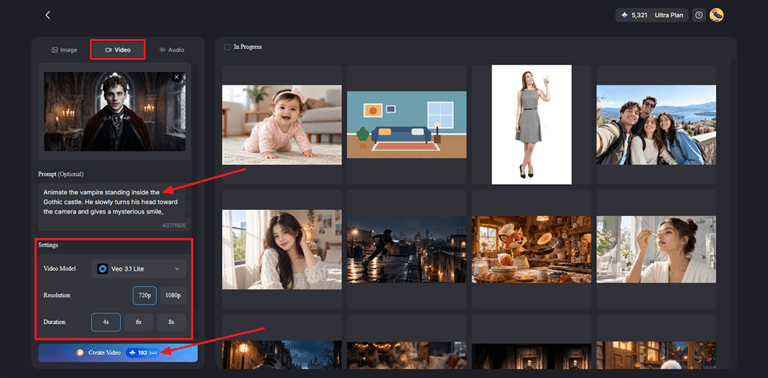
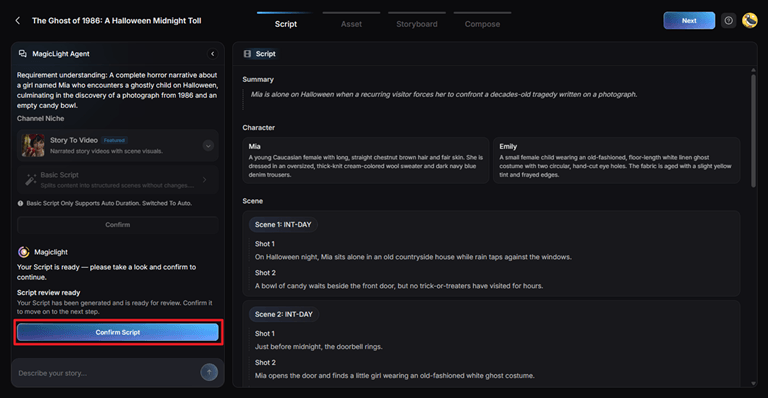
Step 2. Review the Story
Check the Summary, Characters, Scenes, and Shots generated by MagicLight Agent, then confirm the script.
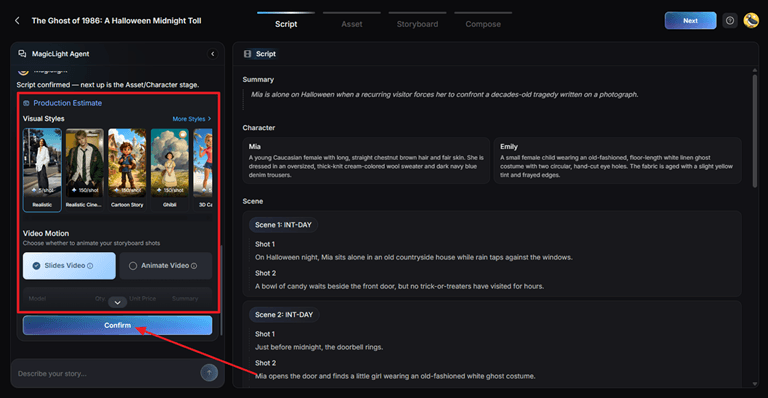
Step 3. Customize the Video
Choose a visual style and select Slides Video or Animate Video.
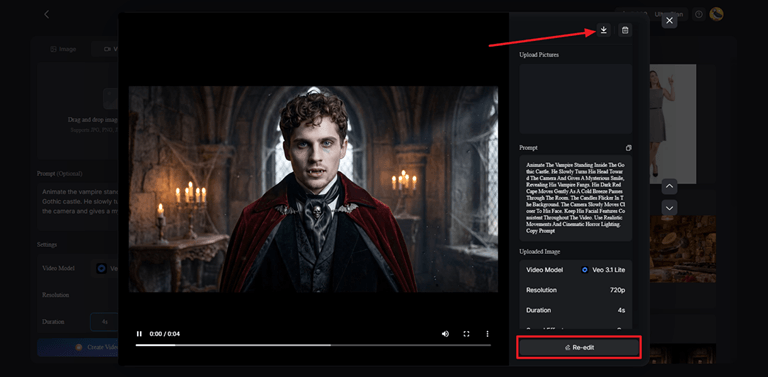
Step 4. Refine and Generate
Adjust characters, storyboard shots, voices, effects, subtitles, and background music. Generate the video, review the result, and download it.
Conclusion
The best AI text-to-video generator for you depends on your project. Some tools are great for cinematic visuals and short clips, while others are better for creative experiments or full storytelling workflows.
Popular on OTW Right Now!


About The Author

Gagan Bhangu
Founder of otechworld.com and managing editor. He is a tech geek, web-developer, and blogger. He holds a master's degree in computer applications and making money online since 2015.