
Gemini Omni and the Rise of Multimodal AI Workflows in 2026
Artificial intelligence tools have changed dramatically in a short period of time. Not long ago, most people used one AI tool for writing, another for generating images, and a completely different application for creating or editing videos.
That fragmented workflow is beginning to change.
One of the biggest technology trends in 2026 is the increasing use of multimodal AI: systems that are able to process information across all media formats, and not just text, images, and videos separately.
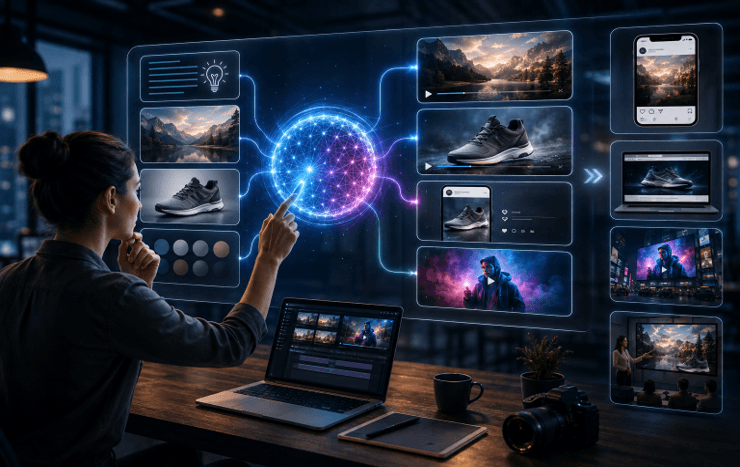
This will be a more significant move than just a newer version of a new image or video model for creators, marketers, small businesses, and everyday users. What’s happening is that the process of all things creative is getting more unified.
A more common question asked by users, as opposed to “Which AI tool should I use for this individual task,” is “Can I do more in one place?”
What Does Multimodal AI Actually Mean?
The word “multimodal” sounds technical, but the basic concept is straightforward.
Typical AI use cases tend to be single-input or single-output systems. The main function of a text generator is to generate text. A picture generator creates pictures based on prompts. A video generator is a system that produces dynamic images.
Multimodal systems: They are systems that are designed, either to understand or produce multiple forms of content in a more unified experience.
For instance, a user may start with an idea in writing, then refer to an existing image, create a new creative asset, and then translate that idea into a short video.
The important part is not simply that AI can create several media types. It’s because those media types can now increasingly be part of the same workflow.
Platforms such as Gemini Omni represent this growing interest in more unified AI creation experiences, where users can move between different kinds of generative tasks without treating every step as an entirely separate project.
This approach is particularly relevant as AI-generated video becomes more accessible.
Why AI Workflows Are Moving Beyond Text
Text generation was one of the first generative AI technologies that got a widespread audience, as it was solving a clear problem.
Writing takes time.
Email, articles, summaries, product descriptions, and social media posts could be composed in a few seconds with the help of AI assistants.
But there’s a bigger workflow challenge with visual content.
Consider what happens when a small business wants to launch a new product online.
The team might need:
- Product descriptions
- Advertising copy
- Website images
- Social media graphics
- Promotional videos
- Different aspect ratios for each platform
- Multiple creative variations for advertising
Those tasks typically require a few iterations of applications, export, resizing, rewriting, and editing.
That complexity has begun to be mitigated by generative AI.
Speeding up each tool is not enough. It’s minimizing the number of times they move from one tool to the next.
Image-to-Video Is Becoming an Important Creative Bridge
The integration of AI-generated images with AI-generated videos is one of the most intriguing developments in recent times.
Images can be controlled relatively easily. A creator may take time to tweak the composition, lighting, subject, background, and visual style to make it look good.
With the video, the complexity is even greater because you need to add the movement.
Rather than creating a scene from scratch, creators can increasingly use an existing image as the basis for a video.
A slow camera movement might be added to a product photograph.
Moving clouds and water can be added to a landscape image.
A fashion idea might be the basis for a short film.
An illustration could be transformed into an animated social media post.
A picture-to-video workflow is an incredibly helpful tool for creators — a visual anchor.
Users can set the look of the scene first, and then concentrate on what the scene is moving.
That can help make AI video more accessible for product marketing, especially.
Short-Form Video Is Increasing the Need for Faster Creation
Content teams are facing a challenging issue with the rise of short-form video.
No longer are companies creating just a few big videos annually. They might have a constant need for content for TikTok, Instagram Reels, YouTube Shorts, ads, product pages, and more.
The formats of the required documents also vary.
The video that works well for a website doesn’t necessarily translate well to mobile viewers when displayed vertically. A slick commercial could be the wrong approach for social media. It may be necessary to perform multiple short versions of a product demonstration.
AI video generation can streamline the process of testing out those formats. The domain of OTechWorld has not yet been entirely dedicated to the AIVGs. Still, it has recently wrapped up coverage of AI video generators specifically for the small business and online seller.
Teams can brainstorm a few ideas instead of just one big idea and then pick out the ones that they want to pursue.
AI Is Making Prototyping Much Faster
This may be one of the most useful applications of generative AI.
Not every AI-generated asset has to become the final product.
Sometimes its biggest value is simply helping someone see an idea.
Imagine a creative team planning a commercial for a new smartwatch. Before AI, they might prepare storyboards, search for visual references, and explain the intended atmosphere through presentations.
Now they can generate early images showing different environments, experiment with lighting styles, and create rough motion concepts before committing to production.
The same process can work for:
- YouTube thumbnails
- Website hero sections
- Social advertisements
- Product photography concepts
- Music video ideas
- App launch campaigns
- Presentation visuals
- Online store banners
This does not necessarily replace professional designers or video production teams.
Instead, it changes what happens before expensive production begins.
AI can generate the rough draft. Humans can then decide whether the idea is worth refining.
Prompting Is Also Becoming More Visual
Prompt engineering was a crucial aspect of early generative AI.
Long descriptions detailing camera angles, lenses, lighting, composition, materials, and styles were often required.
This is still helpful, but multimodal interfaces can help to make the process easier to understand.
It’s sometimes easier to show the AI what you want than to tell them.
A reference image will convey a color palette instantly. Use a product photograph to create a shape of an object. The composition can be provided by an existing drawing. The visual identity of a project can be created by another generated frame.
This gives rise to a process that is both language and visual, that is, prompting.
That can make creating AI much more approachable for those who don’t have a strong background in writing complex prompts.
Small Businesses Benefit From Lower Creative Barriers
Traditionally, professionals have needed time or money to get the job done in their content production process.
A small online retailer might have a clear vision of how they would like to display a product, but not be able to afford to have photographers and editors, designers, and video teams to make the presentation for every campaign.
However, those abilities can’t be fully replaced by AI, particularly in scenarios where precision and brand fidelity are critical.
It cuts the expense of experimentation, however.
A small merchant can investigate a number of backstories for their setup prior to organizing a true product shoot.
A business that is just beginning can get a rough concept for marketing a promotion before spending money on having it professionally produced.
If you have some artworks, you can convert them to motion content for social media using the skill of a freelancer.
When selling online, an online seller can generate several initial ad concepts, rather than going to the expense of a single creative.
AI image tools have already reduced the barrier to entry for those who wish to create images, especially for small business owners and creators with less design experience. Multimodal workflows take that concept a step further and integrate it into a bigger creative process.
More Generation Makes Consistency More Important
There are, however, some limitations to this.
The more you produce, the more you produce doesn’t mean the better, right?
Between outputs, generative AI can cause unanticipated variation. Product information is subject to change. The characters may vary. Colors can change. Information within images may not be the most accurate. Occasionally, video motion is not realistic.
But these problems are especially significant when AI is applied in a business context.
When a company is promoting a physical product, the content that is created should not substantially alter the actual characteristics or look of the product.
This means that the human review will still be required.
The faster the generative tools get, the more time creators may invest in selecting, fixing, and editing outputs, rather than creating everything by hand.
The skill progresses from creation to creative direction.
All-in-One Does Not Mean Fully Automatic
One of the other fallacies around AI is the idea that the end goal is to eventually click a button and let the AI do the entire creative.
That isn’t always a good thing to do.
Making decisions is essential to good content.
Which picture best symbolizes the brand?
Is the message in the video being communicated?
Are the lights suitable?
Is the copy that is generated natural sounding?
Are the final content and the final answers correct?
Any workflow with more than one AI ability requires user input.
The benefits of an integrated AI are not automation in and of itself.
It is continuity.
Users can easily move from idea to image, image to video, experiment to final creative without having to recreate the project again.
The Future of AI Tools May Be About Workflows, Not Features
AI firms have been playing a fiercely competitive game, primarily based on individual capabilities, for the last few years.
One model produces images that are sharper. The other one generates more realistic movement. Another is more precise at following directions.
Those enhancements will be ongoing.
However, as the technology evolves, users will expect more AI platforms to perform a bit more efficiently, and in the absence of friction, that’s another way to measure.
It helps to have a somewhat higher model generation.
An eight-step workflow that eliminates five repetitive steps is even more beneficial.
That’s why it’s important to talk about multimodal AI, even if the technical buzz is captivating, as it is more than just a single model phenomenon.
It changes the way different creative technologies fit together.
What Users Should Look for in Multimodal AI Tools
When assessing multimodal AI tools, Users should consider the following: Users need to evaluate multimodal AI tools based on the following:
When searching for platforms, users should consider them according to their practical needs, not the number of features mentioned in the landing page that are related to artificial intelligence.
Several things should be taken into account.
What is the quality of reference images that are maintained on the platform?
Are there smooth transitions between image and video workflow?
Does it work with the formats required for social media or advertising?
What contingencies does the user have to the generated result?
Are products, characters/letters, and visual styles consistent?
Is it easy to make variations of the concept?
And, of course, does the use of the tool add value to the current workflow?
Not every AI platform has the longest list of features, so it’s not always the most comprehensive one that’s the best.
The one that eliminates the most work that shouldn’t be done.
Multimodal AI Is Changing What “Content Creation” Means
Generative AI started off helping to complete individual creative tasks.
Tasks are beginning to overlap now.
Generating images can be a product of writing. Images can be more than just images; they can be video references. Current assets can be converted into other formats. There are variations of any creative concept that can be created for various platforms.
This is a far greater improvement than just enhancing the quality of AI-generated images.
The most intriguing AI tools are becoming more and more creative environments than generators in 2026.
This is a positive for creators and businesses, as they will no longer have to switch between different applications that do not connect. This is a good thing for creators and businesses, because they will not have to switch between different applications that don’t connect to one another.
There are still some constraints with the technology, and the human element will always be important. The trend is clear, though—AI production is shifting from individual products to interconnected processes.
With that shift in course, the real question might now be, “What can this AI create?”
It may become:
“How much of my creative process can this AI make easier?”
Popular on OTW Right Now!
-
 AI Quote & Proposal Automation: How It Works, Best Tools & Time Saved for Service Businesses
-
 Before You Trust AI, Read This: How Artificial Intelligence Really Makes Decisions
-
 How Small Businesses Can Use AI Image Editing for Better Marketing Visuals
-
 How AI Is Turning Traditional CCTV Cameras Into Intelligent Security Systems


About The Author

Gagan Bhangu
Founder of otechworld.com and managing editor. He is a tech geek, web-developer, and blogger. He holds a master's degree in computer applications and making money online since 2015.