
When Cloud GPU Costs Stop Making Sense: A Practical Framework for Dedicated AI Compute
The usual approach for teams starting their AI journey is to rent GPU capacity from the cloud. This is a quick way to get things set up, and you only pay for the resources you actually use. However, as the workload increases—for example, with more training jobs, more users, and greater amounts of data being transferred in and out—the same arrangement that initially seemed simple begins to become more expensive and more difficult to anticipate.
The article examines when this change happens, as well as the signs that it’s time to consider setting up a dedicated GPU.
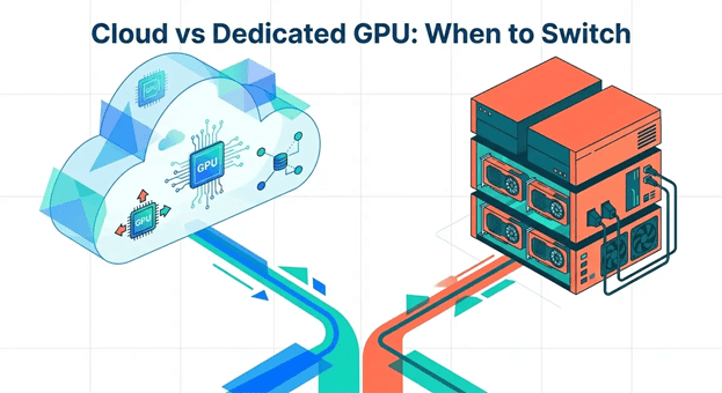
Why GPU Consumption Patterns Matter More Than Headline Pricing
GPU pricing pages show the hourly rate, and this figure is easy to compare across providers. However, the hourly rate only gives part of the picture; what actually determines your monthly bill is the way you use the GPU, for example, how many hours each day it runs for, how much data goes in and out, how much storage remains attached, and how many people have access to it.
A GPU that is used for two hours each day three days a week appears very differently on the bill than one that runs all day and every day. Cloud billing suits the first situation since you are only charged for the time during which it is in use. In the second case, however, hourly pricing works against you because the meter never actually turns off.
That is the reason why looking only at GPU rental prices does not actually answer the real question; the appropriate question to ask is what your actual usage pattern is over a month and whether hourly billing matches that pattern or is contrary to it.
The Costs Teams Miss When They Scale Cloud GPU Usage
When teams first start using cloud GPUs, they focus on the hourly rate, but as usage grows, other costs build up in the background. The following are the ones that teams notice only at a late stage:
Data Transfer and Egress Fees
Data transfer costs apply when data leaves a cloud provider’s network, and they add to the GPU rental price. The major providers charge about $0.07 to $0.12 per gigabyte for data that leaves their network, after first having a small amount per month free. Moving 1 terabyte of model checkpoints or output data could add $70 to $120 to the bill, and that doesn’t even account for cross-region or cross-zone transfer fees, which often apply as well.
The total cloud bill can amount to a significant portion for teams that regularly export their training checkpoints, provide model outputs to users, or carry out data synchronization between regions.
Persistent Storage That Keeps Billing
The storage linked to a GPU instance generally continues to charge even when the GPU is turned off, and a workspace of a few hundred gigabytes can end up costing tens of dollars a month simply because it is idle, waiting for the next job to begin.
Through a number of start-and-stop episodes, this amount becomes a cost that is easy to forget.
Idle Time Between Jobs
Cloud GPUs are charged based on the time they run, not the useful work they complete. The time during which a GPU is in standby between training jobs, while it is waiting for its turn in the queue, or when it is running at low usage during off-hours, is still included in the bill.
With short and simple jobs, this is no issue, but when it comes to workloads that have to be ready most of the day, the idle time gradually nullifies the cost savings that cloud billing is meant to provide.
Deployment Frequency and Access for Teams
Each time a team creates a new instance, there is again setup time, driver checks, and configuration to carry out. For teams that deploy frequently or that have several people who need GPU access at the same time, the cost is not only in cloud charges but also in the amount of time spent managing environments that are reset each time an instance is stopped.
When Dedicated Compute Becomes Operationally Simpler
The maths changes when the pattern of usage is considered. For a GPU that runs most of the day, most days of the week, it is easier to plan a fixed monthly charge than to add up the hourly rates, storage fees, and data transfer charges.
This sort of change generally takes place gradually rather than suddenly. It begins with a series of short experiments, then introduces a routine fine-tuning schedule, followed by serving inference to actual users, and then includes a second or third person who needs GPU access. At every stage, the cloud bill increases in several areas, such as the number of GPU hours, the amount of storage, the volume of data being transferred, and at times there are multiple instances running for different members of the team.
For those teams that have gone beyond carrying out short-term experiments and are now using GPUs on a continuous and regular basis, having a dedicated setup eliminates a number of these variable expenses at the same time. Rather than paying separately for GPU time, storage, and data transfer, a dedicated GPU environment provides a single fixed cost for the entire setup, with the hardware reserved exclusively for that team. It also solves the access problem because the GPU isn’t shared or allocated to other users, and it stays in the same configured state between sessions rather than being reset.
This is the point where many teams start looking at dedicated GPU infrastructure as a practical next step rather than an upgrade. It’s not a universal fix, and it doesn’t remove the need for planning, but for sustained workloads it turns a bill with many moving parts into one number.
Which AI Workloads Benefit Most from Predictable GPU Access
The kinds of workloads which gain the most have a number of features in common: they run frequently, they run over long periods, or they require the same setup to be ready each time.
A model which is put to use by real users throughout the day works well, since the GPU has to remain ready at all times. With a service that never actually stops, idle-time billing is of little benefit. Regular fine-tuning—that is, a team retraining the model on a set timetable—also works well; the GPU is used frequently enough for a fixed charge to generally be better than accumulating hourly charges.
Jobs involving rendering and computer vision that have to deal with large numbers of images or video require steady storage and consistent performance. Since these jobs involve a lot of data transfer, they depend on reliable read speeds rather than just short bursts of GPU power. Similarly, analytical jobs run on a fixed schedule—such as those carried out at night—also benefit from using the same setup every time rather than creating a new instance from scratch.
By contrast, even a single experiment, a brief proof of concept, or a spike in demand that lasts only a few days is generally more advantageous on cloud GPUs. Cloud billing is designed for exactly this: paying only for a few hours or days with no long-term commitment.
A Decision Framework: Cloud GPU or Dedicated GPU?
Deciding between the two doesn’t have to be a guess. A short list of practical signs can show which side of the line your team is really on:
- In a typical week, the GPU is in operation for more than half the hours, not merely for carrying out occasional tests.
- Data transfer and storage charges are now a noticeable element of the monthly bill, not just the cost per hour of GPU usage.
- Several members of the team require regular and same-day GPU access.
- The workload must remain available continuously, for example when providing live inference services.
- Because of privacy or data handling rules, the team has chosen to keep full control over where the data is stored and over who is allowed to access the hardware.
- The time taken to set up between jobs has now become a genuine cost since the instances keep resetting each time.
- It is reasonable for the team to estimate GPU usage next month rather than anticipating any sharp increases or decreases.
If a number of these signs apply to your team, then it’s worth comparing a fixed and dedicated setup with the amount you currently pay for cloud services. In the case where your usage remains occasional, unpredictable, or involves short experiments, it is generally simpler and cheaper to stay with cloud billing, on which you only pay for the time when the services are in use.
There is no one correct answer; align your payment method with how you actually use the GPU, then check that alignment every few months as your usage pattern changes.
Final Words
Both cloud GPUs and dedicated GPUs have their uses, the decision coming down to how steady your usage is. Cloud billing is still a good option for short experiments, sudden spikes in demand, and for work that is unpredictable. However, when a GPU is running most days, is being used by real customers, or is being shared among a growing team, a dedicated setup changes a bill with many variables into a single, clear figure. The easiest way to find out which option you’re using is to check your usage every few months.
Popular on OTW Right Now!



About The Author

Gagan Bhangu
Founder of otechworld.com and managing editor. He is a tech geek, web-developer, and blogger. He holds a master's degree in computer applications and making money online since 2015.