
What Is the Best Free AI Image to Video Generator? A Complete Guide
Artificial intelligence has transformed how people create digital content. Nowadays, it is not necessary to have expert video editing knowledge to make a regular picture a moving, animated video. Now that AI image-to-video generators exist, any person can create attractive images on YouTube, TikTok, Instagram, marketing, presentations, or personal projects. And yet there are too many tools to choose, the true question is: Which is the best free AI image-to-video generator?
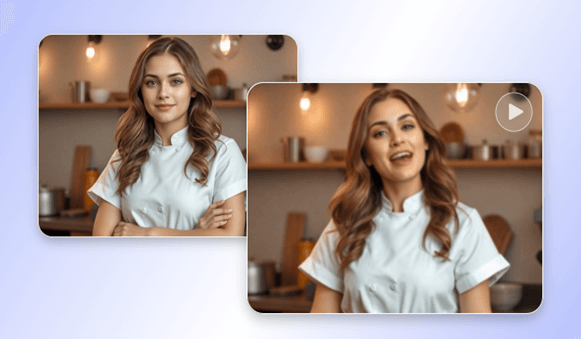
In this article, we will explore how AI image-to-video tools work, what features to look for, and which platforms stand out as the best free options for beginners and professionals.
What Is an AI Image to Video Generator?
An ai image to video generator free uses deep learning models to animate static images. These algorithms can:
- Add motion effects.
- Animate facial features.
- Produce camera movements in films.
- Create video scenes of storytelling.
- Transform drawings, sketches or portraits into motion pictures.
These tools are very helpful for creators who want to produce short videos without filming or professional editing.
Why People Prefer Free AI Image to Video Generators
Free AI tools are becoming popular because they:
- Save time and money.
- Require zero learning curve.
- Allow unlimited creativity.
- It may be implemented for entertainment or professional.
- Work directly in the browser, no software installation needed.
Free tools are ideal especially when one is a beginner. Even most of the professionals begin with the free versions and then upgrade.
Best Features to Look for in a Free AI Image to Video Tool
When choosing the best generator, consider:
1. Animation Quality
The tool must produce natural motion that is not distorted. Videos are more realistic using high-quality motion effects.
2. Resolution
Look for tools that support HD or at least 720p output for social media use.
3. Customization Options
Good AI tools allow you to choose:
- Camera movements.
- Animation style.
- Background music.
- Special effects.
- Video length.
4. Speed
Quick rendering engine saves time, particularly when making numerous videos.
5. Ease of Use
The simplest ones are the best, as you can just upload and choose an animation, and download the video.
6. Free Export Without Watermarks
The tools that can be downloaded freely without any logos or watermarks are more useful.
Top Free AI Image to Video Generators in 2025
After reviewing popular tools, these are the best free options currently available:
1. CapCut AI Image to Video (Best Overall Free Tool)
CapCut stands out because it offers professional-level video generation completely free. You can create:
- 3D image movement.
- Cinematic zoom animations.
- AI-generated motion effects.
- Creative filters.
- Music-synced animations.
Why it’s the best:
- 100% free to use.
- No watermark for most templates.
- Extremely easy interface.
- Fast processing.
- Perfect for TikTok, Reels, and YouTube Shorts.
The CapCut is user-friendly and is suitable in the hands of the novice and content creators who desire a powerful tool that is free.
2. Runway ML (High-Quality AI Animation)
Runway ML is known for its advanced AI models like Gen-2 and Motion Brush. It allows users to animate images with realistic motion.
Pros:
- High-resolution output.
- Advanced effects.
- Professional-grade tools.
Cons:
- Free plan is limited.
- Watermark on some videos.
Nevertheless, it is among the finest in terms of cinema animation.
3. Pika Labs (Great for Storytelling)
Another good AI video generator is Pika. You are able to add a picture and make a video with effects of motion, camera angles, and style alterations.
Pros:
- Very realistic animation.
- Easy to use.
- Multiple style options.
Cons:
- Requires credits for long videos.
- Free version has limits.
Pika is suitable for short creative clips or storytelling scenes.
4. PromeAI
PromeAI is an AI-powered creative platform that helps users turn static images into engaging videos with AI.
Pros:
- Easy-to-use image-to-video generation.
- Supports creative and design-focused content.
- No advanced video editing skills required.
Cons:
- Some features require credits or a paid plan
- Overall, PromeAI is a good choice for designers and content creators who want to quickly bring their images to life with AI.
5. Animaker AI (Beginner-Friendly)
Animaker has a straightforward drag and drop interface. You are able to convert images to animated explainer-style videos.
Pros:
- Free plan available.
- Easy editing tools.
- Perfect for business presentations.
Cons:
- Not as realistic as Runway or Pika.
Ideal for marketers, teachers, and social media creators.
6. Vidnoz AI (Great for AI Talking Videos)
Vidnoz AI is one of the best free websites in case you want to animate faces or make speaking videos out of pictures.
Features:
- AI face animation.
- Lip-syncing.
- Text-to-speech.
The tool would be ideal for business videos and tutorials, and content creation.
Which One Is the Best Free AI Image to Video Generator?
If you want a fully free, easy, and high-quality option, CapCut AI image to video is currently the best choice. It offers:
- No watermark.
- Fast exports.
- Smooth 3D animations.
- Dozens of free templates.
- Professional visual effects.
For professional cinematic animation, Runway ML and Pika Labs are excellent, but their free plans are limited.
For talking character videos, Vidnoz AI is the best.
For business-style videos, Animaker is ideal.
Final Thoughts
AI image-to-video generators are transforming the sphere of the digital content creation. You can create a portrait, a product image in motion, a social media video, a storytelling scene, etc., and it has never been easier than with the current free AI technologies.
Among all options, CapCut stands out as the best free AI image-to-video generator thanks to its flexibility, ease of use, and impressive animation quality.
On the one hand, these AI tools will allow you to create incredible videos at the touch of a couple of clicks, as a freelancer, marketer, content creator, or even a beginner editor, and it is entirely free.
Popular on OTW Right Now!


About The Author

Gagan Bhangu
Founder of otechworld.com and managing editor. He is a tech geek, web-developer, and blogger. He holds a master's degree in computer applications and making money online since 2015.