
SuperBox S8 Max: Features, Specifications, Performance, and Complete User Guide
Introduction to SuperBox S8 Max
The SuperBox S8 Max is an Android-based entertainment box designed to bring streaming applications, digital media, and compatible television content together in one place. It is part of the SuperBox S8 series and is designed for users who want a convenient home entertainment experience with additional storage, flexible viewing features, and modern connectivity.
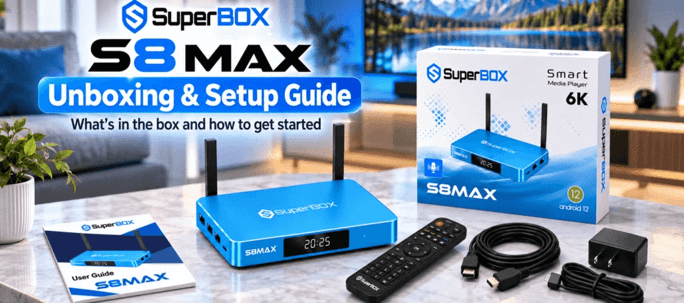
With features such as 4GB of RAM, 64GB of internal storage, Wi-Fi connectivity, voice control, and multi-screen viewing, the SuperBox S8 Max offers several functions for everyday entertainment. Its Android-based platform also provides access to compatible applications, depending on device support, availability, and regional restrictions.
In this guide, we will explore the SuperBox S8 Max specifications, major features, connectivity options, setup process, advantages, limitations, and important considerations before purchasing.
What Is SuperBox S8 Max?
The SuperBox S8 Max is a compact multimedia device that connects to a compatible television through HDMI. It provides a dedicated interface for supported streaming applications and other compatible media features.
Instead of relying only on a television’s built-in smart platform, users can connect an external device to access a separate entertainment interface. This can be useful for televisions with limited application support or for people who prefer a dedicated media device.
The S8 Max is positioned within the SuperBox S8 family, which also includes models such as the S8 Pro, S8 Plus, and S8 Ultra. These models can differ in storage capacity, hardware details, and supported features, so buyers should review the specifications of the exact model they intend to purchase.
Who Is the SuperBox S8 Max Designed For?
The device may be suitable for:
- Households that want a dedicated streaming interface.
- Users who prefer voice-enabled navigation.
- People who want additional internal storage for supported applications and media.
- Viewers interested in picture-in-picture and multi-screen functionality.
- Users who want wired and wireless networking options.
- Families looking for basic parental-management settings.
Actual functionality depends on the software version, supported applications, network conditions, and the availability of compatible content.
SuperBox S8 Max Specifications
Understanding the hardware specifications helps buyers evaluate whether a device meets their entertainment requirements.
| Specification | Published details |
| Model | SuperBox S8 Max |
| Operating system | Android 12 |
| Processor | Quad-core ARM Cortex-A53 |
| Graphics processor | Mali-G31 MP2 |
| RAM | 4GB DDR |
| Internal storage | 64GB eMMC |
| Wireless connectivity | Dual-band Wi-Fi 6 support |
| Wired networking | Gigabit Ethernet |
| Bluetooth | Bluetooth 5.2 |
| USB connectivity | USB 3.0 and USB-C, depending on configuration |
| Video decoding | H.265, advertised up to 6K at 60 fps |
| Television output | HDMI |
| Power input | Published listings specify 5V/2A |
| Exterior | Blue metal housing on listed versions |
Specifications are based on published product listings. Confirm the exact hardware, supported output resolution, ports, and power adapter with the seller because product revisions and regional versions may differ.
Processor and Performance
The SuperBox S8 Max is listed with a quad-core ARM Cortex-A53 processor. The processor handles general system operations, application activity, and interface navigation.
For typical streaming-device tasks, processor performance is only one part of the experience. Application optimization, available memory, network quality, and video-decoding support also affect responsiveness.
Users should not assume that a higher advertised decoding resolution guarantees that every application, stream, or television will support that resolution.
RAM and Internal Storage
The listed configuration includes 4GB of RAM and 64GB of internal storage.
RAM helps the operating system and applications manage active tasks. Internal storage provides space for compatible applications, their data, and supported local media files.
The usable storage will be lower than the advertised capacity because the operating system and preinstalled software occupy part of the available space.
For users who install several applications or store supported media locally, 64GB may provide useful flexibility. However, recording capacity depends on file sizes, application restrictions, and the amount of storage already in use.
Graphics and Video Decoding
The listed Mali-G31 MP2 graphics processor supports graphics-related tasks and contributes to the device’s multimedia capabilities.
Product listings advertise H.265 video decoding at up to 6K and 60 frames per second. This figure describes an advertised decoding capability, not a guarantee that all content will display at 6K.
The actual viewing resolution depends on the connected television, HDMI output configuration, application compatibility, video format, and source quality.
Key Features of SuperBox S8 Max
The SuperBox S8 Max wholesale page combines several entertainment and convenience features. The following sections explain what these functions mean in everyday use.
1. 4K Ultra HD Playback
The SuperBox S8 Max is advertised as supporting 4K playback on compatible equipment.
4K video provides a higher pixel count than Full HD, which can produce a sharper picture when the source content and television both support the resolution.
To benefit from 4K playback, users need compatible hardware, suitable video content, and sufficient network bandwidth for online streaming.
A 4K-capable device will not automatically convert every low-resolution video into native 4K quality. Picture quality also depends on the original source and the application’s playback capabilities.
2. Multi-Screen Viewing
Multi-screen viewing is one of the highlighted features of the S8 Max.
Depending on software and source compatibility, this function can let users display more than one supported viewing source on a single television. It may be useful for following multiple programs or comparing different sources.
The number of simultaneous views and the services that work with the feature should be confirmed before purchase. Multi-screen viewing can require more processing resources and network bandwidth than watching one stream.
3. Picture-in-Picture Functionality
Picture-in-picture, commonly called PiP, allows one supported video source to appear in a smaller window while another occupies the main viewing area.
This feature can be convenient when a compatible application supports background playback or when users want to monitor another source without fully leaving the current screen.
However, PiP does not necessarily work with every application. Availability depends on the software, source restrictions, and device implementation.
4. Built-In Recording
The SuperBox S8 Max is advertised with a built-in recording function for supported content.
Recording can help users save eligible material for later playback, where the application and content provider permit it. Available storage and recording options will determine how much material can be retained.
Before relying on this feature, check whether recording is supported by the specific application you intend to use, whether recordings can be played back locally, and whether any usage restrictions apply.
Recording should be limited to content you are authorized to record.
5. Voice Control
Voice control provides an alternative to navigating every menu with the remote’s directional buttons.
Depending on the implementation, users may be able to search for content, open supported applications, or access certain device functions through spoken commands.
Voice control can be especially convenient when typing a long search term with a remote would otherwise take considerable time.
The available commands and accuracy depend on the remote, language support, microphone performance, and software compatibility.
6. Wi-Fi 6 Connectivity
The S8 Max is listed with dual-band Wi-Fi 6 support.
Wi-Fi 6 is designed to improve wireless network efficiency and performance with compatible routers. Actual speeds depend on router capabilities, distance, interference, network congestion, and the internet connection itself.
For the best streaming experience, place the device within a reliable wireless coverage area. If the router is far away or the wireless connection is inconsistent, a wired Ethernet connection may be a better option.
Wi-Fi 6 cannot eliminate buffering caused by a slow internet connection or problems with the content provider.
7. Gigabit Ethernet
The published specifications list Gigabit Ethernet connectivity.
A wired connection can provide more consistent network performance than Wi-Fi in some home environments. This can be helpful when the device is used for high-quality streaming or when wireless interference is a problem.
To obtain Gigabit Ethernet speeds, the router, Ethernet cable, and network equipment must support the relevant connection speed. The internet service itself may still be the limiting factor.
8. Bluetooth Connectivity
Bluetooth 5.2 is listed among the device’s specifications.
Bluetooth may allow pairing with compatible accessories, although the specific supported devices and functions depend on the operating system and hardware implementation.
Before purchasing an accessory, verify compatibility with the S8 Max rather than assuming every Bluetooth keyboard, speaker, controller, or headphone will work as expected.
9. Parental Controls
Parental-management features are advertised for the SuperBox S8 Max.
When supported, parental controls can help families manage access to selected applications or content. The available settings may vary by application and operating-system configuration.
Parents should review the device’s settings and the controls available in individual streaming applications. Device-level restrictions do not necessarily apply to every application or external service.
10. Redesigned User Interface
The S8 Max is advertised with an updated interface intended to organize entertainment functions and make navigation more convenient.
A clear home screen can help users find installed applications, access settings, and manage common device functions.
The real-world experience depends on the software version, application layout, and available updates. Buyers should check current demonstrations or documentation if the interface is an important purchasing factor.
11. Time-Shift Features
Some published listings describe time-shift functionality, including the ability to pause, rewind, or revisit supported programming.
Certain product descriptions also advertise a seven-day replay window. This should not be interpreted as a guarantee that every channel or program can be replayed for seven days.
Availability may depend on the service, content provider, regional support, and software configuration. Confirm the supported channels and actual replay limits before relying on this feature.
Design and Build Quality
The SuperBox S8 Max is shown in product listings with a blue metal exterior, external antennas, and a front display.
Metal Housing
A metal enclosure gives the device a distinctive appearance and can contribute to heat dissipation when appropriately designed. Actual operating temperature also depends on ventilation, internal components, room temperature, and how the device is used.
Keep the unit on a stable surface with adequate airflow. Avoid covering ventilation openings or placing the box in a tightly enclosed space.
External Antennas
The external antennas are intended to support wireless connectivity. Their presence alone does not guarantee a stronger connection in every environment.
Router placement, walls, interference, and the distance between devices remain important factors.
Compact Entertainment Setup
A dedicated streaming box can reduce dependence on a television’s built-in operating system. When connected correctly, it can sit beside or behind a compatible television and provide a separate interface for supported applications.
Check the device’s physical dimensions and cable arrangement to ensure that it fits your entertainment area.
Connectivity and Available Ports
Published S8 Max listings describe several connection options, although exact port configurations should be verified for the particular unit.
Commonly listed connections include:
- HDMI for connecting to a compatible television or display.
- Ethernet for wired network access.
- USB ports for compatible accessories or storage.
- USB-C for power or other supported functions, depending on the version.
- Bluetooth for compatible wireless accessories.
- Audio-related connections on configurations that include them.
- Memory-card support on certain published configurations.
Not every port supports every type of accessory. For example, external storage may require a compatible file system, and an audio output may require a supported receiver or speaker setup.
Before connecting external equipment, review the supplied manual and verify the function of each port.
How to Set Up SuperBox S8 Max
Setting up the device generally involves connecting it to a television, supplying power, and configuring a network connection.
Step 1: Check the Package
Inspect the package and confirm that the device, remote control, power adapter or cable, HDMI cable where included, and user documentation are present.
Package contents can vary by seller, so check the product listing before ordering.
Step 2: Connect the Device to Your Television
Connect the HDMI cable to the device and a compatible HDMI input on your television.
Use an available HDMI input and remember its label, such as HDMI 1 or HDMI 2.
Step 3: Connect the Power Supply
Use the power adapter specified for your exact device version. An incompatible power supply can cause unstable operation or damage.
Connect the power cable securely and turn on the television.
Step 4: Select the Correct HDMI Input
Use your television remote to select the HDMI input connected to the S8 Max.
The device’s startup screen should appear if the connections and display settings are correct.
Step 5: Connect to the Internet
Open the network settings and select an available Wi-Fi network, or connect an Ethernet cable to a compatible router.
Enter the correct Wi-Fi password if required. A stable broadband connection is important for online video streaming.
Step 6: Review the Device Settings
Check the date and time, display resolution, audio options, Bluetooth settings, and available system updates.
Choose a display resolution supported by your television. If the screen remains blank after changing the resolution, use the device’s documented recovery or display-reset procedure.
Step 7: Install or Open Compatible Applications
Use supported application sources and follow each application’s terms of service.
Review application permissions and privacy settings. Avoid unknown software sources and applications that promise access to content without clear authorization.
Step 8: Test Playback
Open a legitimate streaming application and play supported content.
Check picture quality, sound, remote responsiveness, and network stability. If playback is inconsistent, test the connection and review the troubleshooting section below.
Internet Requirements for SuperBox S8 Max
The internet connection is an important part of any online streaming setup.
The bandwidth required depends on video resolution, compression, stream quality, and the number of devices sharing the network.
As a general planning guide, many streaming services recommend approximately 5 Mbps for Full HD video and 15–25 Mbps or more for 4K streaming. These are general estimates, not official SuperBox requirements, and individual services may specify different minimum speeds.
Tips for Better Streaming Performance
- Position the router in a central, open location where practical.
- Use a compatible Ethernet connection if Wi-Fi is unreliable.
- Reduce unnecessary network congestion during streaming.
- Keep the device’s ventilation openings clear.
- Check the internet connection when buffering occurs.
- Update supported applications and device software through trusted channels.
- Confirm that the streaming service itself is operating normally.
A faster internet package may help when bandwidth is the bottleneck, but it cannot fix every application, server, or device problem.
SuperBox S8 Max: Advantages and Disadvantages
Every streaming device has strengths and limitations. Reviewing both sides helps buyers make an informed decision.
Advantages
- Useful internal storage: The listed 64GB capacity offers room for compatible applications and supported local media.
- Dedicated entertainment interface: A separate device can be useful when a television’s built-in smart features are limited.
- Flexible connectivity: Wi-Fi and Gigabit Ethernet give users different ways to connect to a home network.
- Voice-enabled control: Supported voice commands can make navigation easier.
- Multi-screen features: Picture-in-picture and multi-view options may benefit users who want to monitor multiple supported sources.
- High-resolution decoding claims: Advertised video-decoding capabilities provide additional flexibility, although actual output depends on the entire playback setup.
- External connectivity: Supported USB and Bluetooth functions can provide options for compatible accessories.
Disadvantages and Limitations
- Application compatibility varies: Not every streaming application is guaranteed to work or remain available.
- Advertised resolution can be misunderstood: A 6K decoding claim does not mean every application provides native 6K output.
- Network quality matters: Buffering can occur even with Wi-Fi 6 if the internet connection or streaming service is unreliable.
- Storage is not unlimited: The operating system and installed applications use part of the internal capacity.
- Feature support may differ: Recording, time-shift, multi-screen viewing, and PiP can depend on the software and content source.
- Price and availability can change: Different sellers may offer different prices, warranties, bundles, or shipping arrangements.
- Content access is not guaranteed: The device itself does not establish that every channel, movie, or streaming service is included or licensed.
Is SuperBox S8 Max Worth Buying?
Whether the SuperBox S8 Max is worth buying depends on the features you need and the price offered by a reliable seller.
It may be worth considering if you want a dedicated Android-based media device, additional internal storage, wired networking, voice-enabled navigation, and compatible multi-screen functions.
However, buyers should not choose a device based only on its advertised processor, maximum decoding resolution, or promises of extensive content access. Software support, application compatibility, update policies, warranty terms, and ongoing service costs are equally important.
What to Check Before Purchasing
- Confirm that the exact model is the S8 Max rather than another S8-series device.
- Verify the hardware specifications and physical ports.
- Ask which applications and viewing features are officially supported.
- Confirm whether any advertised content services require separate subscriptions.
- Review the return policy and warranty conditions.
- Check the seller’s reputation and the availability of customer support.
- Verify the total cost, including shipping, taxes, and any applicable fees.
- Ensure that the intended applications and content services are legally available in your region.
A careful comparison of these factors can help you decide whether the device fits your budget and home entertainment needs.
SuperBox S8 Max vs. Other Streaming Devices
The streaming-device market includes Android-based boxes, certified Google TV devices, smart-TV platforms, and streaming players from established manufacturers.
The right choice depends on the user’s priorities.
Storage and Application Flexibility
The S8 Max is listed with 64GB of internal storage. This may be helpful for compatible applications and local files.
When comparing alternatives, check not only the advertised storage but also whether the device supports the applications you need, receives software updates, and provides the required streaming certifications.
Ease of Use
The S8 Max advertises voice control and a redesigned interface. Other streaming devices may provide different voice assistants, application stores, accessibility tools, or remote-control features.
A simple interface is valuable, but long-term software support and compatibility are also important.
Picture Quality
Compare supported resolutions, HDR formats, video codecs, and application-specific playback support rather than relying only on a maximum resolution number.
Your television and the quality of the source content will influence the final picture.
Content and Service Compatibility
Before purchasing any streaming box, confirm that your preferred services are supported through authorized applications. Some services require certification or specific hardware capabilities.
Do not assume that a particular device automatically includes paid subscriptions or provides access to every available channel.
Common SuperBox S8 Max Problems and Troubleshooting
A few basic checks can help identify common issues.
SuperBox S8 Max Is Not Displaying a Picture
- Confirm that the power supply is connected correctly.
- Make sure the television is set to the correct HDMI input.
- Reseat the HDMI cable.
- Try another compatible HDMI port or cable.
- Check whether the television supports the selected output resolution.
If the problem continues, consult the manufacturer’s troubleshooting instructions.
Streaming Is Buffering
- Test the internet connection on another device.
- Restart the router if your connection is experiencing general problems.
- Move the device closer to the router or try Ethernet.
- Reduce competing network activity.
- Check the streaming application’s status and playback settings.
Buffering can originate from the network, the service provider, the application, or the device, so identify the likely cause before changing hardware.
The Remote Control Is Not Working
- Check the batteries or charging requirements specified for the remote.
- Make sure there is no physical obstruction if infrared control is being used.
- Follow the manual’s pairing instructions for Bluetooth or voice remotes.
- Restart the device if the remote was previously working and has stopped responding.
Use the correct pairing procedure for your particular remote model.
An Application Will Not Open
- Confirm that the application supports the device’s operating-system version.
- Check for official application updates.
- Restart the application and device.
- Review available storage.
- Check the application’s regional availability and service status.
Avoid installing unknown application packages to solve compatibility problems, because they can introduce security and privacy risks.
The Device Feels Hot
Electronic devices can become warm during normal operation. Excessive heat, repeated shutdowns, or unusual performance problems require further investigation.
Place the box in a well-ventilated area, keep openings clear, and use the specified power supply. If overheating continues, stop using the device and contact the seller or manufacturer for advice.
Privacy, Security, and Responsible Use
A connected entertainment device can access a home network and may process account information through installed applications.
For safer everyday use:
- Install applications only from trusted and authorized sources.
- Use strong, unique passwords for streaming accounts.
- Review application permissions and privacy settings.
- Install official software updates when available.
- Avoid entering payment details into unfamiliar applications.
- Use parental controls where appropriate.
- Review the privacy policy of each service you use.
It is also important to check the licensing and terms of any streaming service. Owning a streaming box does not automatically provide permission to access copyrighted content or bypass a service’s payment and access restrictions.
Frequently Asked Questions About SuperBox S8 Max
1. What Is SuperBox S8 Max?
The SuperBox S8 Max is an Android-based multimedia box designed to connect to a compatible television and run supported entertainment applications.
2. How Much RAM Does SuperBox S8 Max Have?
Published specifications list 4GB of DDR RAM. Actual application performance depends on software optimization, available resources, and the tasks being performed.
3. How Much Storage Does SuperBox S8 Max Offer?
The listed model has 64GB of eMMC internal storage. The usable amount is lower because system software and applications occupy some space.
4. Does SuperBox S8 Max Support 4K?
Product listings advertise 4K playback. Actual 4K playback requires compatible hardware, a supported application, suitable source content, and a compatible display.
5. Does SuperBox S8 Max Support Wi-Fi 6?
Yes, published specifications list dual-band Wi-Fi 6 support. Actual wireless performance depends on the router, network conditions, and internet service.
6. Can SuperBox S8 Max Connect Through Ethernet?
Published specifications list Gigabit Ethernet. A compatible wired network can be useful when Wi-Fi is unstable or inconsistent.
7. Does SuperBox S8 Max Support Voice Control?
Voice control is an advertised feature. The commands available depend on the remote, software version, language support, and compatible applications.
8. Can SuperBox S8 Max Record Content?
The device is advertised with built-in recording for supported content. Confirm which applications permit recording and how the saved files can be accessed.
9. Does SuperBox S8 Max Support Picture-in-Picture?
Picture-in-picture is an advertised feature. Its availability depends on application compatibility and the supported viewing source.
10. Does SuperBox S8 Max Support Multi-Screen Viewing?
Yes, multi-screen viewing is one of the features advertised for the S8 Max. The number of simultaneous sources and their compatibility should be verified with the current product documentation.
11. Can SuperBox S8 Max Work With Any Television?
It can connect to televisions with a compatible HDMI input, subject to display and resolution compatibility. Older televisions without HDMI may require additional equipment, and compatibility is not guaranteed.
12. Does SuperBox S8 Max Include Every Streaming Subscription?
No. A streaming device should not be assumed to include every paid subscription or guarantee access to all content. Check the terms, pricing, and availability of individual services.
13. Is SuperBox S8 Max Easy to Set Up?
The basic setup generally involves connecting HDMI and power, selecting the correct television input, and configuring the network. Application setup and account requirements vary.
14. Is SuperBox S8 Max Suitable for Families?
It may be suitable for shared household entertainment, particularly where supported parental controls and separate application settings meet the family’s needs. Adults should review content access and privacy settings.
15. Where Can I Find Accurate SuperBox S8 Max Specifications?
Consult the manufacturer’s documentation and a reputable seller that identifies the exact model and hardware revision. Verify the warranty, ports, included accessories, and supported features before placing an order.
Conclusion
The SuperBox S8 Max is an Android-based entertainment device advertised with 4GB of RAM, 64GB of internal storage, Wi-Fi 6, Gigabit Ethernet, voice control, multi-screen viewing, and recording functions for supported content.
Its combination of storage, connectivity, and viewing features may appeal to people who want a dedicated media interface for a compatible television. Nevertheless, advertised specifications should be considered alongside real-world application support, software maintenance, network requirements, warranty coverage, and the total cost of ownership.
Before buying the SuperBox S8 Max, verify the specifications of the exact model, check compatibility with your preferred applications, and confirm that any content services are authorized and available in your region.
Making an informed decision based on verified specifications and your actual viewing requirements is the best way to determine whether the SuperBox S8 Max is the right addition to your home entertainment setup.
Popular on OTW Right Now!




About The Author

Gagan Bhangu
Founder of otechworld.com and managing editor. He is a tech geek, web-developer, and blogger. He holds a master's degree in computer applications and making money online since 2015.