
Step-by-Step Guide to Migrating Your HR Processes to Dynamics 365
Why Companies Are Migrating HR Processes to Dynamics 365
HR departments manage employee records, payroll, benefits, recruitment, and performance tracking. In many companies, systems that are not integrated, not updated, or that utilize manual tracking processes result in duplication of effort. Manual tracking or updates lead to inconsistent and unreliable reporting, and ultimately cause unnecessary increases in the administrative workload and errors.
The use of cloud-based technologies facilitates centralizing HR operational functions. With Microsoft Dynamics 365, employee information is captured, HR workflows are automated to improve operational efficiency, and the system integrates with Financial, Analytical, and Collaborative tools. Interestingly, Microsoft’s own HR team reported a 20% increase in case throughput after implementing Dynamics 365 Customer Service with AI capabilities, meaning HR advisors could handle more support requests within the same time frame as with previous systems.
Scalability is another primary driver in choosing cloud-based technologies. Traditional systems are unable to support the operational changes required to effectively manage workforce expansion, complex supplemental payroll structures, or rapidly changing payroll compliance requirements. The use of Dynamics 365 in a cloud-based environment facilitates operational changes in data security and compliance and enables HR teams to analyze data on reliability, employee performance, retention, and operational efficiency.
What HR Processes Can Be Migrated to Dynamics 365
The question of which Human Resources functions can be processed in the cloud is a common concern during cloud migration.
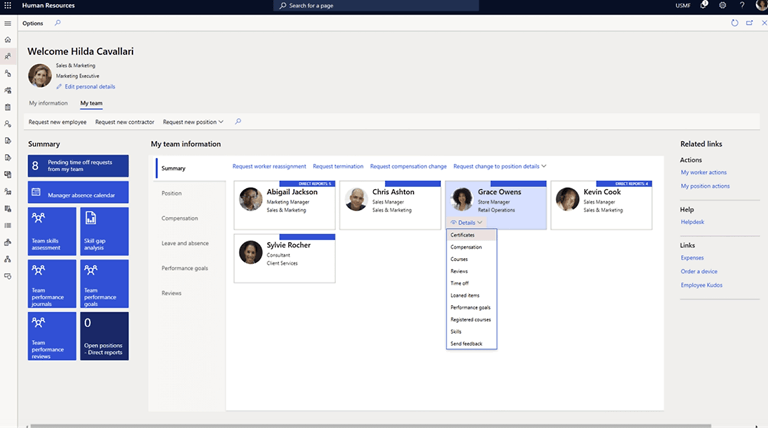
- For core Human Resources management (Employee Records and Profiles), HR teams can use Dynamics 365 to keep all employee records and profiles in one location, including all personally identifiable information, job classifications, organizational hierarchies, tenure, and documents. This prevents the creation of multiple records and simplifies report creation.
- Payroll, benefits, and compensation management are challenges for most organizations because these processes are highly complex and heavily regulated. The good news is that with Dynamics 365, organizations can automate complex calculations and eliminate errors in employee payments, helping them maintain compliance.
- With the recruitment and talent acquisition workflows, Dynamics 365 helps manage job applications, interviews, and candidate communications. Data silos in the recruitment process can be frustrating to all stakeholders. Closed recruitment silos can lead to lengthy processes and a reduced ability to respond to the organization’s changing needs. As a result, many organizations will utilize a nearshore staff augmentation model to quickly fill recruitment silos and/or specialized recruitment silos.
- Performance management and employee development in Dynamics 365 are facilitated by aligning the organization’s objectives with growth. The organization and the employee can benefit from the transparency and structure of the organization’s performance reviews and from tracking the employee’s goals across the management hierarchy.
All HR functions for an organization can be processed in Dynamics 365. The result of this migration is a reduction in administrative tasks, an increase in data accuracy, and greater control and insight for HR teams.
Preparing for an HR Migration to Dynamics 365
There are several reasons why organizations should meticulously plan the migration of HR processes. Effective planning recognizes gaps, defines the purpose of the migration, and assists the team responsible for handling data, workflows, and systems in managing changes. This stage grounds all future work for a seamless migration and minimizes future disruption.
- Auditing the current state of your technology systems and data: Review the HR data and methodologies used and collected within the systems, and pinpoint any automated steps, redundancies, or deficiencies. Issues found during this process that need to be cleared highlight the scope of the migration.
- Establishing the goals and metrics of success for the migration: Set clear, measurable goals. Examples of goals include: decreasing time spent on administrative tasks, improving data accuracy, reducing the time required to prepare and submit reports, and increasing service levels. Goals can be defined in terms of the number of errors found during payroll processing, the time required to complete onboarding, or the number of employee performance evaluations completed.
- Forming the most effective team for the implementation of the technology in the HR process: Create a team that is composed of divisional HR representatives, IT staff, and external consultants. A Dynamics 365 HR consultant can assist with configuring the system, and staff who nearshore or specialize in migration can provide the necessary resources for larger migrations.
Organizations with a strong implementation team, clearly defined objectives, and a thorough understanding of existing systems will be well-positioned. Adequate preparation will enable the migration processes to be executed smoothly and with minimal risk.
Step-by-Step HR Migration Process to Dynamics 365
Migration of HR processes to Dynamics 365 should be carried out with an overview. The systematized approach, often supported by Dynamics integration services, facilitates seamless movement of employee information, operations, and integrations, and is geared toward minimizing errors and disrupting day-to-day HR activities.
- Step 1: Learn What HR Systems You have: Learn the HR software, internal data, data integration solutions, and compliance rules that are enforced on data. You will decide how to have your systems, which ones to get rid of, and which ones to retain, and the conflicts that can be involved.
- Step 2: Clean and Prepare HR Data to be Migrated: Eliminate duplicates and verify the data by matching it to the source. Clean data will enhance the accuracy of reports, aid in eradicating errors, and enhance the quality of reports.
- Step 3: Microsoft Dynamics 365 HR Modules: Configure employee lifecycles, approval processes, leave policies, and hierarchies. When done properly, your organization will achieve its daily and long-term HR objectives.
- Step 4: You need to integrate Dynamics 365 with your current business system. You will have to integrate payroll, finance, ERP, and collaboration systems with Dynamics 365. In that manner, you will not need to update manual procedures, and your organization will possess a single working vision of its workforce.
- Step 5: Test HR Migration Environment: Conduct pilot data tests to confirm accuracy, ensure proper access for the right people to the right records, and verify that workflows have been completed properly. It will assist you in discovering issues early enough, alleviating them in the middle, and also making the data migration easier.
- Step 6: Train the HR Teams and Implement the System: Build a training package that encompasses the organization’s work processes, self-service systems, and reporting systems. The training will equip your HR Teams to have the system ready and change its preferences.
The implementation of the steps outlined in the context of cloud migration can help organizations ensure a successful cloud migration that includes evaluation, data segmentation, testing, and training. Every action undertaken meticulously and systematically provides assurance that Microsoft Dynamics 365 cloud services have been configured correctly, that employees have been adequately trained, and that human resources operations have not been affected by go-live.
Common Challenges in Dynamics 365 HR Migration and How to Avoid Them
HR migrations can still face challenges despite thorough planning. Anticipating potential challenges can help organizations avoid delays, data issues, and adoption problems, making the transition to Dynamics 365 smoother.
| Challenge | Description | How to Avoid |
| Data Quality and Migration Errors | Incomplete or inconsistent employee data can disrupt payroll, benefits, and reporting. | Perform thorough data cleansing, standardize formats, and validate data before migration. Conduct audits during migration. |
| Integration Issues With Legacy Systems | Connecting Dynamics 365 to finance, ERP, or collaboration tools can cause compatibility issues, leading to data silos or workflow interruptions. | Map dependencies, test integrations in a controlled environment, and resolve conflicts before going live. |
| Employee Adoption and Change Management | Employees may resist new workflows or struggle with unfamiliar systems, affecting productivity. | Provide structured training, clear documentation, and hands-on support to encourage adoption. |
Through awareness of pitfalls that are likely to be encountered, including data errors, integration, and resistance to change, organizations can tackle them. This preparation will mitigate risks, ensure the migration process stays on schedule, and facilitate the successful implementation of the new HR platform.
Best Practices for a Successful Dynamics 365 HR Implementation
Best practices can help the organization minimize risks and maximize the benefits of a Dynamics 365 HR migration. Guidelines make the process of workflow, integrations, and adoption of teams efficient.
| Best Practice | Description |
| Use a Phased Migration Strategy | Implement modules in stages: start with core HR functions, then payroll, recruitment, and performance management, to reduce risk and allow for adjustments. |
| Involve HR Stakeholders Early | Engage managers and team leads to align workflows with actual operations and increase buy-in. |
| Work With Experienced Dynamics 365 Implementation Partners | Consultants ensure proper configuration, integration, and training, helping avoid pitfalls. |
A successful HR implementation is supported by best practices such as gradual rollout, early stakeholder engagement, and guidance from seasoned partners. Organizations can maximize system performance, enhance adoption, and ensure smoother long-term operations.
How Dynamics 365 Transforms HR Operations After Migration
Once the migration to Dynamics 365 is done, HR operations can be made more efficient and transparent. The platform offers solutions that streamline daily operations, enhance reporting processes, and improve the overall employee experience.
- Automation of HR workflows: The onboarding process, leave request approvals, and document routing can be automated, minimizing manual tasks and associated errors.
- Analytics and reporting in HR: HR analytics can be conducted in real time to provide up-to-date information to inform workforce strategy and streamline operations based on performance, turnover, and compensation data.
- Enhanced employee experience and self-service: Employee experience and self-service will be increased as employees will be able to update their information, request leaves, and use benefits. This results in fewer HR questions and lower employee satisfaction.
Through automation, real-time analytics, and self-service functionalities, organizations are able to minimize the administrative load, make evidence-based HR choices, and offer employees a more interactive and simplified experience.
Final Thoughts on Migrating HR Processes to Dynamics 365
Microsoft Dynamics 365 has consolidated the most important Human Resources functions, streamlining business operations and enhancing reporting. The system elements are to be user-friendly and aligned smoothly through a phased implementation process, training, and system design.
Migration strategies help organizations reduce administrative overhead, ensure regulatory compliance, and provide useful analytical insights to streamline people and business processes.
Popular on OTW Right Now!


About The Author

Gagan Bhangu
Founder of otechworld.com and managing editor. He is a tech geek, web-developer, and blogger. He holds a master's degree in computer applications and making money online since 2015.