
SAP ECC to S/4HANA: 10 Practical ABAP Troubleshooting and Modernization Lessons
By ERPClimb Editorial Team · erpclimb.com
Custom ABAP code is where most ECC to S/4HANA conversions lose time. The standard software converts through SAP’s tooling, but the reports, interfaces and enhancements your company wrote over fifteen years do not fix themselves.
Some of that code will fail with a syntax error on day one. The harder cases still compile and run, but return different results or take ten times longer. With mainstream maintenance for SAP ECC 6.0 ending on 31 December 2027, many teams are meeting these problems for the first time and on a deadline.
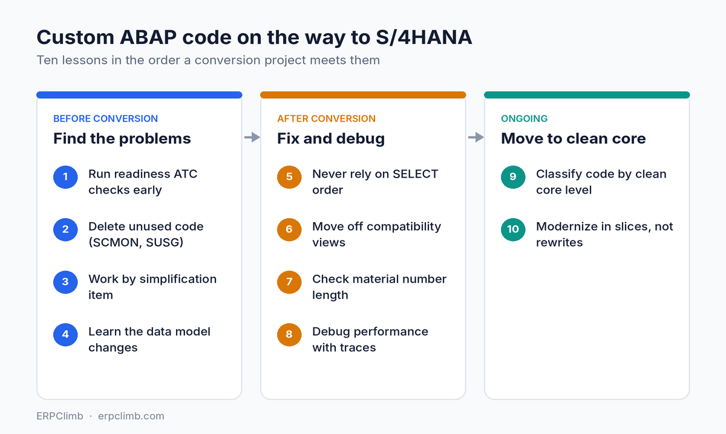
The ten lessons below follow the order a project meets them: finding problems before conversion, fixing and debugging them afterwards, and then modernizing what is left.
Before conversion: find the problems
1. Run the S/4HANA readiness checks early, from a central system
The ABAP Test Cockpit (ATC) can check an ECC system remotely from a central check system. Use the check variant that matches your target release, for example S4HANA_READINESS_2023. It compares your code with SAP’s simplification database and lists every incompatible statement.
Run it a year before conversion, not a month before. The first result is usually thousands of findings, and that number drives your budget and team size. SAP’s own custom code adaptation process describes the setup end to end.
2. Delete unused code before you fix anything
Switch on the ABAP Call Monitor (transaction SCMON) in production and aggregate the data with SUSG. Collect at least twelve months so year-end programs are counted.
Most long-running ECC systems carry a large share of custom objects that nobody executes. Every object you retire is one you never have to adapt, test or document again.
3. Work by simplification item, not by program
Each ATC finding points to a simplification item and an SAP Note. Sort the worklist by item and you will see that a few patterns produce most of the findings.
Fix a pattern once, write down the rule, then apply it everywhere. ABAP Development Tools in Eclipse offers quick fixes for many findings and can apply them to a whole selection at once. That turns weeks of manual edits into days.
4. Learn the data model changes for your modules
Developers fix faster when they know why a finding exists. These five changes cause most of the rework.
| Area | ECC | S/4HANA | What breaks |
| Inventory | MKPF, MSEG | MATDOC | Direct writes fail; reads go through slower compatibility views |
| Finance | BSIS, BSAS, BSID, BSAD, BSIK, BSAK, GLT0 | ACDOCA | Index and totals tables become views; updates are not possible |
| Sales status | VBUK, VBUP | Status fields in VBAK, VBAP, LIKP, LIPS | Selects on the old status tables return nothing for new documents |
| Pricing | KONV | PRCD_ELEMENTS | Custom pricing reports miss new documents |
| Customer and vendor master | XD01, XK01 | Business Partner (transaction BP) | Batch input and call transaction on the old screens stop working |
After conversion: fix and debug
5. Never rely on the order of a SELECT
Many ECC databases happened to return rows sorted by primary key. SAP HANA does not. Code that depended on that order still compiles, then fails at random.
Typical symptoms are a READ TABLE … BINARY SEARCH that misses existing rows, DELETE ADJACENT DUPLICATES that leaves duplicates, and totals that change between runs.
” Worked by accident in ECC, unreliable on HANA
SELECT * FROM vbap INTO TABLE lt_items
WHERE vbeln IN s_vbeln.
READ TABLE lt_items INTO ls_item
WITH KEY vbeln = lv_vbeln BINARY SEARCH.
” Fix: ask for the order you need
SELECT * FROM vbap INTO TABLE lt_items
WHERE vbeln IN s_vbeln
ORDER BY PRIMARY KEY.
If the bug report says “it works in debugging but not in the batch job”, check sort order first.
6. Treat compatibility views as a bridge, not a destination
A SELECT on MSEG or BSID still works after conversion because SAP redirects it to a compatibility view. The view rebuilds the old structure from MATDOC or ACDOCA at runtime.
This is why a report can pass user acceptance testing on a small data set and then time out at month-end in production. For any report that runs on high volume, rewrite the read against the new table or a released CDS view. For writes, replace direct table updates with the standard BAPI or API.
7. Check every place a material number is moved or cut
The material number field grew from 18 to 40 characters, as described in SAP Note 2215424. The extended length is switched off by default, but the data type is longer either way.
Search custom code for these patterns:
- Variables typed as CHAR18 or with a hard-coded (18) that receive a material number
- Offsets such as lv_key+3(18) in concatenated keys
- Flat-file and interface layouts with a fixed 18-character column
- IDoc and BAPI mappings that still use the short material field
8. Debug performance with traces, not guesses
Use ST05 to trace the SQL of one slow transaction and SAT to see where ABAP runtime goes. In production, the SQL Monitor (SQLM, evaluated with SWLT) shows which statements cost the most across all users.
Four patterns explain most slow custom code on HANA: SELECT * on wide tables, selects inside loops, joins done in ABAP instead of the database, and FOR ALL ENTRIES with an empty driver table.
” An empty lt_orders makes this read the whole table
IF lt_orders IS NOT INITIAL.
SELECT vbeln posnr matnr FROM vbap
INTO TABLE lt_items
FOR ALL ENTRIES IN lt_orders
WHERE vbeln = lt_orders-vbeln.
ENDIF.
Modernize: move toward clean core
9. Classify custom code by clean core level
In August 2025 SAP replaced its three-tier extensibility model with four clean core levels. Level A uses only released APIs and ABAP Cloud. Level B uses stable classic APIs. Level C touches SAP internal objects. Level D covers modifications and direct writes to SAP tables.
Rate your remaining custom code against these levels and remove Level D first, because it carries the highest upgrade risk. For a quick first pass on a single program, ERPClimb’s free clean core code check flags common problem patterns before you set up full ATC governance.
10. Modernize in slices, not in one rewrite
A stable report that nobody changes does not need a rewrite. Spend the effort where change is frequent and business risk is high.
- Build new applications with CDS views and the ABAP RESTful Application Programming Model (RAP)
- Replace modifications and classic user exits with BAdIs or key user extensibility
- Where no released API exists, wrap the internal object in one class of your own so only one place changes at the next upgrade
- Add ATC clean core checks to transport release so new code cannot lower your level
A short checklist
- Twelve months before: switch on SCMON, run the readiness ATC checks, size the worklist
- Six months before: retire unused code and agree one fix rule per simplification item
- During conversion: apply quick fixes in bulk, then handle sort order and material number cases by hand
- After go-live: trace the slowest statements weekly and move hot reads off compatibility views
- Ongoing: classify by clean core level and block new Level D code at transport release
The same discipline pays off in any ERP programme. oTechWorld’s article on the benefits of ERP for the mining industry shows what the business expects from the system once the technical work is done.
About the author: The ERPClimb Editorial Team writes for ERPClimb (erpclimb.com), an independent SAP learning and technical knowledge platform built with experienced SAP architects. ERPClimb helps SAP consultants prepare for S/4HANA projects and resolve real production issues.
Popular on OTW Right Now!
-
 Data Governance Strategy: Building a Scalable Compliance Framework for 2026
-
 Blockchain App Development: A Clear Guide from Idea to Launch
-
 Step-by-Step Guide to Migrating Your HR Processes to Dynamics 365
-
 Beyond RPA: Why Intelligent Process Automation Is the Automation Architecture Enterprises Need Now



About The Author

Gagan Bhangu
Founder of otechworld.com and managing editor. He is a tech geek, web-developer, and blogger. He holds a master's degree in computer applications and making money online since 2015.