
Core Pillars of Modern Ecommerce Web Development
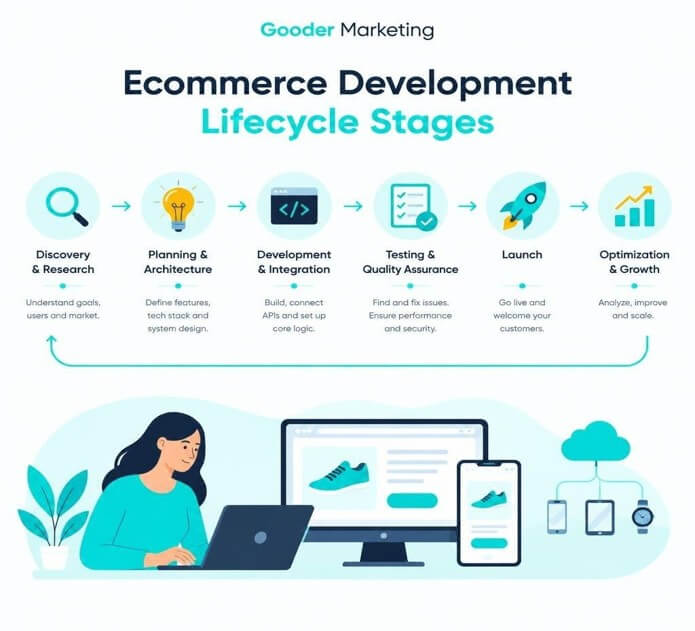
To build a good e-commerce site, you’ve got to go beyond the page builder and think like an architect. Modern development is all about modularity. Headless commerce (the separation of the front end from the back end) is the way to go for any brand that wants to have total control over the customer experience. You can use APIs to deliver the content to any device you like, be that a desktop browser, a mobile app, or indeed an IoT device. The separation of front and back end also allows marketing and engineering to work independently. Designers can play around with the front end all they like without any impact on the backend database transactions or the inventory updates.
UX and CRO aren’t just about design, really; they’re technical necessities. Every step of the way from the first search to the final ‘buy’ button needs to be seamless and easy. We’re all about clean code, simple navigation, and AI-powered personalization (which research has shown can boost sales by 15-20%). The more advanced your search functionality is the better it will be for your users. Things like NLP, predictive autocomplete, and filtering will go a long way to helping your customers find the exact product they’re looking for and will therefore reduce confusion and bounce.
Selecting Platforms for Ecommerce Web Development
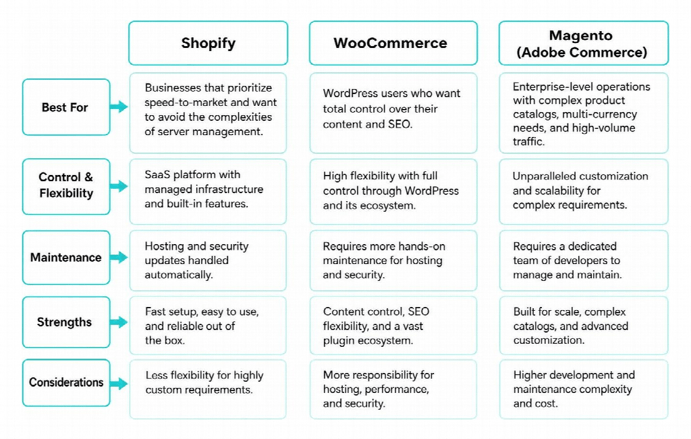
Choosing the right platform is one of the most critical decisions you’ll make during your development journey. It will have a massive impact on your ability to scale, the amount of maintenance you’ll have to do and how flexible your site will be in the future. The turnkey platforms are great for the non-technical founder who wants to get up and running quickly, but as your brand grows you can very quickly hit performance issues or be constrained by the platform’s ability to support custom data models and international expansion.
- Shopify: Great for businesses that want to get going quickly and not have to worry about server management at all. It’s a SaaS platform so it handles the hosting and security updates for you. It also has a very wide range of apps you can trust and a checkout process that’s specifically designed to improve conversion rates.
- WooCommerce: Ideal for WordPress users who want complete control over their content and SEO. It’s extremely flexible and open source; just be aware that you’re going to have to do a lot of the maintenance yourself (optimizing the database, managing the cache, keeping security patches up to date, etc.).
- Magento (Adobe Commerce): Best for large businesses with very large product catalogs, multiple currencies, and high traffic. It’s a highly customizable platform with excellent B2B capabilities, but it requires a very skilled development team and good hosting in order to run it.

Mobile Optimization and Core Web Vitals
Since 53% of all traffic is from mobile devices, a mobile-first approach is absolutely essential. You have to build your layouts so that they work perfectly across all screen sizes without any features being lost. Good mobile design also means that your buttons are easy to tap, your menus are easy to navigate with your thumb and your forms are easy to complete on a mobile device.
Beyond being responsive, Google’s Core Web Vitals are fundamental to both search engine rankings and conversions. They measure page stability (Cumulative Layout Shift), how quickly you can interact with the page (Interaction to Next Paint), and how fast the main content loads (Largest Contentful Paint). The way to improve them is through modern web development which is all about:
- Asset Compression: Using the new WebP and AVIF formats to shrink the size of image and script files, and using automated tools to make the files smaller in order to get the page to load faster.
- Lazy loading: Only loading the content that the user sees first, and then delaying the loading of images, videos or scripts that are further down the page until they’re actually required.
- Caching strategies: Using Content Delivery Networks (CDNs) and edge computing to serve the site files from servers closer to the user, which will result in faster page loads and less latency.
Security Standards and Compliance Protocols
Security is the bedrock of customer trust. If your site gets hacked, you’re not just going to lose data; you’re going to lose your brand and your customers. Every site should have, at the very least, strong SSL/TLS encryption to protect the data in transit between the browser and the server, and a suite of strict HTTP security headers.
For payment processing, you absolutely must comply with PCI DSS. We’d recommend tokenization and hosted fields (where the actual card details are not sent to your server at all and are replaced with a unique token). Multi-factor authentication for admins, regular security scans, and good fraud detection will all go a long way to reducing risk, minimizing chargebacks, and ensuring you’re in line with the various global regulations (GDPR, CCPA, etc.).
Essential Integrations and Architecture Requirements
An e-commerce site is almost never going to exist in isolation. It’s going to be connected to a whole host of other tools (payment gateways, marketing platforms, shipping services etc). The key to success is ensuring that data flows seamlessly between your online store and your back office systems so that you don’t end up with data errors and everything stays in sync.
Payment Gateways and Checkout Flow Optimization
The checkout page is where you’re going to lose the most customers. 70% of carts are abandoned, so every extra field, every extra step, can be a sale you lose. We’d recommend a single-page checkout, allowing customers to check out as guests, having an address lookup tool, and, of course, digital wallets (Apple Pay, Google Pay, Shop Pay, etc.) to make it as easy as possible to buy.

If you’re selling globally, you’ll also need to consider local currency conversion, tax calculation tools (Avalara and TaxJar are the obvious ones), and the various payment methods that are popular in each region (Klarna, iDEAL, SEPA transfers, etc.). You’ll also want to have backup payment gateways in place so that if your primary payment processor goes down, then transactions can be automatically rerouted to an alternative gateway and customers can still check out.
Inventory Management and Shipping API Integrations
Manual data entry is a drag and it’s bad for customer satisfaction. Your site needs to always be showing the correct, current state of your business. The solution is to connect your ERP and your PIM directly to your site via webhooks and REST/GraphQL endpoints so that you can have real-time inventory tracking across all your warehouses and sales channels.
When it comes to the supply chain, reliable custom ecommerce development allows for the integration of sophisticated shipping APIs. These tools automatically calculate real-time shipping rates, generate customs documentation, validate delivery addresses, and provide customers with live tracking updates, significantly reducing the “where is my order” (WISMO) burden on your customer support team. Custom integration layers also enable automated inventory threshold alerts, split-shipment routing, and automated returns management workflows that streamline post-purchase retention.
How to Vet and Choose an Ecommerce Development Partner
The development partner you select will be part of your team. Don’t just go for the cheapest option; pick someone who actually understands your long-term objectives, the technical issues you’re going to face, and how you’re going to go about getting customers.
Technical Expertise in Ecommerce Web Development
When looking at a partner, ask them about their experience in terms of architectural planning and database optimization. A good agency won’t just jump straight into the coding. They’ll first look at the user journey, design the data models and work out how the various systems will interact. They should be able to tell you how they do their code reviews, their CI/CD, their security updates and their stress testing.

Ask them if they’ve got any experience with headless setups, microservices, and dealing with third-party API rate limits. A developer who’s worked with performance budgets will be very mindful of every plugin and every tracking pixel to ensure they’re not having a negative impact on site speed or customer privacy.
Project Management and Post-Launch Support
Development is a step-by-step process which requires clear objectives, good communication, and regular progress updates. You want to work with an agency that uses Agile methodologies (breaking the work down into short sprints with regular reviews and testing) so that you get ongoing feedback and can change your approach if the project takes a different turn.
Also ensure your partner provides a clear SLA for support post-launch and for any subsequent improvements. An e-commerce site is never truly finished. It’s going to need ongoing monitoring, security patches, database tuning and conversion testing to perform well.
Critical Vetting Criteria:
- Portfolio Relevance: Have they built stores with similar transaction volumes, complexity, or specific industry compliance requirements?
- Integration Experience: Can they demonstrate proven proficiency with your specific ERP, CRM, accounting tools, or warehouse management software?
- Communication Style: Are they transparent about project timelines, resource allocation, and potential technical bottlenecks before they turn into costly delays?
- Strategic Vision: Do they provide proactive architectural advice to accelerate your growth, or are they passive order takers who merely fulfill checklists?
Frequently Asked Questions About Ecommerce Development
What are the most common pitfalls to avoid during development?
The most common error is scope creep (i.e., adding extra features during the project without altering the budget or timescale), which invariably leads to missed deadlines and increased costs. Other major issues are not testing adequately across different browsers and on older mobile devices, going for cheap shared hosting which will in turn crash during periods of high traffic, and focusing all our energy on the desktop design at the expense of the mobile experience.
How long does an ecommerce web build typically take?
A basic custom build on a SaaS platform will generally take 8-12 weeks. More complex builds (enterprise headless, multi-store migrations, etc.) can take 6-12 months. The timescale will obviously vary depending on the amount of planning that’s done, the amount of custom business logic required, the number of third-party integrations, the complexity of the data migration, and how rigorously the UAT is carried out.
How does site architecture affect ecommerce conversion rates?
Site architecture affects how well search engines can find your products and how easily customers can find what they want. Simple navigation, fast page loads, and clear call-to-action buttons make shopping easier. When customers can browse, filter, and buy without confusion or slowdowns, your conversion rates go up.
Conclusion
The landscape of ecommerce is shifting rapidly, driven by rising consumer expectations, omnichannel retailing, and advancements in automated fulfillment. However, the core fundamentals remain constant: success in digital retail is built on a foundation of fast, secure, and mobile-responsive architecture. By carefully selecting your platform, integrating essential business operations, and partnering with an experienced development team that prioritizes long-term scalability and robust engineering standards, you can create a digital storefront that not only survives competitive market pressures but thrives within them. Your website is one of the most critical assets for your company’s revenue—treat the development process as a strategic investment toward sustainable, compounding growth.
Popular on OTW Right Now!
-
 Who Owns Your Website After Launch? Questions to Ask a Development Agency Before You Sign
-
 9 Fullstack Web Development Fundamentals That Never Go Out of Date
-
How Aligning Web Development and SEO Strategy Drives Sustainable Business Growth
-
The Importance of Effective Web Design for Modern Businesses in Alberta



About The Author

Gagan Bhangu
Founder of otechworld.com and managing editor. He is a tech geek, web-developer, and blogger. He holds a master's degree in computer applications and making money online since 2015.