
Oracle ERP to Odoo Migration: Reducing ERP Costs Without Sacrificing Performance
If your finance team dreads renewal season, you’re not alone. Every year, more Oracle ERP customers open their license invoice, wince, and start asking the same question: is there a better way to run this business?
That question is usually what brings a company to ERP migration. Oracle ERP was likely the right choice years ago — powerful, comprehensive, built for scale. But as your business has grown, the costs of keeping it running have grown faster than the value it delivers. Licensing fees climb every renewal cycle. Customizations pile up. Every new integration takes longer and costs more than the last one.
Odoo has emerged as the modern alternative for companies in this position. It’s not a stripped-down substitute — it’s a genuinely different approach to ERP: modular, cloud-native, and priced in a way that doesn’t punish you for growing. This guide walks through why businesses are moving away from Oracle, what a realistic Oracle-to-Odoo migration looks like, and how to do it without disrupting the operations you depend on every day.
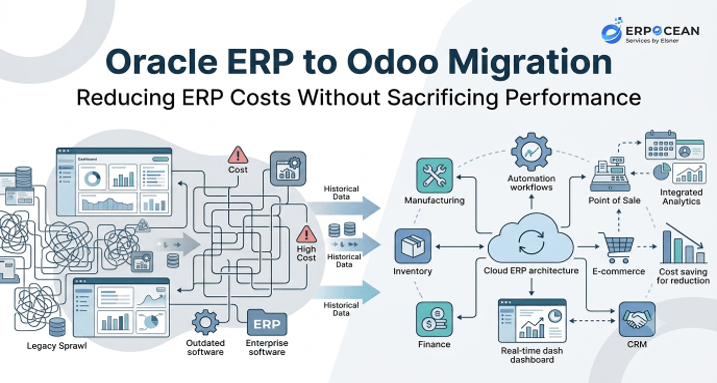
At ERPOcean, we’ve guided manufacturing, wholesale, and distribution businesses through exactly this transition, so what follows is grounded in what actually happens during these projects — not just what should happen in theory.
Why Businesses Are Looking Beyond Oracle ERP
Oracle ERP earned its reputation for a reason. It’s robust, feature-rich, and capable of supporting complex, multi-entity organizations. For a long time, it was simply the default choice for enterprises that needed serious functionality.
But the market has shifted. Cloud-native platforms have matured to the point where they can match — and in many workflows exceed — what legacy systems offer, at a fraction of the total cost. Meanwhile, Oracle’s pricing model, built around per-user licensing and add-on modules, has become harder to justify as headcount and transaction volume grow.
The businesses reaching out to us aren’t dissatisfied with what Oracle ERP can do. They’re dissatisfied with what it costs to keep doing it — in dollars, in IT hours, and in the opportunity cost of a system that resists change instead of enabling it.
Common triggers for reconsidering Oracle ERP include:
- A licensing renewal that jumps significantly year over year
- A new acquisition or business unit that doesn’t fit the existing configuration
- An upgrade cycle that requires re-certifying custom code
- A backlog of automation requests IT can’t get to
- Leadership asking why reporting still takes days instead of minutes
None of these are dramatic failures. They’re symptoms of a system that was built for a different era of enterprise software.
The Hidden Costs of Legacy Oracle ERP Systems
The sticker price of an ERP license is rarely the real cost. The real cost shows up in the line items nobody budgets for at the start.
Licensing and subscription fees are the most visible cost, but they’re often just the entry point. Add-on modules, named-user pricing, and mandatory support contracts stack on top of the base license, and these costs typically scale with your growth rather than your usage.
Customization debt is less visible but often more expensive. Every custom report, workflow, or integration built on top of Oracle ERP needs to be maintained, tested, and — critically — re-validated every time you upgrade. Over five or ten years, this debt compounds. Teams end up avoiding upgrades altogether because the regression testing is too costly, which leaves them running outdated, unsupported versions.
Specialized consulting fees add another layer. Oracle ERP implementations typically require certified consultants for changes that, on more flexible platforms, an internal admin could handle. Every configuration change becomes a billable engagement.
IT overhead rounds out the picture. Legacy systems generally need more infrastructure, more specialized staff, and more manual intervention to keep running smoothly — costs that rarely appear in the original ERP business case.
When you add these together, the total cost of ownership on legacy Oracle ERP systems is often two to three times the visible license fee. That gap is exactly what’s driving so many finance and IT leaders to explore alternatives.
Common ERP Migration Challenges That Delay Business Growth
Before getting into solutions, it’s worth being honest about why so many companies delay ERP migration even after deciding it’s necessary. Migration is genuinely hard, and the risks are real if it’s not planned properly.
The most common challenges we see:
- Fear of business disruption. Nobody wants to be the person who broke order fulfillment during a system cutover.
- Data complexity. Years of accumulated records, custom fields, and inconsistent data entry make a clean migration harder than it looks on paper.
- Integration sprawl. Oracle ERP is often connected to a dozen other systems — CRM, e-commerce, warehouse management, payroll — and each connection needs to be rebuilt or re-mapped.
- Internal resistance. Employees who’ve used the same system for a decade aren’t necessarily excited to learn a new one.
- Underestimated timelines. Migrations that are scoped too optimistically tend to run over budget and over schedule, which erodes leadership confidence in the project.
We’ve covered this in more depth in our breakdown of ERP migration challenges, which is worth reading if you’re at the early evaluation stage.
The good news is that none of these challenges are unique to Odoo migrations — they apply to any ERP transition. What matters is whether your migration partner has a structured way to address each one before it becomes a problem.
How Oracle ERP Increases Operational Costs Over Time
ERP costs rarely spike all at once. They creep. And that gradual increase is part of why so many businesses don’t notice how much they’re overspending until someone does the math.
Three patterns drive this creep:
Scope expansion. As your business adds product lines, warehouses, or subsidiaries, each one typically requires additional Oracle ERP licenses, configuration, and sometimes new modules entirely. The system doesn’t scale with you gracefully — it scales with you expensively.
Upgrade avoidance. Because upgrades are disruptive and costly, many businesses delay them for years. This means they miss out on newer efficiency features while continuing to pay full price for support on an aging version — the worst of both worlds.
Shadow IT. When the core system can’t accommodate a new business need fast enough, teams build workarounds — spreadsheets, point solutions, manual reconciliation processes. These workarounds have real costs in labor and error rates, even though they never show up on the ERP invoice.
The result is a system that costs more every year to deliver roughly the same functionality it delivered five years ago. That’s the core economic argument for enterprise automation and modernization: the cost curve of legacy ERP is upward, while the cost curve of modern, modular platforms tends to flatten as you scale.
Signs Your Business Has Outgrown Oracle ERP
It’s not always obvious when a system has become a liability rather than an asset. A few patterns tend to show up consistently in the companies that eventually migrate:
- Finance teams building manual workarounds in Excel because native reporting is too slow or too limited
- IT spending more time maintaining customizations than supporting new initiatives
- New hires needing weeks of training just to navigate the interface
- Integration requests routinely quoted at months instead of weeks
- Leadership making decisions on data that’s days old instead of real-time
- Mobile or remote access to core ERP functions being limited or nonexistent
If two or three of these sound familiar, that’s usually enough to justify a serious evaluation. If most of them do, the cost of staying on Oracle ERP is likely already outweighing the cost of switching — it’s just not visible on a single invoice.
How Odoo ERP Helps Reduce Costs Without Sacrificing Performance
This is the question every decision-maker actually cares about: can you cut costs without giving up capability? With Odoo, the answer is generally yes — but it’s worth understanding why, not just taking it on faith.
Odoo’s cost advantage comes from its architecture. Instead of one monolithic system with expensive add-on modules, Odoo is built as a set of integrated applications — Sales, Inventory, Accounting, Manufacturing, CRM, and dozens more — that you activate as needed. You’re not paying for capability you don’t use, and you’re not paying premium consulting rates to turn features on.
Where the savings typically come from:
- Lower licensing costs — Odoo’s per-user pricing is generally a fraction of comparable Oracle ERP costs, especially at mid-market scale.
- Reduced maintenance — Cloud deployment shifts much of the infrastructure burden off your internal IT team.
- Faster configuration changes — Many adjustments that would require a consultant engagement in Oracle ERP can be handled internally in Odoo.
- Lower customization costs — Odoo’s open architecture and large module ecosystem mean fewer custom builds from scratch.
On performance, the honest answer is that it depends on your use case. For core operational workflows — order-to-cash, procure-to-pay, inventory management, manufacturing — Odoo performs comparably to Oracle ERP for the vast majority of mid-market and even many enterprise use cases. Where it can lag is in extremely specialized, high-complexity enterprise scenarios that Oracle has spent decades building for. Part of a good migration assessment is figuring out honestly whether your business falls into that category, or whether you’ve been paying enterprise prices for mid-market needs.
Key Odoo ERP Features That Improve Business Efficiency
Odoo’s value isn’t just about cost — it’s about what the platform lets your teams actually do. A few features stand out for the businesses we work with:
Real-time dashboards. Instead of waiting on batch reports, decision-makers get live visibility into sales, inventory, and financials.
Workflow automation. Repetitive tasks — invoice approvals, reorder triggers, follow-up emails — can be automated without custom development.
Odoo CRM integration. Sales and operations data live in the same system, which eliminates the manual reconciliation that plagues businesses running separate CRM and ERP platforms. This is one of the most requested capabilities we see, and our Odoo CRM integration work is often where clients see the fastest measurable ROI.
Mobile accessibility. Native mobile access means field teams, warehouse staff, and traveling executives aren’t tied to a desktop terminal.
Customization flexibility. Odoo’s modular design and open-source foundation mean customizations are typically less expensive to build and easier to carry forward through upgrades — a direct answer to the customization debt problem in legacy Oracle ERP systems.
Odoo erp benefits at a glance:
- Faster reporting and decision-making
- Lower total cost of ownership
- Better scalability across business units
- Simplified integrations with third-party tools
- Improved user adoption due to a more intuitive interface
ERP Migration Best Practices for a Successful Oracle to Odoo Transition
A successful migration isn’t about moving fast — it’s about moving deliberately. The companies that come out the other side without major disruption tend to follow a similar structure.
- Start with a detailed discovery phase. Before any technical work begins, map your current processes, integrations, customizations, and pain points. You can’t migrate what you haven’t fully documented.
- Prioritize core processes first. Get your critical workflows — order management, inventory, financials — stable on the new system before layering in edge cases and nice-to-haves.
- Run parallel systems during transition. Keeping Oracle ERP live alongside Odoo for a defined period reduces risk and gives teams a safety net while they adjust.
- Involve end users early. The people who’ll use the system daily should be part of testing, not just training. Their feedback catches issues that technical teams often miss.
- Plan for phased go-live, not a single cutover. Migrating by business unit, location, or module reduces the blast radius of any single issue.
These are the same principles behind most ERP migration best practices, and they apply whether you’re moving from Oracle, SAP, or any other legacy platform. What changes is the specific technical work required to map Oracle’s data structures and business logic onto Odoo’s.
Common Data Migration Issues and How to Avoid Them
Data migration is where most ERP projects run into trouble, and it deserves special attention.
Duplicate and inconsistent records. Years of manual data entry usually mean duplicate customers, inconsistent naming conventions, and outdated records. Migrating this data as-is just moves the mess into a new system.
Avoid it by: running a data cleansing pass before migration, not after. This is tedious but far cheaper than fixing bad data once it’s live in production.
Incomplete historical data. Not every historical record needs to migrate. Businesses sometimes assume everything must move over, which inflates cost and complexity unnecessarily.
Avoid it by: defining a clear data retention policy — what needs to be live in Odoo versus what can remain archived and accessible separately.
Mismatched data structures. Oracle ERP and Odoo don’t organize data identically. Custom fields, chart of accounts structures, and product hierarchies often need to be re-mapped, not just copied.
Avoid it by: involving someone who understands both systems’ data models before migration scripts are written, not after they fail.
Insufficient testing. Migrated data that looks correct in a spreadsheet can still break workflows once it’s live — incorrect tax mappings, broken inventory valuations, misaligned customer credit terms.
Avoid it by: running full transaction cycles in a test environment — quote to cash, purchase to payment — before go-live, not just spot-checking individual records.
These data migration issues are solvable, but only if they’re planned for from the start rather than discovered mid-project.
How Enterprise Automation Improves Productivity After Migration
Migration itself solves the cost problem. What actually transforms the business is what you do with the system afterward — and this is where enterprise automation delivers the most visible ROI.
Once operations are live on Odoo, businesses typically start automating processes that were manual or semi-manual on Oracle ERP:
- Automatic reorder points triggered by real-time inventory levels
- Invoice approval workflows routed automatically by amount or department
- Automated follow-ups for overdue payments or stalled sales opportunities
- Real-time syncing between sales, inventory, and manufacturing, removing manual data entry between departments
The productivity gains here tend to compound. A single automated workflow might save a few hours a week. Multiply that across order processing, procurement, finance, and customer service, and the cumulative time savings becomes a meaningful shift in how the organization operates — not just a cost reduction, but a capacity increase.
Why Choosing the Right Odoo Implementation Partner Matters
Odoo’s flexibility is a strength, but it can also be a liability in the wrong hands. Because the platform is so configurable, a poorly planned implementation can result in a system that’s technically functional but operationally messy — overly customized, hard to maintain, and not actually aligned with how the business runs.
This is where the choice of Odoo implementation partner matters more than most companies expect going in.
What to look for in an implementation partner:
- Direct experience migrating from Oracle ERP specifically, not just general Odoo deployments
- A structured discovery and data migration methodology, not an ad hoc approach
- Transparency about what Odoo can and can’t do well for your specific use case
- References from companies of similar size and industry
- A clear post-go-live support plan, not just a handoff at launch
At ERPOcean, our approach centers on understanding the business process first and the software second — because a migration that perfectly replicates your old inefficiencies in a new system isn’t actually a win.
How ERP Migration Services Reduce Project Risks
Attempting an Oracle-to-Odoo migration without structured erp migration services is possible, but it significantly raises the risk profile of the project. Professional migration services reduce risk in a few concrete ways:
Structured project management keeps the migration on a defined timeline with clear milestones, rather than an open-ended effort that drifts.
Technical expertise in both systems means data mapping and integration work is handled by people who understand Oracle’s structures and Odoo’s architecture, reducing the trial-and-error that internal teams often face.
Change management support addresses the human side of migration — training, communication, and adoption — which is frequently the actual cause of post-migration friction, even when the technical work goes smoothly.
Post-launch support ensures issues discovered in the first weeks of live use get resolved quickly, rather than lingering and undermining confidence in the new system.
Companies that treat migration as a project to be executed properly — rather than a switch to be flipped — consistently report smoother transitions and faster time to value.
Oracle ERP vs Odoo ERP: Key Differences Businesses Should Know
| Factor | Oracle ERP | Odoo ERP |
| Licensing model | Per-user, tiered, add-on modules | Per-user, modular apps |
| Typical total cost of ownership | Higher, scales steeply with growth | Lower, scales more predictably |
| Customization | Often requires certified consultants | More accessible, open architecture |
| Upgrade complexity | High — custom code needs re-certification | Lower — modular design eases upgrades |
| Deployment | On-premise or cloud, often complex | Cloud-native, generally simpler |
| Best fit | Large, highly complex enterprises with specialized needs | Mid-market to enterprise businesses prioritizing flexibility and cost control |
| Implementation timeline | Typically longer | Typically shorter |
Neither platform is universally “better.” Oracle ERP still makes sense for a subset of large enterprises with extremely specialized, high-complexity requirements that justify the cost. But for the broad middle of the market — manufacturing, wholesale, distribution, and growing SMEs — Odoo increasingly delivers comparable functionality at meaningfully lower total cost.
How to Build a Low-Risk ERP Migration Strategy
Pulling everything together, a low-risk ERP migration strategy generally follows this sequence:
- Assess honestly. Understand what’s actually driving costs and friction in your current Oracle ERP setup, not just what you assume is the problem.
- Define success criteria upfront. Know what “done” looks like — specific cost savings, performance benchmarks, or process improvements — before the project starts.
- Clean your data before migrating it. This single step prevents more downstream problems than almost any other.
- Pilot with a single business unit or process. Prove the approach works before committing the entire organization.
- Run parallel systems during transition. Don’t cut over completely until the new system has been validated in real operating conditions.
- Invest in training before go-live, not after. User adoption problems are far easier to prevent than to fix retroactively.
- Plan for post-launch support. The first 60–90 days after go-live are when most issues surface — budget time and resources accordingly.
Following this kind of structured approach is what separates a successful ERP migration from one that drags on, exceeds budget, or disrupts operations. It’s a methodical process, not a leap of faith.
Final Thoughts
Moving off Oracle ERP isn’t a decision to make lightly, and it shouldn’t be driven purely by frustration with rising costs. But when licensing fees, maintenance overhead, and customization debt are consistently outpacing the value your system delivers, it’s worth a serious, clear-eyed evaluation.
Odoo has matured into a legitimate alternative for businesses that want modern functionality, real-time visibility, and a cost structure that scales sensibly with growth — without the enterprise price tag that made sense for a different stage of the business.
If you’re evaluating whether an Oracle-to-Odoo migration makes sense for your organization, ERPOcean can walk through your current setup, your specific pain points, and what a realistic migration path and timeline would look like — no pressure, just an honest assessment grounded in what we’ve seen work for businesses like yours.
Frequently Asked Questions
Is Oracle ERP to Odoo migration worth the cost?
For most mid-market and growing enterprise businesses, yes — but it depends on your specific situation. If you’re facing rising licensing costs, expensive customizations, or slow upgrade cycles, the long-term savings from Odoo’s lower total cost of ownership typically outweigh the upfront migration investment within 12 to 24 months. Businesses with highly specialized, complex requirements that Oracle was specifically built for may see a smaller gap. The best way to know is a detailed cost comparison based on your current licensing, maintenance, and customization spend versus a realistic Odoo implementation estimate.
How long does ERP migration usually take?
Timelines vary based on business complexity, data volume, and the number of integrations involved. A straightforward migration for a single business unit can take 3 to 6 months. Larger organizations with multiple entities, heavy customization, or complex data migration issues may need 9 to 12 months or longer. Phased migrations — moving one department or location at a time — often extend the overall timeline but significantly reduce operational risk. A detailed discovery phase early on gives the most accurate timeline estimate for your specific situation.
What are the biggest ERP migration risks?
The most common risks include data quality issues carried over from the legacy system, underestimated integration complexity, insufficient user training leading to poor adoption, and unrealistic timelines that create pressure to cut corners on testing. Business disruption during cutover is the risk leadership worries about most, but it’s also the most preventable — through parallel system operation, phased go-live, and thorough pre-launch testing. Working with an experienced ERP implementation partner significantly reduces these risks by applying lessons learned from previous migrations.
Can Odoo replace Oracle ERP for enterprise businesses?
In most cases, yes — particularly for mid-market and growing enterprise businesses in manufacturing, wholesale, and distribution. Odoo handles core operational workflows like inventory, procurement, sales, and financials comparably to Oracle ERP, often with better usability and lower cost. The exception is large enterprises with extremely specialized, high-complexity requirements — certain regulatory environments or highly customized industry-specific workflows — where Oracle’s decades of enterprise-specific development may still offer an edge. A proper assessment of your specific requirements is the only reliable way to know which category your business falls into.
How can businesses reduce ERP costs without affecting performance?
The key is distinguishing between capability you actually use and capability you’re paying for but don’t need. Moving to a modular platform like Odoo lets you activate only the applications your business requires, avoiding the bundled costs common in legacy ERP licensing. Cloud deployment further reduces infrastructure and maintenance costs. Performance is preserved by focusing migration efforts on core workflows first, thoroughly testing before go-live, and working with an implementation partner who understands how to configure the new system to match — or improve on — your existing process efficiency.
Popular on OTW Right Now!


About The Author

Gagan Bhangu
Founder of otechworld.com and managing editor. He is a tech geek, web-developer, and blogger. He holds a master's degree in computer applications and making money online since 2015.