
Markdown or WYSIWYG? How Our Docs Team Decided
When our documentation workflow started getting harder to manage, we assumed choosing a new authoring approach would be straightforward.
The developers wanted Markdown because it was something they were already familiar with; it worked well with Git, and it kept the documentation close to the code. On the other hand, writers and other contributors were less enthusiastic since they preferred to see headings, tables, images, and links as they were working rather than having to worry about the syntax.
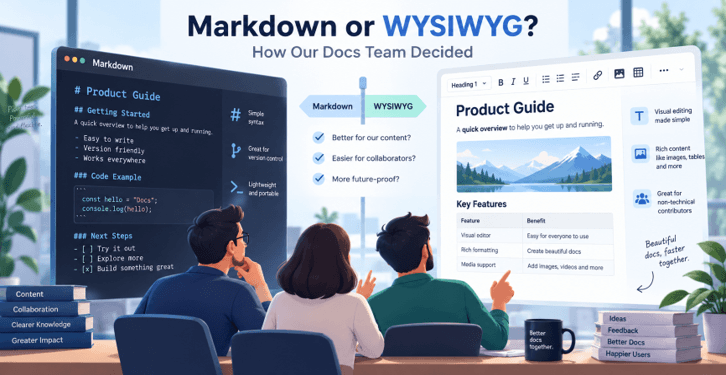
At first, the discussion sounded like the usual Markdown vs WYSIWYG debate: which editor was better?
That turned out to be the wrong question.
What was more important was the person who produced our documentation, the way it was reviewed, where it was stored, and the amount of difficulty we were prepared to impose on different contributors.
Here is how we worked through the decision.
Markdown Looked Like the Obvious Choice
For developer documentation, Markdown has a lot going for it.
A Markdown file consists of plain text and therefore fits easily into a Git-based workflow; developers can edit the documentation using the same IDE that they use for coding, commit the changes to a branch, and then include the modifications in a pull request.
A simple section might look like this:
## Authentication

Send your API key in the `Authorization` header:

```js

fetch('/api/users', {

  headers: {

    Authorization: `Bearer ${token}`

  }

});
That familiarity matters.
There’s no need to learn a separate content management interface since a documentation change follows a workflow similar to that of a code change. Reviewers can look at the diffs, leave comments, and see precisely which lines have changed.
Markdown promotes a fairly clear structure for the content. A great deal of what technical documentation requires can be dealt with using headings, lists, links, code blocks, and simple tables.
It is difficult to object to documents that have almost entirely been written by developers.
However, developers didn’t write all the documentation.
Then We Looked at Who Actually Writes Our Docs
The decision was less clear once we had ceased talking about editor preferences and had made a list of the people who had contributed to the documentation.
The people who might take part in this included developers, technical writers, product managers, members of the support team, and subject-matter experts.
None of them used Git every day, and some of them only occasionally opened an IDE.
That is important because even though Markdown is simpler than HTML, it is still a syntax.
A developer may look at:
```markdown

**Important:** Do not expose your API key.
and immediately understand the result.
A person who spends most of their day working in product, customer success, or support might reasonably wonder why they cannot just click on Bold.
The issue becomes more obvious as documents get more complicated.
It’s easy to create a heading in Markdown, but creating a long table, rearranging nested lists, adding several images, or correcting the formatting over a large page can be less pleasant.
The fact that these issues exist does not mean that Markdown is a poor format; they have just served as a reminder that a good storage format and a good authoring experience are not necessarily one and the same.
Where WYSIWYG Made More Sense
A WYSIWYG editor approaches the problem from the opposite direction.
Instead of writing syntax and visualizing the result, contributors work directly with formatted content.
They select text and turn it into a heading. They insert links through a dialog. They build lists with toolbar controls. They can often resize images, edit tables, and see approximately what the finished content will look like while they are writing it.
For occasional contributors, that removes an entire layer of abstraction.
It can also reduce small formatting mistakes. An author does not need to remember whether a list needs another level of indentation or whether spaces around a Markdown character change how something renders. The editor handles much of that interaction.
However, WYSIWYG brought its own questions.
What format would the editor produce? If we stored HTML, how easy would it be to review changes? Could the content move to another platform later? What happened if contributors used formatting that our documentation site did not support?
A rich text editor could simplify writing while complicating other parts of the publishing system.
So instead of comparing feature lists, we started comparing workflows.
The Comparison That Actually Helped Us Decide
The most useful exercise was to map each approach to the things our team actually needed.
| Requirement | Markdown | WYSIWYG |
| Git-based workflows | Strong fit | Depends on stored format |
| Developer familiarity | High | High to moderate |
| Nontechnical contributors | Requires some learning | Usually easier |
| Code-heavy documentation | Strong | Good with code-block support |
| Rich visual formatting | More limited | Strong |
| Reviewing source changes | Straightforward | Depends on output format |
| Tables and media | More manual | Easier visually |
| Content portability | Generally strong | Depends on output |
| Authoring experience | Syntax-driven | Visual |
| Contributor onboarding | Requires Markdown knowledge | Usually faster |
The table did not produce a universal winner. It did something more useful: it showed us which questions mattered.
Before choosing an editor, we found that a documentation team should ask:
- Who writes the documentation?
A developer-only workflow has different needs from one involving product, support, and marketing teams. - Where does the source of truth live?
If every document is stored in a Git repository, Markdown becomes particularly attractive. - How is documentation reviewed?
Teams relying heavily on pull requests may value clean text diffs more than teams reviewing content inside a CMS. - How complex is the content?
Documentation dominated by headings, paragraphs, and code blocks works well in Markdown. Rich tables, embedded media, and complex formatting may benefit more from visual tools. - How often do occasional contributors edit the docs?
Requiring someone to learn a syntax and Git workflow for two documentation updates per quarter may create unnecessary friction.
Once we answered those questions, the argument stopped being “Markdown or WYSIWYG?” and became a systems-design problem.
Authoring Format and Storage Format Are Different Decisions
This was the idea that changed our thinking the most.
We had been treating the interface people use to write content and the format used to store that content as if they had to be identical.
They do not.
A documentation platform can support several patterns:
Markdown authoring » Markdown storage
This is the traditional docs-as-code model. Developers work directly with Markdown files and commit them to Git.
Visual authoring » HTML storage
This is common in content management systems where visual presentation and flexible formatting are more important than plain-text diffs.
But teams can also design workflows where authoring and storage needs are considered separately.
That opens up more options than simply forcing everyone into the same interface.
It also changes how we evaluate editing tools. Instead of asking whether an editor is “a Markdown editor” or “a visual editor,” we can ask which formats and workflows it can support.
For example, modern rich text editors increasingly provide Markdown capabilities alongside visual editing. Froala’s Markdown editor functionality provides a Markdown mode and APIs for reading and setting Markdown content, giving applications another option when Markdown needs to be part of the authoring or storage workflow.
The important lesson for us was not that every team needs both modes. It was that the authoring interface should not automatically dictate the architecture of the entire content system.
What We Ultimately Chose
We did not end the discussion by declaring either Markdown or WYSIWYG the winner.
Markdown still made sense as the default for developer-heavy documentation. It works naturally with source control, makes changes easy to review, and lets engineers contribute without leaving their normal development environment.
At the same time, we did not want every contributor to become proficient in Markdown and Git before they could correct a paragraph, update a table, or improve an onboarding guide.
So we decided to treat the writing experience and the underlying content format as separate concerns.
Developers could keep a workflow that felt natural to them. Other contributors could have a more accessible editing experience where needed. The publishing system, rather than individual author preference, would determine which format served as the source of truth.
That gave us more flexibility without abandoning the benefits that originally attracted us to Markdown.
A Simple Decision Framework for Your Docs Team
If your own team is considering Markdown vs WYSIWYG, the decision can usually be narrowed down quickly.
Choose a Markdown-first workflow when developers are the primary authors, documentation lives alongside code, pull-request reviews are important, and the content mostly consists of text, code examples, links, and straightforward formatting.
Lean toward WYSIWYG editing when many contributors are nontechnical, documents depend heavily on tables and media, or authors need to understand the visual structure of a page while editing it.
Consider a hybrid approach when you want the portability or workflow advantages of Markdown without requiring every contributor to work directly with Markdown syntax.
Most importantly, start with the people and the workflow rather than the editor.
We began by asking, “Markdown or WYSIWYG?”
The better question turned out to be:
What authoring experience and content format make sense for the people who create, review, and maintain our documentation?
Once we answered that, choosing the tools became much easier.
Popular on OTW Right Now!


About The Author

Gagan Bhangu
Founder of otechworld.com and managing editor. He is a tech geek, web-developer, and blogger. He holds a master's degree in computer applications and making money online since 2015.