
How to Make a Boomerang with AI for Instagram Stories, Reels, and TikTok
A hair flip, a quick outfit change, or a product reveal can make a good short-form video, but not every moment needs a full edit. A boomerang adds a simple forward-and-backward motion that makes a short action repeat. Here’s how to make a boomerang video with AI using Pollo AI, whether starting with a photo or an existing clip.
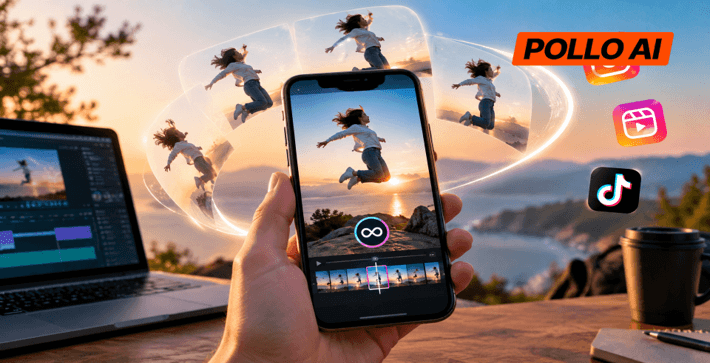
What Is Pollo AI Boomerang Video Maker?
Pollo AI Boomerang Video Maker is an online tool that takes your photos and video clips and turns them into forward and reverse loops. Rather than just jumping back to the first frame as a normal loop would do, the boomerang plays the clip forwards and then backward, giving you a smooth back-and-forth effect.
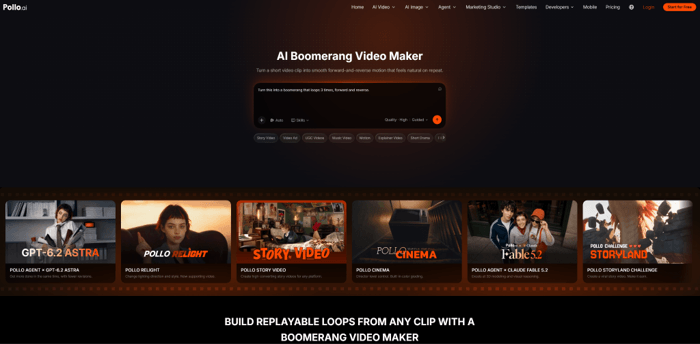
It works with two types of source material. Users can animate photos by describing the movement they want to add, such as a head turn or hand gesture. For videos, the tool will take the action that’s already been recorded and make a loop from that. You can also select between 9:16 and 16:9 aspect ratios and add background music if you like.
This is useful for far more than just fun social media posts. Fashion houses can animate a portrait or loop an outfit reveal. Beauty brands can take a product shot or a short demo and turn it into a looping clip. Online retailers can use it to highlight things like a rotating accessory, a package opening or a drink being poured. Rather than going back and manually editing the reverse, you can actually create the loop from your original footage.
How to Make a Boomerang Video with AI in Pollo AI
The process is actually very simple, really; it just depends on what you’re after. If you’ve got a specific image in mind, then use a photo. If you want the movement to be pre-recorded, then use a video clip.
Step 1: Open Pollo AI and Upload a Photo or Video
Go to the Pollo AI Boomerang Video Maker and upload the clip.
If you’re using a photo, then pick one with a clear subject in it (a portrait, an outfit shot, a product shot, etc.) as that’s what the AI will use to determine where to add the movement.
If you already have a good recording, then just upload the video. A short clip of someone turning, waving, jumping or picking something up is perfect for the boomerang effect. You don’t need to reverse or duplicate the clip prior to uploading.
Step 2: Set the Movement
The next stage is whether the source is a photo or a video.
For a still image, you want the subject to do the action. It’s best to pick one small, simple movement rather than several at once. A fashion portrait, for instance, might require a very slight head turn or a hair movement. A product image might be best with a very slight rotation to show another angle.
If it’s a video, then the action is already in there. Simple, clear movements are far easier to turn into a smooth loop than something with a lot of action in it. A person waving or a product being rotated is far better than a clip with a lot of moving bits in it.
Step 3: Choose the Aspect Ratio and Add Music
Choose the aspect ratio depending on where you’re going to post the video. Pollo AI supports both 9:16 and 16:9.
For Instagram Stories, Reels, and TikTok, 9:16 is usually the best as it fills the vertical mobile screen. 16:9 is the format to use for landscape videos or wider placements.
Adding background music is optional. A fairly up tempo track can be great with a dance move or an outfit reveal but product demos can be clearer without it. Don’t add any audio at all if it’s going to distract from the movement or make the clip feel too busy.
Step 4: Generate and Download the Boomerang
Once you’ve got everything set up, generate the video and then just watch it from beginning to end prior to downloading.
Pay very close attention to where the movement reverses. Does it still look natural when played backward? Is the subject still clearly identifiable? For animated photos you want to make sure the face or product hasn’t changed in any way that’s obvious. For videos you want to make sure there’s no odd movement as it goes back to the start.
If it doesn’t look right, try a simpler action or use a different image/clip. Don’t just make the prompt more complex if the footage isn’t working as a boomerang. Once you’ve got a loop that you like, download it and get it ready to post.
Tips for Making Better AI Boomerang Videos
There are a few things to bear in mind before you go and make a loop. These tips will save you time and will help you to avoid some rather awkward results.
1. Choose an action that looks convincing in reverse.
Some movements work very well as boomerangs (waving, turning, jumping, pouring, rotating etc). Others can be quite odd when reversed, particularly if there are multiple people or objects moving in different directions. If the reverse is confusing, then the clip may not make any sense to the viewer.
2. Start with clear source material.
For photos, get a well-lit shot with the subject clearly separated from the background. For video, avoid anything that’s shaky, anything that has motion blur and anything where the action you’re trying to capture is actually difficult to see. Good source material will, of course, help the tool perform better.
3. Think about mobile framing.
If your video is for Stories, Reels, or TikTok, then do leave some space around the subject. Faces and product details that are right up against the edge of the frame can be difficult to see on a phone and may well get covered by the app’s own UI. It’s also much easier to frame the subject properly if you’re going to be reusing the clip on other platforms.
4. Keep the soundtrack in proportion.
Choose music that matches the movement but doesn’t dominate it. A beat can definitely add some energy to a fun clip, but for a lot of product shots and reactions you can actually get away with no music at all. If you’re doing a promo piece, then just make sure the music you choose is licensed for commercial use on the platform you’re using.
How to Use the Boomerang on Instagram Stories, Reels, and TikTok
Once you’ve downloaded the video, you can upload it via the standard posting tools on Instagram or TikTok. A vertical 9:16 will generally be fine for Stories, Reels, and TikTok, so you don’t need to create a separate loop for each platform.
You can tailor the presentation to your particular post. For a Story you might just need a short caption or a sticker. For a Reel, you could use the boomerang as your opening shot and then go into a longer demo. On TikTok a quick text overlay can be used to explain a product feature or to provide some context to a funny reaction.
Conclusion
A good boomerang doesn’t need complex editing. With Pollo AI Boomerang Video Maker, you can bring a photo to life or turn a video clip into a forward-and-reverse loop. Pick a clear subject, focus on one clear action, and check the movement before downloading. Then, use your finished video on Instagram Stories, Reels, or TikTok.
Popular on OTW Right Now!


About The Author

Gagan Bhangu
Founder of otechworld.com and managing editor. He is a tech geek, web-developer, and blogger. He holds a master's degree in computer applications and making money online since 2015.