
How to Convert a Photo into a 3D Model for Free
Have you ever looked at a photo and wished you could turn it into a real 3D object?
Just a few years ago, creating a 3D model from a single image required professional modeling skills and expensive software. Today, AI has changed everything. Modern image-to-3D AI tools can analyze a photo and automatically generate a 3D model in minutes, often without requiring any design experience.
Experiment with AI technology. This guide will show you exactly how to convert a photo into a 3D model for free.
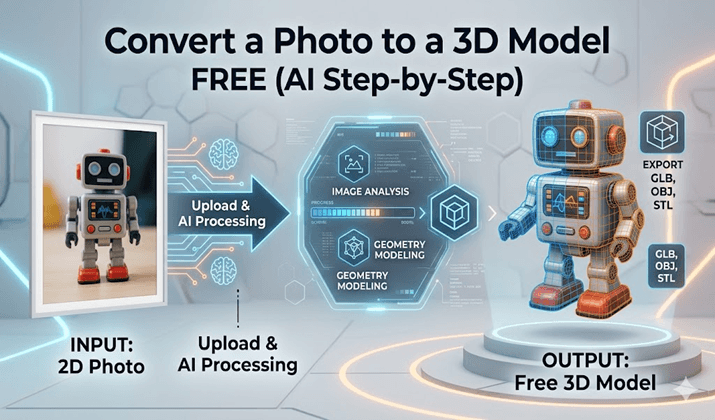
The alt title must read the name of the file. The title alt is to display the name of the file.
Why Convert Photos into 3D Models?
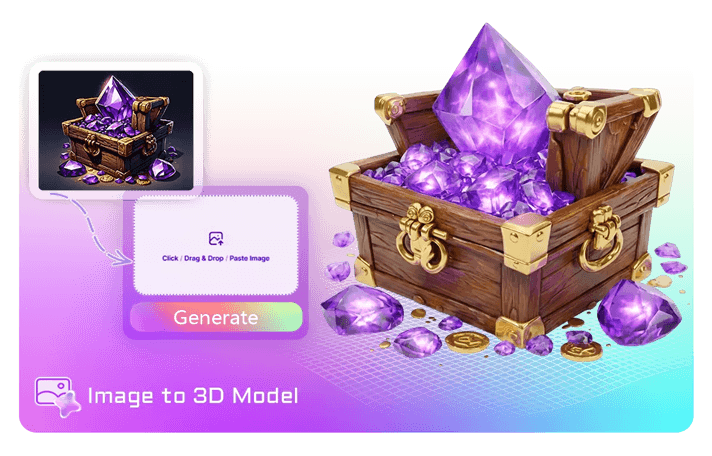
AI-driven 3D generation is finding applications in numerous fields, with creators leveraging its functionality for various reasons.
It saves a lot of time for game developers when it comes to creating assets.
For online retailers, a 3D product preview can be a key to better customer engagement and conversion.
It’s an easy tool for hobbyists to convert real-life items into digital models.
From that, even students and educators are leveraging the creation of more interactive learning experiences with AI-generated 3D models . From there, students and educators are utilizing 3D models created through AI for more interactive learning experiences.
The best thing about it is that it can be done in a few clicks and used to be hours of work.
Before You Start: Choosing the Right Photo
The quality of your final model will be dependent on the photo that you upload.
AI is better when it is able to clearly see the shape and information of the object.
Good Photos Usually Have:
- A single subject
- Sharp focus
- Bright, even lighting
- Minimal background distractions
- High resolution
Photos to Avoid
- Blurry images
- Dark photos
- Crowded scenes
- Objects hidden behind other items
- Extreme camera angles
Consider the picture as a blueprint for the AI. The clearer and more understandable the blueprint, the better the model.
Step 1: Upload Your Photo
After you’ve chosen an appropriate image, upload it to an Image to 3D Model AI generator.
Most tools support:
- JPG
- PNG
- WEBP
Ideally, use the original image, rather than a compressed screenshot.
When uploaded, the AI starts examining the structure, texture,s and object boundaries of the image.
Step 2: Let AI Reconstruct the Object
This is where the magic happens.
The AI attempts to understand:
- The object’s overall shape
- Surface depth
- Hidden geometry
- Texture information
You don’t have to create vertices, polygons, ns, and UV maps as you would with traditional modeling software.
Everything happens automatically.
The time required to generate a given image can vary from a few seconds to several minutes, depending on the complexity of the image.
Step 3: Review the Generated Model
Once the current generation is complete, rotate the model and inspect it carefully.
Pay attention to:
Shape Accuracy
Is it similar in shape to the object?
Missing Areas
Single-image generation can sometimes be problematic for hidden surfaces.
Texture Quality
Look for any unpleasantly stretched or blurred textures.
Edge Definition
Usually, the areas that are the most difficult to get thin in are the thin parts and small details.
If the first one is not perfect, it’s ok. It’s common for AI generation to get better with the second time around.
Step 4: Export the File
After reviewing the model, export it in the format you need.
Common options include:
GLB
Perfect for Web Viewers, AR Apps,s and modern workflows.
OBJ
One of the most popular 3D formats.
FBX
Frequently used in computer games and animation workflows.
STL
The preferred method to print in 3D.
The right export format can save time down the road in your process.
How to Get Better Results from a Single Photo
Newbies think that AI can recapture any image flawlessly.
In fact, there really are some small changes that can make a significant difference in quality.
Use a Plain Background
The background needs to be clear so that AI can concentrate on the subject.
Center the Object
It’s easier to analyze objects in the middle of the frame.
Capture More Detail
The higher the resolution of the photographs, the more important visual information they will retain.
Avoid Reflections
Reconstruction models may be fooled by mirrors, glass, and shiny surfaces.
Try Multiple Versions
Having multiple iterations can yield significantly varied results.
Best Objects for AI 3D Generation
Some subjects naturally work better than others.
Excellent Candidates
- Toys
- Action figures
- Furniture
- Product photos
- Statues
- Decorative objects
More Difficult Subjects
- Transparent objects
- Human faces
- Hair
- Jewelry chains
- Thin wires
It is important to be aware of these constraints to have realistic expectations.
What Can You Do with the Finished Model?
Once a model has been created, the possibilities are virtually endless.
Build Game Assets
Import Models into Unity, Unreal Engine, or any other game engine.
Create 3D Prints
Print real-life objects from pictures with a 3D printer.
Design Product Showcases
Experts note that 3D viewers are a great way to help products stand out online.
Create AR Experiences
Place models in the real world.
Produce Marketing Content
3D images tend to have a greater impact than static images.
Common Beginner Mistakes
Many first-time users make the same mistakes.
Using Low-Quality Photos
Bad source images will almost invariably yield bad models.
Expecting Perfection
AI is powerful, but it’s not magic.
Ignoring Lighting
Many don’t realize that lighting has a larger impact on depth estimation than it does on most things.
Skipping Review
Always check the model that was created prior to export.
It’ll take just a few minutes to get it right and then hours of corrections after that.
Is Free Photo-to-3D Conversion Actually Good Enough?
For many users, yes.
AI generators have undergone significant advancements in recent times.
And although there are still occasions when a professional artist can use manual modeling skills, the free AI tools are usually more than adequate for:
- Prototypes
- Concept designs
- Social media content
- Educational projects
- Personal creations
- Basic game assets
The technology is continually evolving with each iteration of AI models.
Conclusion: Anyone Can Create a 3D Model from a Photo
One of the biggest hurdles for 3D content creation, namely, image-to-3D Model Artificial Intelligence, has been eliminated. No need to have years of software or modeling experience to make useable 3D assets.
By choosing a high-quality photo, following a simple workflow, and understanding the strengths of modern Image to 3D Model AI tools, you can turn ordinary images into impressive 3D models completely free. If you are new to 3D design, it’s easier than ever to get started.
Popular on OTW Right Now!



About The Author

Gagan Bhangu
Founder of otechworld.com and managing editor. He is a tech geek, web-developer, and blogger. He holds a master's degree in computer applications and making money online since 2015.