
How to Adapt One AI Video Concept for Multiple Content Formats
A strong AI video concept should not be limited to a single format. The same idea may need to work as a vertical social media post, a square feed advertisement, a wwidescreenlanding-page video, or a short clip embedded on a website.
Reusing the same prompt across all formats usually results in compromises. The subject or an important action may be cropped out, text may become difficult to read, camera movement may not suit the frame, and the pacing may feel wrong for the target platform.

Instead of treating the prompt as a fixed instruction, use it as a flexible creative specification. Adapt the framing, timing, movement, and level of detail for each delivery format while keeping the underlying concept consistent. This makes the results easier to compare, helps preserve visual quality, and reduces unnecessary regeneration.
Start With a Format-Neutral Creative Brief
Before choosing an aspect ratio, create a concise master brief that defines the elements that must remain consistent. These may include the subject, action, duration, visual style, tone, environment, and central message. At this stage, avoid committing to a specific shot composition.
For example, a chocolate dessert advertisement might feature a dark studio background, slowly flowing liquid, a luxurious atmosphere, and a final hero shot of the product. Without changing the core idea, the concept can be adapted into a 9:16 social video, a 1:1 feed advertisement, or a 16:9 website banner.
Teams can use a browser-based workspace, such as Seedance2AI, to test the same core concept across different models and formatting settings. The purpose is not simply to generate more versions. It is to control the variables carefully so that each output answers a specific production question.
Design the Frame Before Writing Camera Instructions
Aspect ratio affects how visual information should be arranged. A vertical frame often benefits from depth, forward movement, and vertically layered action. A widescreen frame provides more room for lateral movement and environmental context. A square frame generally works well with balanced compositions and a clearly centered subject.
- 9:16: Keep the subject and critical action inside the central safe zone. Depth and vertical movement can be effective, but essential details should not be placed too close to the edges.
- 1:1: Favor balanced compositions, centered hero shots, and clearly readable product silhouettes.
- 16:9: Use wider establishing shots, lateral tracking, and environmental storytelling.
This planning should occur before detailed camera instructions, such as “slow push-in,” “lateral tracking shot,” or “extreme macro close-up,” are added. Camera language is only effective when it supports the geometry of the final frame.
Adjust Timing Instead of Merely Cropping
A 15-second advertisement and a 10-second cinematic clip require different pacing. All short social media formats must introduce the theme within the first couple of seconds, whereas a widescreen presentation can take longer to set the scene.
If taking on a concept, structure the action in the following functional beats: introduction, development, detail, and resolution. The timing of each beat may vary, but the purpose of the narrative remains the same.
Keep the number of beats manageable. Excessive transitional changes may result in unsteady movements, subject confusion, and confusing transitions. Two or three separate, well-chosen shots can make a short video (10-15 seconds). There should be one key action, one significant camera instruction, and one visual priority per shot.
Case One: A Miniature Skateboard Chase

Picture a realistic child’s room in which a small-sized child rides her mini skater around the room. She has to deal withgiant-sizedd furniture and toys, and a low-angle tracking camera.
There are 3 steps to the action. She passes through the narrow streets formed by the blocks of buildings. She then dodges a ball that is rolling away. In the end, she breaks out of a crumbling toy and arrives at the end.
The 16:9 format offers more horizontal room for depicting hazards and lateral escape routes between toy cars, blocks, and walls. This allows viewers to see enough to know what to expect from each near miss.
The obstacles should be placed in the center in Version 9:16, with greater attention to forward progression. For instance, a large ball can roll up to the skateboarder as he/shecrossesg a book with an open page and jumps into a toy box before the lid shuts. Throughout the sequence, the Subject and Critical Action should stay within the vertical safe zone.
The stages should also be the same length as the acceleration stages. If you’d like to set a different pace and build-up for each stage, a 15-second version can be used. If the social cut is short, it can be shortened to fit into the first two stages,s and then the final step is the visual payoff.
The low camera angle, lighting, and controlled motion blur can be maintained across different formats. The placement and timing of the obstacles are the only things that change.
Case Two: Turning a Detailed Blueprint Into a Finished House
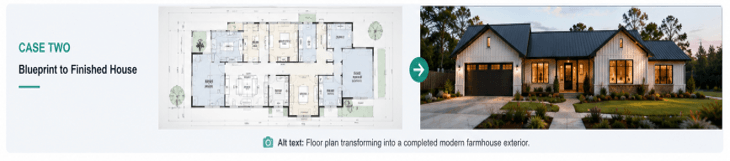
A blueprint-to-reality sequence must be more continuous than the process itself. The idea could start with a labeled floor plan against a blank white background. The spatial interrelationships of the rooms as the plan evolves into a completed house should be maintained.
This design could feature dark metal roofing, black-framed windows, an open-air double garage, and outfitted patios. Cohesion in the material palette enables the blueprint to become part of the finished building.
Footprint can be clearly shown in a 16:9 frame, even when it is irregular, L- or T-shaped. The final exterior reveal also takes place in the wider format, showing the garage, entrance, terrace, and main roofline.
If you are making the sequence 9:16, just don’t simply cut the plan. Rather than that, reframe the movement. The camera could start near the central kitchen/dining space, move up through the bedrooms and garage, and then begin the transformation in the kitchen and dining area.
This also illustrates the need for good continuity rules. The interior rooms and garage will be covered; the terrace, small patio, and garden corner will be open to the sky.
The aspect ratio may change; however, the footprint, room relationships, material selection, and transformation logic should stay constant.
Build a Small Variant Matrix
If making multiple versions, try not to change multiple parameters at once. Construct a basic test matrix instead. Maintain the same concept and model across tests, and vary only one production variable per test.
A useful sequence is:
- Create the initial version in the selected master aspect ratio.
- Adjust only the framing and safe-zone instructions.
- Test one camera movement at a time.
- Refine and lock the pacing after the composition is established.
- Select the version that communicates the subject, action, and intended emotion most clearly.
V
Compare Models With the Same Evaluation Criteria
Some cameras will only recognize some of the same camera language. A model could keep product geometry fairly intact but result in stiff or unrealistic liquid flow. One could produce more dynamic movement and have the subject’s presence float between scenes.
The core prompt, length of writing, reference materials, assignment requirements, a nd evaluation checklist should be the same for comparison.
Review more than visual impact. Evaluation criteria should include:
- Subject and scene continuity
- Motion stability
- Adherence to the requested action
- Safe framing
- Camera control
- Generation and review time
- Required post-production work
The best result doesn’t necessarily have the best one frame. This is the one that is compatible with the delivery and needs the fewest corrections before being published.
A Practical Pre-Generation Checklist
- What must remain identical across every format?
- Where is the safe zone for the main subject?
- Does the camera movement suit the selected aspect ratio?
- Can the main action be expressed clearly in one shot?
- Does the opening reveal the subject quickly enough?
- Is reserved space needed for text, a logo, or other branding?
- Which single variable is being tested in this version?
- Are the reference materials and model settings consistent?
Final Thoughts
Exporting the same clip at different dimensions alone is not enough for a successful multi-format adaptation strategy. The relationship among the subject, movement, timing, composition, and negative space varies across delivery formats.
The better way to start is to have a brief that is succinct, format-independent,t and creative. Maintain the same story and idea, and vary each production element, one by one.
Using this system, one idea can be used to develop a social media concept, product promotion, website content, and more, without compromising visual identity or anything else. The more important part, however, is that each generation can build on the built-up production process rather than create a “one-off.
Popular on OTW Right Now!




About The Author

Gagan Bhangu
Founder of otechworld.com and managing editor. He is a tech geek, web-developer, and blogger. He holds a master's degree in computer applications and making money online since 2015.