
How Interactive Display Networks Improve Customer Experience
I walked into a dental clinic last year, and there was a screen in the waiting room showing a live queue. My name, my estimated wait time, and a little progress bar. Tiny thing. But I sat down relaxed instead of fidgeting and asking the receptionist every five minutes. That one screen changed my entire mood.
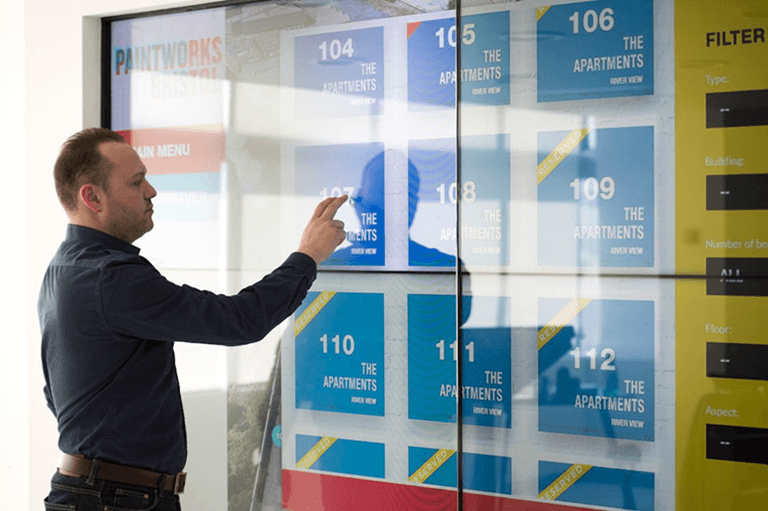
And that’s really the whole argument for interactive displays in a nutshell. They don’t just decorate a wall. They solve a friction point. If you run any kind of physical space, whether it’s a shop, a clinic, a hotel, or an office, the screens you put up either help your customers or they collect dust. There’s not much middle ground.
Why Printed Signs Stopped Working
Here’s a confession. I used to think digital signs were a gimmick. Fancy TVs for businesses with money to burn. Then I noticed something at a gym I joined.
They had a printed poster for group classes near the entrance. Same poster for months. I stopped seeing it after week two. My brain just filtered it out. Psychologists have a word for this. Habituation. Your mind ignores stimuli that never change.
A rotating screen, though? Different story. Monday morning, it shows yoga schedules. Friday afternoon, it pushes weekend boot camp spots. The information stays relevant because the content moves with the calendar. Printed signs can’t do that. Not even close.
So, when did you last actually read a static poster in a business you visit regularly? Probably can’t remember. That’s the problem.
Giving Customers the Steering Wheel
Most businesses communicate with people. Interactive displays flip that around. They let people pull the information they actually want.
This was what I witnessed in an Austin burger joint. They were provided with Tablets at each table. No waiter hovering. No menus on which to wave! You scrolled, you made your toppings and ordered, you paid. Done. The owner said that since the installation of those tablets, the accuracy of the orders increased by 40%. Forty percent. This is a ton of “no pickles” that was finally heard.
Retail kiosks are similar in operation to touch kiosks. Customers look at the stock as they please. Check-in screens in hospital lobbies help to alleviate wait time anxiety. How does this pattern continue to be successful? People have a tendency to believe information that they have created. No one enjoys having their ears buzzed at. The first thing that anyone likes is being in control.
Scaling From One Screen to a Real Network
There’s one screen in your lobby that you can use to display something. Fine. However, what can you do if you have 15 locations? Or 50? Now you have multiple time zones, promotions, audiences, and more.
That’s where most businesses run into a brick wall. Last year, I spoke with one of the franchise owners who had screens in 12 stores. He was to go to each of the places and update the content on his USB stick. Every. Single. Week. Twelve stores. Twelve USB sticks. He looked exhausted.
The fix isn’t complicated, but it does require the right setup. Businesses running multi-location display networks often rely on platforms like MonitorAnywhere to manage everything from one dashboard. Push content, monitor screen health, and schedule by location. No more USB road trips. Without centralized control, you don’t really have a network. You have a bunch of disconnected TVs pretending to be one.
Don’t have the same tone for your Monday morning as for your Friday evening either. And your downtown flagship will have different content from your suburban store. Effective network software enables you to configure those rules in just one place. After that, it will operate automatically.
Getting the Content Right (Most People Don’t)
Honestly? It’s the hardware that’s easy. I have been to businesses with very nice 4K screens with… a static logo. Or perhaps, a scroll-spinning text ticker, which looks like it came from 2007. What a waste.
There is one test for good screen content: Does it serve a useful purpose or serve an interesting purpose? Ideally both. What I see that really works:
- Live wait times/queue positions.
- Create short video loops (up to 15 seconds).
- QR codes that link in person to an action online.
- Social proof walls with live reviews.Live reviews that attract with social proof walls.
- Rides that change according to the hour.Shifts promotions by the hour.
And what tanks? Walls of text. Writing that is too small to read without glasses. Any type of presentation board. You have 3 seconds to make an impact before you lose them. Three seconds. That’s your window.
Tracking Whether Any of This Works
Would you be spending $5,000 every month on Google Ads and never look at the dashboard? Of course not. So, if they put screens in place, why don’t so many businesses measure anything?
Start simple. Is anyone stopping at the kiosk? Touching it? Scanning QR codes? Just a simple foot traffic counter in front of your displays will give you some indication. Last summer, I assisted a friend in establishing a counter in his coffee shop. Of the viewers, 70% looked at the screen. Only 15% interacted. The gap was a message to him that although his content is good, it was in need of work, but not his hardware.
Then link those numbers to actual results. Was it really the case that the sandwich that was promoted on screen 3 sold more than the other? As a result of the wayfinding display, were there fewer questions asked about the location of the bathroom? The wins are not necessarily big. Small successes add up, though.
Mistakes That’ll Cost You
The most important is that of rushing. Teams are excited, purchase screens, attach them, and then discover that no one had thought about the content workflow. A blank screen or a screen that goes black is not better than a blank wall. It cries out, “We are not in control of our own lives.
The issue of accessibility is ignored on a regular basis as well. Screens that are too high for wheelchair users to reach. Typefaces that exact retribution from anyone over 40! No option to use a touch screen with audio. These are not uncommon circumstances. These are your REAL customers who pay for your services.
But Gosh, forgo a gimmick unless it is truly a problem that is being addressed. It’s a great gesture control for trade shows. Augmented Reality brings a lot of ‘Oohs’ and ‘Aahs’. However, when it comes to reducing check-in times and promoting special offers daily, a clean touchscreen will win hands down over a hologram, 10 times out of 10.
What Comes Next
All screens in your business are either talking or talking up a storm. What companies are succeeding at this have nothing to do with the coolest technologies. They are the ones who ask themselves, “What does my customer need right here, right now?” and make the display around that.
Frequently Asked Questions
How much does it cost to set up an interactive display network?
This is dependent on the scale. The interactive kiosks can range in price from $2,000 to $5,000 installed. The multi-location configuration with the management software can cost you anywhere from $15,000 to $50,000. Remember the continuing expenses, as well. Subscription costs for software and new content come out sooner than the cost of the hardware.
What separates digital signage from an interactive display network?
Any screen that can present changing information is a digital signage. The user interaction (touch, QR codes, sensors) and multiple screens or locations under centralized control are the two additional aspects of an interactive display network. One of them is a TV that plays a loop. The other one is a system that is connected to respond to its audience.
How often should I refresh display content?
Weekly at a minimum. Alternatively, high-traffic areas can have daily or hourly shifts in accordance with customer traffic. Old screens induce people to turn off their gaze. Old displays encourage people to shift their focus. If you have the same display as Saturday, you’re missing out on the usability of the display.
Can small businesses benefit from this?
Absolutely. It’s not necessary to have 20 screens. A single tablet handling of a self-checkout or appointment bookings can make a huge difference. Begin with one display to address one problem. Measure results. Then, determine whether you wish to expand on this.
Which industries see the best results?
The sectors that are leading the pack are retail, restaurants, healthcare, and hospitality. They’re employed in fast-casual restaurants for orders. The concierge information is displayed in the lobby of the hotel. Patients are calmed by having live queue updates displayed at the clinics. If you have a brick-and-mortar business and you see your clients over and over again, there is almost certainly a reason to use it.
Popular on OTW Right Now!
-
 Engineering ePoP Memory for Space-Constrained Devices: Why LPDDR5X and eMMC 5.1 Integration Matters
-
 How to Receive Text Messages from Another Phone Number: A Guide for Parents and Legal Use Cases
-
 From Video to Vibe: The Smartest Way to Convert MP4 Audio to MP3
-
 What Businesses Expect Today from a Chicago Mobile App Development Company



About The Author

Gagan Bhangu
Founder of otechworld.com and managing editor. He is a tech geek, web-developer, and blogger. He holds a master's degree in computer applications and making money online since 2015.