
How I Use AI Anime Art Tools to Turn Character Ideas Into Better Visuals
AI image tools are no longer just small toys for making random pictures. I have been using them more often for character ideas, blog visuals, social media posts, and quick concept testing. The biggest change I noticed is not speed, although speed is useful. The real value is that I can move from a vague idea to a usable visual direction without opening a complex design app.
Anime-style visuals are a good example. A few years ago, creating a consistent anime character required drawing skill, hiring an artist, or spending hours editing reference images. Now, an AI anime art generator can help turn a rough description into a polished character concept in minutes. That does not mean every output is perfect. It means the early creative stage has become much easier.
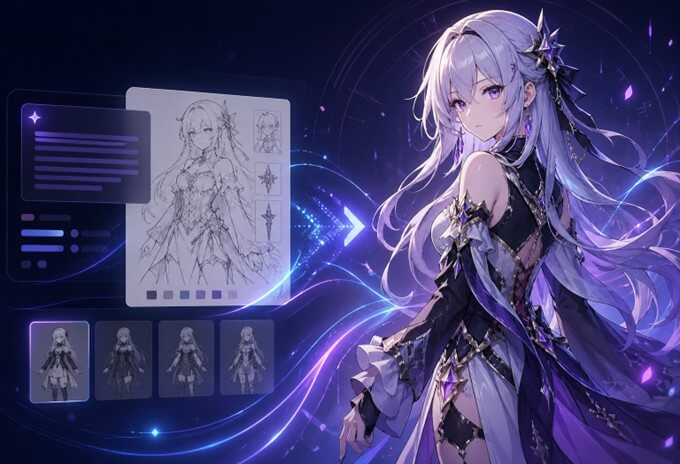
Why Anime Art Works So Well With AI
Animated characters rely on visual cues. The overall look can be altered by: the color of the hair, facial expression, type of clothes, pose, background atmosphere, and little accessories. Many people are surprised by how well this type of prompt will work with AI tools, as there are identifiable styles in the prompt.
If I’m testing anime prompts, I’ll typically begin with a single character concept. I could write a “calm fantasy girl with silver hair, navy cloak, soft moonlight, and a serious expression. This is enough to get a starting point. Once that, I tweak the prompt according to what I see is wrong.
Eyes are sometimes over-dramatic. At times, the attire is too contemporary. There are times when the background is distracting from the character. Here is where the tool is beneficial: it helps to facilitate this back-and-forth process. I’m not creating art. I am forming a path.
My Basic Workflow for Creating Anime Characters
I don’t think it is advisable to place an extremely long prompt into the tool at the start. Long prompts can be effective, but they can also be difficult to tease out for a good or bad outcome.
My workflow is usually simple:
- Start with the character type
- Add visual traits
- Define the mood
- Add clothing and accessories
- Refine the background
- Generate several versions
- Pick the strongest one and improve it
This helps to make it manageable. If the first one sucks, I can easily tell if the problem is in the description of the character, the style, or the scene.
For instance, anime warrior isn’t specific enough. The “young anime warrior with short black hair, red scarf, light armor, sunset battlefield, confident pose” description provides a lot more direction to the tool. It might still require fine-tuning, but it’s a start towards my idea in my head.
What Makes a Good Anime Prompt?
A good prompt is not always a long prompt. It is a clear prompt. I have found that the best prompts usually include these parts:
| Prompt Part | Why It Matters | Example |
| Character identity | Defines who the image is about | anime student, fantasy mage, cyberpunk girl |
| Main features | Helps keep the character recognizable | blue eyes, short silver hair, glasses |
| Outfit | Adds personality and story | school uniform, leather jacket, royal robe |
| Mood | Controls emotional direction | cheerful, lonely, mysterious, heroic |
| Scene | Gives context to the image | rainy street, magic library, rooftop at night |
| Style detail | Improves final look | soft lighting, clean line art, cinematic shading |
This is helpful because the prompt will not be random. This also makes revisions simpler. If I really like the character, but not the background, I just change the scene part. If the character is too young or too serious, I change the character’s identity and mood.
Where AI Anime Art Is Actually Useful
Concept creation is the most useful application. Original characters: writers can make fast visuals of characters. Game developers can test directions of characters before entering the production art stage, and content creators can create thumbnails, profile images, or story images.
I also see value for people who build fictional worlds. Having a visual draft helps a novel character, role-playing avatar, or mascot feel more grounded. Although the AI-generated image might be subsequently redrawn by humans, it aids in conveying the concept.
There’s another little thing that goes along for the ride that is easy to miss. AI art generators can be used to find out what you don’t want. I’m going to come up with a version and then realize that the character should be older, or softer, or simpler, or darker, or more colorful. This is a display-level feedback that is difficult to achieve from text.
A Few Mistakes I Try to Avoid
The first error is too much in a single prompt. Having three outfits, four emotions, five accessories, and a complex action scene can make things messy.
The second error is not paying attention to consistency. When you wish to have the same character in multiple photographs, make sure you repeat the essential qualities carefully. The color of the hair, eyes, clothing, and personality should remain consistent. In any other way, each picture begins to appear to be a different man.
The third error is considering the first picture as the final. The first output I don’t use very often. I consider it a working document. The standard image will become clearer after 2-3 iterations of adjusting.
For people who want to create original characters instead of just random anime portraits, tools like OCMaker AI are useful because the focus is closer to character creation, not only image generation. That distinction matters. A general image tool may create something beautiful, but an OC-focused workflow usually makes it easier to think about identity, design, and repeatable character details.
Human Creativity Still Matters
The AI can create the image, but it doesn’t necessarily understand the reason for the character’s existence. It’s the user who is still responsible for that part. There needs to be a purpose behind a strong character. What is their role? Are they kind, threatening, timid, strong, hilarious, or sad? What is their world like?
If I get better results, I usually make those decisions before writing the prompt. The tool is now a visual assistant. It is a tool to test the idea, but it isn’t the idea itself.
That’s why I do not want to call AI anime tools “for artists only. Very helpful for writers, marketers, hobbyists, game enthusiasts, and those who can’t draw but think in pictures. It’s easier to get in, and that means more people are going to venture into character design.
Final Thoughts
The most effective use of AI anime art tools is when they are directed. When the prompt is random, it does not produce a definite result. After some rounds of iteration, sketches can become much closer to the vision if a good character concept is used along with a simple structure.
The creative momentum is the greatest thing for me. I can try out ideas at the matter of a moment’s notice; compare different versions and make a decision if the character is worth elaborating on or not, rather than leaving the idea in a notebook. It’s not an AI anime generator as a crutch. It becomes a very usable part of today’s creative process.
Popular on OTW Right Now!
-
 How AI Search Is Reshaping Content Marketing: Strategies to Get Mentioned by ChatGPT, Gemini and AI Assistants
-
 How to Remove Text and Logo Overlays from Videos Using AI
-
How Councils Can Reduce Time Spent on Manual Plate Checks and Ticket Issuance
-
 How AI Detects Unseen Defects Missed by Traditional Automation

About The Author

Gagan Bhangu
Founder of otechworld.com and managing editor. He is a tech geek, web-developer, and blogger. He holds a master's degree in computer applications and making money online since 2015.