
7 Mistakes I Made When Using AI Photo Generators for YouTube Content
Creating YouTube content has always involved more than recording and editing videos. Thumbnails, community posts, channel banners, and promotional images all influence whether people notice a creator. Over the years, I have learned that even a good video can struggle if its visual presentation does not attract the right audience.
When I first started experimenting with an AI Photo Generator, I thought the biggest advantage would be speed. I imagined I could type a prompt, get a perfect image, and move on to editing. That expectation was unrealistic. The technology is powerful, but the results depend heavily on how it is used.
After testing different workflows, I realized most problems were not caused by the tool itself. They came from the way I approached image creation. Many creators make similar mistakes when incorporating AI visuals into their content creation process, especially when competing on crowded platforms like YouTube.
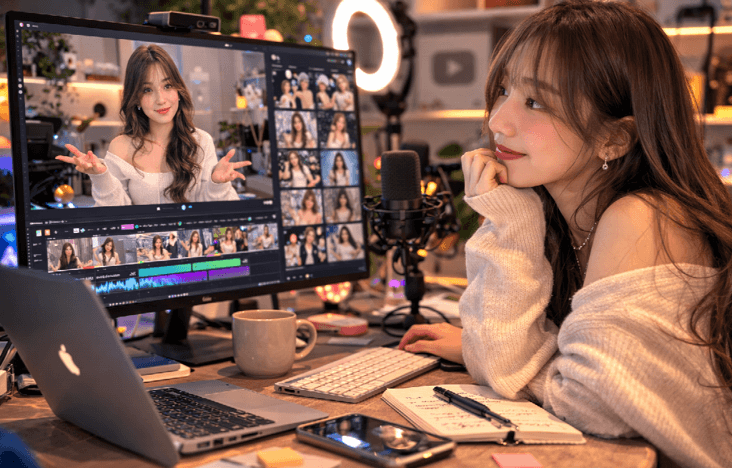
Gartner reported that 80% of enterprise software engineering organizations are expected to establish internal AI-augmented development platforms by 2027, showing how quickly AI-assisted workflows are becoming part of professional production environments. While this statistic focuses on software development, the same shift is happening in creative fields: people are learning to integrate AI into existing workflows rather than treating it as a replacement for human skills.
Here are seven mistakes I made and the lessons I learned from using AI-generated images for my channel.
1. Expecting AI to Replace Creative Direction — The Tool Cannot Decide Your Story
My first mistake was assuming that AI could create a complete visual concept without much input from me.
It cannot.
An AI Photo Generator can produce impressive images, but it does not understand my audience, my video style, or the emotion I want viewers to feel. Those decisions still come from the creator.
For example, I created some general images for a video about productivity tools, starting with laptops, offices, and digital screens. Looks good, but it was just a stock photo. With a fresh strategy and a new mindset of sticking to the core message of the video- calm workflow, focused creators, and organized digital spaces- the images were much more appropriate for my channel.
The biggest lesson was simple: AI works better when I provide creative direction instead of expecting it to invent the entire concept.
2. Choosing Beautiful Images That Do Not Match the Video — A Thumbnail Is Not Decoration
Something I see creators often do is pick images they think will look great, but they don’t convey the video’s intent.
The sole purpose of a YouTube thumbnail is to generate curiosity and present the topic succinctly.
This is the kind of mistake I made while making a video editing how-to. I was using an image created by AI using a visually interesting prompt that contained futuristic elements to make it look interesting. The picture, however, wasn’t much of a connection to the actual tutorial. The thumbnail garnered attention, but the wrong kind of attention.
Since then, I haven’t used AI images as filler; I use them as part of the story. The visual should reinforce the topic/sentence, provide a call to click, and tell the viewer what they will see on the website or page.
Not allAI-generatedd images are necessarily the most artistic. It is the one that is suitable for the material.
3. Ignoring Realism Problems — More Detail Does Not Always Mean Better Images
With the rise in the popularity of AI image generators, many creators have been creating highly detailed images. I did the same. I felt that the more details, the stronger the effects, and the more dramatic the lighting, the better the results.
It was not necessarily so, but it hasn’t been that way.
However, sometimes highly complicated images seemed less believable. Very odd facial expressions, impossibilities, or unnecessary visual effects may detract from the message.
It’s at this point that an AI-realistic photo-generation method was helpful to my workflow. Rather than going for the most dramatic shot, I began to look at realistic settings, natural lighting,g and believable scenarios.
For example, if a video is about creator equipment, a desk setup is a more effective approach than a futuristic studio with unnecessary equipment. The simpler picture was more relatable.
It’s sometimes better to make people feel than to make them see.
4. Creating Every Image From Scratch — Consistency Matters More Than Variety
Initially, I came up with entirely new designs for each video. For seven days, my thumbnails looked like movie posters; after another week, they looked like artwork; next, they looked like advertisements.
The images were all good when they were viewed individually.
Combined, they were a hassle, making my channel feel inconsistent.
Even independent content makers are a brand with a YouTube channel. It’s important that viewers slowly come to know your visual style.
I began to develop a consistent system: similar color moods, repeated design elements, and consistent image styles. I started to use tools such as the photogenerator to explore ideas and help keep me on a visual track.
The purpose is not to make endless variations of pictures. The objective is to establish a brandable logo.
5. Using AI Images Without Editing Them — The First Result Is Usually Only a Starting Point
One of the errors has been publishing AI-generated images right after they are generated.
The first output can be excellent, but it doesn’t always align with my content objective. It’s the little things that can add up.
Now I use AI pictures as a starting point for me to write my own content. I check the composition, crop out unnecessary areas, rearrange text, and sometimes use AI-generated components alongside my normal editing.
In designing a thumbnail for a video review of software, for example, I created several background ideas and then manually edited the most promising one. I was able to add my own layout, branding,, and visual hierarchy,, which really made the final product much more effective.
AI provides possibilities. Editing transforms the possibilities into content.
6. Forgetting Audience Psychology — A Click Comes From Emotion, Not Technology
One common pitfall is placing too much emphasis on the technology behind AI images.
The only reason viewers click is that a picture was generated using AI. They click from curiosity, excitement, surprise, or recognition of the image.
I found out through trial and error as I tried various thumbnail types while setting up my channel. Average results were obtained from some technically impressive images generated by the AI. Others were easier but caused a more emotional response.
Often, a complicated fantasy scene failed to resonate as well as a thumbnail that showed a clear problem, an interesting expression, or a relatable situation.
The audience is not concerned about the tool. They take an interest in the story.
7. Treating AI as a Shortcut Instead of a Creative Partner — Faster Does Not Mean Automatic
My final faux pas was thinking that AI would eliminate all of my creative responsibilities.
It brought some things down but new things up. I had more to look at, more to think about, more choices, and more decisions to make.
This isn’t always a bad thing.
Throughout history, creative work has required making decisions about what to do and what not to do. AI adds to the options offered.
In this way, I can quickly try out various directions to my concept and have more time to refine the concept itself.
What I Learned After Building an AI-Assisted YouTube Workflow
From now on, I’m going to make more use of AI images for my YouTube videos. The most significant change was not getting images quicker, but considering the meaning of each image.
Today, creators have tools at their disposal to help them throughout the production process, from concept to creation. But the best results continue to be achieved when technology is used in conjunction with sound judgment.
AI-generated images are at their best when aligned with the creator’s voice. The future has nothing to do with replacing traditional creativity. It’s all about providing more avenues for creators to explore ideas, test concepts, and connect with their viewers.
I’m not sure how to explain this, but the AI photo generator is more of a creative assistant than an image-making machine. The true magic lies in knowing when to use it, how to direct it, and how to make the possibilities it creates into content.
Popular on OTW Right Now!


About The Author

Gagan Bhangu
Founder of otechworld.com and managing editor. He is a tech geek, web-developer, and blogger. He holds a master's degree in computer applications and making money online since 2015.