
How Digital Document Workflows Are Transforming Everyday Transactions
Digital advances are everywhere. And obviously, it is mostly good news.
When handling transactions, you no longer need to print out dozens of pages or send out a courier to get a couple of signatures. Digital document workflows have fundamentally shifted how we formalize agreements and manage personal data. At the same time, they require more knowledge about proper data management and correct automation arrangements.

Why Document Workflows Are Going Fully Digital
The massive migration away from paper files isn’t just a corporate trend but rather a standard for everyday life. Let’s see why.
Democratization Beyond the Enterprise
Earlier, advanced automated document systems were multi-million-dollar software installations reserved exclusively for global banks, insurance conglomerates, and enterprise-scale tech companies. Today, cloud infrastructure has substantially democratized this space. Independent contractors, local landlords, and casual peer-to-peer sellers have access to the exact same enterprise-grade document creation, tracking, and execution tools.
The Standardization of PDFs and Cloud Storage
The universal adoption of PDF really solved a major compatibility issue. It ensures that a contract looks identical whether it’s opened on a smartphone, a tablet, or a desktop computer. Combined with cloud storage networks, now we can maintain a secure, organized repository of the vital paperwork that is accessible from anywhere in the world.
The Rise of Browser-Based Document Editing
We have moved past the era where modifying a form required expensive, heavy desktop software licenses. Modern, browser-based document editing platforms allow users to open, fill out, edit, and sign complex forms directly inside a web browser window.
Core Technologies Powering Modern Document Workflows
Behind every smooth digital transaction lies a connected stack of specialized software engines working together to ensure speed, accuracy, and legality.
- Cloud-based document management (DMS): These platforms are basically secure digital file cabinets. They provide instant access controls, precise version tracking, and automated backup systems.
- Electronic signatures: Electronic signatures benefit from the robust legal framework, such as the ESIGN Act of the United States and the eIDAS of the European Union. They create a secure cryptographic audit trail of who signed the file, when it was signed, and the IP address used, and are very defensible in court.
- AI-assisted content parsing: AI-powered machine learning engines scan uploaded documents to automatically identify missing signature sections, highlight conflicting terms, or pull out relevant transactional data.
Everyday Transactions That Benefit from Digital Workflows
Digital document systems can be helpful to high-value business transactions,tions but they can also help with the handling of routine personal and professional transactions.
High-Value Asset Purchases
When buying or selling a used vehicle or heavy machinery, using a bill of sale is essential to legally transfer ownership and protect both parties from liability. Digital platforms let both parties fill out a state-specific template, verify identification details, sign electronically, and instantly send copies to the respective insurance providers and state registries.
Service Agreements and Vendor Contracts
Standard service level agreements (SLAs) can be sent out via a digital platform by freelancers, independent contractors, and small service businesses. This means that when terms are presented to the client, they can easily review them, make changes, or sign the contract immediately, ensuring that the project does not start with delays and a delay in the administrative process.
Employment and HR Onboarding
It used to be a huge pile of paper tax forms, direct deposit authorizations, and non-disclosures when you hired a new employee. Today’s HR digital pipelines streamline these processes and take the new hire through several steps in a single, web-based platform, with completed documents being sent straight to payroll systems.
Why Digital Document Workflows Improve Accuracy and Efficiency
Digital document structures offer computational safeguards that eliminate human error.
| Operational Indicator | Manual Paper Process | Digital Automated Workflow |
| Document Execution Window | 3 to 7 business days | Less than 2 hours on average |
| Missing Signatures / Form Errors | Common (requires manual re-printing) | Prevented via mandatory field validation |
| Audit and Tracking Capability | Invisible (hard to track who has the paper) | Real-time status views with time stamping |
| Physical Storage Footprint | Bulky file cabinets and off-site storage units | Encrypted cloud environments |
Managing a Digital Asset Transfer: A Practical Guide
Planning a high-dollar personal asset sale or transfer of a digital business asset? At any rate, you should take measures to safeguard your monetary advantages and stay away from legal exposures.
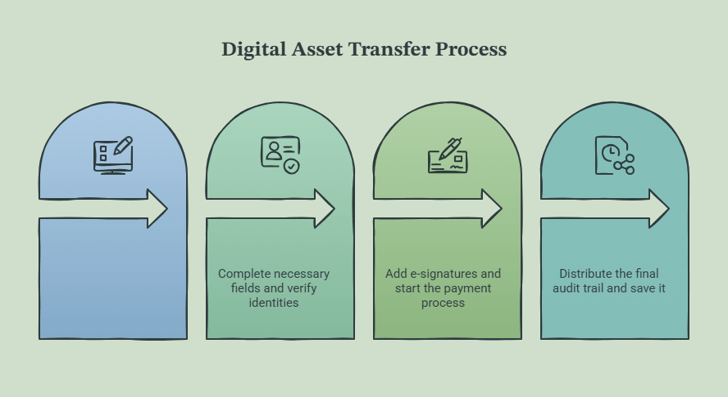
1. Select a validated template: Preparation stage.
Don’t create arbitrary terms. Use a pre-formatted Bill of Sale or Asset Transfer Agreement that is compliant with state law from a trusted template supplier to make sure that all of the necessary statutory disclosures are addressed.
2. Fill out fields and verify identities: Collaborative review.
Enter the particular identification number of the asset (such as a vehicle’s VIN or a digital domain’s registration token) in addition to obvious buyer and vendor information. Share the draft securely to ensure security of sharing of draft by both parties to ensure security and to ensure the terms are checked.
3. Execute e-signatures and start payment: Financial safe zone.
With both parties signed with an electronic signature in a secure e-signature system, transfer the cash through a secure wire transfer or a trusted escrow platform.
4. Distribute and lock the final audit trail: Archival phase.
Download final PDF and certificate of completion (cryptographic). Send digital versions to the needed regulatory agencies (such as the DMV) and secure them in cloud storage.
Security Considerations for Digital Documents
Using digital workflows is easy, but it doesn’t mean there aren’t important things to do. Businesses can put their financial information, personally identifying information, or proprietary corporate metrics at risk by taking document security lightly.
First, ensure that all cloud storage platforms where you store your documents use multi-factor authentication (MFA). A password is not enough – users can become very vulnerable to credential phishing if they rely on a password for their repository. Second, ensure your document generation and e-signature providers use end-to-end encryption when transporting your documents across the network and also when they are «stored» on the cloud servers.
Last but not least, watch out for emails containing links to document access. Be sure to check the sender’s real email domain before clicking on any digital signature link.
What’s Next for Digital Document Workflows?
The changes in the way that daily documentation is done are continuing. The platforms and operations keep being increasingly interconnected, and document ecosystems are becoming increasingly context-aware. The ID verification process is also being streamlined as secure digital ID and biometric tokens are taking the place of the typical email verification process.
Use these tools today,y and you’ll avoid office paperwork and make your business dealings quick, efficient, and very secure.
Frequently Asked Questions
Are electronic signatures legally binding for real estate purchases?
Yes, in the majority of jurisdictions. In the United States, the ESIGN Act and UETA grant electronic signatures the exact same legal weight as traditional ink signatures. However, certain unique real estate documents (specific property deeds or foreclosure notices) may still require physical paper processing or remote online notarization (RON) depending on the local county rules.
How can I verify that an electronic document hasn’t been altered after signing?
Cryptographic hashing technology is used with secure e-signature platforms. Therefore, once the last party has signed a document, the PDF is digitally certified. Once the seal is opened, any change by anyone to that file would break the cryptographic seal, and any PDF-viewing software would give a clear warning that the document has been altered since activation.
What should I do if a vendor or client refuses to use a digital document platform?
Of course, there are still clients and/or regulatory authorities who want paper. This is easily managed when a good digital workflow is present, as you can print a clean and uniform template, get the signature, scan it back in with OCR, and upload it to your digital repository.
Popular on OTW Right Now!


About The Author

Gagan Bhangu
Founder of otechworld.com and managing editor. He is a tech geek, web-developer, and blogger. He holds a master's degree in computer applications and making money online since 2015.