
EasyCut Pro Review: Powerful Vinyl Cutting Software for Your Business
Are you looking for a simple and reliable vinyl cutting software for your work? If yes, then EasyCut Pro is a strong option you can consider.
It is not only about vinyl cutting, which involves cutting shapes. You require good design equipment, correct control of cutting, and machine support. Nevertheless, a lot of tools are too complicated or too restricted.
This is where EasyCut Pro comes in.
It is made to assist you in the creation of signs, decals, stickers, lettering, heat transfers, etc., without complicating the process. This review will explain what EasyCut Pro provides, how it functions, and whether it is the right solution for you.
What is EasyCut Pro?
EasyCut Pro is a vinyl cutter and sign design software that works on both Windows and macOS.
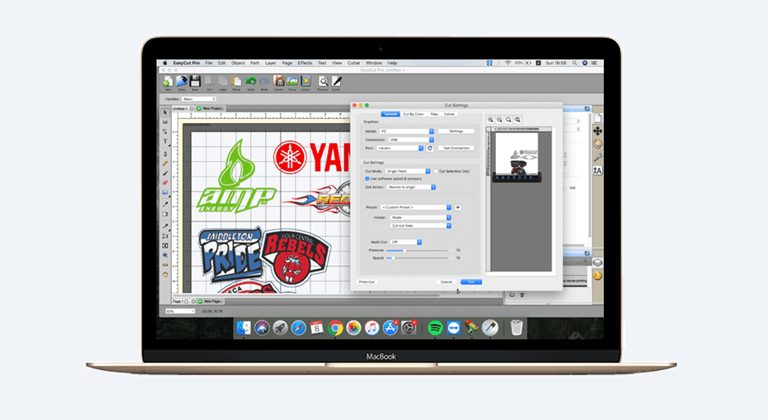
It gives you the ability to design, edit, and cut directly with your plotter or vinyl cutter. You can create in software, or you can import files and begin to cut.
The software is compatible with a wide variety of cutting machines, such as such popular brands such as Graphtec, Roland, Mimaki, GCC, USCutter, and others.
And this matters.
The reason being that you do not feel like changing software merely because your cutter is not supported.
EasyCut Pro is designed as a beginner and professionals. The Pro version is, however, more appropriate in case you run a business or have regular large cutting projects.
Why You Need Vinyl Cutting Software Like EasyCut Pro
Without proper software, vinyl cutting may slow you down.
You can experience such problems as improper scaling, a low quality of design, or material wastage. And when your workflow is not flowing, it has a direct impact on your productivity.
This is why a special tool such as EasyCut Pro comes in handy.
It assists in designing and cutting where you want. It reduces errors. And it also provides you with more control over your cut.
As a result, you are not required to handle numerous tools at once, but can handle them all within a single software.
How to Use EasyCut Pro
Getting started with EasyCut Pro is simple.
The first step is to download and install the software on your system. It is compatible with Windows and macOS.
Once the software has been installed, open it and create a new project. You can do the design yourself or import a file such as SVG, AI, PDF, or PNG.
After designing, attach your vinyl cutter and access the cutting options.
In this case, you are able to change such options as cut mode, origin point, and cutting order.
Then select cut, and your machine will begin to work.
And that’s it.
It is easy, and you do not require highly technical skills to get started.
Features of EasyCut Pro
EasyCut Pro offers many features that help you design and cut with better control. Below are the main features explained in simple words.
Draw and Edit Shapes
You are able to create your own shapes within the software.
To design something is easy and has several tools. Shapes, sizes and details can be edited and modified without the need to use a third-party tool.
And you have all the control over your design.
Text Editing Tools
The text tools are feasible and user-friendly.
You may use any fonts in your system. The design is real-time, and what you see is what you get.
You are also able to use various effects on your text.
This is useful when designing logos, decals, or custom lettering.
Node Editing
Precision is provided in node editing.
You can edit curves, edges, and points of your design. It comes in handy in case of clean cuts or when repairing imported designs.
And it helps you not to make mistakes when cutting.
Import Multiple File Formats
EasyCut Pro can accommodate numerous file formats.
You may import DXF, SVG, AI, PDF, EPS, PNG, and so on.
It implies that you can edit client files or designs of other tools without inconveniences.
Image Vectorization
You are able to transform images into a vector design.
When you have a JPG or a PNG, with a few clicks, you can convert the image into a cuttable design.
The last qual, however, is what you look like.
However, in the vast majority of applications, it is efficient and time-saving.
Design Effects
You have the option of using various effects such as shadow, wave, bulge, and 3D rotation.
These effects assist you in making distinctive designs.
And you do not have to install additional software to do this.
Create Rhinestone Designs
Templates in rhinestones are easy to design.
The size and spacing of stones can be determined according to your design.
This could come in handy in case you deal with clothing or tailor-made decorations.
True Shape Nesting
This capability can assist you in storing content.
It organises your designs in a manner that will minimise waste.
And in the long run, this may save you money, particularly when you deal with bulk work.
Weld Shapes and Text
You are able to blend numerous shapes.
This eliminates intersections and gives straight edges.
And your result is improved.
Tile Cutting
With a larger design than your cutter width, you can cut it into smaller segments.
All sections are cut individually.
You may put them together later.
It applies to large signs and wall graphics.
Weeding Support
With this feature, weeding is easy.
The program provides outlines for your design, and you can deforeign the additional vinyl in a short time.
This will save time in the production process.
Shapes Library
You have access to more than 350 pre-designed shapes.
This assists in cases where you require fast designs.
And it is particularly beneficial when you are new.
Layer Management
Layers allow you to arrange your designs.
It is possible to conceal or display certain layers.
Only visible layers will be cut.
So you can have more control over your project.
Cut by Color
You are able to sort designs by color.
This will assist when you deal with multi-color work.
And it minimizes confusion in cutting.
Advanced Cutting Options
You have complete control of your cutter.
You are able to change cut selection, origin point, duplicate cuts, and so on.
It also has a cutting preview, which shows the way your design is going to be cut.
To correct problems before real cutting.
Control Cutting Order
The cutting order can be set manually.
This helps in optimizing your workflow.
And it enhances cutting accuracy.
Cut End Actions
It is up to you to choose what to do after cutting.
You can rewind, pause,e or advance the material.
This makes it easier to work.
Cut Copies
You will be able to make a series of the same design.
This can be applied in mass production.
Supported Vinyl Cutters
EasyCut Pro is compatible with numerous cutting machines.
And even when your machine is not listed, you may use a generic alternative.
And compatibility does not pose a big problem.
Contour Cutting
You may make sketches of your designs.
This can be applied to stickers and decals.
And it assists you in cleaning cuts.
Easy to Use Interface
The interface is straightforward and minimalistic.
Tools are readily available.
And you do not need high abilities to operate it.
Trial Version and Activation
EasyCut Pro has a 15-day trial version.
The trial, however, adds watermark lines when you cut designs.
In order to eliminate this, you will have to buy the software and key it in with a serial number.
Upon purchase, you will be sent your serial number via email.
If you don’t see it, check your spam folder as well.
Common Issues and Fixes
In some cases, there might be problems with the software.
To take an instance, your design can be cut off-size.
This normally occurs when there is no match between your cutter settings and software settings.
All you have to do is equate the step size in both.
Connection problems can be another problem.
This can occur because of improper ports, drivers, or offline mode in your cutter.
And then you can correct these settings, and the software is fine.
Pricing
EasyCut Pro is provided with various price variants based on your requirements.
Nevertheless, it is preferable to use the trial version.
This can assist you in knowing whether it fits into your workflow or not.
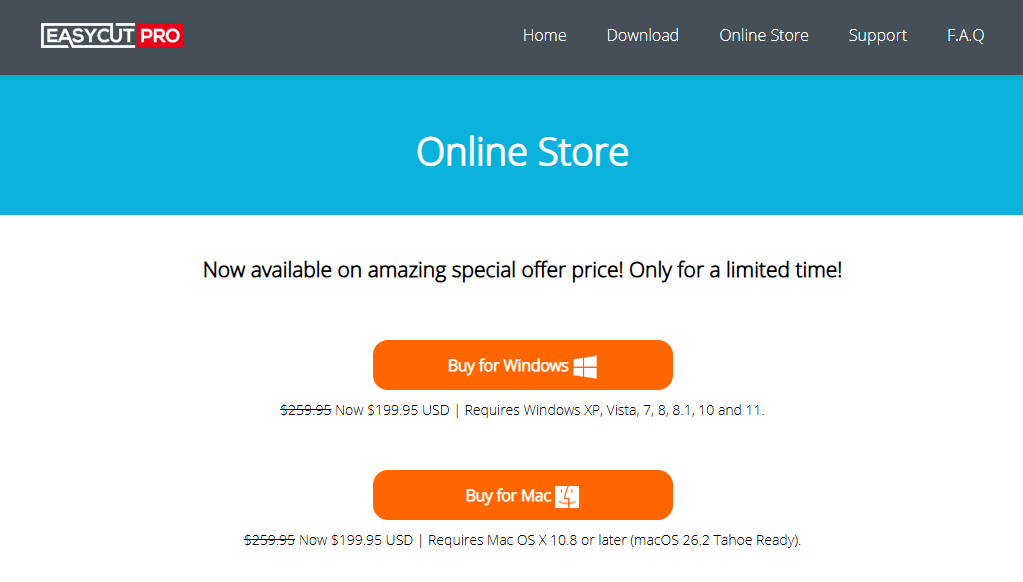
For Windows OS: $199.95 USD
For Mac OS: $199.95 USD
Pros and Cons
Pros
- Simple to handle both by novices and experts.
- Numerous file formats.
- Works with numerous cutters.
- Also has handy capabilities such as weeding and nesting.
- Assist in minimizing waste material.
Cons
- Trial version adds watermark cuts
- The trial version provides watermark cuts.
- Certain cutters may need to be adjusted to a certain setup.
- External design tools can still be used by advanced users.
Final Words
EasyCut Pro focuses on one thing: making vinyl cutting simple and efficient.
It provides you with the means without complication. It is possible to create, edit, or cut everything in one location.
And that saves time.
You will be able to learn easily if you are starting out. Features such as nesting, cut contr,ol and multi-format support will be useful to you should you be running a business.
Then, hen when you feel like having a useful vinyl cutting software that is not confusing to use, you can give EasyCut Pro a trial.
Popular on OTW Right Now!




About The Author

Gagan Bhangu
Founder of otechworld.com and managing editor. He is a tech geek, web-developer, and blogger. He holds a master's degree in computer applications and making money online since 2015.