
Q&A: Can AI Erasers Accurately Remove People from Complex Backgrounds (Fences, Brick Walls)?
You finally got the perfect shot of your outfit, but a stranger walked right behind you. To make things worse, you are standing in front of a complex brick wall with a lot of detail. You might think the photo is ruined because the background is too busy to fix. Traditional editing tools required you to manually clone every single brick, which takes forever and often looks fake.
This is where a Magic Eraser comes in to help you save your memories. These tools use smart technology to look at the patterns around the object you want to remove. They can identify the edges of the bricks or the wires in a fence and try to fill in the blanks. It is much faster than doing it by hand and the results are often surprisingly clean.
You can find a Free AI Image Editor online that handles these tasks without requiring you to download heavy software. These web tools are built to recognize common textures like wood, stone, and metal. By using these editors, you can quickly see if your photo can be saved or if the background is just too messy for the computer to understand.
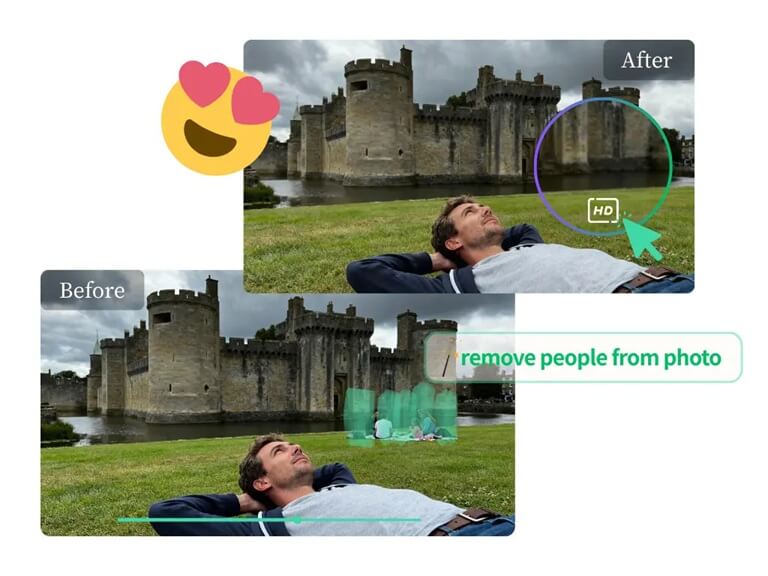
How do AI erasers handle repeating patterns like brick?
Generative fill is an algorithm that AI tools use to process repeating patterns. The AI does not simply blur whenever you point out a person in front of a brick wall. It, instead, examines the bricks around it to know the size, color, and texture of the material. It then attempts to attract new bricks that are similar to existing ones. This is not easy since bricks have mortar lines, which should be perfectly aligned. When the lines are not straight, the human eye will pick this straight away.
The current AI models are trained using millions of architectural images. They are aware that bricks tend to be in a grid. By filling the gap created by the AI, it tries to keep the horizontal and vertical lines it perceives on either side of the person. With the lighting being steady, the AI can often blend the new bricks so much that you cannot notice that anything has ever been there. It is best used when the bricks are of standard size, and the picture is captured in a straight position.
Can AI reconstruct a fence after removing a person?
Fences are quite difficult compared to walls, which are solid. When an individual is behind or in front of a fence, they are blocking what is on the other side. An artificial intelligence eraser must perform a two-fold task. First, it needs to reconstruct the design of the fence, the wooden slats, or the metal chain links. Second, it must speculate on what is in the background of those gaps. This is a highly complicated job of any software.
When the fence is a basic structure, such as the vertical wooden posts, the AI tends to perform well. It is able to visualize the pattern of the posts and replicate it throughout the blank space. Chain link fences or fences with complicated lattice patterns are far more challenging though. The AI can be disoriented as to the point where one wire starts and where another one starts. In such instances, you may notice a few shadowy dots or odd figures where the fence ought to be. Sometimes it takes several attempts or minor corrections to do it.
Why do some AI tools struggle with complex backgrounds?
Generative fill is an algorithm that AI tools use to process repeating patterns. The AI does not simply blur whenever you point out a person in front of a brick wall. It, instead, examines the bricks around it to know the size, color, and texture of the material. It then attempts to attract new bricks that are similar to existing ones. This is not easy since bricks have mortar lines, which should be perfectly aligned. When the lines are not straight, the human eye will pick this straight away.
The current AI models are trained using millions of architectural images. They are aware that bricks tend to be in a grid. By filling the gap created by the AI, it tries to keep the horizontal and vertical lines it perceives on either side of the person. With the lighting being steady, the AI can often blend the new bricks so much that you cannot notice that anything has ever been there. It is best used when the bricks are of standard size, and the picture is captured in a straight position.
What makes a background difficult for an AI eraser?
A background can become a nightmare for the AI software due to several factors. The first one is depth of field. In case the background is smooth and the individual is in focus, the AI must reproduce that particular amount of blur. When it renders the new area excessively sharp, it will stick out. The second is sporadic patterns. The hard things, such as the natural stone walls or the piles of rocks, are not a strict grid. The AI is not able to copy and paste a pattern since each stone is of a different shape.
Lighting and shadows are also very significant. When that individual you are removing was projecting a long shadow on a complicated texture, the AI must also delete the shadow. It must then speculate how the light would otherwise have struck the wall had the individual not been present. In case the AI cannot adjust to the light and shadow, the edited section will appear as a flat and dull patch. That is why such photos, which were made under even light, are always easier to edit than those taken in bright sunlight with strong shadows.
How can you improve results on complicated textures?
Should you be working on a tricky ground, you must not attempt to take away all in a single broad stroke of your brush. Rather work in bits. Begin by taking away small components of the individual and observe how the AI copes with the loss. In case it is a good job, proceed to the next section. In case it gets messy, undo it and use a smaller or larger brush. This provides the AI with additional opportunities to examine the pixels around and make a superior guess.
The next trick is the attention to edges. In highlighting the person, attempt to remain as close to the outline of the person as possible. When you pick an excessive background, the AI will have less original texture to play with. There are individuals who feel that being very close, through Zoom, makes them more specific. When the AI leaves a small smudge or a strange line, it is often possible to erase it again by passing the eraser over that small area a second time. This compels the AI to examine the newly formed texture and eliminate wrinkles.
Is it possible to remove large groups from detailed scenes?
It is easy to remove one person, yet it is much more difficult to remove a group of five people. With a group of people taken away, a massive part of the background is lost. The reconstruction has minimal information to work with for the AI. In case the group is before an elaborate brick wall, the AI would need to create a big part of the wall on its own. This frequently results in glitchy repetitions.
When working with big groups, it is better to take them out one at a time. Begin on the far left or right with the individual and cross across. This enables the AI to learn the background that the last removal displayed, so that it applies it to the subsequent removal. This is more time-consuming, and the end picture will be far more realistic. In case the background is simply too complicated, you may have to come to terms with the fact that you cannot have a perfect edit without some manual adjustments.
Do these tools work on mobile and desktop?
The majority of the contemporary AI editing tools can be used on all machines. As it is normally carried out on a server in the cloud, your phone does not require it to be incredibly powerful to complete the task. You can take a photo out of your mobile gallery, hit the object with your finger, and receive the result within seconds. It is superb in the editing of photos as you go before posting them to social media.
The desktop versions tend to give a little more control. A mouse enables greater accuracy as compared to a finger on a small screen. A big monitor also allows you to view the details more clearly, and you can identify any minor mistakes that the AI may have committed. A lot of individuals like to make fast edits on their phones, and then they leave really difficult photographs to their computers. The quality of the removal will generally be similar in both platforms as both use the same AI technology.
What should you look for in a high-quality AI eraser?
When selecting a tool, you want to find one that utilizes deep learning models. These are the latest forms of AI. They have been trained on a big array of images, hence they know how various materials must appear. An excellent tool will also have a brush that can be resized. This is essential in reaching tight corners or in dealing with details in a complicated background.
Another thing to look at is whether the tool can be done more than once. The initial attempt is not always ideal, and the problem can be rectified during the second or third time the area is passed. There are also tools that give a before and after perspective that are useful in deciding whether the perspective and lines are still appearing correct. Lastly, seek a tool that will preserve the original quality of your photo. You also do not want to fix the background and then get a low-quality image.
| Background Type | Difficulty Level | Success Rate |
| Plain White Wall | Low | Very High |
| Natural Grass | Low | High |
| Red Brick Wall | Medium | High |
| Wooden Decking | Medium | Medium |
| Chain Link Fence | High | Medium |
| Crowded City Street | Very High | Low |
Summary Takeaway
AI erasers have evolved to a great extent and can now work with a lot of complicated backgrounds, such as fences and brick walls. Although they are not flawless in all cases, they are significantly quicker and more efficient than manual editing. To work slowly, in small strokes, and in a tool that interprets patterns and perspective is the key to success. With a very messy background, you may get a few minor mistakes, but most of the casual photos have better-than-good outcomes to share. These tools will only become increasingly better at reproducing the world behind the objects we want to eliminate as the technology keeps advancing.
Popular on OTW Right Now!




About The Author

Gagan Bhangu
Founder of otechworld.com and managing editor. He is a tech geek, web-developer, and blogger. He holds a master's degree in computer applications and making money online since 2015.